FiveTech Support Forums

FiveWin / Harbour / xBase community
Board index FiveWin for Harbour/xHarbour Dialog, xbrowse,splitter,folder and ttitle
Posts: 7317
Joined: Thu Oct 18, 2012 07:17 PM
Dialog, xbrowse,splitter,folder and ttitle
Posted: Mon Feb 05, 2018 04:25 PM
Dear Friend ,
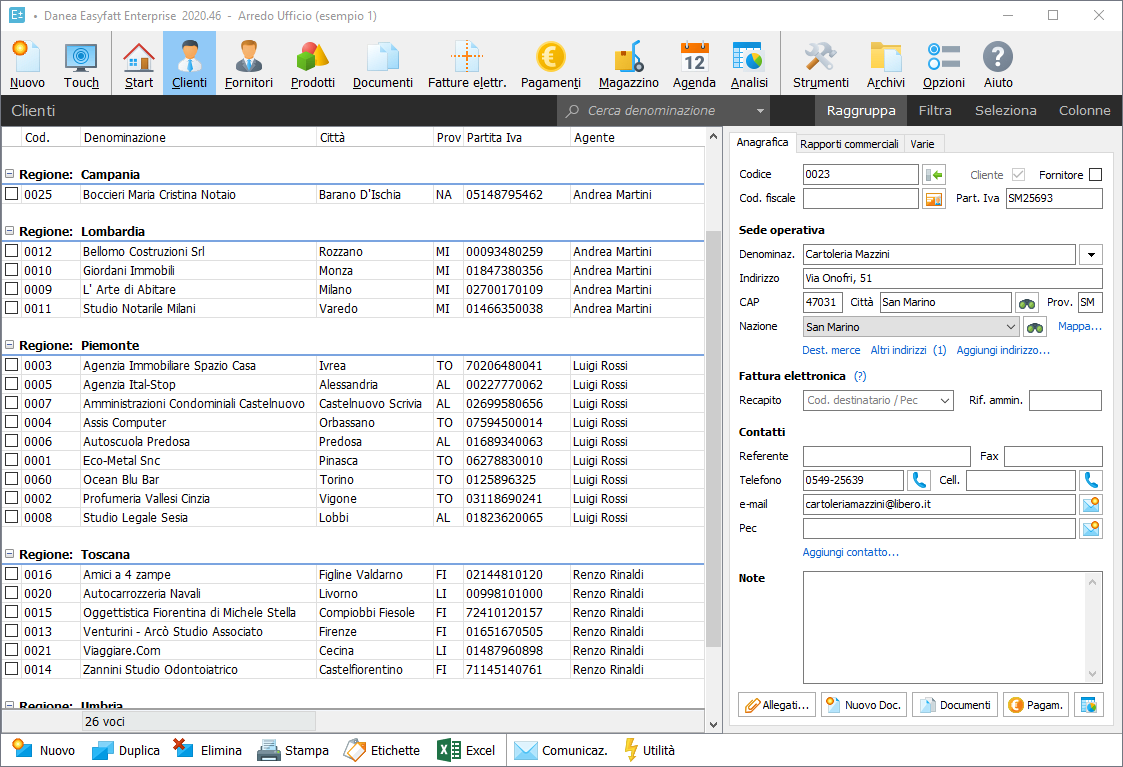
I wish create this window


it is a dialog on main window with ttitle on top , xbrowse at left a vertical splitter and a folder at right
on bottom a buttonbar
how i can make it ?
Inot wish use tlayout class but on a Windows and a tfsdi dialog
a tfsdi dialog is a dialog with the style nOR( WS_CHILD, 4 )

i made a test but not run ok there is someone can help me please . i insert the tfsdi class on bottom

Code (fw): Select all Collapse
 
// a Windows with a Dialog with ttitle xbrowse and buttonbar

#include "fivewin.ch"

聽REQUEST DBFCDX
聽REQUEST DBFFPT

static oWndMain,oBar,oBartitle
Static oDlgNew,oGrid,oPanelRight,oSplit
Static cIniFile

Function Main()


cIniFile 聽 聽:= cFilePath( GetModuleFileName( GetInstance() ) ) + "test.ini"

DEFINE WINDOW oWndMain Title "Test with ttitle and xbrowse,splitter,"

DEFINE BUTTONBAR oBar _3D SIZE 44, 46 OF oWndMain

SET MESSAGE OF oWndMain TO "fivewin power" CENTER NOINSET

oWndMain:bResized := {|| ResizeWndMain() }

聽ACTIVATE WINDOW oWndMain;
聽 聽 聽 on init test()
聽return nil

//--------------------------------------------------------------------------//

Function Test()
聽 聽Local oCol,i,aBrowse
聽 聽Local nSplit :=VAL(GetPvProfString("Browse", "CuSplit","302", cIniFile))

聽 聽oDlgNew := TFsdi():New(oWndMain)
聽 聽oWndMain:oClient := oDlgNew
聽 聽 oBarTitle:=TTitle():New( oDlgNew,0, 0,oDlgNew:nGridRight, 40)

USE CUSTOMER ALIAS CU

oDlgNew:NewGrid( nSplit )

oGrid:cAlias := "CU"

聽 聽aBrowse 聽 := { { { || CU->FIRST }, i18n("First"), 150, 0 },;
聽 聽 聽 聽 聽 聽 聽 聽 聽 { { || CU->LAST 聽}, i18n("Last"), 150, 0 },;
聽 聽 聽 聽 聽 聽 聽 聽 聽 { { || CU->STREET}, i18n("Street"), 150, 0 },;
聽 聽 聽 聽 聽 聽 聽 聽 聽 { { || CU->CITY } , i18n("City"), 150, 0 } }


聽 聽FOR i := 1 TO Len(aBrowse)
聽 聽 聽 oCol := oGrid:AddCol()
聽 聽 聽 oCol:bStrData := aBrowse[ i, 1 ]
聽 聽 聽 oCol:cHeader 聽:= aBrowse[ i, 2 ]
聽 聽 聽 oCol:nWidth 聽 := aBrowse[ i, 3 ]
聽 聽 聽 oCol:nDataStrAlign := aBrowse[ i, 4 ]
聽 聽 聽 oCol:nHeadStrAlign := aBrowse[ i, 4 ]
聽 聽NEXT


聽 聽oGrid:CreateFromCode()

聽 聽 //---------------------------------------------------------------------------//
聽 聽oPanelRight:=TPanel():New(oBarTitle:nBottom+1,nSplit+2,;
聽 聽 聽 聽 聽 聽 聽 聽oDlgNew:nGridRight,;
聽 聽 聽 聽 聽 聽 聽 聽oDlgNew:nGridBottom-26,;
聽 聽 聽 聽 聽 聽 聽 聽oDlgNew)
聽 聽 //---------------------------------------------------------------------------//

聽 聽 聽 聽oSplit := TSplitter():New(oBarTitle:nBottom+1,nSplit,(.not..F.) .or. .T.,{oGrid},.not..F.,;
聽 聽 聽 聽 聽 聽 聽 聽 聽 聽 聽 聽 聽 聽 聽 聽 聽 聽 {oPanelRight},.not..F.,,,;
聽 聽 聽 聽 聽 聽 聽 聽 聽 聽 聽 聽 聽 聽 聽 聽 聽 聽oDlgNew,,1,oDlgNew:nGridBottom ,;
聽 聽 聽 聽 聽 聽 聽 聽 聽 聽 聽 聽 聽 聽 聽 聽 聽 聽 .T.,.T.,,.F.,.T.,.T. )


聽 聽 聽 聽ACTIVATE DIALOG oDlgNew NOWAIT ;
聽 聽 聽 聽 聽 聽ON PAINT (oSplit:AdjClient()) ;
聽 聽 聽 聽 聽 聽ON INIT ( Load_dialog(),oGrid:SetFocus(),ResizeWndMain()) ;
聽 聽 聽 聽 聽 聽 VALID ( oGrid:nLen := 0 ,;
聽 聽 聽 聽 聽 聽 聽 聽 DbCloseAll(), oDlgNew := NIL, .t. )


聽 聽 聽 聽return nil

Function Load_dialog()
聽 聽 聽Local oFld

聽 聽 聽 @ 30,0 聽FOLDER oFld 聽ITEMS 聽"Anagrafica","Rapporti Commerciali","Varie";
聽 聽 聽 SIZE oPanelRight:nRight,oPanelRight:nBottom-26 PIXEL;
聽 聽 聽 OF oPanelRight ;
聽 聽 聽 OPTION 1
聽 聽oPanelRight:oClient:= 聽oFld
聽 聽return nil


//---------------------------------------------------------------------------//

Function ResizeWndMain()
聽 聽local aClient
聽 聽 IF oDlgNew != NIL
聽 聽 聽 聽aClient := GetClientRect ( oWndMain:hWnd )
聽 聽 聽 聽 聽oDlgNew:SetSize( aClient[4], aClient[3] - oBar:nHeight - oWndMain:oMsgBar:nHeight+1 - oBartitle:nBottom)

聽 聽 聽 聽 聽 IF 聽oSplit 聽!= NIL
聽 聽 聽 聽 聽 聽 聽 聽oSplit:Refresh()
聽 聽 聽 ENDIF


聽 聽 聽 聽 聽IF oBarTitle != nil
聽 聽 聽 聽 聽 聽 oBarTitle:SetSize(aClient[ 2 ],40)
聽 聽 聽 聽 聽 聽 oBarTitle:Refresh()
聽 聽 聽 聽 聽ENDIF

聽 聽 聽IF oGrid 聽!= NIL
聽 聽 聽 聽 聽oGrid:SetSize( aClient[ 3 ]- oGrid:nLeft, oDlgNew:nHeight -oBartitle:nBottom)
聽 聽 聽 聽 聽oGrid:Refresh()
聽 聽 聽 聽ENDIF

聽 聽 聽 聽if oPanelRight != nil
聽 聽 聽 聽 oPanelRight:SetSize( aClient[ 4 ]- oPanelRight:nLEFT,oDlgNew:nHeight- oBartitle:nBottom)
聽 聽 聽 聽 oPanelRight:Refresh()
聽 聽 聽endif

聽 聽 聽oWndMain:oMsgBar:Refresh()
聽 聽 聽 聽 聽SysRefresh()
聽 聽ENDIF
聽return nil

//-----------------------------------------------------------------------------//

CLASS TFsdi FROM TDialog
聽 聽DATA nGridBottom, nGridRight
聽 聽CLASSDATA lRegistered AS LOGICAL

聽 聽METHOD New( oWnd, lPixels ) CONSTRUCTOR
聽 聽METHOD AdjClient() // INLINE oApp():AdjClient()
聽 聽METHOD NewGrid( nSplit )
ENDCLASS


METHOD New( oWnd ) CLASS TFsdi
聽 聽local 聽 aClient
聽 聽default oWnd 聽 聽:= oWndMain // GetWndDefault()
聽 聽aClient := GetClientRect (oWnd:hWnd )
聽 聽::oWnd = oWnd
聽 聽::nTop 聽 聽= oBar:nHeight
聽 聽::nLeft 聽 = 0
聽 聽::nBottom = aClient[3] - 1
聽 聽::nRight 聽= aClient[4]
聽 聽::nStyle 聽:= nOR( WS_CHILD, 4 )
聽 聽::lHelpIcon 聽 聽:= .f.
聽 聽::lTransparent := .f.

聽 聽DEFINE FONT ::oFont NAME 'Tahoma' SIZE 0, -12

聽 聽::nGridBottom 聽:= (::nBottom / 2) - oBar:nHeight
聽 聽::nGridRight 聽 := (::nRight / 2 )
聽 聽::aControls 聽 聽:= {}
聽 聽::SetColor( CLR_WHITE, GetSysColor(15) )
聽 聽::Register( nOr( CS_VREDRAW, CS_HREDRAW ) )
聽 聽 聽SetWndDefault( Self )
聽 聽 聽return Self

聽 METHOD NewGrid( nSplit ) CLASS TFsdi
聽 聽oGrid := TXBrowse():New( oDlgNew )
聽 聽oGrid:nTop 聽 聽:= oBarTitle:nBottom
聽 聽oGrid:nLeft 聽 := 00
聽 聽oGrid:nBottom := oDlgNew:nGridBottom
聽 聽oGrid:nRight 聽:= oDlgNew:nGridRight
return nil

METHOD AdjClient() CLASS TFsdi
聽 聽return nil
Since from 1991/1992 ( fw for clipper Rel. 14.4 - Momos)

I use : FiveWin for Harbour March-April 2024 - Harbour 3.2.0dev (harbour_bcc770_32_20240309) - Bcc7.70 - xMate ver. 1.15.3 - PellesC - mail: silvio[dot]falconi[at]gmail[dot]com
Posts: 3022
Joined: Fri Oct 07, 2005 01:45 PM
Re: Dialog, xbrowse,splitter,folder and ttitle
Posted: Mon Feb 05, 2018 05:12 PM

Silvio,

That is really quite simple to do in an .RC. You define the dialog, add the two button bar controls, and the browse. The right section is a folder control, each with it's own sub-dialog. The Title is a value fed to the browse.

I have multiple screens with folders, browse control, multiple button bars, edit controls. In fact, as you scroll the browse rows, the data in the edit boxes changes to reflect the highlighted record.

Because it is your application, only you know exactly how each control is to work. It will take some effort, but you can build this. Just start with a layout on the .RC. If you use @ positioning, you can likely do it, but I find .RC files to be far easier to get everything correct.

Tim

Tim Stone
http://www.MasterLinkSoftware.com
http://www.autoshopwriter.com
timstone@masterlinksoftware.com
Using: FWH 23.10 with Harbour 3.2.0 / Microsoft Visual Studio Community 2022-24 32/64 bit
Posts: 7317
Joined: Thu Oct 18, 2012 07:17 PM
Re: Dialog, xbrowse,splitter,folder and ttitle
Posted: Tue Feb 06, 2018 09:43 AM
Timm,
I knew you or anyone would answer this way. I do not use Rc if not for bitmaps files.

I have already built this window with the xbrowse on the left and the panel on the right and I have used it for a long time successfully.

Everything is in the source using the Tfsdi class by Jos猫 di Alanit.

as you can see here


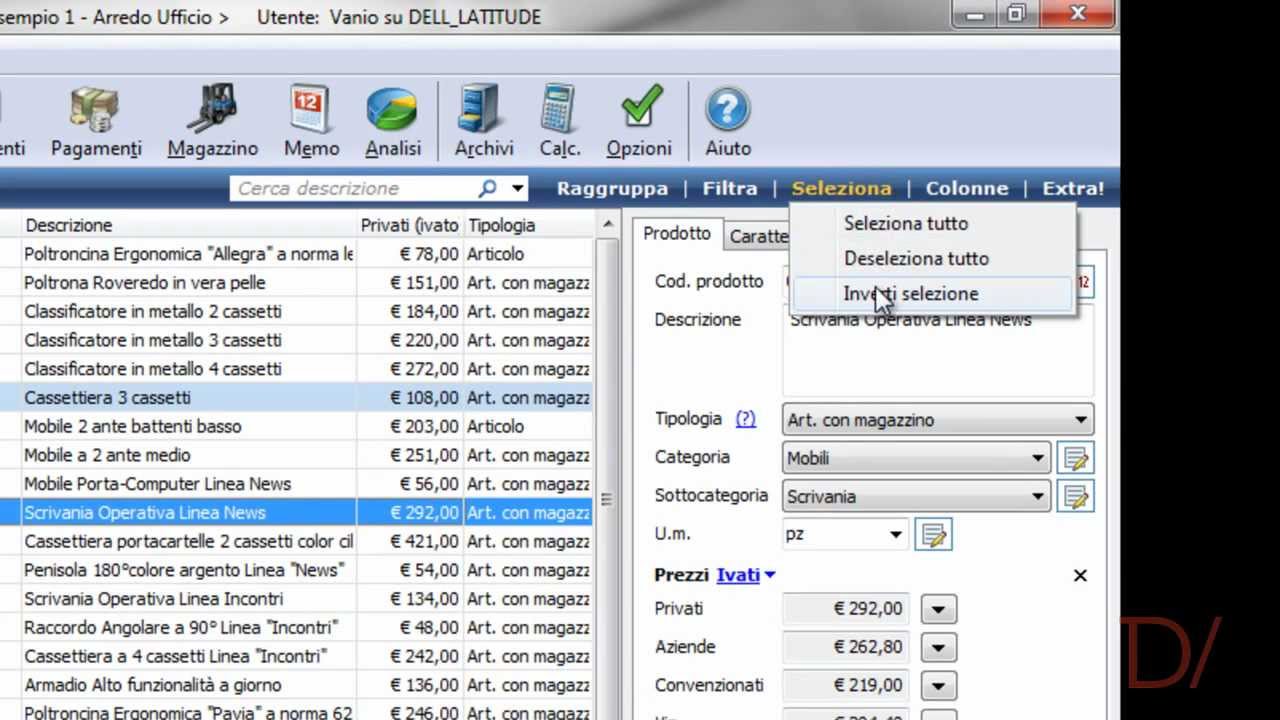
The problem with this type of window is that the end customer sees the list and does not see the data of each record and a customer now wants that when he scrolls a record from the list he must view the data of that record on video without loading the input dialog or change every time.

That's why I thought to create the same window with xbrose on the left and the panel with unfolder on the right so that the end user could scroll the laista from the xbrowse and show the data for that record on the screen.

Doing so in this way it is no longer possible to insert an explorer type menu and I am forced to insert a buttonbar at the bottom with the buttons new edit delete and search
Since from 1991/1992 ( fw for clipper Rel. 14.4 - Momos)

I use : FiveWin for Harbour March-April 2024 - Harbour 3.2.0dev (harbour_bcc770_32_20240309) - Bcc7.70 - xMate ver. 1.15.3 - PellesC - mail: silvio[dot]falconi[at]gmail[dot]com
Posts: 3022
Joined: Fri Oct 07, 2005 01:45 PM
Re: Dialog, xbrowse,splitter,folder and ttitle
Posted: Tue Feb 06, 2018 05:40 PM
Silvio,

Yes, I use .RC files for everything and the results are very precise. That is the only type of help I can provide.

I understand what your client wants. It can be done, but it does take a lot of work. It is more complex than just the controls. It also means updating the data properly.

I display a browse on the lower part of a dialog, and data fields in the top half. Browse the data records, and the edits for the highlighted appear above. I have multiple folders displayed, and switching between them shows browses and data edit screens on each. Everything is open, and I use tData and tRecord to insure that nothing gets corrupted. Of course there is extensive code underneath to make decisions and process data properly.

My point is that it can be done, but the method might need to be different than what you have done in the past. You can go to my website,http://www.autoshopwriter.com, and view the manual or videos to get an idea of what I do. It is a bit easier than posting screen shots here.

Tim
Tim Stone
http://www.MasterLinkSoftware.com
http://www.autoshopwriter.com
timstone@masterlinksoftware.com
Using: FWH 23.10 with Harbour 3.2.0 / Microsoft Visual Studio Community 2022-24 32/64 bit
Posts: 7317
Joined: Thu Oct 18, 2012 07:17 PM
Re: Dialog, xbrowse,splitter,folder and ttitle
Posted: Tue Feb 06, 2018 10:25 PM

ok
Timm, I wish create it
That screen of that application is an Italian company that with a simple program made with beautiful graphics has depopulated throughout the Italian trogatory making millions of euro: it will be a case?
I not use Rc, tdata or trecord I use symply the dbf this is not important
I wish create that structure I explain on top
if you not Know How make it ok not important I Know there is someone is able to create it
like every dream I have to give it up because with fivewin I can not do it until it only interests me

Since from 1991/1992 ( fw for clipper Rel. 14.4 - Momos)

I use : FiveWin for Harbour March-April 2024 - Harbour 3.2.0dev (harbour_bcc770_32_20240309) - Bcc7.70 - xMate ver. 1.15.3 - PellesC - mail: silvio[dot]falconi[at]gmail[dot]com
Posts: 6755
Joined: Wed Feb 15, 2012 08:25 PM
Re: Dialog, xbrowse,splitter,folder and ttitle
Posted: Wed Feb 07, 2018 03:14 PM
Try with this, but..
1) Why fsdi ( dialog )?
2) Why Panel?

Not finished
Code (fw): Select all Collapse
// a Windows with a Dialog with ttitle xbrowse and buttonbar

#include "fivewin.ch"
#include "splitter.ch"

REQUEST DBFCDX
REQUEST DBFFPT

static oWndMain, oBartitle
Static oDlgNew, oGrid, oPanelRight, oSplit, oBarMain, oFld
Static cIniFile

Function Main()

   cIniFile    := cFilePath( GetModuleFileName( GetInstance() ) ) + "test.ini"

   DEFINE WINDOW oWndMain Title "Test with ttitle and xbrowse,splitter,"
      DEFINE BUTTONBAR oBarMain SIZE 48, 48 OF oWndMain BOTTOM 2010
      oWndMain:oBottom  := oBarMain
      DEFINE BUTTON OF oBarMain FILE "..\bitmaps\exit.bmp" GROUP
      //SET MESSAGE OF oWndMain TO "fivewin power" CENTER NOINSET
      oWndMain:bResized := {|| ResizeWndMain() }
   ACTIVATE WINDOW oWndMain MAXIMIZED ON INIT test()
      
return nil

//--------------------------------------------------------------------------//

Function Test()

   Local oCol,i,aBrowse
   Local nSplit := Val( GetPvProfString( "Browse", "CuSplit", "302", cIniFile) )

   oDlgNew       := TFsdi():New( oWndMain )
   oWndMain:oTop := oDlgNew

   oBarTitle := TTitle():New( oDlgNew, 0, 0, oWndMain:nWidth - 2, 20 )  //oDlgNew:nGridRight
   oBarTitle:AddText( 20, 100, "Text Title", , , , , , CLR_WHITE, )

   USE CUSTOMER ALIAS CU

   oDlgNew:NewGrid( nSplit )
   oGrid:cAlias := "CU"
   aBrowse   := { { { || CU->FIRST }, i18n("First"), 150, 0 },;
                  { { || CU->LAST  }, i18n("Last"), 150, 0 },;
                  { { || CU->STREET}, i18n("Street"), 150, 0 },;
                  { { || CU->CITY } , i18n("City"), 150, 0 } }

   FOR i := 1 TO Len(aBrowse)
      oCol := oGrid:AddCol()
      oCol:bStrData := aBrowse[ i, 1 ]
      oCol:cHeader  := aBrowse[ i, 2 ]
      oCol:nWidth   := aBrowse[ i, 3 ]
      oCol:nDataStrAlign := aBrowse[ i, 4 ]
      oCol:nHeadStrAlign := aBrowse[ i, 4 ]
   NEXT

   oPanelRight:= TPanel():New( oBarTitle:nBottom + 2, nSplit + 2, oBarMain:nTop - 2, oDlgNew:nWidth - nSplit - 20, oDlgNew )
   oPanelRight:SetColor( CLR_WHITE, CLR_YELLOW )
   //oPanelRight := Load_Dialog( nSplit )

   @ oBarTitle:nBottom + 1, nSplit SPLITTER oSplit ;
        VERTICAL ;
        PREVIOUS CONTROLS oGrid ; //, oBarTitle ;
        HINDS CONTROLS oPanelRight ;
        LEFT MARGIN  2 ;
        RIGHT MARGIN 2 ;
        SIZE 1, Int( ( oDlgNew:nHeight - oBarTitle:nBottom ) / 2 ) - 12 ;
        COLOR CLR_GRAY PIXEL ;
        OF oDlgNew ;
        ON CHANGE ( oPanelRight:SetSize( oDlgNew:nWidth - oSplit:nRight - 4, oBarMain:nTop - 2 ), ;
                    oFld:SetSize( oPanelRight:nWidth - 4, oPanelRight:nHeight - oBarMain:nHeight + 8 ) )

   //oSplit := TSplitter():New( oBarTitle:nBottom+1, nSplit, (.not..F.) .or. .T.,{oGrid},.not..F.,;
   //                           { oPanelRight, oBarTitle },.not..F.,,,;
   //                                 oDlgNew,,1,oDlgNew:nGridBottom ,;
   //                                 .T.,.T.,,.F.,.T.,.T. )

   ACTIVATE DIALOG oDlgNew NOWAIT ; //      ON PAINT ( oSplit:AdjClient() ) ;
      ON INIT ( Load_Dialog( nSplit ), oGrid:SetFocus(), ResizeWndMain() ) ;
      VALID ( oGrid:nLen := 0, DbCloseAll(), oDlgNew := NIL, .t. )


return nil

//----------------------------------------------------------------------------//

Function Load_Dialog( nSplit )
   
   @ 2, 2 FOLDER oFld ITEMS  "Anagrafica","Rapporti Commerciali","Varie";
      SIZE oPanelRight:nWidth / 2 + 12, oPanelRight:nHeight / 2 - 22  PIXEL;
      OF oPanelRight ;
      OPTION 1
   
   //oPanelRight:=  oFld

return oFld

//---------------------------------------------------------------------------//

Function ResizeWndMain()
   /*
   local aClient
   IF oDlgNew != NIL
      aClient := GetClientRect ( oWndMain:hWnd )
      oDlgNew:SetSize( aClient[4], aClient[3] - oBar:nHeight - oWndMain:nHeight+1 - oBartitle:nBottom)
      IF oSplit  != NIL
         oSplit:Refresh()
      ENDIF
      IF oBarTitle != nil
         oBarTitle:SetSize(aClient[ 2 ],40)
         oBarTitle:Refresh()
      ENDIF
      IF oGrid  != NIL
         oGrid:SetSize( aClient[ 3 ]- oGrid:nLeft, oDlgNew:nHeight -oBartitle:nBottom)
         oGrid:Refresh()
      ENDIF
      if oPanelRight != nil
         oPanelRight:SetSize( aClient[ 4 ]- oPanelRight:nLEFT,oDlgNew:nHeight- oBartitle:nBottom)
         oPanelRight:Refresh()
      endif
      oWndMain:Refresh()
      SysRefresh()
   ENDIF
   */
return nil

//-----------------------------------------------------------------------------//

CLASS TFsdi FROM TDialog
   
   DATA nGridBottom, nGridRight
   CLASSDATA lRegistered AS LOGICAL

   METHOD New( oWnd, lPixels ) CONSTRUCTOR
   METHOD AdjClient() // INLINE oApp():AdjClient()
   METHOD NewGrid( nSplit )
ENDCLASS


METHOD New( oWnd ) CLASS TFsdi
   
   local   aClient
   DEFAULT oWnd   := oWndMain // GetWndDefault()
   aClient        := GetClientRect ( oWnd:hWnd )
   ::oWnd         := oWnd
   ::nTop         := 0
   ::nLeft        := 0
   ::nBottom      := oBarMain:nTop //aClient[ 3 ] - 1
   ::nRight       := aClient[ 4 ] 
   ::nStyle       := nOR( WS_CHILD, 4 )
   ::lHelpIcon    := .f.
   ::lTransparent := .f.

   DEFINE FONT ::oFont NAME 'Tahoma' SIZE 0, -12

   ::nGridBottom  := (::nBottom / 2) - oBarMain:nHeight
   ::nGridRight   := (::nRight / 2 )
   ::aControls    := {}
   ::SetColor( CLR_WHITE, GetSysColor(15) )
   ::Register( nOr( CS_VREDRAW, CS_HREDRAW ) )
     SetWndDefault( Self )
     return Self

//----------------------------------------------------------------------------//

METHOD NewGrid( nSplit ) CLASS TFsdi
   
   WITH OBJECT ( oGrid := TXBrowse():New( oDlgNew ) )
      :nTop    := oBarTitle:nBottom
      :nLeft   := 02
      :nBottom := Int( ( oBarMain:nTop - :nTop ) / 2 ) + 12 //oDlgNew:nGridBottom
      :nRight  := nSplit - 2 // oDlgNew:nGridRight
      :CreateFromCode()
   END

return nil

//----------------------------------------------------------------------------//

METHOD AdjClient() CLASS TFsdi
return nil

//----------------------------------------------------------------------------//
Cristobal Navarro

Hay dos tipos de personas: las que te hacen perder el tiempo y las que te hacen perder la noci贸n del tiempo

El secreto de la felicidad no est谩 en hacer lo que te gusta, sino en que te guste lo que haces
Posts: 7317
Joined: Thu Oct 18, 2012 07:17 PM
Re: Dialog, xbrowse,splitter,folder and ttitle
Posted: Wed Feb 07, 2018 03:47 PM
>tfsdi
if you use a child window or tlayout it
I had m with !Alias dont't Exist" and others problems i never I understood why

>panel
to insert folder

your test run ok but

if you resize the main window you have this error


but I wish this


I made a function called ResizeWndMain() where I try to resize all
Since from 1991/1992 ( fw for clipper Rel. 14.4 - Momos)

I use : FiveWin for Harbour March-April 2024 - Harbour 3.2.0dev (harbour_bcc770_32_20240309) - Bcc7.70 - xMate ver. 1.15.3 - PellesC - mail: silvio[dot]falconi[at]gmail[dot]com
Posts: 6755
Joined: Wed Feb 15, 2012 08:25 PM
Re: Dialog, xbrowse,splitter,folder and ttitle
Posted: Wed Feb 07, 2018 04:24 PM
Silvio.Falconi wrote:>

your test run ok but

if you resize the main window you have this error

I made a function called ResizeWndMain() where I try to resize all


That error?
I have commented on its function ResizeWndMain() because it is not possible to resize the xbrowse if you define a static position of the splitter
You have to define the position of the splitter proportionally to the width of the window

In my code, put this and look

Code (fw): Select all Collapse
   .../...
   oWndMain:bResized := oSplit:bChange      // Add this

   ACTIVATE DIALOG oDlgNew NOWAIT ;

   .../...
Cristobal Navarro

Hay dos tipos de personas: las que te hacen perder el tiempo y las que te hacen perder la noci贸n del tiempo

El secreto de la felicidad no est谩 en hacer lo que te gusta, sino en que te guste lo que haces
Posts: 7317
Joined: Thu Oct 18, 2012 07:17 PM
Re: Dialog, xbrowse,splitter,folder and ttitle
Posted: Wed Feb 07, 2018 05:45 PM
cnavarro wrote:
Silvio.Falconi wrote:>

your test run ok but

if you resize the main window you have this error

I made a function called ResizeWndMain() where I try to resize all


That error?
I have commented on its function ResizeWndMain() because it is not possible to resize the xbrowse if you define a static position of the splitter
You have to define the position of the splitter proportionally to the width of the window

In my code, put this and look

Code (fw): Select all Collapse
聽 聽.../...
聽 聽oWndMain:bResized := oSplit:bChange 聽 聽 聽// Add this

聽 聽ACTIVATE DIALOG oDlgNew NOWAIT ;

聽 聽.../...

5


Is not possible resize the xbrowse???????
Strange ...i resize the xbrowse
Do you want see how?
Since from 1991/1992 ( fw for clipper Rel. 14.4 - Momos)

I use : FiveWin for Harbour March-April 2024 - Harbour 3.2.0dev (harbour_bcc770_32_20240309) - Bcc7.70 - xMate ver. 1.15.3 - PellesC - mail: silvio[dot]falconi[at]gmail[dot]com
Posts: 6755
Joined: Wed Feb 15, 2012 08:25 PM
Re: Dialog, xbrowse,splitter,folder and ttitle
Posted: Wed Feb 07, 2018 06:01 PM

without changing position of splitter?

Cristobal Navarro

Hay dos tipos de personas: las que te hacen perder el tiempo y las que te hacen perder la noci贸n del tiempo

El secreto de la felicidad no est谩 en hacer lo que te gusta, sino en que te guste lo que haces
Posts: 7317
Joined: Thu Oct 18, 2012 07:17 PM
Re: Dialog, xbrowse,splitter,folder and ttitle
Posted: Wed Feb 07, 2018 09:39 PM
cnavarro wrote:without changing position of splitter?


Yes see Alanit's applications
Since from 1991/1992 ( fw for clipper Rel. 14.4 - Momos)

I use : FiveWin for Harbour March-April 2024 - Harbour 3.2.0dev (harbour_bcc770_32_20240309) - Bcc7.70 - xMate ver. 1.15.3 - PellesC - mail: silvio[dot]falconi[at]gmail[dot]com
Posts: 6755
Joined: Wed Feb 15, 2012 08:25 PM
Re: Dialog, xbrowse,splitter,folder and ttitle
Posted: Wed Feb 07, 2018 11:25 PM
Silvio.Falconi wrote:
cnavarro wrote:without changing position of splitter?


Yes see Alanit's applications


Not is possible
If position of splitter is 360 and not change position, xbrowse width is 360
Cristobal Navarro

Hay dos tipos de personas: las que te hacen perder el tiempo y las que te hacen perder la noci贸n del tiempo

El secreto de la felicidad no est谩 en hacer lo que te gusta, sino en que te guste lo que haces
Posts: 7317
Joined: Thu Oct 18, 2012 07:17 PM
Re: Dialog, xbrowse,splitter,folder and ttitle
Posted: Thu Feb 08, 2018 12:29 AM

Try with osplit:nleft;=arclient[4]/on resize

Since from 1991/1992 ( fw for clipper Rel. 14.4 - Momos)

I use : FiveWin for Harbour March-April 2024 - Harbour 3.2.0dev (harbour_bcc770_32_20240309) - Bcc7.70 - xMate ver. 1.15.3 - PellesC - mail: silvio[dot]falconi[at]gmail[dot]com
Posts: 6755
Joined: Wed Feb 15, 2012 08:25 PM
Re: Dialog, xbrowse,splitter,folder and ttitle
Posted: Thu Feb 08, 2018 01:23 AM

I think we do not talk about the same topic
If it works for you, perfect

Cristobal Navarro

Hay dos tipos de personas: las que te hacen perder el tiempo y las que te hacen perder la noci贸n del tiempo

El secreto de la felicidad no est谩 en hacer lo que te gusta, sino en que te guste lo que haces
Posts: 7317
Joined: Thu Oct 18, 2012 07:17 PM
Re: Dialog, xbrowse,splitter,folder and ttitle
Posted: Thu Feb 08, 2018 08:52 AM
Sorry I explain you bad
the project here run but I have only the explorerbar at left and xbrowse at right. on this project I use a splitter beetewen explorerbar and xbrowse
Now I wish modify this project add a TTitle on top, a xbrowse at left , a folder/explorerbar at right and a buttonbar at bottom . I wish crecreate the interface of an italian commercial application . I download this application and I saw there is not any splitter . the folder is near to scrollbar of the xbrowse as you can ssee here:


I think the splitter is not necessary

When I try to resize my project all It not run well

I hope you understood my problem
Since from 1991/1992 ( fw for clipper Rel. 14.4 - Momos)

I use : FiveWin for Harbour March-April 2024 - Harbour 3.2.0dev (harbour_bcc770_32_20240309) - Bcc7.70 - xMate ver. 1.15.3 - PellesC - mail: silvio[dot]falconi[at]gmail[dot]com