

Is it possibile to color each item of a Combobox with a different color?
King Regards
Marco
Marco Boschi
info@marcoboschi.it
info@marcoboschi.it
Is it possibile to color each item of a Combobox with a different color?
King Regards
Marco
Marco,
Please review FWH\samples\ownerdra.prg
VeryGood 
Antonio,
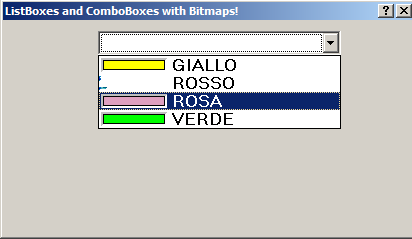
not all bitmaps are correctly displayed
I open yellow.bmp using Paint I draw another color using brush and save
But I cannot see correctly the bitmap


Hello Christobal,
Could you share the code for the combo with the colors insite ?
Marc Venken wrote:Hello Christobal,
Could you share the code for the combo with the colors insite ?
Antonio Linares wrote:Marco,
Please review FWH\samples\ownerdra.prg
Ah!, ok, I will try
Send me your image original


REDEFINE COMBOBOX oCbx2 VAR cItem4 ;
ID 140 OF oDlg ;
ITEMS   { "   White", "   Blue", "   Rosso", "   Yellow", "   Green", "   Red" } ;
BITMAPS { c_path + "sWhite.bmp",;
                c_path + "sBlue.bmp",;
                c_path + "sRosso.bmp",;
                c_path + "sYellow.bmp",;
               c_path + "sGreen.bmp",;
               c_path + "sRed.bmp" }
oCbx2:nItemHeight( 22 )
The bitmaps are drawn, treating the color at pixel 0,0 as transparent. In the case of rosso.bmp, color at (0,0) is same as the entire body of the bitmap, so the entire bitmap is treated as transparent.
Please choose a bitmap where the color at (0,0) is different from the rest of the bitmap

Uwe
I am referring to the bitmap downloaded from http://www.marcoboschi.it/public/rosso.bmp, not the bmps you are using.
Yes. Because in your bitmaps 0,0 color is different from the rest of the colors, the painting is ok.


