FiveTech Support Forums

FiveWin / Harbour / xBase community
Board index WhatsNew / Novedades Harbour 3.2 con Profiler para Borland 32 bits
Posts: 44162
Joined: Thu Oct 06, 2005 05:47 PM
Harbour 3.2 con Profiler para Borland 32 bits
Posted: Tue Mar 13, 2018 08:33 AM
1. We download the Harbour source code:

git.exe clone --progress -v "https://github.com/harbour/core.git" "C:\harbour"

2. We build it this way:

go.bat
Code (fw): Select all Collapse
set path=c:\bcc7\bin
set HB_WITH_OPENSSL=c:\OpenSSL-Win32\include
set HB_WITH_CURL=c:\curl\include
set HB_USER_CFLAGS=-DHB_USE_PROFILER
win-make.exe


3. Download it from here already built:
https://bitbucket.org/fivetech/harbour-xharbour-builds/downloads/harbour_bcc7_32bits_profiler.zip
regards, saludos

Antonio Linares
www.fivetechsoft.com
Posts: 44162
Joined: Thu Oct 06, 2005 05:47 PM
Re: Harbour 3.2 con Profiler para Borland 32 bits
Posted: Tue Mar 13, 2018 09:09 AM
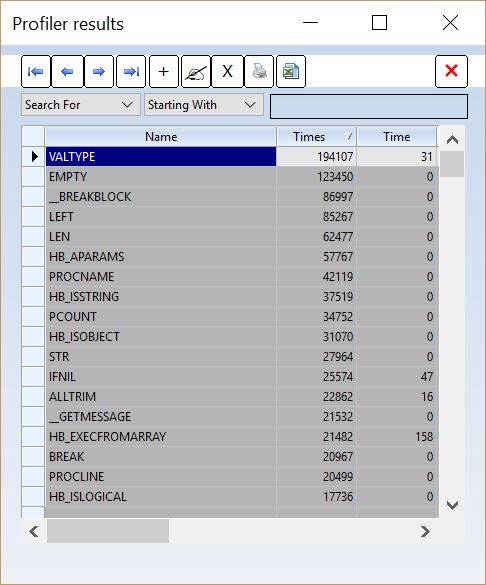
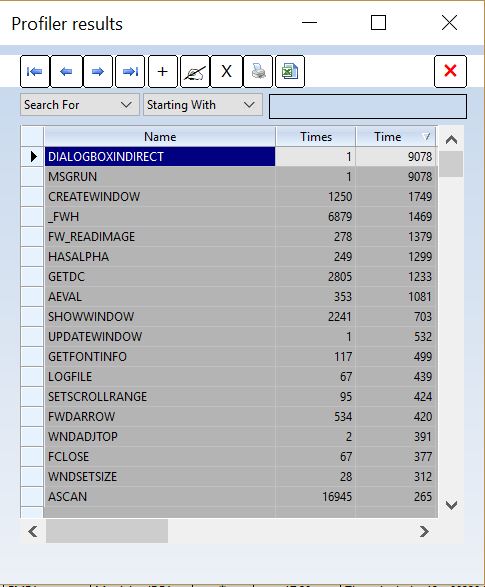
How to use the Harbour Profiler:

1. Install the provided Harbour with profiler

2. At the beginning of your app call this:

__SetProfiler( .T. )

3. Before exiting your app call this:

ShowProfiler()

4. Add this code to your main PRG:

Code (fw): Select all Collapse
#include "xbrowse.ch"


Code (fw): Select all Collapse
function ShowProfiler()

   local aValues := {}, n

   for n := 1 TO __dynsCount()
      if __dynsIsFun( n )
         AAdd( aValues, { __dynsGetName( n ), __dynsGetPrf( n )[ 1 ], __dynsGetPrf( n )[ 2 ] } )
      endif
   next

   XBROWSER ASort( aValues,,, { | x, y | x[ 1 ] < y[ 1 ] } ) ;
      TITLE "Profiler results" ;
      SETUP BrwSetup( oBrw, "Name" ) AUTOSORT

   aValues = {}

   for n = 0 to __opCount() - 1
      AAdd( avalues, { n, __opGetPrf( n )[ 1 ], __opGetPrf( n )[ 1 ] } )
   next      

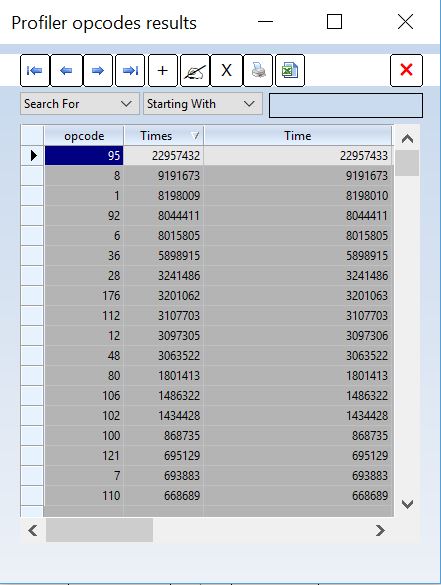
   XBROWSER ASort( aValues,,, { | x, y | x[ 1 ] < y[ 1 ] } ) ;
      TITLE "Profiler opcodes results" ;
      SETUP BrwSetup( oBrw, "opcode" ) AUTOSORT

return nil 

function BrwSetup( oBrw, cType )

   oBrw:aCols[ 1 ]:cHeader = cType
   oBrw:aCols[ 2 ]:cHeader = "Times"
   oBrw:aCols[ 3 ]:cHeader = "Time"
   
return nil
regards, saludos

Antonio Linares
www.fivetechsoft.com
Posts: 1387
Joined: Fri May 23, 2008 01:33 PM
Re: Harbour 3.2 con Profiler para Borland 32 bits
Posted: Tue Mar 13, 2018 02:07 PM

Hi Antonio,

What is harbour profiler? :oops:

Regards,


Hakan ONEMLI


Harbour & MSVC 2022 & FWH 23.06
Posts: 44162
Joined: Thu Oct 06, 2005 05:47 PM
Re: Harbour 3.2 con Profiler para Borland 32 bits
Posted: Tue Mar 13, 2018 04:24 PM
Hakan,

https://en.wikipedia.org/wiki/Profiling_(computer_programming)

Provides measurements of application performance. The better ones isolate methods that:

1. Consume the most amount of time
2. Have the most amount of calls
regards, saludos

Antonio Linares
www.fivetechsoft.com
Posts: 44162
Joined: Thu Oct 06, 2005 05:47 PM
Re: Harbour 3.2 con Profiler para Borland 32 bits
Posted: Tue Mar 13, 2018 04:33 PM


regards, saludos

Antonio Linares
www.fivetechsoft.com
Posts: 231
Joined: Fri Jul 20, 2012 01:49 AM
Re: Harbour 3.2 con Profiler para Borland 32 bits
Posted: Thu Mar 15, 2018 08:38 PM

Hi Antonio,

Very interesting.

One question, the "__SetProfiler( .t. )" is one procedure of FiveWin or Harbour?

Thanks for share!

Regards,

Lailton Fernando Mariano
Posts: 44162
Joined: Thu Oct 06, 2005 05:47 PM
Re: Harbour 3.2 con Profiler para Borland 32 bits
Posted: Fri Mar 16, 2018 07:26 AM

Lailton,

It belongs to Harbour

regards, saludos

Antonio Linares
www.fivetechsoft.com
Posts: 231
Joined: Fri Jul 20, 2012 01:49 AM
Re: Harbour 3.2 con Profiler para Borland 32 bits
Posted: Fri Mar 16, 2018 08:52 PM

Thank you :)

Regards,

Lailton Fernando Mariano
Posts: 193
Joined: Wed Apr 04, 2007 06:54 AM
Re: Harbour 3.2 con Profiler para Borland 32 bits
Posted: Thu Mar 29, 2018 08:15 AM
i have added IF aScan( aValues, { | x | x[ 2 ] > 0 } ) > 0 to avoid opening of the 2 empty tables if the code is compiled without profiler or __SetProfiler( .f. )

Code (fw): Select all Collapse
function ShowProfiler()

   local aValues := {}, n

   for n := 1 TO __dynsCount()
      if __dynsIsFun( n )
         AAdd( aValues, { __dynsGetName( n ), __dynsGetPrf( n )[ 1 ], __dynsGetPrf( n )[ 2 ] } )
      endif
   next

   IF aScan( aValues, { | x | x[ 2 ] > 0 } ) > 0
      XBROWSER ASort( aValues,,, { | x, y | x[ 1 ] < y[ 1 ] } ) ;
         TITLE "Profiler results" ;
         SETUP BrwSetup( oBrw, "Name" ) AUTOSORT

      aValues = {}

      for n = 0 to __opCount() - 1
         AAdd( avalues, { n, __opGetPrf( n )[ 1 ], __opGetPrf( n )[ 1 ] } )
      next      

      XBROWSER ASort( aValues,,, { | x, y | x[ 1 ] < y[ 1 ] } ) ;
         TITLE "Profiler opcodes results" ;
         SETUP BrwSetup( oBrw, "opcode" ) AUTOSORT
   ENDIF

return nil

function BrwSetup( oBrw, cType )

   oBrw:aCols[ 1 ]:cHeader = cType
   oBrw:aCols[ 2 ]:cHeader = "Times"
   oBrw:aCols[ 3 ]:cHeader = "Time"
   
return nil

Continue the discussion