FiveTech Support Forums

FiveWin / Harbour / xBase community
Board index FiveWin for Harbour/xHarbour xBrowse Row-Height
Posts: 811
Joined: Tue May 06, 2008 04:28 AM

xBrowse Row-Height

Posted: Sat Jun 09, 2018 04:10 AM
Hi All,

Anyone encountering this in FWH18.x
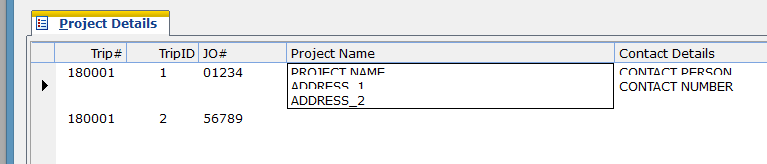


even if I define like this:
Code (fw): Select all Collapse
WITH OBJECT oBrw
       ...
       :nRowHeight := 60
  
       [u]or[/u]

       :Adjust()

       [u]or[/u]

       :Checksize()      

END


:-)
Kind Regards,

Frances


Fivewin for xHarbour v18.07

xHarbour v1.2.3.x

BCC 7.3 + PellesC8 ( Resource Compiler only)

ADS 10.1 / MariaDB

Crystal Reports 8.5/9.23 DE

xMate v1.15
Posts: 10733
Joined: Sun Nov 19, 2006 05:22 AM

Re: xBrowse Row-Height

Posted: Sat Jun 09, 2018 02:47 PM
I tried, but I am unable to get what you could get.
This is my code:
Code (fw): Select all Collapse
   local oDlg, oFld, oFont, oBrw

   USE CUSTOMER NEW ALIAS CUST

   DEFINE FONT oFont NAME "VERDANA" SIZE 0,-16
   DEFINE DIALOG oDlg SIZE 800,500 PIXEL TRUEPIXEL FONT oFont

   @ 20,20 FOLDEREX oFld SIZE 760,460 PIXEL OF oDlg ;
      PROMPT "Customer"

   @ 10,10 XBROWSE oBrw SIZE -10,-10 PIXEL OF oFld:aDialogs[ 1 ] ;
      DATASOURCE "CUST" ;
      COLUMNS "ID", "FIRST+CHR(13)+CHR(10)+LAST", ;
         "STREET+CHR(13)+CHR(10)+CITY+CHR(13)+CHR(10)+STATE+ '-' + ZIP" ;
      HEADERS "ID", "NAME", "ADDRESS" ;
      CELL LINES NOBORDER

   WITH OBJECT oBrw
      :nDataLines     := 3
      //
      :CreateFromCode()
   END

   ACTIVATE DIALOG oDlg CENTERED
   RELEASE FONT oFont

This is what I got:


Note: XBrowse uses Adjust() method internally. Please never use it directly in the application program.

I am very interested in knowing how did you manage to get the appearance you posted.
Please let us have a simple self contained code reproducing the issue.
Regards


G. N. Rao.

Hyderabad, India
Posts: 811
Joined: Tue May 06, 2008 04:28 AM

Re: xBrowse Row-Height

Posted: Wed Jun 13, 2018 12:07 AM
Hi Rao,

Thanks for extra tip!

You are using this:

...
DATASOURCE "CUST" ;
COLUMNS "ID", "FIRST+CHR(13)+CHR(10)+LAST", ;
"STREET+CHR(13)+CHR(10)+CITY+CHR(13)+CHR(10)+STATE+ '-' + ZIP" ;
..


while I did like this:
Code (fw): Select all Collapse
...
   oBrw:aCols[ 4]:SetColsAsRows(  4,  5,  6 )
   oBrw:aCols[ 7]:SetColsAsRows(  7,  8 )
   oBrw:aCols[ 9]:SetColsAsRows(  9, 10 )
...
Kind Regards,

Frances


Fivewin for xHarbour v18.07

xHarbour v1.2.3.x

BCC 7.3 + PellesC8 ( Resource Compiler only)

ADS 10.1 / MariaDB

Crystal Reports 8.5/9.23 DE

xMate v1.15
Posts: 10733
Joined: Sun Nov 19, 2006 05:22 AM

Re: xBrowse Row-Height

Posted: Wed Jun 13, 2018 06:55 AM

Even this should work. But you do not change row-heights or fonts afterwards.

Regards


G. N. Rao.

Hyderabad, India
Posts: 811
Joined: Tue May 06, 2008 04:28 AM

Re: xBrowse Row-Height

Posted: Wed Jun 13, 2018 07:03 AM
nageswaragunupudi wrote:Even this should work. But you do not change row-heights or fonts afterwards.


I See.

I have oDlg:SetFont( oFont ) on Dialog's INIT.. will change it.

:-)
Kind Regards,

Frances


Fivewin for xHarbour v18.07

xHarbour v1.2.3.x

BCC 7.3 + PellesC8 ( Resource Compiler only)

ADS 10.1 / MariaDB

Crystal Reports 8.5/9.23 DE

xMate v1.15
Posts: 10733
Joined: Sun Nov 19, 2006 05:22 AM

Re: xBrowse Row-Height

Posted: Thu Jun 14, 2018 04:17 AM
Sample using SetColsAsRows()
Code (fw): Select all Collapse
#include "fivewin.ch"

function Main()

   local oDlg, oBrw, oFont, oFont2, oFont3, oFont4

   USE CUSTOMER

   DEFINE FONT oFont  NAME "TAHOMA" SIZE 0,-14
   DEFINE FONT oFont2 NAME "TAHOMA" SIZE 0,-22
   DEFINE FONT oFont3 NAME "TAHOMA" SIZE 0,-30
   DEFINE FONT oFont4 NAME "TAHOMA" SIZE 0,-14 ITALIC

   DEFINE DIALOG oDlg SIZE 900,400 PIXEL TRUEPIXEL FONT oFont

   @ 20,20 XBROWSE oBrw SIZE -20,-20 PIXEL OF oDlg DATASOURCE "CUSTOMER" ;
      COLUMNS "ID", "FIRST", "LAST", "STREET", "CITY", "STATE+' - '+ZIP", "AGE", "SALARY" ;
      HEADERS nil, "NAME", nil, "ADDRESS", nil, nil, "DETAILS" ;
      CELL LINES NOBORDER

   WITH OBJECT oBrw
      :aCols[ 1 ]:oDataFont   := oFont3
      :aCols[ 2 ]:oDataFont   := oFont2
      :aCols[ 5 ]:oDataFont   := oFont2
      :aCols[ 6 ]:oDataFont   := oFont4

      :aCols[ 5 ]:bClrStd     := { || { CLR_HRED, CLR_WHITE } }

      :aCols[ 2 ]:SetColsAsRows( { 2, 3 } )
      :aCols[ 4 ]:SetColsAsRows( { 4, 5, 6 } )
      :aCols[ 7 ]:SetColsAsRows( { 7, 8 } )
      //
      :CreateFromCode()
   END

   ACTIVATE DIALOG oDlg CENTERED
   RELEASE FONT oFont, oFont2, oFont3, oFont4

return nil

Regards


G. N. Rao.

Hyderabad, India

Continue the discussion