
Hi,
I wish to move the data from a cell of a list to another list based on mouse release position.
can someone please help.
Thanks and regards,
Alfred
Hi,
I wish to move the data from a cell of a list to another list based on mouse release position.
can someone please help.
Thanks and regards,
Alfred
Set oBrw:lAllowPaste in the second browse.
Press Ctrl-C in the cell of the first browse and then press Ctrl-V in the cell of the second browse.
#include "fivewin.ch"

function Main()

   local oDlg, oBrw1, oBrw2, oCur
   local aData := Array( 50, 2 )

   USE STATES NEW

   DEFINE CURSOR oCur DRAG
   DEFINE DIALOG oDlg SIZE 640,500 PIXEL TRUEPIXEL ;
      TITLE "DRAG AND DROP"

   @ 20, 20 XBROWSE oBrw1 SIZE 300,-20 PIXEL OF oDlg ;
      DATASOURCE "STATES" AUTOCOLS ;
      COLSIZES 60,180 ;
      CELL LINES NOBORDER

   WITH OBJECT oBrw1
      :oDragCursor   := oCur
      :bDragBegin    := { |r,c,f| SetDropInfo( oBrw1:SelectedCol():Value ) }
      :CreateFromCode()
   END

   @ 20,320 XBROWSE oBrw2 SIZE 300,-20 PIXEL OF oDlg ;
      DATASOURCE aData AUTOCOLS ;
      HEADERS "CODE", "NAME" ;
      COLSIZES 60,180 ;
      CELL LINES NOBORDER

   WITH OBJECT oBrw2
      :bDropOver  := { |u,r,c,f| DropOver( u,r,c, oBrw1, oBrw2 ) }
      :CreateFromCode()
   END

   ACTIVATE DIALOG oDlg CENTERED

return nil

function DropOver( uInfo, nRow, nCol, oBrw1, oBrw2 )

   local aPoint

   aPoint      := ClientToScreen( oBrw1:hWnd, { nRow, nCol } )
   aPoint      := ScreenToClient( oBrw2:hWnd, aPoint )

   oBrw2:SetPos( aPoint[ 1 ], aPoint[ 2 ], .t. )
   oBrw2:SelectedCol():VarPut( uInfo )

return nil :bDropOver := { |uInfo,r,c,f,aPt| oBrw2:SetPos( aPt[ 1 ], aPt[ 2 ], .t. ), ;
oBrw2:SelectedCol():VarPut( uInfo ) }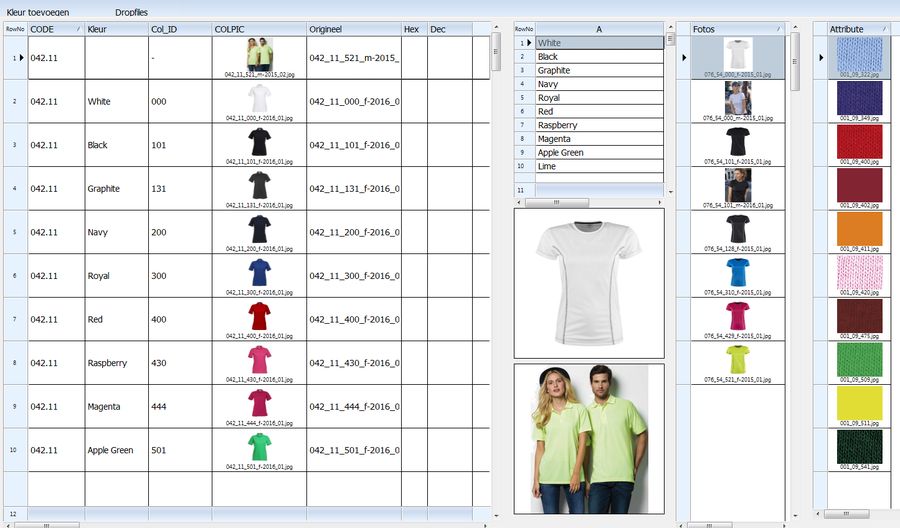
1) You can. When the drag begins, set the information to be sent using SetDropInfo(). When the drop finishes, use the uInfo (1st parameter of bDropInfo) the way you want to.
2) Can you show me the part of your code dislaying the image on the top and title in the bottom?
WITH OBJECT:colpic
   :bStrImage     := { || "r:\pictures\"+alltrim(ATT->colpic) }
   :oDataFont     := oFontS
   :nDataStrAlign := AL_CENTER + AL_BOTTOM
   :nDataBmpAlign := AL_CENTER
   :aImgRect      := { nil, nil, -10, nil }
END
Marc Venken wrote:You mean this part ?
WITH OBJECT:colpic
:bStrImage := { || "r:\pictures\"+alltrim(ATT->colpic) }
DataFont := oFontS
:nDataStrAlign := AL_CENTER + AL_BOTTOM
:nDataBmpAlign := AL_CENTER
:aImgRect := { nil, nil, -10, nil }
END
Thanks Mr. G. N. Rao., tested your sample and work very well.
regards alfred

