FiveTech Support Forums

FiveWin / Harbour / xBase community
Board index FiveWin for Harbour/xHarbour To Nages Insert images on xbrowse
Posts: 7318
Joined: Thu Oct 18, 2012 07:17 PM

To Nages Insert images on xbrowse

Posted: Tue Jul 31, 2018 06:13 PM
Dear Nages, remeber this topic?
http://forums.fivetechsupport.com/viewtopic.php?f=3&t=35687&p=212509#p212509

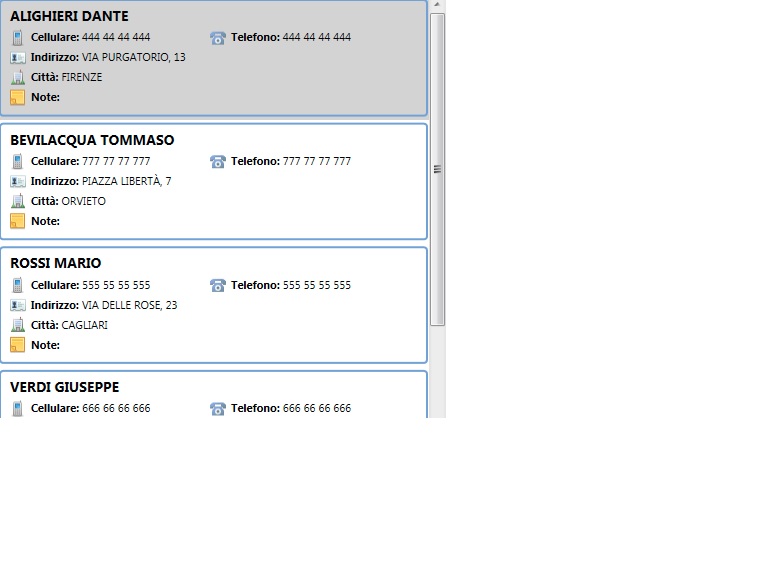
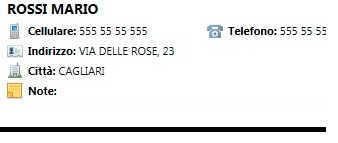
I wish create a Xbrowse as this


Each row ( one record) must have ;

First Last
phone 444 44 444 4444 phone2 77 777 77777
Address xxxxxxxxxxxxxxxxxxxxxxxxxxxxxxxxx
city xxxxxxxxxxxxxxxxxxxxxxxxxxxxxxxxxxxxx
Note aaaaaaaaaaaaaaaaaaaaaaaaaaaaaaaaaaaaa


with small images on each record /field as you see on picture

Ho I can make it ?
Since from 1991/1992 ( fw for clipper Rel. 14.4 - Momos)

I use : FiveWin for Harbour March-April 2024 - Harbour 3.2.0dev (harbour_bcc770_32_20240309) - Bcc7.70 - xMate ver. 1.15.3 - PellesC - mail: silvio[dot]falconi[at]gmail[dot]com
Posts: 6755
Joined: Wed Feb 15, 2012 08:25 PM

Re: To Nages Insert images on xbrowse

Posted: Wed Aug 01, 2018 07:24 PM
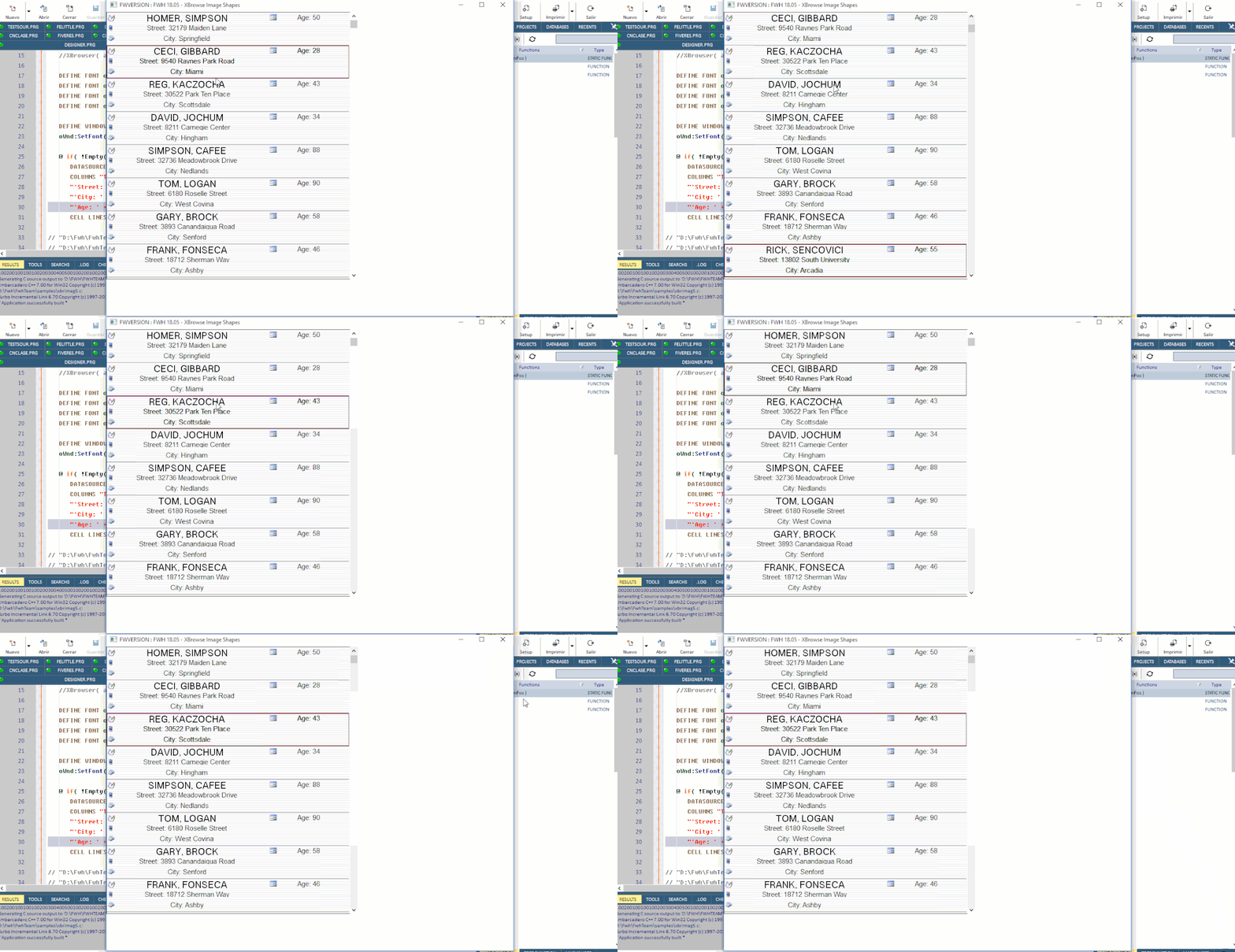
Something like that?

Cristobal Navarro

Hay dos tipos de personas: las que te hacen perder el tiempo y las que te hacen perder la noci贸n del tiempo

El secreto de la felicidad no est谩 en hacer lo que te gusta, sino en que te guste lo que haces
Posts: 163
Joined: Thu Mar 16, 2017 04:08 PM

Re: To Nages Insert images on xbrowse

Posted: Wed Aug 01, 2018 08:21 PM

Dear Cristobal

Very nice and interesting, could you give an example of how it does it?

Cheers

Posts: 6755
Joined: Wed Feb 15, 2012 08:25 PM

Re: To Nages Insert images on xbrowse

Posted: Wed Aug 01, 2018 08:35 PM
Dear Fernando
Define your columns normaly, add image for each column
Code (fw): Select all Collapse
聽 聽 聽 WITH OBJECT :aCols[ 1 ]
聽 聽 聽 聽 聽:bStrImage 聽 聽 := { || "D:\Fwh\FwhTeam\bitmaps\16x16\notes16.bmp" }
聽 聽 聽 聽 聽:oDataFont 聽 聽 := oBold
聽 聽 聽 聽 聽:nDataStrAlign := AL_CENTER + AL_VCENTER
聽 聽 聽 聽 聽:nDataBmpAlign := AL_LEFT
聽 聽 聽 聽 聽//:aImgRect 聽 聽 聽:= { 4, 4, 32, 32 }
聽 聽 聽 END


And then, define your SetColsAsRows
Cristobal Navarro

Hay dos tipos de personas: las que te hacen perder el tiempo y las que te hacen perder la noci贸n del tiempo

El secreto de la felicidad no est谩 en hacer lo que te gusta, sino en que te guste lo que haces
Posts: 811
Joined: Tue May 06, 2008 04:28 AM

Re: To Nages Insert images on xbrowse

Posted: Thu Aug 02, 2018 02:35 AM

Mr. Navarro,

How to add the 'AGE' along side with the 'NAME?

:?:

Kind Regards,

Frances


Fivewin for xHarbour v18.07

xHarbour v1.2.3.x

BCC 7.3 + PellesC8 ( Resource Compiler only)

ADS 10.1 / MariaDB

Crystal Reports 8.5/9.23 DE

xMate v1.15
Posts: 163
Joined: Thu Mar 16, 2017 04:08 PM

Re: To Nages Insert images on xbrowse

Posted: Thu Aug 02, 2018 04:06 AM
Perfect, thanks

cnavarro wrote:Dear Fernando
Define your columns normaly, add image for each column
Code (fw): Select all Collapse
聽 聽 聽 WITH OBJECT :aCols[ 1 ]
聽 聽 聽 聽 聽:bStrImage 聽 聽 := { || "D:\Fwh\FwhTeam\bitmaps\16x16\notes16.bmp" }
聽 聽 聽 聽 聽:oDataFont 聽 聽 := oBold
聽 聽 聽 聽 聽:nDataStrAlign := AL_CENTER + AL_VCENTER
聽 聽 聽 聽 聽:nDataBmpAlign := AL_LEFT
聽 聽 聽 聽 聽//:aImgRect 聽 聽 聽:= { 4, 4, 32, 32 }
聽 聽 聽 END


And then, define your SetColsAsRows
Posts: 6755
Joined: Wed Feb 15, 2012 08:25 PM

Re: To Nages Insert images on xbrowse

Posted: Thu Aug 02, 2018 10:00 AM
fraxzi wrote:Mr. Navarro,

How to add the 'AGE' along side with the 'NAME?

:-)


Age is other column

With new syntax

Code (fw): Select all Collapse
聽 聽@ 0, 0 XBROWSE oBrw OF oWnd ;
聽 聽 聽 DATASOURCE "Cust" ; 
聽 聽 聽 COLUMNS "TRIM(FIRST)+', '+TRIM(LAST) AS FullName PICTURE @! WIDTH 350 SORT FIRST", ;
聽 聽 聽 "'Street: ' + TRIM(STREET) AS Street WIDTH 350", ;
聽 聽 聽 "'City: ' + TRIM(CITY) AS Address WIDTH 350 SORT CITY", ;
聽 聽 聽 "'Age: ' + StrZero( AGE, 2 ) WIDTH 200" ;
聽 聽 聽 CELL LINES NOBORDER PIXEL AUTOSORT

聽 聽WITH OBJECT oBrw
聽 聽 聽 :lHeader 聽 聽 聽 聽 聽:= .F.
聽 聽 聽 :lRecordSelector 聽:= .F.
聽 聽 聽 :lHScroll 聽 聽 聽 聽 := .F.

聽 聽 聽 聽// Important for not separate NAME with AGE
聽 聽 聽 :nColDividerStyle := LINESTYLE_NOLINES

聽 聽 聽 :nRowDividerStyle := LINESTYLE_DARKGRAY //LIGHTGRAY //
聽 聽 聽 :nRowHeight 聽 聽 聽 := 72

.../...
    END
   // Column AGE is not included
   :aCols[ 1 ]:SetColsAsRows( { 1, 2, 3 } )
Cristobal Navarro

Hay dos tipos de personas: las que te hacen perder el tiempo y las que te hacen perder la noci贸n del tiempo

El secreto de la felicidad no est谩 en hacer lo que te gusta, sino en que te guste lo que haces
Posts: 7318
Joined: Thu Oct 18, 2012 07:17 PM

Re: To Nages Insert images on xbrowse

Posted: Thu Aug 02, 2018 01:24 PM
Navarro,
I try it but make me error


I have the browse at left and the fields at right on a dialog

I use my archive and not run also bchange
I sent you mt small test
Since from 1991/1992 ( fw for clipper Rel. 14.4 - Momos)

I use : FiveWin for Harbour March-April 2024 - Harbour 3.2.0dev (harbour_bcc770_32_20240309) - Bcc7.70 - xMate ver. 1.15.3 - PellesC - mail: silvio[dot]falconi[at]gmail[dot]com
Posts: 6755
Joined: Wed Feb 15, 2012 08:25 PM

Re: To Nages Insert images on xbrowse

Posted: Thu Aug 02, 2018 01:32 PM

You need last version of Fw for new syntax definition of columns in xbrowse
I have answered your mail

Cristobal Navarro

Hay dos tipos de personas: las que te hacen perder el tiempo y las que te hacen perder la noci贸n del tiempo

El secreto de la felicidad no est谩 en hacer lo que te gusta, sino en que te guste lo que haces
Posts: 7318
Joined: Thu Oct 18, 2012 07:17 PM

Re: To Nages Insert images on xbrowse

Posted: Thu Aug 02, 2018 01:53 PM
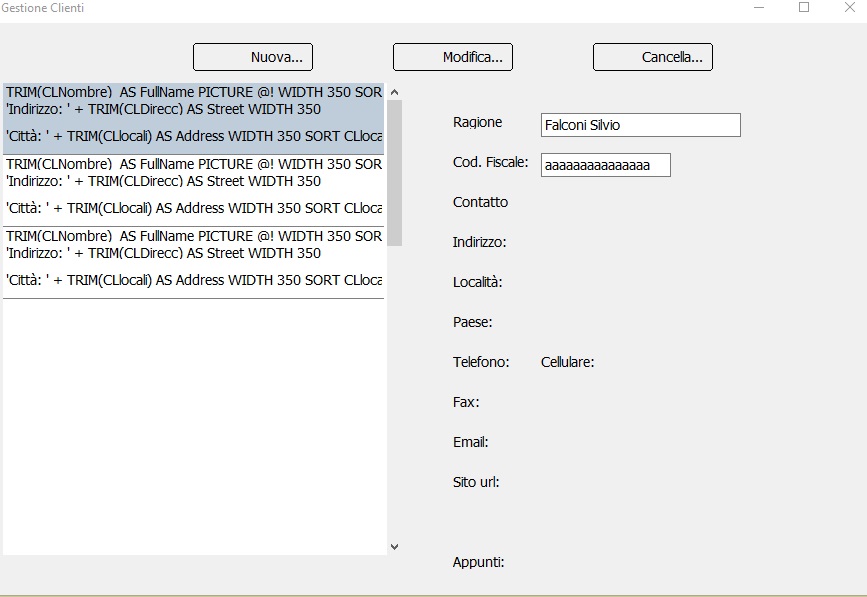
I try this :
Code (fw): Select all Collapse
 @ 30,0 XBROWSE oBrowse OF oDlg DATASOURCE "CL" ;
          COLUMNS "CLNombre","CLDirecc","CLlocali","CLCap","CLProv","CLTELEFONO","CLMOVIL" ;
          HEADERS "Ragione Sociale", "Indirizzo", nil, nil, "Dettagli" ;
          CELL LINES NOBORDER


        WITH OBJECT oBrowse
         WITH OBJECT :aCols[ 1 ]
         :bStrImage     := { || "phone.bmp" }
        * :oDataFont     := oBold
         :nDataStrAlign := AL_CENTER + AL_VCENTER
         :nDataBmpAlign := AL_LEFT
         //:aImgRect      := { 4, 4, 32, 32 }
      END

       *  WITH OBJECT oBrw
          :aCols[ 1 ]:SetColsAsRows( 1,6,2,3 )
          :aCols[ 2 ]:SetColsAsRows( 2, 3, 4 )
          :aCols[ 5 ]:SetColsAsRows( 5, 6, 7 )
          //
      :lHeader          := .F.
      :lRecordSelector  := .F.
      :lHScroll         := .F.

       // Important for not separate NAME with AGE
      :nColDividerStyle := LINESTYLE_NOLINES

      :nRowDividerStyle := LINESTYLE_DARKGRAY //LIGHTGRAY //
      :nRowHeight       := 72
          :CreateFromCode()
       END


the result is


But I wish this


any solution ?
Since from 1991/1992 ( fw for clipper Rel. 14.4 - Momos)

I use : FiveWin for Harbour March-April 2024 - Harbour 3.2.0dev (harbour_bcc770_32_20240309) - Bcc7.70 - xMate ver. 1.15.3 - PellesC - mail: silvio[dot]falconi[at]gmail[dot]com
Posts: 7318
Joined: Thu Oct 18, 2012 07:17 PM

Re: To Nages Insert images on xbrowse

Posted: Thu Aug 02, 2018 03:37 PM
Now I found another sample of Nages Compatible with my release of fivewin.

the source test

Code (fw): Select all Collapse
#include "fivewin.ch"

function colsasrows2()

   local oWnd, oBrw, oFont, aCols
   local nLine    := 0

   USE CUSTOMER ALIAS CUST

 //  xbrowse()

   DEFINE FONT oFont NAME "TAHOMA" SIZE 0,-14
   DEFINE WINDOW oWnd
   oWnd:SetFont( oFont )

   aCols := { ;
      { { || If( nLine == 0, STR(CUST->ID,4), "" ) }, "ID" }, ;
      { { || If( nLine == 0, CUST->FIRST+" "+CUST->LAST, If( nLine == 1,  CUST->ZIP, CUST->ZIP ) ) }, "CustName" }, ;
      { { || If( nLine == 0, CUST->STREET, If( nLine == 1, CUST->CITY, CUST->ZIP ) ) }, "Address" }, ;
      { { || If( nLine == 0, DTOC(CUST->HIREDATE), If( nLine == 1, Str( CUST->AGE, 2 ), TRANSFORM( CUST->SALARY,"9,999,999.99") ) ) }, "Details" } }


   @ 0,0 XBROWSE oBrw OF oWnd DATASOURCE "CUST" ;
      COLUMNS aCols ;
      CELL LINES NOBORDER

   // Navigation blocks
   oBrw:bGoTop    := { || nLine := 0, ( oBrw:cAlias )->( DBGOTOP()    ) }
   oBrw:bGoBottom := { || nLine := 2, ( oBrw:cAlias )->( DBGOBOTTOM() ) }
   oBrw:bKeyCount := { || ( oBrw:cAlias )->( OrdKeyCount() ) * 3 }
   oBrw:bKeyNo    := { || ( ( oBrw:cAlias )->( OrdKeyNo() - 1 ) * 3 ) + 1 + nLine  }
   oBrw:bSkip     := { |nSkip| ( oBrw:cAlias )->( MySkipper( nSkip, @nLine ) ) }
   oBrw:bKeyNo := { |n| If( n != nil, ( n--, ( oBrw:cAlias )->( OrdKeyGoTo( Int( n / 3 ) + 1 ) ), nLine := n % 3 ), nil ), ;
                        ( ( oBrw:cAlias )->( OrdKeyNo() - 1 ) * 3 ) + 1 + nLine }
   oBrw:bBookMark := { |n| If( n != nil, ( n--, ( oBrw:cAlias )->( DbGoTo( Int( n / 3 ) + 1 ) ), nLine := n % 3 ), nil ), ;
                        ( ( oBrw:cAlias )->( RecNo() - 1 ) * 3 ) + 1 + nLine }


   WITH OBJECT oBrw
      :aCols[ 1 ]:nDataStrAlign := AL_RIGHT


      :aCols[ 2 ]:bLeftText   := { || If( nLine == 0, "", If( nLine == 1, "Phone1", "Phone2:" ) ) }
      :aCols[ 2 ]:bStrImage     :=  { || If( nLine == 0, "", If( nLine == 1, "phone.bmp", "phone2.bmp" ) ) }
      :aCols[ 2 ]:nDataBmpAlign := AL_RIGHT

      :aCols[ 3 ]:bStrImage     :=  { || If( nLine == 0, "address.bmp", If( nLine == 1, "city.bmp", "note.bmp" ) ) }
      :aCols[ 3 ]:nDataBmpAlign := AL_RIGHT
      :aCols[ 3 ]:nWidth      := 340
      :aCols[ 3 ]:bLeftText   := { || If( nLine == 0, "Address:", If( nLine == 1, "City:", "Cap:" ) ) }

      :aCols[ 4 ]:nWidth      := 140
      :aCols[ 4 ]:nDataStrAlign := AL_RIGHT
      :aCols[ 4 ]:bLeftText   := { || If( nLine == 0, "Date:", If( nLine == 1, "Age:", "Sal:" ) ) }


      :bClrStd    := { || { CLR_BLACK, If( nLine == 0, CLR_HGRAY, CLR_WHITE ) } }
      //
      :CreateFromCode()
   END
   oWnd:oClient   := oBrw

   ACTIVATE WINDOW oWnd CENTERED
   RELEASE FONT oFont

return nil

static function MySkipper( nSkip, nLine )

   local nSkipped := 0

   DEFAULT nSkip := 1

   if nSkip == 0
      return 0
   endif
   if nSkip > 0
      do while nSkipped < nSkip
         if nLine < 2
            nLine++
            nSkipped++
         else
            DBSKIP( 1 )
            if Eof()
               DBGOBOTTOM()
               EXIT
            endif
            nLine := 0
            nSkipped++
         endif
      enddo
   else
      do while nSkipped > nSkip
         if nLine > 0
            nLine--
            nSkipped--
         else
            DBSKIP( -1 )
            if BOF()
               EXIT
            endif
            nLine    := 2
            nSkipped--
         endif
      enddo
   endif

return nSkipped

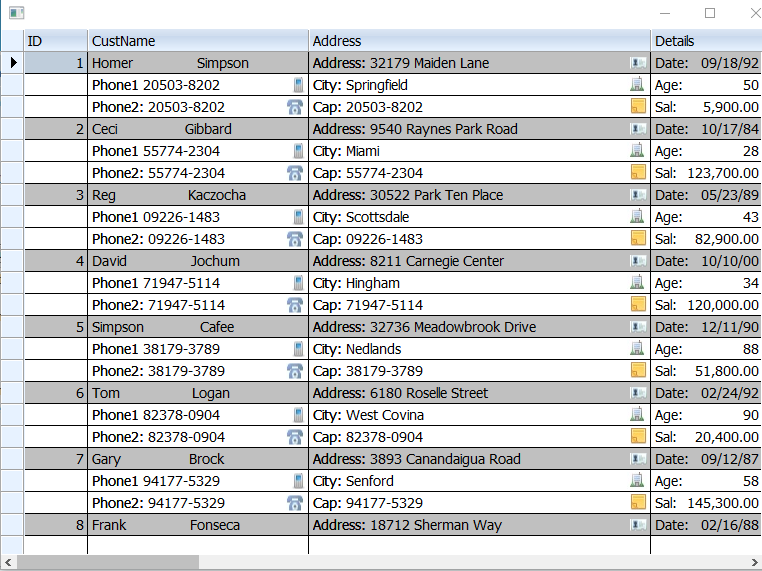
this is the result :


Questions
1 . Can I set the font of each bLefttext ?
2. Can I move the images on Left before of bLefttext ?
3. When I select a record can have one record as one Row ? ( with a box arround)

thanks
Since from 1991/1992 ( fw for clipper Rel. 14.4 - Momos)

I use : FiveWin for Harbour March-April 2024 - Harbour 3.2.0dev (harbour_bcc770_32_20240309) - Bcc7.70 - xMate ver. 1.15.3 - PellesC - mail: silvio[dot]falconi[at]gmail[dot]com
Posts: 7318
Joined: Thu Oct 18, 2012 07:17 PM

Re: To Nages Insert images on xbrowse

Posted: Sun Aug 05, 2018 03:06 PM
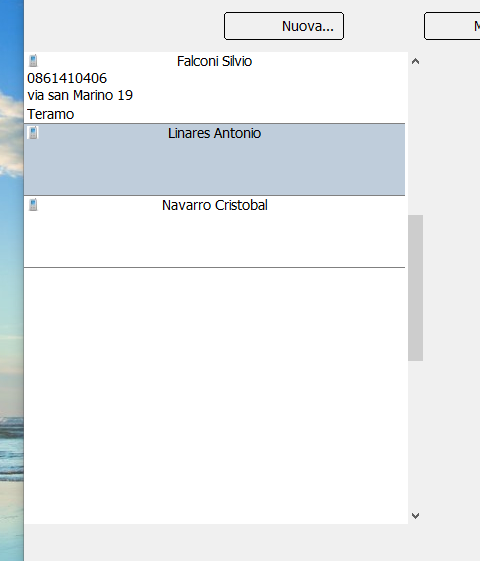
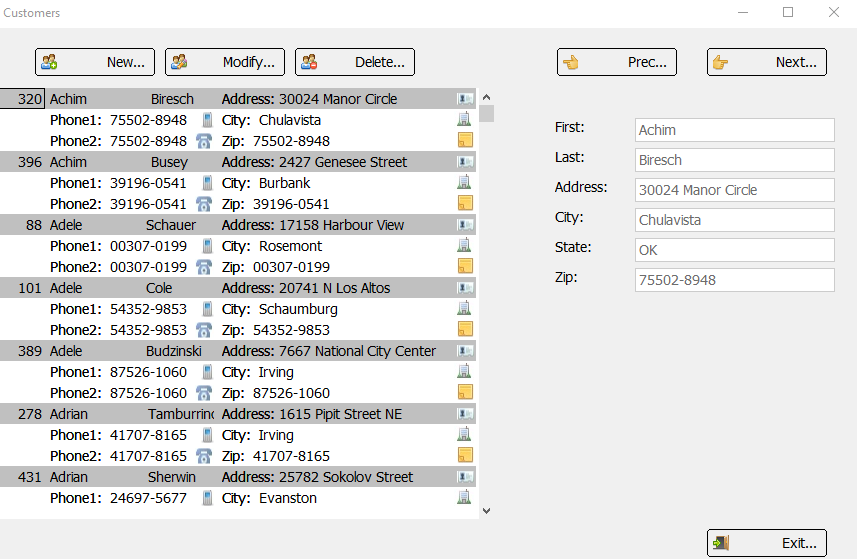
This is the last my release


I can Add, edit and delete record, also scroll ( prev/next) record.


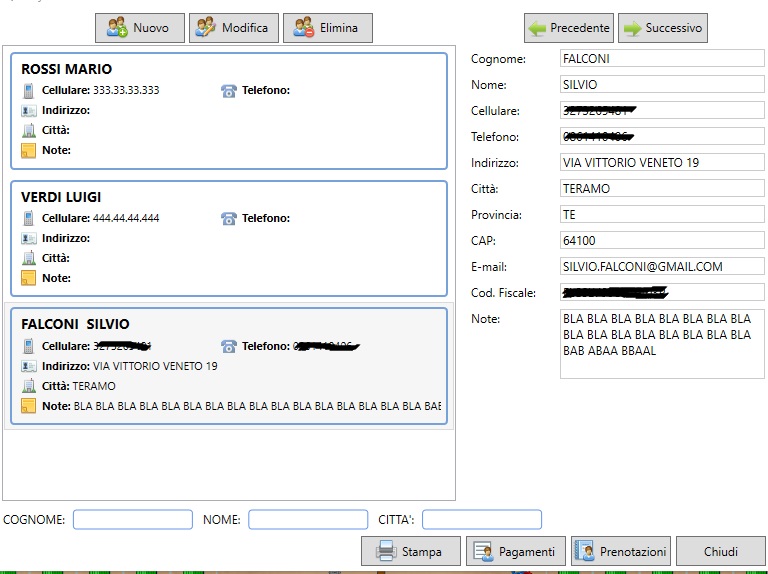
I wish to have on xbrowse the record with two columns and 5 lines on white backgroung and a line box to determine a record
as this picture


How I can make it
Since from 1991/1992 ( fw for clipper Rel. 14.4 - Momos)

I use : FiveWin for Harbour March-April 2024 - Harbour 3.2.0dev (harbour_bcc770_32_20240309) - Bcc7.70 - xMate ver. 1.15.3 - PellesC - mail: silvio[dot]falconi[at]gmail[dot]com

Continue the discussion