FiveTech Support Forums

FiveWin / Harbour / xBase community
Board index FiveWin for Harbour/xHarbour TGet Unicode problem
Posts: 1387
Joined: Fri May 23, 2008 01:33 PM
TGet Unicode problem
Posted: Fri Aug 17, 2018 02:57 PM
Hi,

As you know the sample program. I dont use unicode. (FW_SetUnicode( .f. )). I try both .T. and .F. in TGet():lDefaultANSI := ??.

How can I solve this problem?

Thanks,

sample program
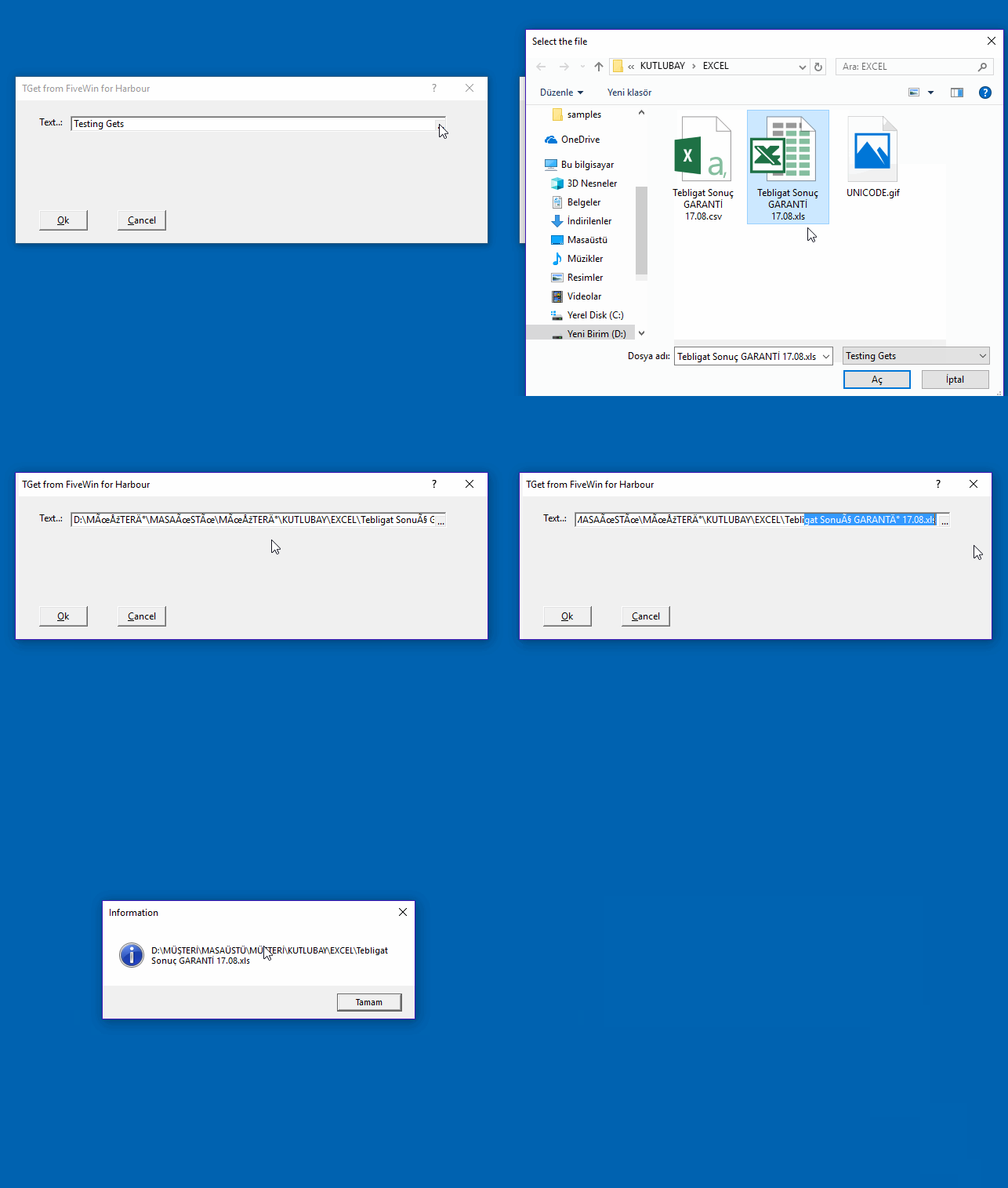
Code (fw): Select all Collapse
#include "FiveWin.ch"

function Main()
   LOCAL oDlg, oGet
   LOCAL cCad := pad("Testing Gets",40)
   LOCAL nNum := 0
   LOCAL dDat := Date()
   
    FW_SetUnicode( .f. )
    TGet():lDefaultANSI := .F.
   

   Set century On
   Set Date Ansi
   Set Date format "mm/dd/yyyy"

   SET _3DLOOK ON

//   DEFINE DIALOG oDlg TITLE "TGet from " + FWDESCRIPTION
   DEFINE DIALOG oDlg from 0,0 to 180,600 pixel TITLE "TGet from " + FWDESCRIPTION

   @ 10, 15 SAY "Text..:" OF oDlg PIXEL
   @ 10, 35 GET oGet VAR cCad OF oDlg SIZE 240, 10 PIXEL ;
        ACTION (cCad := cGetFile32(cCad))

   @ 70,   15 BUTTON "&Ok" OF oDlg SIZE 30, 12 PIXEL ACTION oDlg:End()
   @ 70,   65 BUTTON "&Cancel" SIZE 30, 12 PIXEL OF oDlg ACTION oDlg:End() CANCEL
   
   // TGet():SetColorFocus( nRGB( 200, 120, 120 ) )

   ACTIVATE DIALOG oDlg CENTERED
   
  MsgInfo(cCad)

return nil


Regards,


Hakan ONEMLI


Harbour & MSVC 2022 & FWH 23.06
Posts: 1387
Joined: Fri May 23, 2008 01:33 PM
Re: TGet Unicode problem
Posted: Mon Aug 27, 2018 12:50 PM

?

Regards,


Hakan ONEMLI


Harbour & MSVC 2022 & FWH 23.06
Posts: 10733
Joined: Sun Nov 19, 2006 05:22 AM
Re: TGet Unicode problem
Posted: Mon Aug 27, 2018 05:23 PM

This works if we set FW_SetUnicode( .t. ).
Without that, I could not find a way. Probably we need to set the right codepage for the Turkish language. I could not figure out what it is. Maybe other programmers from Turkey can help.

Note:
? command and all Msg* functions like MsgInfo() display Unicode characters even in a non-Unicode application.

Regards


G. N. Rao.

Hyderabad, India
Posts: 1387
Joined: Fri May 23, 2008 01:33 PM
Re: TGet Unicode problem
Posted: Mon Aug 27, 2018 06:05 PM
Hi Mr. Rao,

You are right if we set FW_SetUnicode( .t. ). but there is also another problem. I can not open the selected file in GetExcelRange() function. File(cSelectedfile) is also says .f.

I have found a workaround like this. It is funny but it works.

Code (fw): Select all Collapse
cFileName := MyUnicodeToAnsi(cGetFile32(oData:cDosya))

...
FUNCTION MyUnicodeToAnsi(cText)
    Copy_Clipboard(cText)
    cText := Get_Clipboard()    
RETURN cText
*-------------------------------------------------------------------------------
PROCEDURE Copy_Clipboard(cText)
LOCAL oClp, i
DEFAULT cText := ""
    DEFINE CLIPBOARD oClp OF oApp:oDlg
    cText := ALLTRIM(cText)
    oClp:SetText(cText)
    oClp:End()
RETURN
*-------------------------------------------------------------------------
FUNCTION Get_Clipboard()
LOCAL oClipBoard, oDlg, i, cText:=""

    DEFINE DIALOG oDlg TITLE "Test"
    DEFINE CLIPBOARD oClipBoard OF oDlg FORMAT TEXT
    ACTIVATE DIALOG oDlg CENTERED ON INIT ( cText := ALLTRIM(oClipBoard:GetText()),;
                                        oClipBoard:End(), oDlg:End())
RETURN cText
Regards,


Hakan ONEMLI


Harbour & MSVC 2022 & FWH 23.06
Posts: 10733
Joined: Sun Nov 19, 2006 05:22 AM
Re: TGet Unicode problem
Posted: Mon Aug 27, 2018 07:05 PM
I think with these settings you shd get everything work.

Code (fw): Select all Collapse
   FW_SetUnicode( .t. )
   HB_CDPSELECT( "UTF8" )

With this, ExcelRange() should also work and clipboard and everything, without any workarounds.
Please try
Regards


G. N. Rao.

Hyderabad, India
Posts: 1387
Joined: Fri May 23, 2008 01:33 PM
Re: TGet Unicode problem
Posted: Tue Aug 28, 2018 01:59 PM
nageswaragunupudi wrote:I think with these settings you shd get everything work.

Code (fw): Select all Collapse
   FW_SetUnicode( .t. )
   HB_CDPSELECT( "UTF8" )

With this, ExcelRange() should also work and clipboard and everything, without any workarounds.
Please try


Hi,

or If we don't want to use UTF8, We can use the unmodified cGetFile32 function as a new function with a different name.

Code (fw): Select all Collapse
December 2017
=============

* Enhancement: cGetFile(), aGetFiles() and cGetDir() now 
work with Unicode file and directory names also, even in 
an ANSI application (i.e., even when FW_SetUnicode(.F.) )
Regards,


Hakan ONEMLI


Harbour & MSVC 2022 & FWH 23.06
Posts: 10733
Joined: Sun Nov 19, 2006 05:22 AM
Re: TGet Unicode problem
Posted: Tue Aug 28, 2018 02:15 PM
or If we don't want to use UTF8, We can use the unmodified cGetFile32 function as a new function with a different name.


Did you try? Are you able to display the result of unmodified cGetFile32() in the Get correctly?
Regards


G. N. Rao.

Hyderabad, India

Continue the discussion