
Greetings colleagues noble. it is possible to roll a BUTTOMBAR case a small screen does not fit all the buttons?
below is an illustration of the control I need:

below is an illustration of the control I need:
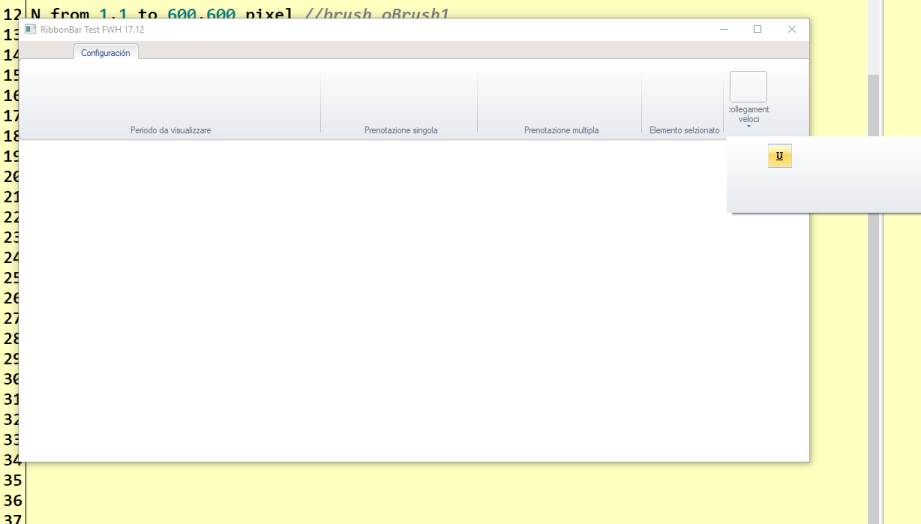
I ask the same for the tabof ribbonbar because I wish set all buttons on first tab
I don't know how to make a buttonbar wrap, but as an alternative you could make the text description tooltips instead. And/or make the images smaller.
The text is only for novices and expert users will remember the icons. So, tooltips are available for the novice, but not cluttering up the screen for the expert. I would never use both on the screen at all times.
Note that images are easier to remember because you don't have to read and process them each time like you do with text.
You could also use a ribbonbar with tabs so you don't have to put all the icons on the same space.
Personally, I don't like wrapped toolbars. My editor does this when you change the size of the window, then I have to remember, is the icon on the top-right or the wrapped middle?
Dear James, I have a schedule where the user sees the whole structure of the beach
1 Having all the buttons in a single buttonbar or on a single tab of the ribbon is essential and unfortunately we have many buttons: I'll give you an example list
1 button to change the date
2. date box
3 date box
4 button for booking journal
5 button for periodic booking
6. button for automatic booking
7 button for multiple booking
8 group for the selected element display
9 booking gesione button
10 customer management
11 booking management
12 management Notes
13 Planner
14 advanced planner
15 beach print
16 individual services
17 services available
18 shows desktop
19 Bar
20 restaurant
21 full screen
22 exit
2 We can not shrink the images of the buttons that must be at least 32X32 or even larger
I assume they have to be 32x32 because it is a touch-screen?
If so, maybe you need to adopt some of the design features for the metro style.
Maybe you could do a drop down menu with the large icons. I have seen touch-screen cash registers to do it like that.
Or you could do it Explorer bar style with several expanding menus.
YES
it is touch screen
I'm rebuilding my old application for use on Tablet Lenovo Mx with Windows 10
I suggest searching this forum for "metro" and "tablet."

#include "fivewin.ch"

function Main()

   local oDlg, oBar, oBtn, oBtn2, oBtn3,oBtn4, oBrw
    local nRechts := 0

   USE CUSTOMER

   DEFINE DIALOG oDlg SIZE 600,400 PIXEL TRUEPIXEL
   DEFINE BUTTONBAR oBar OF oDlg SIZE 64,48 2007 GDIP

   DEFINE BUTTON oBtn OF oBar ;
      FILE "\fwh\bitmaps\hcsmall.bmp", "\fwh\bitmaps\users.bmp" ;
      PROMPT { || If( nRechts = 0, "first", "fourth" ) } ;
      ACTION If( CUSTOMER->MARRIED, MsgInfo( "MARRIED" ), MsgInfo( "SINGLE" ) )

    DEFINE BUTTON oBtn2 OF oBar ;
      FILE "\fwh\bitmaps\pdf.bmp", "\fwh\bitmaps\magenta.bmp" ;
      PROMPT { || If( nRechts = 0, "second", "fifth" ) } ;
      ACTION If( CUSTOMER->MARRIED, MsgInfo( "MARRIED" ), MsgInfo( "SINGLE" ) )

    DEFINE BUTTON oBtn3 OF oBar ;
      FILE "\fwh\bitmaps\user.bmp", "\fwh\bitmaps\cyan.bmp" ;
      PROMPT { || If( nRechts = 0 , "third", "sixth" ) } ;
      ACTION If( CUSTOMER->MARRIED, MsgInfo( "MARRIED" ), MsgInfo( "SINGLE" ) )

    DEFINE BUTTON oBtn4 OF oBar ;
      FILE "\fwh\bitmaps\next.bmp", "\fwh\bitmaps\prev.bmp" ;
      PROMPT { || If( nRechts = 1, "links", "rechts" ) } ;
      ACTION ( iif( nRechts = 0, nRechts := 1 , nRechts := 0 ), oBar:Refresh() )


   if Val( HB_ATokens( FWVERSION )[ 2 ] ) > 17.06
            oBtn:bBmpNo := { || If( nRechts = 0, 2, 1 ) }
            oBtn2:bBmpNo := { || If( nRechts = 0, 2, 1 ) }
            oBtn3:bBmpNo := { || If( nRechts = 0, 2, 1 ) }
            oBtn4:bBmpNo := { || If( nRechts = 1, 2, 1 ) }


   endif

   @ 50,20 XBROWSE oBrw SIZE -20,-20 PIXEL OF oDlg ;
      DATASOURCE "CUSTOMER" ;
      COLUMNS "FIRST","CITY","MARRIED","AGE" ;
      CELL LINES NOBORDER

   WITH OBJECT oBrw
      :Married:SetCheck( nil, .t. )
      :bChange       := { || oBar:Refresh() }
      //
      :CreateFromCode()
   END

   ACTIVATE DIALOG oDlg CENTERED

return nil

Best regards
OttoJames Bott wrote:I suggest searching this forum for "metro" and "tablet."
Otto wrote:Hello Silvio,
you can Change btndyn.prg.
#include "fivewin.ch"

function Main()

   local oDlg, oBar, oBtn, oBtn2, oBtn3,oBtn4, oBrw
    local nRechts := 0

   USE CUSTOMER

   DEFINE DIALOG oDlg SIZE 600,400 PIXEL TRUEPIXEL
   DEFINE BUTTONBAR oBar OF oDlg SIZE 64,48 2007 GDIP

   DEFINE BUTTON oBtn OF oBar ;
      FILE "\fwh\bitmaps\hcsmall.bmp", "\fwh\bitmaps\users.bmp" ;
      PROMPT { || If( nRechts = 0, "first", "fourth" ) } ;
      ACTION If( CUSTOMER->MARRIED, MsgInfo( "MARRIED" ), MsgInfo( "SINGLE" ) )

    DEFINE BUTTON oBtn2 OF oBar ;
      FILE "\fwh\bitmaps\pdf.bmp", "\fwh\bitmaps\magenta.bmp" ;
      PROMPT { || If( nRechts = 0, "second", "fifth" ) } ;
      ACTION If( CUSTOMER->MARRIED, MsgInfo( "MARRIED" ), MsgInfo( "SINGLE" ) )

    DEFINE BUTTON oBtn3 OF oBar ;
      FILE "\fwh\bitmaps\user.bmp", "\fwh\bitmaps\cyan.bmp" ;
      PROMPT { || If( nRechts = 0 , "third", "sixth" ) } ;
      ACTION If( CUSTOMER->MARRIED, MsgInfo( "MARRIED" ), MsgInfo( "SINGLE" ) )

    DEFINE BUTTON oBtn4 OF oBar ;
      FILE "\fwh\bitmaps\next.bmp", "\fwh\bitmaps\prev.bmp" ;
      PROMPT { || If( nRechts = 1, "links", "rechts" ) } ;
      ACTION ( iif( nRechts = 0, nRechts := 1 , nRechts := 0 ), oBar:Refresh() )


   if Val( HB_ATokens( FWVERSION )[ 2 ] ) > 17.06
            oBtn:bBmpNo := { || If( nRechts = 0, 2, 1 ) }
            oBtn2:bBmpNo := { || If( nRechts = 0, 2, 1 ) }
            oBtn3:bBmpNo := { || If( nRechts = 0, 2, 1 ) }
            oBtn4:bBmpNo := { || If( nRechts = 1, 2, 1 ) }


   endif

   @ 50,20 XBROWSE oBrw SIZE -20,-20 PIXEL OF oDlg ;
      DATASOURCE "CUSTOMER" ;
      COLUMNS "FIRST","CITY","MARRIED","AGE" ;
      CELL LINES NOBORDER

   WITH OBJECT oBrw
      :Married:SetCheck( nil, .t. )
      :bChange       := { || oBar:Refresh() }
      //
      :CreateFromCode()
   END

   ACTIVATE DIALOG oDlg CENTERED

return nil

Best regards
Otto
Otto,
I try , it run but I think Fwteam can found a good solution also for the Left type
sse your mail thanks
This immediatly solution is buttonbar with control manualy of left and right (horizontal scroll) on place of first and last buttons.
Maybe in the new fivewin version this scroll be incresead.
Thanks.
+1 but I need also on ribbonbar now


