FiveTech Support Forums

FiveWin / Harbour / xBase community
Board index FiveMac / FivePhone (iPhone, iPad) reading available fonts on system
Posts: 166
Joined: Wed Nov 25, 2015 07:13 PM
reading available fonts on system
Posted: Sat Sep 08, 2018 07:49 AM

Hello,

Is it possible to check what fonts are available on a system. I want to put all fonts in an array, so the user can choose which font to use for printing some data.
I am looking for some function like "aFonts := ReadFonts()"

Kind regards,


René Koot
Posts: 9020
Joined: Thu Oct 06, 2005 08:17 PM
Re: reading available fonts on system
Posted: Sat Sep 08, 2018 08:19 AM
Code (fw): Select all Collapse
ChooseFont()


EMG
Posts: 44158
Joined: Thu Oct 06, 2005 05:47 PM
Re: reading available fonts on system
Posted: Sat Sep 08, 2018 10:04 AM
René,

I am implementing ChooseFont() using Cocoa's NSFontPanel:

https://stackoverflow.com/questions/1415716/using-nsfontpanel-in-cocoa
regards, saludos

Antonio Linares
www.fivetechsoft.com
Posts: 9020
Joined: Thu Oct 06, 2005 08:17 PM
Re: reading available fonts on system
Posted: Sat Sep 08, 2018 10:08 AM

Ops, sorry. Wrong forum.

EMG

Posts: 44158
Joined: Thu Oct 06, 2005 05:47 PM
Re: reading available fonts on system
Posted: Sat Sep 08, 2018 12:15 PM
First try:

Code (fw): Select all Collapse
#include "FiveMac.ch"

function Main()

   MsgInfo( ChooseFont() )

return nil

#pragma BEGINDUMP

#include <fivemac.h>

HB_FUNC( CHOOSEFONT )
{
   NSFontManager * fontManager = [ NSFontManager sharedFontManager ];
   NSFontPanel * fontPanel = [ fontManager fontPanel:YES ];

   [ fontPanel makeKeyAndOrderFront: fontPanel ];
   // [ NSApp runModalForWindow: fontPanel ];
}

#pragma ENDDUMP
regards, saludos

Antonio Linares
www.fivetechsoft.com
Posts: 44158
Joined: Thu Oct 06, 2005 05:47 PM
Re: reading available fonts on system
Posted: Sat Sep 08, 2018 12:55 PM
More...

Code (fw): Select all Collapse
#include "FiveMac.ch"

function Main()

   MsgInfo( ChooseFont() )

return nil

#pragma BEGINDUMP

#include <fivemac.h>

@interface FontPanelController : NSWindowController <NSWindowDelegate>
{
}
-( void ) changeFont: ( id ) sender;
-( void ) windowWillClose: ( id ) sender;
@end

@implementation FontPanelController
-( void ) changeFont: ( id ) sender
{
   NSBeep();
}

- ( void ) windowWillClose: ( id ) sender
{
   NSBeep();
   [ NSApp abortModal ];
   // hb_retc( [ [ sender font ].fontName cStringUsingEncoding : NSWindowsCP125$sCP1252StringEncoding ] );
   hb_retc( "font name" );
}
@end

HB_FUNC( CHOOSEFONT )
{
   NSFontManager * fontManager = [ NSFontManager sharedFontManager ];
   NSFontPanel * fontPanel = [ fontManager fontPanel:YES ];

   [ fontPanel setDelegate: [ [ FontPanelController alloc ] init ] ];
   [ fontPanel makeKeyAndOrderFront: fontPanel ];
   [ NSApp runModalForWindow: fontPanel ];
}

#pragma ENDDUMP


https://stackoverflow.com/questions/9234587/name-and-size-from-nsfont
regards, saludos

Antonio Linares
www.fivetechsoft.com
Posts: 44158
Joined: Thu Oct 06, 2005 05:47 PM
Re: reading available fonts on system
Posted: Sun Sep 09, 2018 08:07 AM
This function ChooseFont() is working fine :-)

I have implemented it as modal. Its easy to implement it as non modal too.

Code (fw): Select all Collapse
#include "FiveMac.ch"

function Main()

   MsgInfo( ChooseFont() )

return nil

#pragma BEGINDUMP

#include <fivemac.h>

@interface FontPanelController : NSWindowController <NSWindowDelegate>
{
   @public NSFont * font;
   @public NSFont * newFont;
}
-( void ) changeFont: ( id ) sender;
-( void ) windowWillClose: ( id ) sender;
@end

@implementation FontPanelController
-( void ) changeFont: ( id ) sender
{
   newFont = [ sender convertFont: font ];
}

- ( void ) windowWillClose: ( id ) sender
{
   [ NSApp abortModal ];

   hb_retc( [ [ ( newFont ? newFont: font ) displayName ] cStringUsingEncoding : NSWindowsCP1252StringEncoding ] );
}
@end

HB_FUNC( CHOOSEFONT )
{
   NSFontManager * fontManager = [ NSFontManager sharedFontManager ];
   NSFontPanel * fontPanel = [ fontManager fontPanel:YES ];
   FontPanelController * fontPanelController = [ [ FontPanelController alloc ] init ];

   [ fontPanel setDelegate: fontPanelController ];
   fontPanelController->font = [ NSFont systemFontOfSize : 10 ];
   [ fontPanel makeKeyAndOrderFront: fontPanel ];
   [ NSApp runModalForWindow: fontPanel ];
}

#pragma ENDDUMP
regards, saludos

Antonio Linares
www.fivetechsoft.com
Posts: 44158
Joined: Thu Oct 06, 2005 05:47 PM
Re: reading available fonts on system
Posted: Sun Sep 09, 2018 08:16 AM
René,

I have added this new function ChooseFont() to FiveMac:

https://bitbucket.org/fivetech/fivemac/commits/b2fecc39e050a61cebc991ff8ecfc3d9d06858f3

So simply download the new FiveMac libs and try this example:

https://bitbucket.org/fivetech/fivemac/src/master/lib/libfive.a
https://bitbucket.org/fivetech/fivemac/src/master/lib/libfivec.a

Code (fw): Select all Collapse
#include "FiveMac.ch"

function Main()

   MsgInfo( ChooseFont() )

return nil


Will users ever notice that we are giving FiveMac for free... ? :-)
regards, saludos

Antonio Linares
www.fivetechsoft.com
Posts: 9020
Joined: Thu Oct 06, 2005 08:17 PM
Re: reading available fonts on system
Posted: Sun Sep 09, 2018 08:27 AM

So my suggestion was right, after all. :D

EMG

Posts: 44158
Joined: Thu Oct 06, 2005 05:47 PM
Re: reading available fonts on system
Posted: Sun Sep 09, 2018 08:33 AM

Dear Enrico,

Always :-)

regards, saludos

Antonio Linares
www.fivetechsoft.com
Posts: 166
Joined: Wed Nov 25, 2015 07:13 PM
Re: reading available fonts on system
Posted: Tue Sep 11, 2018 07:56 PM

Hello Antonio,

Thank you very much for this implementation, it looks very nice and easy to use.
But what I mean is a function that only puts the names of the fonts in an array. Than I can use that array in a COMBOBOX and use the name of the font in a print routine. Simular as in Word where the user can choose the font from a combobox and than the fontsize from another combobox.

Always thankful for all the help you give. If you need some financial support, please let me know.

Kind regards,


René Koot
Posts: 44158
Joined: Thu Oct 06, 2005 05:47 PM
Re: reading available fonts on system
Posted: Wed Sep 12, 2018 06:55 AM
René,

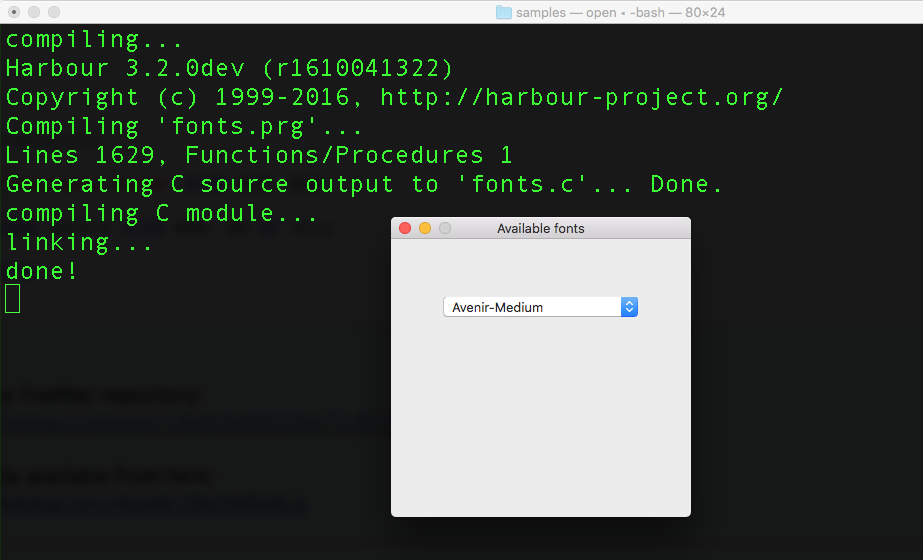
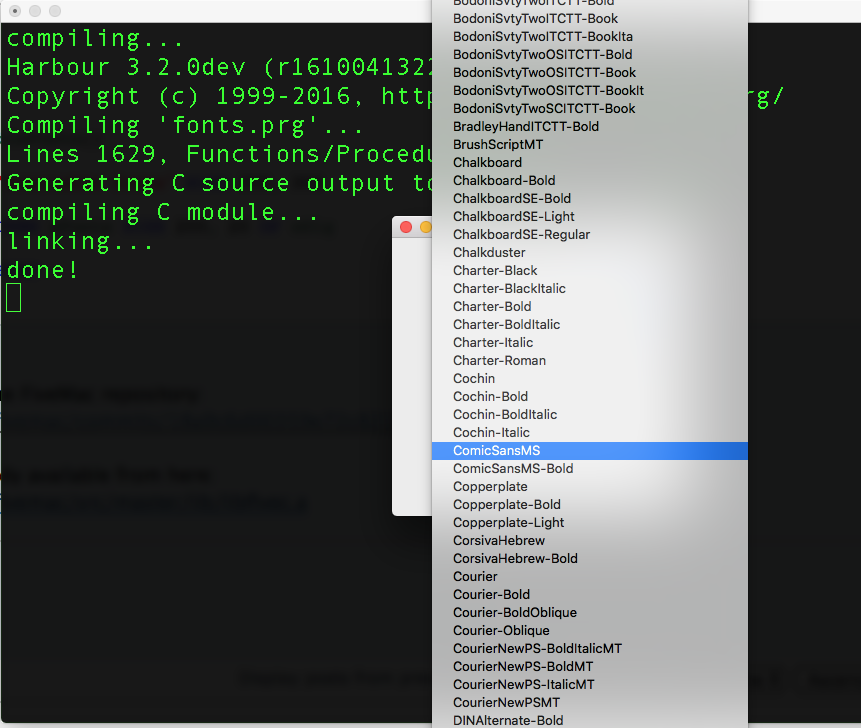
This is function FM_AvailableFonts() that returns an array with all available fonts names:
Code (fw): Select all Collapse
HB_FUNC( FM_AVAILABLEFONTS )
{
   NSArray * aFonts = [ [ NSFontManager sharedFontManager ] availableFonts ];
   int i;

   hb_reta( [ aFonts count ] );

   for( i = 0; i < [ aFonts count ]; i++ )
      hb_storvc( [ ( NSString * ) [ aFonts objectAtIndex: i ] cStringUsingEncoding : NSWindowsCP1252StringEncoding ], -1, i + 1 );
}


This is an example of use:
Code (fw): Select all Collapse
#include "FiveMac.ch"

function Main()

   local oDlg, cVar
   local aFonts := FM_availableFonts()

   DEFINE DIALOG oDlg TITLE "Available fonts" SIZE 300, 300

   @ 200, 50 COMBOBOX cVar ITEMS aFonts SIZE 200, 20 OF oDlg

   ACTIVATE DIALOG oDlg CENTERED

return nil


Changes already commited to the FiveMac repository:
https://bitbucket.org/fivetech/fivemac/commits/18a9c6d00359e72c8215121b8660769b0c0b51d1

FiveMac modified C library already available from here:
https://bitbucket.org/fivetech/fivemac/src/master/lib/libfivec.a
regards, saludos

Antonio Linares
www.fivetechsoft.com
Posts: 44158
Joined: Thu Oct 06, 2005 05:47 PM
Re: reading available fonts on system
Posted: Wed Sep 12, 2018 07:04 AM


regards, saludos

Antonio Linares
www.fivetechsoft.com
Posts: 166
Joined: Wed Nov 25, 2015 07:13 PM
Re: reading available fonts on system
Posted: Fri Sep 21, 2018 06:02 AM

Hello Antonio,

Sorry for the late response, I had a small vacation (needed it)

Thank you very much, this is just what I was looking for.

Kind regards,


René Koot

Continue the discussion