FiveTech Support Forums

FiveWin / Harbour / xBase community
Board index FiveWin for Harbour/xHarbour Ribbonbar with solid brush color
Posts: 4840
Joined: Fri Nov 18, 2005 04:52 PM
Ribbonbar with solid brush color
Posted: Wed Sep 19, 2018 10:08 PM

I am working on the Ribbonbar class. I am trying to make the ribbon color solid instead of gradient (Windows 10 uses solid colors). There is brush defined like this in the class:

::hBmpBrushEx = GradientBmp( Self, ::nRight - ::nRightMargin - 3, ::nBottom - ::nTopMargin + 1, ::aGrad )
::hBrushEx = CreatePatternBrush( ::hBmpBrushEx )

::aGrad is defined in the class like this:

::aGrad := { { 1, RGB( 255, 255, 255 ), RGB( 255, 255, 255 ) } }

One would think that this would be a solid color but no, it is a gradient. I have tried changing the RGB values and I see no change in the ribbonbar color or gradient. I have never had a reason to work with brushes before so I know next to nothing about them.

Maybe I don't even need to use a brush?

I can find no documentation on brushes except in C.

Any ideas?

FWH 18.05/xHarbour 1.2.3/BCC7/Windows 10
Posts: 4840
Joined: Fri Nov 18, 2005 04:52 PM
Re: Ribbonbar with solid brush color
Posted: Thu Sep 20, 2018 12:43 AM

Well I accidently got it working. I don't know how yet, but no more gradients.

FWH 18.05/xHarbour 1.2.3/BCC7/Windows 10
Posts: 2706
Joined: Fri Oct 07, 2005 01:50 PM
Re: Ribbonbar with solid brush color
Posted: Thu Sep 20, 2018 02:43 PM
James

This is how I setup my ButtonBar gradient ( grey\white ) .. It might also work for the RibbonBar as well ?? .. If you want a solid color .. play with the rgb colors in :bClrGrad code block.

Rick Lipkin

Code (fw): Select all Collapse
DEFINE BUTTONBAR oBar OF oWind SIZE 80,58 2010    // 80,58   80,64
       oBar:SetColor(0)
                            
       oBar:bClrGrad = { || { { 0.10,15724527,7303023 }, ;
                       { 0.10,7303023,15724527 } } }


Posts: 4840
Joined: Fri Nov 18, 2005 04:52 PM
Re: Ribbonbar with solid brush color
Posted: Thu Sep 20, 2018 04:49 PM
Thanks for the input Rick.

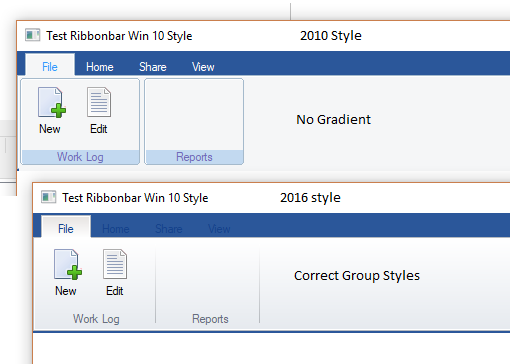
I am trying to configure the ribbonbar to look like current Microsoft apps such as Office. I finally found that the 2010 style Ribbonbar has a solid background but the wrong style groups. And the 2016 style has a gradient background with the right style groups. So, now I need to combine them into a new styles. There is quite a learning curve with this class as there is no documentation, and no comments in the code.

FWH 18.05/xHarbour 1.2.3/BCC7/Windows 10
Posts: 4840
Joined: Fri Nov 18, 2005 04:52 PM
Re: Ribbonbar with solid brush color
Posted: Thu Sep 20, 2018 05:00 PM
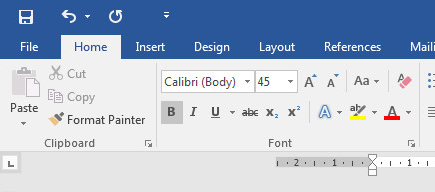
Here is MS Word for comparison.

FWH 18.05/xHarbour 1.2.3/BCC7/Windows 10

Continue the discussion