FiveTech Support Forums

FiveWin / Harbour / xBase community
Board index FiveWin para Harbour/xHarbour Error compilando con vs2017
Posts: 1276
Joined: Tue Dec 28, 2010 01:29 PM
Error compilando con vs2017
Posted: Mon Oct 01, 2018 01:10 AM
Hola

Estoy tratando de compilar TUTOR01.PRG con vs 2017 y fwh17.05/harbour32 y me arroja este error

Code (fw): Select all Collapse
┌────────────────────────────────────────────────────────────────────────────┐
?FiveWin for Harbour 17.05 (MSVC++) May  2017     Harbour development power │▄
?(c) FiveTech 1993-2017 for Microsoft Windows 9X/NT/200X/ME/XP/Vista/7/8/10 │█
└────────────────────────────────────────────────────────────────────────────┘?
  ▀▀▀▀▀▀▀▀▀▀▀▀▀▀▀▀▀▀▀▀▀▀▀▀▀▀▀▀▀▀▀▀▀▀▀▀▀▀▀▀▀▀▀▀▀▀▀▀▀▀▀▀▀▀▀▀▀▀▀▀▀▀▀▀▀▀▀▀▀▀▀▀▀▀▀▀?
**********************************************************************
** Visual Studio 2017 Developer Command Prompt v15.8.5
** Copyright (c) 2017 Microsoft Corporation
**********************************************************************
[vcvarsall.bat] Environment initialized for: 'x86'
Compiling...
Harbour 3.2.0dev (r1801051438)
Copyright (c) 1999-2016, http://harbour-project.org/
Compiling 'tutor01.prg' and generating preprocessed output to 'tutor01.ppo'...
Lines 4674, Functions/Procedures 1
Generating C source output to 'tutor01.c'... Done.
Microsoft (R) C/C++ Optimizing Compiler Version 19.15.26730 for x86
Copyright (C) Microsoft Corporation.  All rights reserved.

tutor01.c
c:\harbour\include\hbdefs.h(51): fatal error C1083: Cannot open include file: 'stdio.h': No such file or directory
Microsoft (R) Windows (R) Resource Compiler Version 6.0.5724.0
Copyright (C) Microsoft Corporation.  All rights reserved.

LINK : fatal error LNK1181: cannot open input file 'tutor01.obj'
* Linking errors *

C:\fwh1705\samples>


Alguna sugerencia o algo esta mal configurado ?

FWH 25.12

Harbour/Hbmk2

Microsoft Visual C++

MySql 8.0

Antigravity

Posts: 44158
Joined: Thu Oct 06, 2005 05:47 PM
Re: Error compilando con vs2017
Posted: Mon Oct 01, 2018 03:55 AM

Busca el fichero stdio.h y añade su path al llamar a cl.exe desde buildh32.bat usando -Ipath

regards, saludos

Antonio Linares
www.fivetechsoft.com
Posts: 1276
Joined: Tue Dec 28, 2010 01:29 PM
Re: Error compilando con vs2017
Posted: Mon Oct 01, 2018 12:09 PM
Antonio Linares wrote:Busca el fichero stdio.h y añade su path al llamar a cl.exe desde buildh32.bat usando -Ipath


No entendi como hacerlo, me podrias colocar un ejemplo ?

FWH 25.12

Harbour/Hbmk2

Microsoft Visual C++

MySql 8.0

Antigravity

Posts: 6755
Joined: Wed Feb 15, 2012 08:25 PM
Re: Error compilando con vs2017
Posted: Mon Oct 01, 2018 01:18 PM

También puedes probar lo siguiente
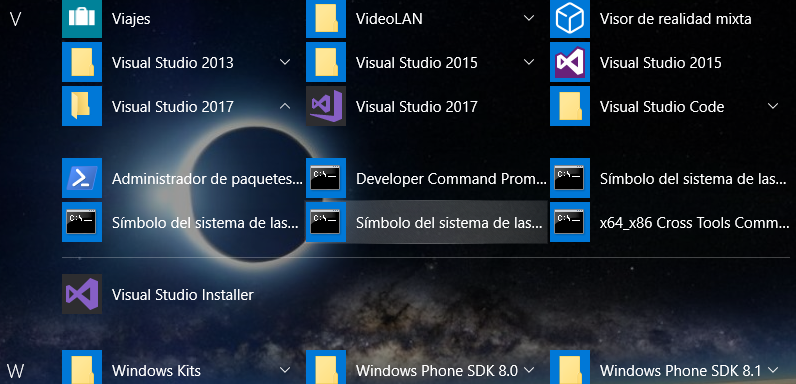
La instalación de VSC genera unos accesos directos de consola para X86 y para X64.
Busca y ejecuta el de X86, y desde la consola que te abre, prueba a ejecutar el buildh32
Ya de paso, con los comandos de consola puedes comprobar los paths que genera e investigar

Cristobal Navarro

Hay dos tipos de personas: las que te hacen perder el tiempo y las que te hacen perder la noción del tiempo

El secreto de la felicidad no está en hacer lo que te gusta, sino en que te guste lo que haces
Posts: 1276
Joined: Tue Dec 28, 2010 01:29 PM
Re: Error compilando con vs2017
Posted: Mon Oct 01, 2018 02:51 PM
cnavarro wrote:También puedes probar lo siguiente
La instalación de VSC genera unos accesos directos de consola para X86 y para X64.
Busca y ejecuta el de X86, y desde la consola que te abre, prueba a ejecutar el buildh32
Ya de paso, con los comandos de consola puedes comprobar los paths que genera e investigar


Entendi menos...pense que Buildh32.bat ya estaba configurado para vs2017

FWH 25.12

Harbour/Hbmk2

Microsoft Visual C++

MySql 8.0

Antigravity
Posts: 6755
Joined: Wed Feb 15, 2012 08:25 PM
Re: Error compilando con vs2017
Posted: Mon Oct 01, 2018 03:11 PM
Y no he dicho que no, sólo que pruebes esta opción para comprobar que tu instalación es correcta y el buildh32 funciona también

Cristobal Navarro

Hay dos tipos de personas: las que te hacen perder el tiempo y las que te hacen perder la noción del tiempo

El secreto de la felicidad no está en hacer lo que te gusta, sino en que te guste lo que haces
Posts: 44158
Joined: Thu Oct 06, 2005 05:47 PM
Re: Error compilando con vs2017
Posted: Mon Oct 01, 2018 05:47 PM

En buildh32.bat tienes esta línea:

cl.exe -TP -W3 -c /GS- /I%hdir%\include /GA %1.c

La modificas así:

cl.exe -TP -W3 -c /GS- /I%hdir%\include /Ipath_a_stdio_h /GA %1.c

Busca stdio.h en tu ordenador para saber cual es su path

regards, saludos

Antonio Linares
www.fivetechsoft.com
Posts: 1276
Joined: Tue Dec 28, 2010 01:29 PM
Re: Error compilando con vs2017
Posted: Tue Oct 02, 2018 12:53 AM
Antonio Linares wrote:En buildh32.bat tienes esta línea:

cl.exe -TP -W3 -c /GS- /I%hdir%\include /GA %1.c

La modificas así:

cl.exe -TP -W3 -c /GS- /I%hdir%\include /Ipath_a_stdio_h /GA %1.c

Busca stdio.h en tu ordenador para saber cual es su path


Hola Antonio:

Este es el path

Code (fw): Select all Collapse
C:\Program Files (x86)\Windows Kits\10\Include\10.0.17134.0\ucrt


Como deberia quedar la linea en Buildh32.bat ?

FWH 25.12

Harbour/Hbmk2

Microsoft Visual C++

MySql 8.0

Antigravity

Posts: 2706
Joined: Fri Oct 07, 2005 01:50 PM
Re: Error compilando con vs2017
Posted: Tue Oct 02, 2018 03:01 PM
Here is my modified MSVC 2017 batch file for xHarbour ... I ran into the same problems not finding some of the MSVC header files .h You can successfully substitute the Borland header files and copy them to your MSVC \include path ..

Don't forget you will need the matching MSVC Harbour or xHarbour .. hope this code helps .. please note you will have to modify the code below to match your MSVC file locations.

Rick Lipkin

Code (fw): Select all Collapse
@ECHO OFF
CLS
ECHO ÚÄÄÄÄÄÄÄÄÄÄÄÄÄÄÄÄÄÄÄÄÄÄÄÄÄÄÄÄÄÄÄÄÄÄÄÄÄÄÄÄÄÄÄÄÄÄÄÄÄÄÄÄÄÄÄÄÄÄÄÄÄÄÄÄÄÄÄÄÄÄÄÄÄÄÄÄ¿
ECHO ³ FiveWin for Harbour\xHarbour (MSVC2017++) May 2018                         ³Ü
ECHO ³ (c) FiveTech 1993-2018 for Microsoft Windows 9X/NT/200X/ME/XP/Vista/7/8/10 ³Û
ECHO ÀÄÄÄÄÄÄÄÄÄÄÄÄÄÄÄÄÄÄÄÄÄÄÄÄÄÄÄÄÄÄÄÄÄÄÄÄÄÄÄÄÄÄÄÄÄÄÄÄÄÄÄÄÄÄÄÄÄÄÄÄÄÄÄÄÄÄÄÄÄÄÄÄÄÄÄÄÙÛ
ECHO ÿ ßßßßßßßßßßßßßßßßßßßßßßßßßßßßßßßßßßßßßßßßßßßßßßßßßßßßßßßßßßßßßßßßßßßßßßßßßßßßß

if A%1 == A GOTO :SINTAX
if NOT EXIST %1.prg GOTO :NOEXIST


ECHO Compiling...

set hdir=c:\xharbourM
set vcdir=c:\msvc2017
set include=%vcdir%\include;%hdir%\include;%include%
set lib=%vcdir%\lib;%hdir%\lib;%lib%


%hdir%\bin\harbour %1 /n /ic:\Fwh1707\include;%hdir%\include /w /p %2 %3 > comp.log 2> warnings.log
IF ERRORLEVEL 1 GOTO COMPILEERROR
@type comp.log
@type warnings.log

IF ERRORLEVEL 1 PAUSE
IF ERRORLEVEL 1 GOTO EXIT

: mvsc compiler line
%vcdir%\bin\cl.Exe -W3 -O2 -nologo -c -GA -GS -EHsc /I%hdir%\include /I%vcdir%\include %1.c


:ENDCOMPILE

IF EXIST %1.rc IF EXIST %vcdir%\bin\rc %vcdir%\bin\rc -r -d__FLAT__ %1
IF EXIST %1.rc IF NOT EXIST %1.res rc -r -d__FLAT__ %1

echo %1.obj  > msvc.tmp

: fivewin libs
echo c:\Fwh1707\lib\FivehMX.lib c:\fwh1707\lib\FiveHc32.lib  >> msvc.tmp

: xHarbourM libs

echo %hdir%\lib\rtl.lib    >> msvc.tmp
echo %hdir%\lib\vm.lib     >> msvc.tmp
echo %hdir%\lib\gtgui.lib  >> msvc.tmp
echo %hdir%\lib\lang.lib   >> msvc.tmp
echo %hdir%\lib\macro.lib  >> msvc.tmp
echo %hdir%\lib\rdd.lib    >> msvc.tmp
echo %hdir%\lib\dbfntx.lib >> msvc.tmp
echo %hdir%\lib\dbfcdx.lib >> msvc.tmp
echo %hdir%\lib\dbffpt.lib >> msvc.tmp
echo %hdir%\lib\hbsix.lib  >> msvc.tmp
echo %hdir%\lib\debug.lib  >> msvc.tmp
echo %hdir%\lib\common.lib >> msvc.tmp
echo %hdir%\lib\pp.lib     >> msvc.tmp
echo %hdir%\lib\pcrepos.lib >> msvc.tmp
echo %hdir%\lib\png.lib     >> msvc.tmp

echo %hdir%\lib\ct.lib  >> msvc.tmp

rem ... can not find this in xHarbourM
rem echo %hdir%\lib\hbzlib.lib  >> msvc.tmp

echo %hdir%\lib\zlib.lib   >> msvc.tmp
echo %hdir%\lib\HBMzip.lib  >> msvc.tmp
echo %hdir%\lib\HBzip.lib  >> msvc.tmp

: msvc libs

echo %vcdir%\lib\kernel32.lib  >> msvc.tmp
echo %vcdir%\lib\user32.lib    >> msvc.tmp
echo %vcdir%\lib\gdi32.lib     >> msvc.tmp
echo %vcdir%\lib\winspool.lib  >> msvc.tmp
echo %vcdir%\lib\comctl32.lib  >> msvc.tmp
echo %vcdir%\lib\comdlg32.lib  >> msvc.tmp
echo %vcdir%\lib\advapi32.lib  >> msvc.tmp
echo %vcdir%\lib\shell32.lib   >> msvc.tmp
echo %vcdir%\lib\ole32.lib     >> msvc.tmp
echo %vcdir%\lib\oleaut32.lib  >> msvc.tmp
echo %vcdir%\lib\uuid.lib      >> msvc.tmp
echo %vcdir%\lib\odbc32.lib    >> msvc.tmp
echo %vcdir%\lib\odbccp32.lib  >> msvc.tmp
echo %vcdir%\lib\iphlpapi.lib  >> msvc.tmp
echo %vcdir%\lib\mpr.lib       >> msvc.tmp
echo %vcdir%\lib\version.lib   >> msvc.tmp
echo %vcdir%\lib\wsock32.lib   >> msvc.tmp
echo %vcdir%\lib\msimg32.lib   >> msvc.tmp
echo %vcdir%\lib\oledlg.lib    >> msvc.tmp
echo %vcdir%\lib\psapi.lib     >> msvc.tmp
echo %vcdir%\lib\gdiplus.lib   >> msvc.tmp
echo %vcdir%\lib\winmm.lib     >> msvc.tmp
echo %vcdir%\lib\libcmt.lib    >> msvc.tmp
echo %vcdir%\lib\oldnames.lib  >> msvc.tmp
echo %vcdir%\lib\libcpmt.lib   >> msvc.tmp
echo %vcdir%\lib\ws2_32.lib    >> msvc.tmp

IF EXIST %1.res echo %1.res >> msvc.tmp

%vcdir%\bin\link @msvc.tmp /nologo /NODEFAULTLIB:LIBC /NODEFAULTLIB:msvcrt /force:multiple /nxcompat:NO /subsystem:windows,5.01 /machine:X86 /Ignore:4006 /LIBPATH:c:\Msvc17\lib

IF ERRORLEVEL 1 GOTO LINKERROR
ECHO * Application successfully built *
%1
GOTO EXIT
ECHO

: delete temporary files

@del %1.c
@del msvc.tmp

:COMPILEERROR
@type comp.log
@type warnings.log
ECHO * Compiling errors *
GOTO EXIT

:LINKERROR
ECHO * Linking errors *
GOTO EXIT

:SINTAX
ECHO    SYNTAX: Build [Program]     {-- No especifiques la extensi¢n PRG
ECHO                                {-- Don't specify .PRG extension
GOTO EXIT

:NOEXIST
ECHO The specified PRG %1 does not exist

:EXIT

Continue the discussion