FiveTech Support Forums

FiveWin / Harbour / xBase community
Board index FiveWin for Harbour/xHarbour Folderex LEFT
Posts: 1195
Joined: Mon Oct 17, 2005 05:41 AM
Folderex LEFT
Posted: Sat Oct 06, 2018 05:42 PM

Hi,

I want to use the folderex class with the tab's at the left.
The only problem is that the text on the tab is not rotated.
How can I rotate the text, or maybe put the characters below each other.
Like:

O
N
E

T
W
O

Thank you

Regards,

Marc


FWH32+xHarbour | FWH64+Harbour | BCC | DBF | ADO+MySQL | ADO+MariaDB | ADO+SQLite
Posts: 4043
Joined: Wed Dec 19, 2007 06:40 PM
Re: Folderex LEFT
Posted: Sun Oct 07, 2018 12:39 PM
Marc,

the solution You are looking for ?


because normal text doesn't work I used
transparent Images created with text

the images created with PIXELFORMER


Code (fw): Select all Collapse
#include "FiveWin.ch"

function main()
local oWnd, i
local oFld
local aBitmaps := { "Test1.png",;
                      "Test2.png",;
                      "Test3.png" }
  
DEFINE WINDOW oWnd TITLE "TFolderex - Testing -"
     
@ 3, 3 FOLDEREX oFld PIXEL ADJUST;
          PROMPT  "", "", "";          
          BITMAPS aBitmaps;
          ACTION( ::HideTab( nOption ) )
 
//#define LAYOUT_TOP     1
//#define LAYOUT_LEFT    2
//#define LAYOUT_BOTTOM  3
//#define LAYOUT_RIGHT   4  

oFld:nFolderHeight := 100
oFld:nLayOut := 2
   
ACTIVATE WINDOW oWnd
   
RETURN NIL


regards
Uwe :-)
Since 1995 ( the first release of FW 1.9 )

i work with FW.

If you have any questions about special functions, maybe i can help.
Posts: 1195
Joined: Mon Oct 17, 2005 05:41 AM
Re: Folderex LEFT
Posted: Sun Oct 07, 2018 03:09 PM

Thank you Uwe,

That's a nice solution. I thought it might be possible to use text instead of a bitmap, but this is also good.

Regards,

Marc


FWH32+xHarbour | FWH64+Harbour | BCC | DBF | ADO+MySQL | ADO+MariaDB | ADO+SQLite
Posts: 6755
Joined: Wed Feb 15, 2012 08:25 PM
Re: Folderex LEFT
Posted: Sun Oct 07, 2018 06:02 PM
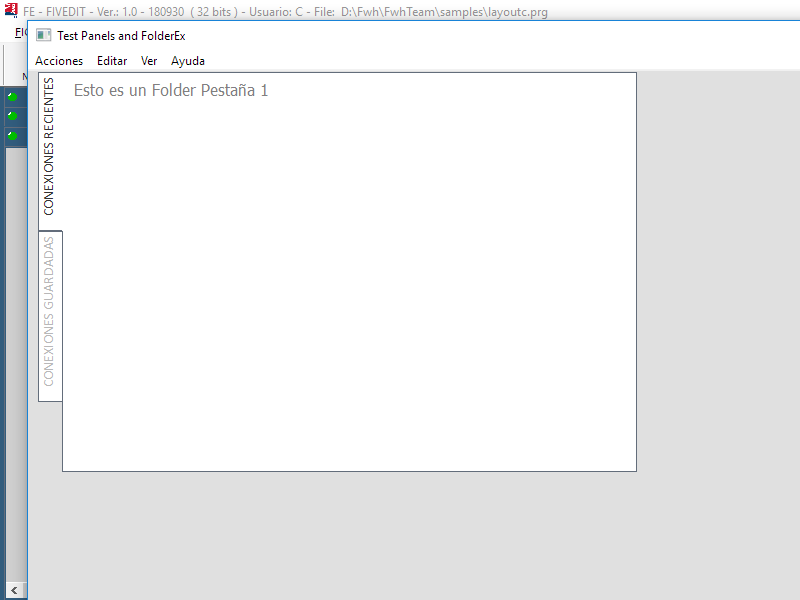
I do not know if I understood your problem
Code (fw): Select all Collapse
Function TestFldEx()

   local oSay5
   local oSay6
   local nClrL   := Rgb( 0, 188, 142 )
   local oFld12
   local oFont

   DEFINE FONT oFont NAME "CALIBRI" SIZE 0,-14

   DEFINE WINDOW oWindow FROM 20, 20 TO GetSysMetrics( 1 ) - 60, 1120 ;
      PIXEL TITLE "Test Panels and FolderEx" ;  //      MENU MyMenu(); 
      COLOR CLR_BLACK, Rgb( 224, 224, 224 )
      oWindow:SetFont( oFont )

      @ 1, 10 FOLDEREX oFld12 ;
         PROMPTS "CONEXIONES RECIENTES", "CONEXIONES GUARDADAS" PIXEL ;
         OF oWindow SIZE 600, 400 ; //TRANSPARENT ;
         FONT oFont COLOR CLR_WHITE LEFT
   
      WITH OBJECT oFld12
         :nFolderHeight  := 24
         :nRound         := 0
         :nSeparator     := 0
         :aGradSel       := { { 1, CLR_WHITE, CLR_WHITE } }
         :aGradUnSel     := { { 1, CLR_WHITE, CLR_WHITE } }
         :bClrText       := { | o, n | if( n = o:nOption, ;
                              METRO_GRIS2, Rgb( 184, 184, 184 ) ) }
         :aGradOver      := { { 0.8, CLR_WHITE, CLR_WHITE }, { 0.2, nClrL, nClrL } }
         :aGradOverUnSel := :aGradOver
         //:AdjClient()
         :Default()
      END

      @ 0, 10 SAY oSay5 PROMPT "Esto es un Folder Pestaña 1" OF oFld12:aDialogs[ 1 ] ;
         SIZE 250, 32 PIXEL ;
         FONT oFont /*TRANSPARENT*/ VCENTER COLOR Rgb( 128, 128, 128 )

      @ 5, 10 SAY oSay6 PROMPT "Esto es un Folder Pestaña 2" OF oFld12:aDialogs[ 2 ] ;
         SIZE 250, 32 PIXEL ;
         FONT oFont /*TRANSPARENT*/ VCENTER COLOR Rgb( 128, 128, 128 )

   ACTIVATE WINDOW oWindow  VALID ( .T. )

   RELEASE FONT oFont

Return nil

Cristobal Navarro

Hay dos tipos de personas: las que te hacen perder el tiempo y las que te hacen perder la noción del tiempo

El secreto de la felicidad no está en hacer lo que te gusta, sino en que te guste lo que haces
Posts: 1195
Joined: Mon Oct 17, 2005 05:41 AM
Re: Folderex LEFT
Posted: Mon Oct 08, 2018 05:59 AM
Thank you Navarro,

My question was indeed to place either the text rotated like in your example or below each other like in the example of Uwe.
The only problem I had in the rotated text was that my text was always horizontal because I did'n define a font.
I thought maybe that I have to define a rotated text.
But now with oly defining a font, like your example, it is rotated :-)

Now I'm wondering what is the best of the two :-)

or
Regards,

Marc


FWH32+xHarbour | FWH64+Harbour | BCC | DBF | ADO+MySQL | ADO+MariaDB | ADO+SQLite
Posts: 6755
Joined: Wed Feb 15, 2012 08:25 PM
Re: Folderex LEFT
Posted: Mon Oct 08, 2018 10:15 AM

My opinion: let the control paint the text

Cristobal Navarro

Hay dos tipos de personas: las que te hacen perder el tiempo y las que te hacen perder la noción del tiempo

El secreto de la felicidad no está en hacer lo que te gusta, sino en que te guste lo que haces

Continue the discussion