

I Always use "append from" for import and "copy to" for export files from/to disk, but this commands doesn't have syntax for work with files CSV easily and natively (only pipe | separator is expected, but not ; ).
Surely there is a function/command that handles this type of very common files more efficiently. Which?
Board index FiveWin for Harbour/xHarbour Import/Export from/to CSV files (; separator)
Page: 1 2 (17 posts)

APPEND FROM <sourceFile> ;
[FIELDS <fieldNames,...> ;]
[<Scope> ; ]
[WHILE <lWhileCondition> ;]
[FOR <lForCondition> ;]
[VIA <rddName> ;]
[SDF | DELIMITED [WITH BLANK | TAB | PIPE | <xDelimiter> ;]
[CODEPAGE <cCodePage> ;]
[CONNECTION <nConnection>] ]
[FIELDS <fieldNames,...> ;]
[<Scope> ; ]
[WHILE <lWhileCondition> ;]
[FOR <lForCondition> ;]
[VIA <rddName> ;]
[SDF | DELIMITED [WITH BLANK | TAB | PIPE | <xDelimiter> ;]
[CODEPAGE <cCodePage> ;]
[CONNECTION <nConnection>] ]

COPY TO "target.csv" DELIMITED WITH ( { '"', ";" } )
APPEND FROM "source.csv" DELIMITED WITH ( { '"', ";" } )
Regards
G. N. Rao.
Hyderabad, India
G. N. Rao.
Hyderabad, India
Massimo,
APPEND FROM …. DELIMITED WITH ";" is exactly the command that i try each time, but it doesn't work fine with files without spaces.
It works fine only if the file is with field fixed ascii (lenght declared for each field), but if the file is without space and doesn't have fixed lenght (standard format CSV), it is not ok.
I'll try this syntax Nages, thank you.

Can I see a reduced and self-contained sample showing the problem, please? If those commands are not working maybe they can be fixed.
EMG
Enrico Maria Giordano wrote:Can I see a reduced and self-contained sample showing the problem, please? If those commands are not working maybe they can be fixed.
EMG
The solution I posted works.
Regards
G. N. Rao.
Hyderabad, India
G. N. Rao.
Hyderabad, India

My test
Conversion DBF to cvs
comand : DoTXT(ndelimiter)
ndelimiter can be {";",",","|"}
default 1
if you have suggestion you are welcome
Conversion DBF to cvs
comand : DoTXT(ndelimiter)
ndelimiter can be {";",",","|"}
default 1
#include "FiveWin.ch"
#include "FileIo.ch"

FUNCTION GenTxt(ndelimiter)

   MsgRun('Sto generando file in  csv. Aspetta un momento...', oApp():cAppName, ;
         { || DoTXT() } )
   MsgInfo("Processo terminato."+CRLF+CRLF+"I file  CSV generati sono stati salvati"+CRLF+CRLF+"nella cartella : "+oApp():cDocPath)
RETU NIL

FUNCTION DoTXT(ndelimiter)
   LOCAL aFields
   LOCAL cBuffer
   LOCAL cDbfFile
   LOCAL cTxtFile
   LOCAL cValue
   LOCAL cTable
   LOCAL nHandle
   LOCAL nFields
   LOCAL nField
   LOCAL nPos
   local aCTipo := {"C","N","L","M","D"}
   local aDTipo := {"Character","Numeric","Logical","Memo","Date"}
   local aFiles := {}
   local aDir   := {}
   local i

   DEFAULT ndelimiter := 1    // ,   ;  |      //  aDelimiters  := {";",",","|"}


   IF ! Empty(oApp():cDbfPath)
      cDir     := oApp():cDbfPath
      aDir  := Directory( cDir+"*.dbf")

      else
        MsgStop( i18n( "Esercizio non attivato correttamente." ) + CRLF + ;
                 i18N( "Per favore eseguire l'attivazione di un esercizio."))
         DbCloseAll()
        return nil
     Endif


   FOR i := 1 TO LEN( aDir )
      aadd(aFiles, aDir[i,1])
   NEXT

  FOR i := 1 TO Len(aFiles)
      cDbfFile := lower(aFiles[i])
      cTxtFile := oApp():cDocPath +StrTran( cDbfFile, ".dbf", ".csv" )
      IF FILE( cTxtFile  )
         DELETE FILE ( cTxtFile  )
      ENDIF


      USE (oApp():cDbfPath+cDbfFile)

      nHandle := fCreate( cTxtFile , FC_NORMAL )

      nFields := fCount()
      aFields := dbStruct()
      cBuffer :=""

      DO WHILE .NOT. Eof()


         FOR nField := 1 TO nFields

           //-------------------
            // Beginning Record
            //-------------------


            DO CASE
               CASE aFields[nField, 2] == "D"
                  cValue := Dtos( FieldGet( nField ))

               CASE aFields[nField, 2] == "N"
                  cValue := Str( FieldGet( nField ))

               CASE aFields[nField, 2] == "L"
                  cValue := If( FieldGet( nField ), "True", "False" )

               OTHERWISE
                  cValue := '"'+Alltrim(FieldGet( nField )) +'"'
               ENDCASE

         //------------------
         // Ending Record
         //------------------

            IF nField=nFields
               cBuffer := Alltrim( cValue )+ CRLF
            else

               If ndelimiter=1
                  cBuffer := Alltrim( cValue )+","
                 elseif  ndelimiter=2
                  cBuffer := Alltrim( cValue )+";"
                 elseif  ndelimiter=3
                  cBuffer := Alltrim( cValue )+"|"
               Endif
              Endif
            fWrite( nHandle, cBuffer )

         NEXT nField


        SKIP
     ENDDO
   *   quit
      dbCloseAll()

      fClose( nHandle )
   NEXT
RETURN NIL
if you have suggestion you are welcome
Since from 1991/1992 ( fw for clipper Rel. 14.4 - Momos)
I use : FiveWin for Harbour March-April 2024 - Harbour 3.2.0dev (harbour_bcc770_32_20240309) - Bcc7.70 - xMate ver. 1.15.3 - PellesC - mail: silvio[dot]falconi[at]gmail[dot]com
I use : FiveWin for Harbour March-April 2024 - Harbour 3.2.0dev (harbour_bcc770_32_20240309) - Bcc7.70 - xMate ver. 1.15.3 - PellesC - mail: silvio[dot]falconi[at]gmail[dot]com
i have the same problem
import to dbf from csv
this example export to csv
you know the way to import csv to dbf ??
As Nages wrote (read above), to import CSV use this:
APPEND FROM "source.csv" DELIMITED WITH ( { '"', ";" } )
dont work for me

I use this : (found from the forum)
Maybe this be be updated of made better.
Maybe this be be updated of made better.
function csvtransform()
LOCAL hCsv, cLine, aLine, nI := 0,aFiles[ADIR("*.csv")]

ADIR("*.csv", aFiles)

nFile = msglist(aFiles )
cFile = aFiles[nFile]
cDbf = STRTRAN(lower(cFile), ".csv", ".dbf")


//  Calculate the max field lengt
//  Caution : If there are CDX-files, dbf ceation will faile !!  erase them first of code it...

IF ( hCsv := fOpen( cFile , 16 ) ) > 0
    HB_FReadLine( hCsv, @cLine, chr( 10 ) )
    aHeader = strtoarr(cLine)
    nlenarray = len(aHeader)
    aFieldcount = array(nLenarray)
    afill(aFieldcount,1)
    nTester = 1
    nTeller = 1
    cdeli = MsgSelect( { ";",","} )

    WHILE HB_FReadLine( hCsv, @cLine, chr( 10 ) ) == 0
      oWnd:SetMsg( "Process data "+str(nTeller++))  // Show progress, but slows down on large files
      if cDeli = ","
         FOR I := 1 TO nLenarray

         if I < nLenarray
           cStr = subStr( cLine, 1, at( [,], cLine ) - 1 )
           cStr = STRTRAN(cStr, '"', '')
         else
           cStr = STRTRAN(cLine, '"', '')
         endif

         nlengte = len(alltrim(cStr))

         if aFieldcount[ I ] < nLengte
            afieldcount[i] = nLengte
         endif

         cLine := subStr( cLine, at( [,], cLine ) + 1 )

         //cLine := subStr( cLine, at( ["], cLine ) + 1 )

         NEXT
      else

         FOR I := 1 TO nLenarray

         if I < nLenarray
           cStr = subStr( cLine, 1, at( [;], cLine ) - 1 )
           cStr = STRTRAN(cStr, '"', '')
         else
           cStr = STRTRAN(cLine, '"', '')
         endif

         nlengte = len(cStr)

         if aFieldcount[ I ] < nLengte
            afieldcount[i] = nLengte
         endif

         cLine := subStr( cLine, at( [;], cLine ) + 1 )

         //cLine := subStr( cLine, at( ["], cLine ) + 1 )

         NEXT

      endif

    ENDDO
    builddbf(aHeader,aFieldcount,cDbf)

    fClose( hCsv )
ELSE
    alert( "BAD LUCK" )
    return
ENDIF
fClose( hCsv )
close all
Marc Venken
Using: FWH 23.08 with Harbour
Using: FWH 23.08 with Harbour
Marc Venken wrote:I use this : (found from the forum)
Maybe this be be updated of made better.
function csvtransform()
LOCAL hCsv, cLine, aLine, nI := 0,aFiles[ADIR("*.csv")]

ADIR("*.csv", aFiles)

nFile = msglist(aFiles )
cFile = aFiles[nFile]
cDbf = STRTRAN(lower(cFile), ".csv", ".dbf")


//  Calculate the max field lengt
//  Caution : If there are CDX-files, dbf ceation will faile !!  erase them first of code it...

IF ( hCsv := fOpen( cFile , 16 ) ) > 0
    HB_FReadLine( hCsv, @cLine, chr( 10 ) )
    aHeader = strtoarr(cLine)
    nlenarray = len(aHeader)
    aFieldcount = array(nLenarray)
    afill(aFieldcount,1)
    nTester = 1
    nTeller = 1
    cdeli = MsgSelect( { ";",","} )

    WHILE HB_FReadLine( hCsv, @cLine, chr( 10 ) ) == 0
      oWnd:SetMsg( "Process data "+str(nTeller++))  // Show progress, but slows down on large files
      if cDeli = ","
         FOR I := 1 TO nLenarray

         if I < nLenarray
           cStr = subStr( cLine, 1, at( [,], cLine ) - 1 )
           cStr = STRTRAN(cStr, '"', '')
         else
           cStr = STRTRAN(cLine, '"', '')
         endif

         nlengte = len(alltrim(cStr))

         if aFieldcount[ I ] < nLengte
            afieldcount[i] = nLengte
         endif

         cLine := subStr( cLine, at( [,], cLine ) + 1 )

         //cLine := subStr( cLine, at( ["], cLine ) + 1 )

         NEXT
      else

         FOR I := 1 TO nLenarray

         if I < nLenarray
           cStr = subStr( cLine, 1, at( [;], cLine ) - 1 )
           cStr = STRTRAN(cStr, '"', '')
         else
           cStr = STRTRAN(cLine, '"', '')
         endif

         nlengte = len(cStr)

         if aFieldcount[ I ] < nLengte
            afieldcount[i] = nLengte
         endif

         cLine := subStr( cLine, at( [;], cLine ) + 1 )

         //cLine := subStr( cLine, at( ["], cLine ) + 1 )

         NEXT

      endif

    ENDDO
    builddbf(aHeader,aFieldcount,cDbf)

    fClose( hCsv )
ELSE
    alert( "BAD LUCK" )
    return
ENDIF
fClose( hCsv )
close all
where is the source code complete ?
Since from 1991/1992 ( fw for clipper Rel. 14.4 - Momos)
I use : FiveWin for Harbour March-April 2024 - Harbour 3.2.0dev (harbour_bcc770_32_20240309) - Bcc7.70 - xMate ver. 1.15.3 - PellesC - mail: silvio[dot]falconi[at]gmail[dot]com
I use : FiveWin for Harbour March-April 2024 - Harbour 3.2.0dev (harbour_bcc770_32_20240309) - Bcc7.70 - xMate ver. 1.15.3 - PellesC - mail: silvio[dot]falconi[at]gmail[dot]com
Silvio.Falconi wrote:Marc Venken wrote:I use this : (found from the forum)
Maybe this be be updated of made better.
Silvio :
where is the source code complete ?
This function i have found on the forum. What would you like more ?
Marc Venken
Using: FWH 23.08 with Harbour
Using: FWH 23.08 with Harbour

some infos about converting data DBF - CSV and CSV - DBF
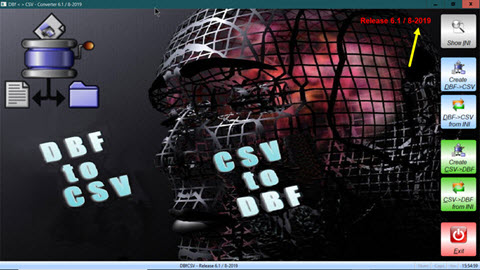
viewtopic.php?f=3&t=25043&p=155953&hilit=dbfcsv#p155953
regards
Uwe
viewtopic.php?f=3&t=25043&p=155953&hilit=dbfcsv#p155953
regards
Uwe
Since 1995 ( the first release of FW 1.9 )
i work with FW.
If you have any questions about special functions, maybe i can help.
i work with FW.
If you have any questions about special functions, maybe i can help.
Page: 1 2 (17 posts)