FiveTech Support Forums

FiveWin / Harbour / xBase community
Board index FiveWin for Harbour/xHarbour image on menu RESOLVED
Posts: 7317
Joined: Thu Oct 18, 2012 07:17 PM
Re: image on menu
Posted: Mon Oct 22, 2018 07:28 AM

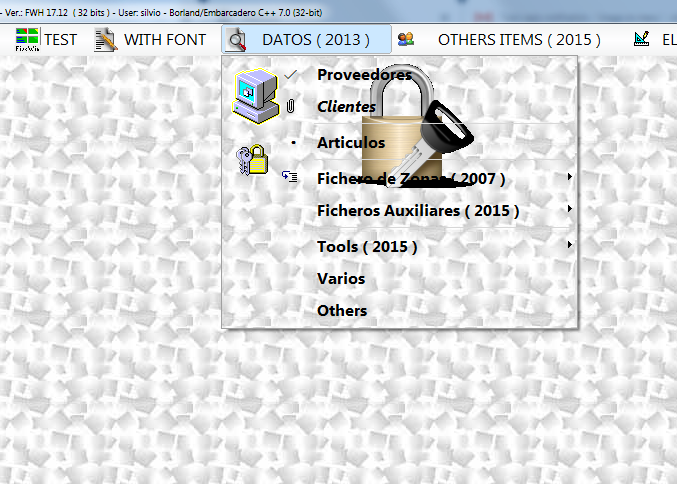
yes But I seems it is different from the picture I post
the logomenu is on center instaed into picture the bitmap is on the left of menu

Since from 1991/1992 ( fw for clipper Rel. 14.4 - Momos)

I use : FiveWin for Harbour March-April 2024 - Harbour 3.2.0dev (harbour_bcc770_32_20240309) - Bcc7.70 - xMate ver. 1.15.3 - PellesC - mail: silvio[dot]falconi[at]gmail[dot]com
Posts: 6755
Joined: Wed Feb 15, 2012 08:25 PM
Re: image on menu
Posted: Mon Oct 22, 2018 09:23 AM
Left image with this clause

Code (fw): Select all Collapse
LOGOMENU "..\bitmaps\fivetechv.png" ;  //identify.bmp" ;
Cristobal Navarro

Hay dos tipos de personas: las que te hacen perder el tiempo y las que te hacen perder la noción del tiempo

El secreto de la felicidad no está en hacer lo que te gusta, sino en que te guste lo que haces
Posts: 7317
Joined: Thu Oct 18, 2012 07:17 PM
Re: image on menu
Posted: Mon Oct 22, 2018 11:27 AM

I tried .. the image go on the center of submenu

Since from 1991/1992 ( fw for clipper Rel. 14.4 - Momos)

I use : FiveWin for Harbour March-April 2024 - Harbour 3.2.0dev (harbour_bcc770_32_20240309) - Bcc7.70 - xMate ver. 1.15.3 - PellesC - mail: silvio[dot]falconi[at]gmail[dot]com
Posts: 6755
Joined: Wed Feb 15, 2012 08:25 PM
Re: image on menu
Posted: Mon Oct 22, 2018 12:14 PM

Put your definition of menu

Cristobal Navarro

Hay dos tipos de personas: las que te hacen perder el tiempo y las que te hacen perder la noción del tiempo

El secreto de la felicidad no está en hacer lo que te gusta, sino en que te guste lo que haces
Posts: 1276
Joined: Tue Dec 28, 2010 01:29 PM
Re: image on menu
Posted: Mon Oct 22, 2018 01:30 PM
cnavarro wrote:Put your definition of menu


Silvio, try this ways as Cristobal says

It worked for me

FWH 25.12

Harbour/Hbmk2

Microsoft Visual C++

MySql 8.0

Antigravity

Posts: 7317
Joined: Thu Oct 18, 2012 07:17 PM
Re: image on menu
Posted: Mon Oct 22, 2018 06:45 PM
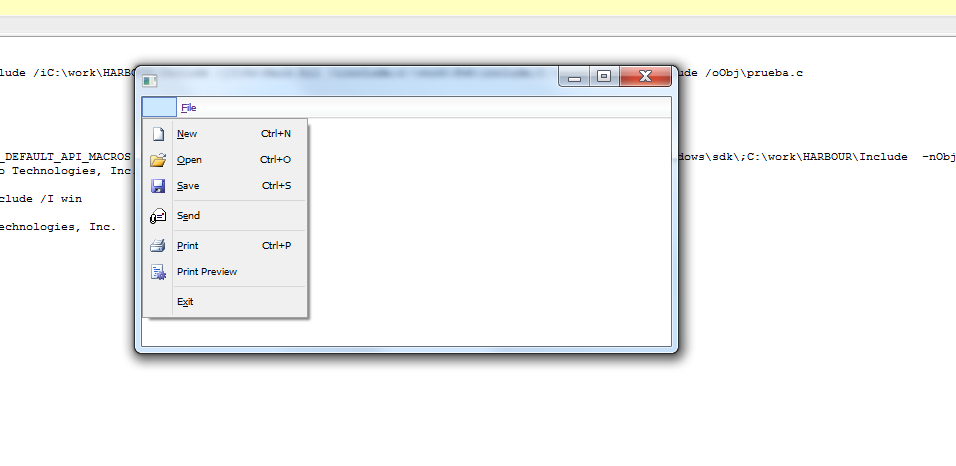
Cristobal, compuin

I see this


the lock is on the left side of the sub-menu
Since from 1991/1992 ( fw for clipper Rel. 14.4 - Momos)

I use : FiveWin for Harbour March-April 2024 - Harbour 3.2.0dev (harbour_bcc770_32_20240309) - Bcc7.70 - xMate ver. 1.15.3 - PellesC - mail: silvio[dot]falconi[at]gmail[dot]com
Posts: 1276
Joined: Tue Dec 28, 2010 01:29 PM
Re: image on menu
Posted: Mon Oct 22, 2018 06:53 PM
Silvio.Falconi wrote:Cristobal, compuin

I see this


the lock is on the left side of the sub-menu


Silvio, may be this error is because of image size

Try to use an image with 23 x 285 pixels just for try

Please, let us knows

FWH 25.12

Harbour/Hbmk2

Microsoft Visual C++

MySql 8.0

Antigravity

Posts: 7317
Joined: Thu Oct 18, 2012 07:17 PM
Re: image on menu
Posted: Mon Oct 22, 2018 06:53 PM
My test


Perhaps there is an error ?


the source
( is one test of c5)
Code (fw): Select all Collapse
#include "fivewin.ch"

function main()
local oWnd
local oBar
local oMenu, oMenu2
local oItem
local oFont


      local  nClrText   := RGB(  99,  54, 128 )
      local  nClrTDisa  := RGB( 197, 194, 184 )
      local  nClrPane   := RGB( 245, 245, 245 )
      local  nClrSepar  := RGB(  94, 129, 197 )
      local  nClrPMgn1  := RGB( 227, 238, 255 )
      local  nClrPMgn2  := RGB( 128, 167, 226 )
      local  nClrPSel   := RGB( 255, 252, 203 )
      local  nClrPSel2  := RGB( 255, 213,  61 )
      local  nClrBPSel  := RGB( 185, 158, 106 )
      local  nClrPCheck := RGB( 225, 230, 232 )
      local  nClrBCheck := RGB(  49, 106, 197 )


DEFINE FONT oFont NAME "Tahoma" SIZE 0, -10


              // oMenu:SetStyle( 14 )

   MENU oMenu 2015 ;
            COLORMENU nClrPane, nClrText ;
            COLORSELECT nClrPSel, nClrPSel2, nClrBPSel ;
            COLORLEFT nClrPMgn1 ;
            COLORRIGHT nClrPMgn2;
            COLORSEPARATOR nClrSepar ;
            logomenu "medical.BMP"

            oMenu:oFont := oFont

MENUITEM "&File" :
   MENU
      MENUITEM "&New"  + chr(9) + "Ctrl+N"  NAME "btn1"
      MENUITEM "&Open" + chr(9) + "Ctrl+O"  NAME "btn2"
      MENUITEM "&Save" + chr(9) + "Ctrl+S"  NAME "btn3"
      SEPARATOR
      MENUITEM "S&end"                      NAME "btn4"
      SEPARATOR
      MENUITEM "&Print" + chr(9) + "Ctrl+P" NAME "btn5"
      MENUITEM "Print Preview"              NAME "btn6"
      SEPARATOR
      MENUITEM "E&xit"
   ENDMENU


ENDMENU

DEFINE WINDOW oWnd MENU oMenu


ACTIVATE WINDOW oWnd

return 0


res
Code (fw): Select all Collapse
btn1  BITMAP "bmps\image1.bmp"
btn2  BITMAP "bmps\image2.bmp"
btn3  BITMAP "bmps\image3.bmp"
btn4  BITMAP "bmps\image4.bmp"
btn5  BITMAP "bmps\image5.bmp"
btn6  BITMAP "bmps\image6.bmp"
btn7  BITMAP "bmps\image7.bmp"
btn8  BITMAP "bmps\image8.bmp"
btn9  BITMAP "bmps\image9.bmp"


I tried also with

MENU oMenu ;
COLORMENU nClrPane, nClrText ;
COLORSELECT nClrPSel, nClrPSel2, nClrBPSel ;
COLORLEFT nClrPMgn1 ;
COLORRIGHT nClrPMgn2;
COLORSEPARATOR nClrSepar ;
LOGOMENU "medical.bmp" ;
IMGMENU "medical.bmp" ;
LEFTWIDTH 24


it seems to ignore any color that I have entered

if I insert 2015 or 2013 then it colorized the menu but I not see the bitmaps
Since from 1991/1992 ( fw for clipper Rel. 14.4 - Momos)

I use : FiveWin for Harbour March-April 2024 - Harbour 3.2.0dev (harbour_bcc770_32_20240309) - Bcc7.70 - xMate ver. 1.15.3 - PellesC - mail: silvio[dot]falconi[at]gmail[dot]com
Posts: 1276
Joined: Tue Dec 28, 2010 01:29 PM
Re: image on menu
Posted: Mon Oct 22, 2018 07:00 PM

Silvio,

Your test is good.

Did you try to see medidal.BMP size ??

FWH 25.12

Harbour/Hbmk2

Microsoft Visual C++

MySql 8.0

Antigravity

Posts: 7317
Joined: Thu Oct 18, 2012 07:17 PM
Re: image on menu
Posted: Mon Oct 22, 2018 07:09 PM
it the same of the post converte to bmp ( with infarview)


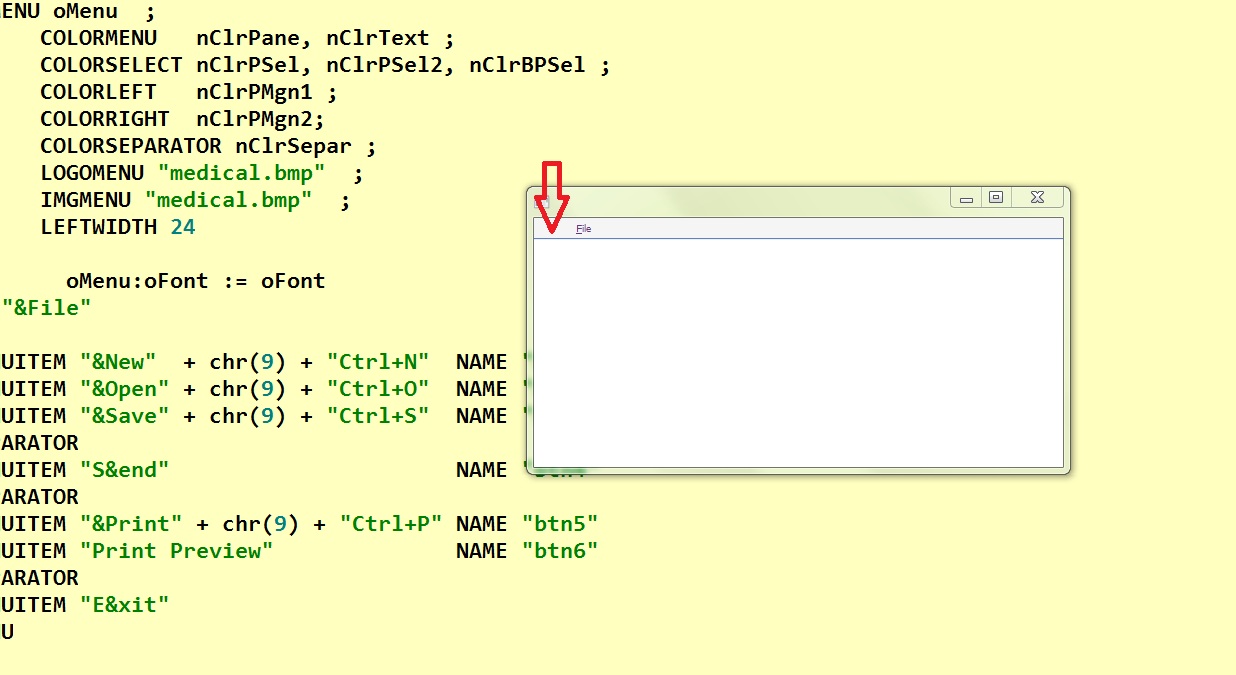
return to menu

if I insert before the first menuitem this lis line

I see


then I click on widow client with the mouse the menu "File" is moved to right as you can see here


is there a bug, I'm sure ... then I not see the bmps also !!!!
Since from 1991/1992 ( fw for clipper Rel. 14.4 - Momos)

I use : FiveWin for Harbour March-April 2024 - Harbour 3.2.0dev (harbour_bcc770_32_20240309) - Bcc7.70 - xMate ver. 1.15.3 - PellesC - mail: silvio[dot]falconi[at]gmail[dot]com
Posts: 1276
Joined: Tue Dec 28, 2010 01:29 PM
Re: image on menu
Posted: Mon Oct 22, 2018 07:13 PM

Hello Cristobal

Any adivse ? I think Silvio found something is not working ok with this menu

Regards,

FWH 25.12

Harbour/Hbmk2

Microsoft Visual C++

MySql 8.0

Antigravity

Posts: 7317
Joined: Thu Oct 18, 2012 07:17 PM
Re: image on menu
Posted: Mon Oct 22, 2018 07:18 PM

compuin do you saw the mail ?

Since from 1991/1992 ( fw for clipper Rel. 14.4 - Momos)

I use : FiveWin for Harbour March-April 2024 - Harbour 3.2.0dev (harbour_bcc770_32_20240309) - Bcc7.70 - xMate ver. 1.15.3 - PellesC - mail: silvio[dot]falconi[at]gmail[dot]com
Posts: 1276
Joined: Tue Dec 28, 2010 01:29 PM
Re: image on menu
Posted: Mon Oct 22, 2018 07:43 PM
Silvio.Falconi wrote:compuin do you saw the mail ?


Silvio,

Listo!

Revisa tu email y dejame saber

FWH 25.12

Harbour/Hbmk2

Microsoft Visual C++

MySql 8.0

Antigravity

Posts: 1276
Joined: Tue Dec 28, 2010 01:29 PM
Re: image on menu
Posted: Mon Oct 22, 2018 07:45 PM
Compuin wrote:
Silvio.Falconi wrote:compuin do you saw the mail ?


Silvio,

Listo!

Revisa tu email y dejame saber


Debe quedar asi

Code (fw): Select all Collapse
#include "fivewin.ch"

function main()
local oWnd
local oBar
local oMenu, oMenu2
local oItem
local oFont

       // oMenu:SetStyle( 14 )

      local  nClrText   := RGB(  99,  54, 128 )
      local  nClrTDisa  := RGB( 197, 194, 184 )
      local  nClrPane   := RGB( 245, 245, 245 )
      local  nClrSepar  := RGB(  94, 129, 197 )
      local  nClrPMgn1  := RGB( 227, 238, 255 )
      local  nClrPMgn2  := RGB( 128, 167, 226 )
      local  nClrPSel   := RGB( 255, 252, 203 )
      local  nClrPSel2  := RGB( 255, 213,  61 )
      local  nClrBPSel  := RGB( 185, 158, 106 )
      local  nClrPCheck := RGB( 225, 230, 232 )
      local  nClrBCheck := RGB(  49, 106, 197 )


DEFINE FONT oFont NAME "Tahoma" SIZE 0, -10

                      //oMenu:oFont := oFont

MENU oMenu  ;

              oMenu:oFont := oFont
MENUITEM "&File"
         MENU FONT oFont 2013 ;
            COLORMENU CLR_WHITE, CLR_BLUE ;
            COLORSELECT METRO_STEEL, METRO_STEEL, RGB( 0, 0, 1 ) ;
            COLORLEFT CLR_WHITE ;
            COLORRIGHT CLR_WHITE ;
            COLORSEPARATOR METRO_OLIVE ; //      NOINHERIT ;   //      FACTOR 4 ;
            LEFTWIDTH 24 ; //HEIGHT 1.0 * 2 ;     //      RIGHTSPACE 10 ; //            ADJUST ;
            LOGOMENU "medical.bmp" ;  //identify.bmp" ; //
//            IMGMENU "..\bitmaps\AlphaBmp\lock.bmp" ;//fivewing.bmp"
//            BRUSH "..\bitmaps\backgrnd\confetti.bmp"

      MENUITEM "&New"  + chr(9) + "Ctrl+N"  NAME "btn1"
      MENUITEM "&Open" + chr(9) + "Ctrl+O"  NAME "btn2"
      MENUITEM "&Save" + chr(9) + "Ctrl+S"  NAME "btn3"
      SEPARATOR
      MENUITEM "S&end"                      NAME "btn4"
      SEPARATOR
      MENUITEM "&Print" + chr(9) + "Ctrl+P" NAME "btn5"
      MENUITEM "Print Preview"              NAME "btn6"
      SEPARATOR
      MENUITEM "E&xit"
   ENDMENU


ENDMENU

DEFINE WINDOW oWnd MENU oMenu


ACTIVATE WINDOW oWnd

return 0

FWH 25.12

Harbour/Hbmk2

Microsoft Visual C++

MySql 8.0

Antigravity

Posts: 6755
Joined: Wed Feb 15, 2012 08:25 PM
Re: image on menu
Posted: Mon Oct 22, 2018 08:10 PM
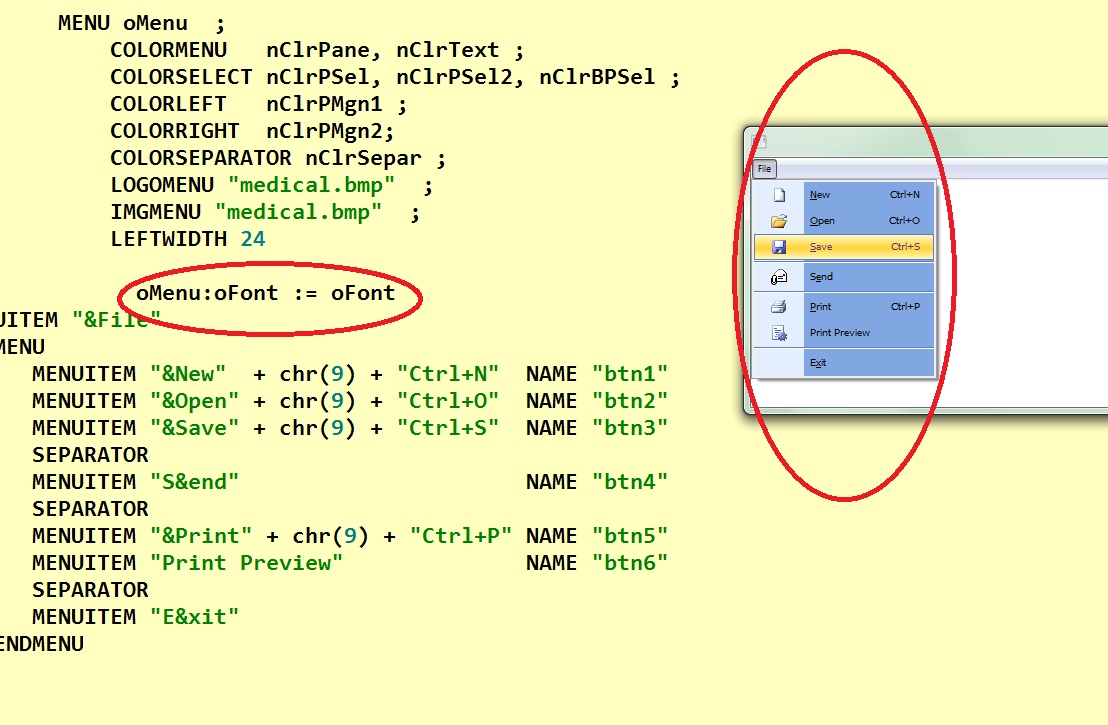
Silvio

Code (fw): Select all Collapse
    oMenu:oFont  := oFont


Please, define font in command menu

Code (fw): Select all Collapse
    MENU oMenu FONT oFont
Cristobal Navarro

Hay dos tipos de personas: las que te hacen perder el tiempo y las que te hacen perder la noción del tiempo

El secreto de la felicidad no está en hacer lo que te gusta, sino en que te guste lo que haces