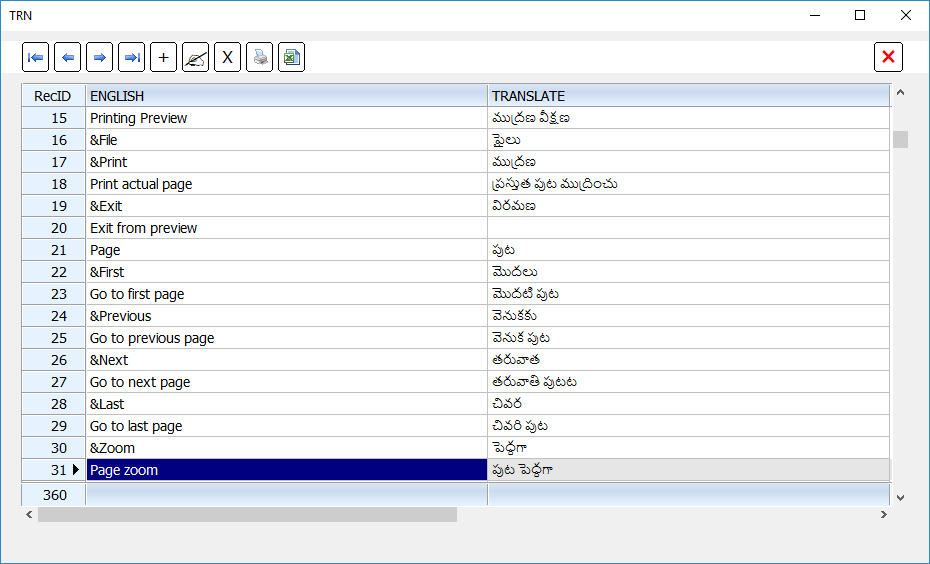
FWString( <english> ) translates the English string to the application's language. This feature is supported for 5 languages.
(1) English, (2) Spanish, (3) French, (4) Portuguese, (5) German and (6) Italian. This translation is based on the translated messages stored in a two dimensional array, "aStrings" in strings.prg. Each element of this array is an array of 6 strings in English, Spanish, etc.
Function FWAddString( aString ) is provided to add an additional translation. Now, this function can also be used to modify an existing entry.
Example usage:
Please see: viewtopic.php?f=18&t=36305
English "Move Down" is incorrectly translated as "Mover para cima" instead of "Mover para baixo".
This can be easily fixed by calling this function
This modifies the Portuguese translation of "Move Down"
In a single call, we can add/modify multiple entries by using a two-dimensional array.
FWAddString( {{ <eng1>,,,<trans1> }, ... { <engN>,,,<transN> } } )
Adding a new language:
FWAddLanguage( [aLangArray] ) --> NewLanguageID
This function provides an additional column for the new language and return the ID (column number).
If aLangArray is specified, it should be a single dimensional array containing translates for all or some of the English words in the aStrings array in the same order. Where the translates are provided, FWString() returns the new translate and same English word in other cases. It is also possible to omit this array initially and later add translations using FWAddString().
FWMissingStrings() --> Writes missing strings (where translates are not available) to a file by name "missing.str". This can be used to add these translates and revise the program.
This is an example to add a new language and provide translates only to the required extent.
Add the beginning of the application call FWAddLanguage() and at the end call FWMissingStrings().
Run and close the application. This program creates "missing.str". Open the file with notepad which looks like this:
Now edit this file and add your translates after the last comma in each line. I have done this for an Indian language "Telugu". Like this:
Now, copy this and paste into the application.
Adding the new language, for the words used in the application, is complete now.
(1) English, (2) Spanish, (3) French, (4) Portuguese, (5) German and (6) Italian. This translation is based on the translated messages stored in a two dimensional array, "aStrings" in strings.prg. Each element of this array is an array of 6 strings in English, Spanish, etc.
Function FWAddString( aString ) is provided to add an additional translation. Now, this function can also be used to modify an existing entry.
Example usage:
Please see: viewtopic.php?f=18&t=36305
English "Move Down" is incorrectly translated as "Mover para cima" instead of "Mover para baixo".
This can be easily fixed by calling this function
FWAddString( { "Move Down", nil, nil, "Mover para baixo" } )This modifies the Portuguese translation of "Move Down"
In a single call, we can add/modify multiple entries by using a two-dimensional array.
FWAddString( {{ <eng1>,,,<trans1> }, ... { <engN>,,,<transN> } } )
Adding a new language:
FWAddLanguage( [aLangArray] ) --> NewLanguageID
This function provides an additional column for the new language and return the ID (column number).
If aLangArray is specified, it should be a single dimensional array containing translates for all or some of the English words in the aStrings array in the same order. Where the translates are provided, FWString() returns the new translate and same English word in other cases. It is also possible to omit this array initially and later add translations using FWAddString().
FWMissingStrings() --> Writes missing strings (where translates are not available) to a file by name "missing.str". This can be used to add these translates and revise the program.
This is an example to add a new language and provide translates only to the required extent.
Add the beginning of the application call FWAddLanguage() and at the end call FWMissingStrings().
#include "fivewin.ch"

function Main()

   FW_SetUnicode( .t. )

   FWAddLanguage() // --> 7

   // Your entire application code
   XBROWSER "STATES.DBF"

   FWMissingStrings() // List missing strings

return nil
Run and close the application. This program creates "missing.str". Open the file with notepad which looks like this:
   FWAddString( { ;
   { "Add",,,,,, }, ;
      { "Bottom",,,,,, }, ;
      { "Close",,,,,, }, ;
      { "Delete",,,,,, }, ;
      { "Edit",,,,,, }, ;
      { "Move Down",,,,,, }, ;
      { "Move Up",,,,,, }, ;
      { "Print",,,,,, }, ;
      { "Top",,,,,, } ;
   } )
Now edit this file and add your translates after the last comma in each line. I have done this for an Indian language "Telugu". Like this:
   FWAddString( { ;
      { "Add",,,,,,"నూతన" }, ;
      { "Bottom",,,,,,"చివర"  }, ;
      { "Close",,,,,,"ముగించు" }, ;
      { "Delete",,,,,,"తొలగించు"  }, ;
      { "Edit",,,,,,"సవరింపు"  }, ;
      { "Move Down",,,,,,"తరువాత"  }, ;
      { "Move Up",,,,,,"వెనుక"  }, ;
      { "Print",,,,,,"ముద్రించు"  }, ;
      { "Top",,,,,,"మొదలు"  } ;
   } )
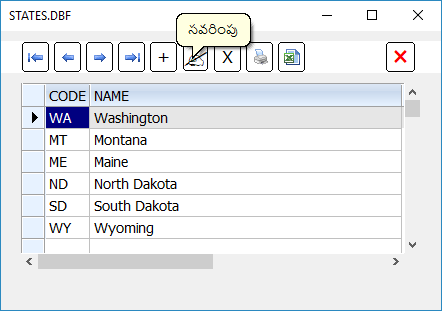
Now, copy this and paste into the application.
#include "fivewin.ch"

function Main()

   SetBalloon( .t. )
   FW_SetUnicode( .t. )

   FWAddLanguage()
   FWAddString( { ;
      { "Add",,,,,,"నూతన" }, ;
      { "Bottom",,,,,,"చివర"  }, ;
      { "Close",,,,,,"ముగించు" }, ;
      { "Delete",,,,,,"తొలగించు"  }, ;
      { "Edit",,,,,,"సవరింపు"  }, ;
      { "Move Down",,,,,,"తరువాత"  }, ;
      { "Move Up",,,,,,"వెనుక"  }, ;
      { "Print",,,,,,"ముద్రించు"  }, ;
      { "Top",,,,,,"మొదలు"  } ;
   } )

   XBROWSER "STATES.DBF"

return nil
Adding the new language, for the words used in the application, is complete now.
Regards
G. N. Rao.
Hyderabad, India
G. N. Rao.
Hyderabad, India