FiveTech Support Forums

FiveWin / Harbour / xBase community
Board index FiveWin para Harbour/xHarbour Exportacion especial Excel a Dbf SOLUCIONADO
Posts: 2170
Joined: Fri Jul 18, 2008 01:24 AM
Exportacion especial Excel a Dbf SOLUCIONADO
Posted: Thu Dec 20, 2018 05:46 PM

Saludos, amigos del foro.
Es posible exportar de excel a dbf, teniendo en cuenta que los nombres de columnas y su posicion en el fichero Excel difieren de los nombres de campos y su posicion en la tabla destino DBF?

He visto la function FW_ExcelToDbf() y hace algo parecido cuando los nombres de columnas Excel son identicos a nombres de campos Dbf.

Gracias.

Francisco J. Alegría P.

Chinandega, Nicaragua.


Fwxh-MySql-TMySql
Posts: 8515
Joined: Tue Dec 20, 2005 07:36 PM
Re: Exportacion especial Excel a Dbf
Posted: Thu Dec 20, 2018 06:10 PM
Una idea:

Code (fw): Select all Collapse
#include "FiveWin.ch"

FUNCTION Main()

   LOCAL cArquivoCSV := "IBPTax.CSV"  // coloque aqui o seu arquivo .CSV
   LOCAL cArquivoDBF := "IBPTax.DBF"  // coloque aqui o seu arquivo .DBF

   LOCAL nPointer := 0
   LOCAL nEol, cConteudo, cLinha
   LOCAL nRegistro, cBuffer, nLenArq, nLido
   LOCAL cEol := Chr( 13 ) + Chr( 10 )
   LOCAL nHandle := FOpen( cArquivoCSV, 2 )

   LOCAL aEstr := { ;
      { "codigo"    , "C",   8, 0 }, ;
      { "ex"        , "N",   3, 0 }, ;
      { "tabela"    , "N",   1, 0 }, ;
      { "descricao" , "C", 255, 0 }, ;
      { "aliqnac"   , "N",   5, 2 }, ;
      { "aliqimp"   , "N",   5, 2 };
      }

   PRIVATE cCampo

   DBCreate( cArquivoDBF, aEstr )

   USE ( cArquivoDBF ) Shared New

   nRegistro := 0

   cBuffer := Space( 1200 )                  // se houver linha maior aumente o 1200

   nLenArq := FSeek( nHandle, nPointer, 2 )  // pega tamanho arquivo

   FSeek( nHandle, nPointer, 0 )             // posiciona o pointer noinicio

   nLido := FRead( nHandle , @cBuffer, 1200 )

   nEol := AT( cEol, cBuffer )

   nPointer += nEol + 1           // vamos ignorar a linha de nomes de campo

   FSeek( nHandle, nPointer, 0 )  // posiciona o pointer na segunda linha

   WHILE nEol > 0

      nLido := FRead( nHandle , @cBuffer, 1200 )

      nEol := AT( cEol, cBuffer )

      IF nEol > 0

         cLinha := Left( cBuffer, nEol - 1 )

         APPEND BLANK  // cria o registro vazio no dbf

         // @ 10, 25 SAY "Salvando Registro => " + Str( ++nRegistro )

         FOR x = 1 TO FCount()

            cConteudo := SubSt( cLinha, 0, At( ";", cLinha ) )

            cLinha := StrTran( cLinha, cConteudo, Nil, 1, 1 )  // remove apenas esta sequencia

            cConteudo := Left( cConteudo, Len( cConteudo ) - 1 )  // tira o ";" do final
     
            cCampo := Field( x )

            IF ValType( &cCampo. ) = "N"

               cConteudo := Val( cConteudo )

            ENDIF

            Replace &cCampo. WITH cConteudo  // salva o campo

         NEXT

      ENDIF
 
      nPointer += nEol + 1            // incrementa o pointer

      IF nPointer >= nLenArq          // se fim de arquivo,
         EXIT                           // fim...
      ELSE                            // se nao,
         FSeek( nHandle, nPointer, 0 )  // posiciona o pointer
      ENDIF

   ENDDO

RETURN Nil
João Santos - São Paulo - Brasil - Phone: +55(11)95150-7341
Posts: 2170
Joined: Fri Jul 18, 2008 01:24 AM
Re: Exportacion especial Excel a Dbf
Posted: Thu Dec 20, 2018 08:05 PM

Karinha:
Gracias. Voy a estudiar y probar tu código.
Saludos.

Francisco J. Alegría P.

Chinandega, Nicaragua.


Fwxh-MySql-TMySql
Posts: 2170
Joined: Fri Jul 18, 2008 01:24 AM
Re: Exportacion especial Excel a Dbf
Posted: Thu Dec 20, 2018 08:26 PM

Karinha:
He visto tu código y tiene buena pinta, pero no es lo que estoy buscando.

En mi caso la Dbf ya existe y le vamos a agregar los datos desde un Xls, cuyas nombres y posiciones de columnas son diferentes.

Para explicar mas ampliamente, a la DBF se le van a agregar los datos de algunas columnas del XLS. Es decir, no vamos a crear la estructura de la DBF en base a las columnas del XLS.
PD. Por supuesto, que manualmente puedo editar nombres y posiciones en el Xls, pero la idea es automatizar el procedimiento.
Saludos.

Karinha:
I've seen your code and it looks good, but it's not what I'm looking for.

In my case, the Dbf file already exists and we are going to add the data from an Xls file, whose names and column positions are different.

To explain more extensively, the data of some columns of the XLS will be added to the DBF. That is, we are not going to create the structure of the DBF based on the columns of the XLS.

Greetings.

Francisco J. Alegría P.

Chinandega, Nicaragua.


Fwxh-MySql-TMySql
Posts: 2170
Joined: Fri Jul 18, 2008 01:24 AM
Re: Exportacion especial Excel a Dbf
Posted: Thu Dec 20, 2018 08:29 PM

Amigos.
Estoy tratando de crear la función que necesito, basándome en FW_ExcelToDbf(), y otros ejemplos del Sr. Rao.
Mientras, tanto, si alguien más ha hecho algo al respecto, agradeceré sus consejos y/o ejemplos.
Saludos.

Francisco J. Alegría P.

Chinandega, Nicaragua.


Fwxh-MySql-TMySql
Posts: 2170
Joined: Fri Jul 18, 2008 01:24 AM
Re: Exportacion especial Excel a Dbf
Posted: Thu Dec 20, 2018 10:14 PM
Hola a todos.
Aqui está mi solución. La comparto por si a otro le es útil. Cualquier modificación (mejora) es bien venida.
Code (fw): Select all Collapse
oRange := GetExcelRange( cExcelFile, , )
nCols  := oRange:Columns:Count
nRows  := oRange:Rows:Count
aData  := ArrTranspose (oRange:Value)  
oRange:WorkSheet:Parent:Close()

aDataD := {}
aadd( aDataD, {nColXls7, cCampoDbf} )
aadd( aDataD, {nColXls3, cCampoDbf} )
etc...

//-----------------------------------------//
Function Xls_A_Dbf(cAlias,aDataD,aData,nRows)
local nReg:=0, nRow, nCol, nColum, cCampo, uValue, uDest


FOR nRow := 2 TO nRows   // 2 es la primera linea de datos (1=headers)

  (cAlias)->(DbAppend())

  FOR nCol := 1 to len(aDataD)
     nColum := aDataD[nCol,1]             //column xls fuente
     cCampo := alltrim( aDataD[nCol,2] )  //campo tabla destino

     if !Empty(nColum)   //si celda esta configurada...
        uValue := aData[nRow,nColum]
        uDest  := (cAlias)->&cCampo   

        if Valtype( uValue ) != ValType( uDest )
           uValue := ConvertType( uValue, ValType(uDest) ) 
        endif

        (cAlias)->(FieldPut(FieldPos(cCampo), uValue))
     endif
  NEXT nCol

  if ( nReg += 1 ) >= 60
     nReg:=0
     SysRefresh()
  endif

NEXT nRow

  SysRefresh()

RETURN NIL

Saludos.
Francisco J. Alegría P.

Chinandega, Nicaragua.


Fwxh-MySql-TMySql
Posts: 2170
Joined: Fri Jul 18, 2008 01:24 AM
Re: Exportacion especial Excel a Dbf
Posted: Thu Dec 20, 2018 10:21 PM

Karinha:
Probé tu código y funciona excelente. Lo he guardado porque estoy seguro en un futuro me servirá.
Gracias.

Francisco J. Alegría P.

Chinandega, Nicaragua.


Fwxh-MySql-TMySql
Posts: 10733
Joined: Sun Nov 19, 2006 05:22 AM
Re: Exportacion especial Excel a Dbf SOLUCIONADO
Posted: Fri Dec 21, 2018 10:59 AM
FW_ExcelToDbf() works perfectly when you have different names in the dbf.
You need not first save to CSV and then append to dbf.
Code (fw): Select all Collapse
FW_ExcelToDbf( oExcelRange,
                        cDbfFieldList,
                        lRangeHasHeaders )
Regards


G. N. Rao.

Hyderabad, India
Posts: 2170
Joined: Fri Jul 18, 2008 01:24 AM
Re: Exportacion especial Excel a Dbf SOLUCIONADO
Posted: Fri Dec 21, 2018 02:50 PM

Mr. Rao.
I'm not sure if I understood.
It means that FW_ExcelToDbf works well even if in the xls file the column names and their position
are different from the names and positions in the dbf file ?
Can you post a sample, please?
Thanks.

No estoy seguro si entendí.
Quiere decir que FW_ExcelToDbf funciona bien aunque en el fichero xls los nombres de columnas y su posicion
son diferentes a los nombres y posiciones en el fichero dbf?
Puede postear un ejemplo?
Gracias.

Francisco J. Alegría P.

Chinandega, Nicaragua.


Fwxh-MySql-TMySql
Posts: 8515
Joined: Tue Dec 20, 2005 07:36 PM
Re: Exportacion especial Excel a Dbf SOLUCIONADO
Posted: Fri Dec 21, 2018 03:41 PM
Teste para veer se funciona bien, porfa.

Code (fw): Select all Collapse
#include "fivewin.ch"

Function FWEXCEL()

   LOCAL oRange, lOpened:=.f., aData
   LOCAL cExcelFileName := "COMPRAS.XLS"

   // oRange := GetExcelRange( "COMPRAS.xls", , , @lOpened )

   // oRange  := GetExcelRange( [ cExcelFileName ], [ cSheetName ], [ acRange ], @lOpened )

   oRange  := GetExcelRange( [ cExcelFileName ], , , @lOpened )

   if oRange == nil

      ? "Error en el XLS"

   else

      aData := ArrTranspose( oRange:Value )

      if lOpened

        oRange:WorkSheet:Parent:Close()

      endif

      xbrowser aData

      USE COMPRAS NEW ALIAS CP

      SELECT CP

      FW_ExcelToDBF( oRange, nil, .t. )

   endif

return nil


Saludos
João Santos - São Paulo - Brasil - Phone: +55(11)95150-7341
Posts: 8515
Joined: Tue Dec 20, 2005 07:36 PM
Re: Exportacion especial Excel a Dbf SOLUCIONADO
Posted: Fri Dec 21, 2018 03:46 PM
João Santos - São Paulo - Brasil - Phone: +55(11)95150-7341
Posts: 2170
Joined: Fri Jul 18, 2008 01:24 AM
Re: Exportacion especial Excel a Dbf SOLUCIONADO
Posted: Fri Dec 21, 2018 05:43 PM
Karina:
Por supuesto que tu ejemplo funciona. (Ya tengo otros codigos muy similares).

karinha wrote:http://forums.fivetechsupport.com/viewtopic.php?f=3&t=36090&start=0


Another case:
Let us consider other case, where the headers of Excel sheet doe not match with any field names of the DBF. Assume that we can not or do not want to edit and modify the header names in the Excel sheet.

We want columns 1,2,3,4 of the sheet to be copied to fields "PROF,CLASSE,FLAG,AULA". Then :

FW_ExcelToDBF( oRange, "PROF,CLASSE,FLAG,AULA", .t. )
In case the excel sheet does not contain a header row at all, then:
FW_ExcelToDBF( oRange, "PROF,CLASSE,FLAG,AULA", .f. )


Lo escrito por el Sr. Rao bajo el titulo "Another case", se parece a lo que yo necesitaba. (O no he sabido entender la logica)

Lo que requería es poder exportar, de manera automatizada, desde cualquier columna del archivo XLS hacia un campo específico del archivo DBF (por supuesto compatible o que se pueda hacer compatible)

Por ejemplo, tenemos:
en fichero XLS las Cols : Codigo, nombre, fechaemision, documento, monto,...
en fichero DBF campos: fecha, factura, valor, descrip, codiCte, nombreCte

Y la importacion hacia la dbf seria
La columna codigo del xls hacia el campo codicte de la dbf
La columna nombre del xls hacia el campo nombreCte de la dbf
La columna documento del xls hacia el campo factura de la dbf

Como dije en post anterior, ya lo he resuelto. Si lo deseas, puedo postear todas las funciones completas que componen el procedicimiento.
Saludos.
Francisco J. Alegría P.

Chinandega, Nicaragua.


Fwxh-MySql-TMySql
Posts: 10733
Joined: Sun Nov 19, 2006 05:22 AM
Re: Exportacion especial Excel a Dbf SOLUCIONADO
Posted: Fri Dec 21, 2018 07:10 PM
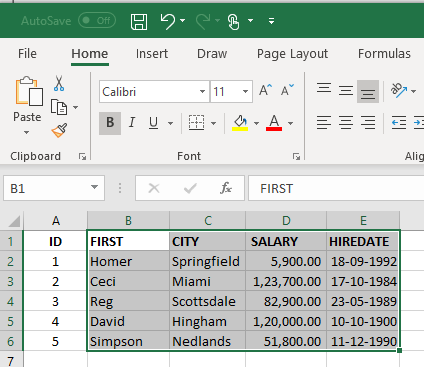
This is the Excel Range we want to import to dbf.


This is the structure of the dbf.
Code (fw): Select all Collapse
   aStruct  := { { "NAME",    "C", 15, 0 }, ;
                 { "DATE",    "D",  8, 0 }, ;
                 { "ADDRESS", "C", 15, 0 }, ;
                 { "AMOUNT",  "N", 12, 0 }  }

Names of the dbf fields are different.
Also the order of the fields is different from the Excel sheet.
We want to import these columns from the Excel:
Code (fw): Select all Collapse
Excel column "ID"       --> Ignore
Excel column "FIRST"    --> dbf field "NAME"
Excel column "HIREDATE" --> dbf field "DATE"
Excel column "CITY"     --> dbf field "ADDRESS"
Excel column "SALARY"   --> dbf field "AMOUNT"


This is the way to use the function:
Code (fw): Select all Collapse
function ImportXLS()

   local oRange, aStruct
   local cXls     := "c:\tests\import.xlsx"
   local cDbf     := "c:\tests\import.dbf"

   aStruct  := { { "NAME",    "C", 15, 0 }, ;
                 { "DATE",    "D",  8, 0 }, ;
                 { "ADDRESS", "C", 15, 0 }, ;
                 { "AMOUNT",  "N", 12, 0 }  }

   DBCREATE( cDBF, aStruct, "DBFCDX", .T., "DST" ) // Create and keep open
   // or open an existing DBF

   oRange   := GetExcelRange( cXls, "Sheet1", "B1:E6" )
   FW_ExcelToDBF( oRange, "NAME,ADDRESS,AMOUNT,DATE", .t. )

   XBROWSER

return nil


Imported DBF:
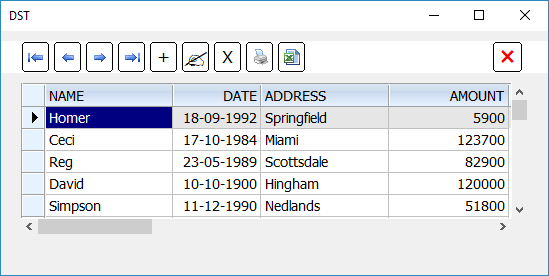

If the dbf already exists, the records are appended to the existing data.
Regards


G. N. Rao.

Hyderabad, India
Posts: 2170
Joined: Fri Jul 18, 2008 01:24 AM
Re: Exportacion especial Excel a Dbf SOLUCIONADO
Posted: Fri Dec 21, 2018 07:36 PM

Thanks, Mr. Rao.
I will do various tests and later I inform you.
Regards.

Francisco J. Alegría P.

Chinandega, Nicaragua.


Fwxh-MySql-TMySql
Posts: 2170
Joined: Fri Jul 18, 2008 01:24 AM
Re: Exportacion especial Excel a Dbf SOLUCIONADO
Posted: Fri Dec 21, 2018 09:51 PM

Mr. Rao.
Thanks for your support. It works.
Regards.

Francisco J. Alegría P.

Chinandega, Nicaragua.


Fwxh-MySql-TMySql

Continue the discussion