FiveTech Support Forums

FiveWin / Harbour / xBase community
Board index FiveWin for Harbour/xHarbour How Open the same dbf
Posts: 7318
Joined: Thu Oct 18, 2012 07:17 PM
How Open the same dbf
Posted: Tue Dec 25, 2018 04:41 PM
I need to open the same dbf but with filter different
My archive
Code (fw): Select all Collapse
DbCreate(cDbfPath+'Servizi', { { "id"    , "C",    4, 0 },;
                            { "name"  , "C",   30, 0 },;    
                            { "breve"  , "C",  10, 0 },;    
                            { "price" , "N",    9, 2 },;    
                            { "image" , "C",   30, 0 },;    
                            { "struttura", "C",60, 0 },;    
                            { "unit"  , "N",    4, 0 },;    
                            { "a4"    , "L",    1, 0 },;    
                            { "pos"   , "L",    1, 0 },;    
                            { "multiple", "L",  1, 0 },;    
                            { "islock"  , "L",  1, 0 },;    
                            { "ordine" , "N",    2, 0 }   }, "DBFCDX", .T., "DB" )


cDbfPath := cFilePath(GetModuleFileName( GetInstance() )) + "Data\"

first area set filter to multiple:=.f.
second area set filter to multiple:=.t.

before I resolved making two arrays but Now I'thinking is not good because I have problems when I manage the records
I must open the dbf and use it
How I resolve ?

I tried with

use servizi alias oServiziSingoli
set filter to oServiziSingoli->multiple=.f.
oServiziSingoli->(dbgotop())

use servizi alias oServiziMultipli
set filter to oServiziMultipli->multiple=.t.
oServiziMultipli->(dbgotop())


but not run
Since from 1991/1992 ( fw for clipper Rel. 14.4 - Momos)

I use : FiveWin for Harbour March-April 2024 - Harbour 3.2.0dev (harbour_bcc770_32_20240309) - Bcc7.70 - xMate ver. 1.15.3 - PellesC - mail: silvio[dot]falconi[at]gmail[dot]com
Posts: 10733
Joined: Sun Nov 19, 2006 05:22 AM
Re: How Open the same dbf
Posted: Tue Dec 25, 2018 07:57 PM
Code (fw): Select all Collapse
USE SERVIZI NEW SHARED ALIAS "SINGL"
SET FILTER TO FIELD->MULTIPLE=.F.
SINGL->(DBGOTOP())

USE SERVIZI NEW SHARED ALIAS "MULTI"
SET FILTER TO FIELD->MULTIPLE=.T.
MULTI->(DBGOTOP())
Regards


G. N. Rao.

Hyderabad, India
Posts: 7318
Joined: Thu Oct 18, 2012 07:17 PM
Re: How Open the same dbf
Posted: Tue Dec 25, 2018 08:05 PM
run ok . thanks

Nages,
I have the dbf in a folder
cDbfPath := cFilePath(GetModuleFileName( GetInstance() )) + "Data\"

USE cDbfPath+SERVIZI NEW SHARED ALIAS "SINGL"
SET FILTER TO FIELD->MULTIPLE=.F.
SINGL->(DBGOTOP())


make error !!!
If I use
SE cDbfPath+SERVIZI not run

f I insert .\data\servizi run ok

strange ...
Since from 1991/1992 ( fw for clipper Rel. 14.4 - Momos)

I use : FiveWin for Harbour March-April 2024 - Harbour 3.2.0dev (harbour_bcc770_32_20240309) - Bcc7.70 - xMate ver. 1.15.3 - PellesC - mail: silvio[dot]falconi[at]gmail[dot]com
Posts: 10733
Joined: Sun Nov 19, 2006 05:22 AM
Re: How Open the same dbf
Posted: Tue Dec 25, 2018 08:15 PM

What error?

Regards


G. N. Rao.

Hyderabad, India
Posts: 7318
Joined: Thu Oct 18, 2012 07:17 PM
Re: How Open the same dbf
Posted: Tue Dec 25, 2018 08:23 PM
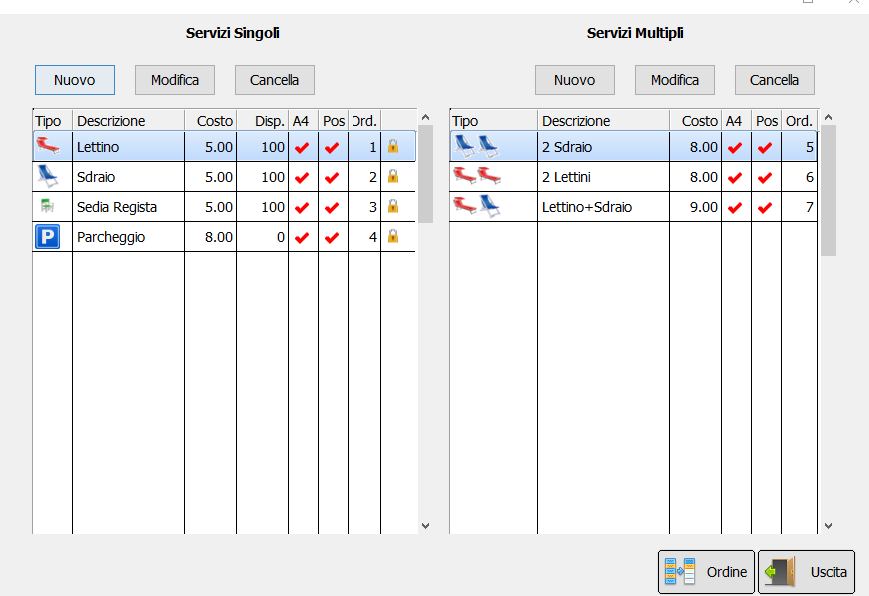
I have dbfs/cdx into a Folder

cDbfPath := cFilePath(GetModuleFileName( GetInstance() )) + "Data\"

I made

USE cDbfPath+SERVIZI NEW SHARED ALIAS "SINGL"
SET FILTER TO FIELD->MULTIPLE=.F.
SINGL->(DBGOTOP())

USE cDbfPath+SERVIZI NEW SHARED ALIAS "MULTI"
SET FILTER TO FIELD->MULTIPLE=.T.
MULTI->(DBGOTOP())

give me error
Code (fw): Select all Collapse
 Path and name: C:\Work\Errori\tdata_test\test.Exe (32 bits)
   Size: 3,826,688 bytes
   Compiler version: Harbour 3.2.0dev (r1703231115)
   FiveWin  version: FWH 18.11
   C compiler version: Borland/Embarcadero C++ 7.0 (32-bit)
   Windows version: 6.2, Build 9200 

   Time from start: 0 hours 0 mins 0 secs 
   Error occurred at: 25-12-2018, 21:22:57
   Error description: (DOS Error 3) DBFCDX/1001  Errore in apertura: cDbfPath+SERVIZI.dbf
Since from 1991/1992 ( fw for clipper Rel. 14.4 - Momos)

I use : FiveWin for Harbour March-April 2024 - Harbour 3.2.0dev (harbour_bcc770_32_20240309) - Bcc7.70 - xMate ver. 1.15.3 - PellesC - mail: silvio[dot]falconi[at]gmail[dot]com
Posts: 10733
Joined: Sun Nov 19, 2006 05:22 AM
Re: How Open the same dbf
Posted: Tue Dec 25, 2018 08:57 PM
Code (fw): Select all Collapse
USE (cDbfPath+SERVIZI) NEW SHARED ALIAS "SINGL"
Regards


G. N. Rao.

Hyderabad, India
Posts: 7318
Joined: Thu Oct 18, 2012 07:17 PM
Re: How Open the same dbf
Posted: Tue Dec 25, 2018 09:00 PM

ooppsss sorry ...

USE &(cDbfPath+cDbf+".dbf") ;
INDEX &(cDbfPath+cDbf+".cdx") ;
ALIAS &(cAlias) NEW SHARED

Since from 1991/1992 ( fw for clipper Rel. 14.4 - Momos)

I use : FiveWin for Harbour March-April 2024 - Harbour 3.2.0dev (harbour_bcc770_32_20240309) - Bcc7.70 - xMate ver. 1.15.3 - PellesC - mail: silvio[dot]falconi[at]gmail[dot]com
Posts: 10733
Joined: Sun Nov 19, 2006 05:22 AM
Re: How Open the same dbf
Posted: Tue Dec 25, 2018 09:04 PM
Also instead of
Code (fw): Select all Collapse
cDbfPath := cFilePath(GetModuleFileName( GetInstance() )) + "Data\"


This is a lot simpler

Code (fw): Select all Collapse
cDbfPath := cFilePath( ExeName() ) + "Data\"


And this is the simplest
Code (fw): Select all Collapse
cDbfPath := TrueName( "Data\" )
Regards


G. N. Rao.

Hyderabad, India
Posts: 10733
Joined: Sun Nov 19, 2006 05:22 AM
Re: How Open the same dbf
Posted: Tue Dec 25, 2018 09:09 PM
Silvio.Falconi wrote:ooppsss sorry ...

USE &(cDbfPath+cDbf+".dbf") ;
INDEX &(cDbfPath+cDbf+".cdx") ;
ALIAS &(cAlias) NEW SHARED


NO.
Do not put &.
Regards


G. N. Rao.

Hyderabad, India
Posts: 7318
Joined: Thu Oct 18, 2012 07:17 PM
Re: How Open the same dbf
Posted: Wed Dec 26, 2018 05:15 PM

Rao,
your sample
sometmes the first xbrowse is hided when I resize the dialog ...it is not stable !!!!

Since from 1991/1992 ( fw for clipper Rel. 14.4 - Momos)

I use : FiveWin for Harbour March-April 2024 - Harbour 3.2.0dev (harbour_bcc770_32_20240309) - Bcc7.70 - xMate ver. 1.15.3 - PellesC - mail: silvio[dot]falconi[at]gmail[dot]com
Posts: 3022
Joined: Fri Oct 07, 2005 01:45 PM
Re: How Open the same dbf
Posted: Thu Dec 27, 2018 06:22 PM

Silvio,

Instead of filters, create indexes. It is MUCH faster. Also, whenever you add records, the indexes are automatically updated.

Open the first alias with the index for .t., and open the second alias with the index for .f.

Filters are always slower.

Tim Stone
http://www.MasterLinkSoftware.com
http://www.autoshopwriter.com
timstone@masterlinksoftware.com
Using: FWH 23.10 with Harbour 3.2.0 / Microsoft Visual Studio Community 2022-24 32/64 bit
Posts: 7318
Joined: Thu Oct 18, 2012 07:17 PM
Re: How Open the same dbf
Posted: Fri Dec 28, 2018 01:37 AM
tried not run
I also tried with diferent arrays I thinked cold be more fast
then the problem is to add/mod/can record for each xbrowse and upate the archive

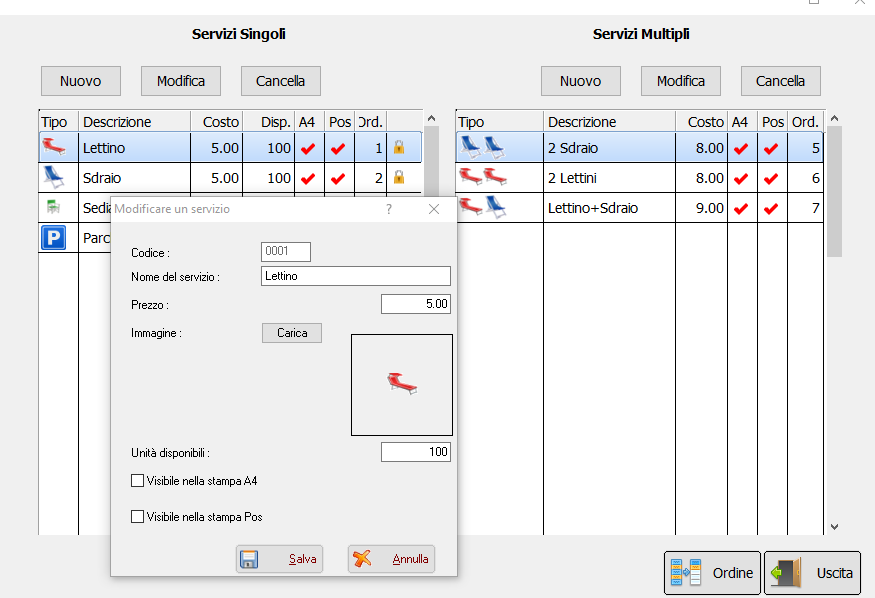
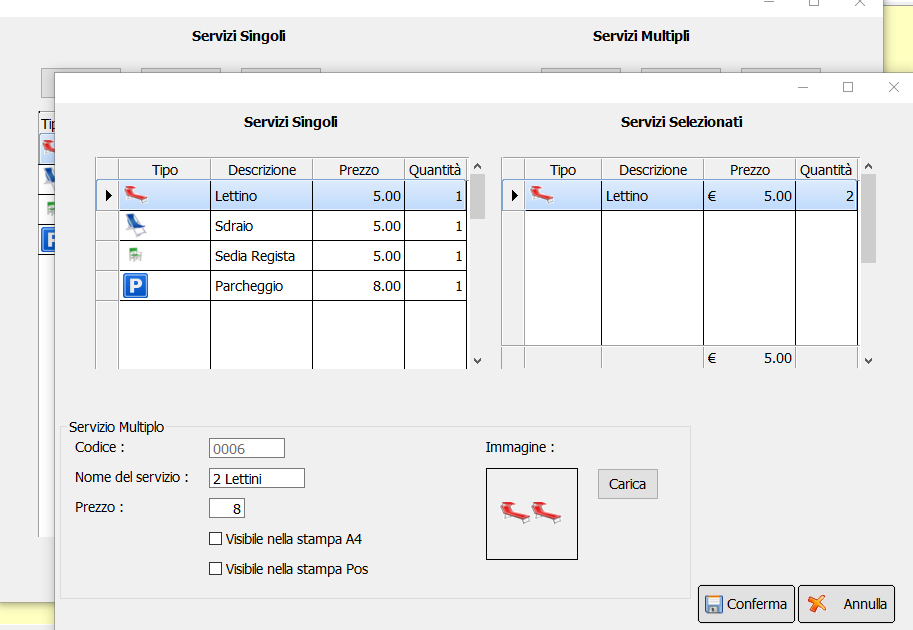
Now run ok only the first xbrowse on resizin sometimes is hided...i not Know why

two Xbrowse


Add/mod single service


add/mod Multiple service


But I see all more more instable I not Know why
Since from 1991/1992 ( fw for clipper Rel. 14.4 - Momos)

I use : FiveWin for Harbour March-April 2024 - Harbour 3.2.0dev (harbour_bcc770_32_20240309) - Bcc7.70 - xMate ver. 1.15.3 - PellesC - mail: silvio[dot]falconi[at]gmail[dot]com
Posts: 4840
Joined: Fri Nov 18, 2005 04:52 PM
Re: How Open the same dbf
Posted: Fri Dec 28, 2018 10:14 PM

It is this simple with database objects.

oServizi1 := TServizi():New()
oServizi1:setFilter( "multiple = .f.")

oServizi2 := TServizi():New()
oServizi2:setFilter( "multiple = .t.")

However, filters are really impractical for all but very small databases. As Tim stated, indexes are much better. To use indexes (in this case), just create one for True and one for False.

oServizi1 := TServizi():New()
oServizi1:setFilter( "MFALSE")

oServizi2 := TServizi():New()
oServizi2:setFilter( "MTRUE")

Very fast, new records are automatically added.

James

FWH 18.05/xHarbour 1.2.3/BCC7/Windows 10
Posts: 3022
Joined: Fri Oct 07, 2005 01:45 PM
Re: How Open the same dbf
Posted: Sat Dec 29, 2018 06:28 PM

James,

If tServiz opens a database object, as part of it's code, I use the setorder() in it's code.

If the first index is 1 ( for the true records ), and the second index is 2 ( for the false records ), I would open the two views as:

oServiz1 := TServiz():New(1)
oServiz2 :- TServiz():New(2)

I use dual browses on the same dialog all of the time within my programming, though it's usually two different databases. However, that doesn't matter. In this case the first browse is created with oServiz1 as the DATASOURCE, and the second one uses oServiz2.

I have so many of these running, and they NEVER fail.

Tim

Tim Stone
http://www.MasterLinkSoftware.com
http://www.autoshopwriter.com
timstone@masterlinksoftware.com
Using: FWH 23.10 with Harbour 3.2.0 / Microsoft Visual Studio Community 2022-24 32/64 bit
Posts: 4840
Joined: Fri Nov 18, 2005 04:52 PM
Re: How Open the same dbf
Posted: Tue Jan 01, 2019 12:17 AM

Tim,

When I first read your message I was confused as to why you were restating what I said in my previous message. Then I noticed what I had written in my previous message:

oServizi1 := TServizi():New()
oServizi1:setFilter( "MFALSE")

oServizi2 := TServizi():New()
oServizi2:setFilter( "MTRUE")

These lines were supposed to say SetOrder() not SetFilter(), where the passed parameter is the TAG name of the order.

oServizi1 := TServizi():New()
oServizi1:setOrder( "MFALSE")

oServizi2 := TServizi():New()
oServizi2:setOrder("MTRUE")

Of course, one could use the number of the order like you did, but I find it more difficult to remember and not as clear to read later, as the tag name.

For others reading this, the indexes the indexes would be built using a condition:

 INDEX ON <expKey> [TAG <cOrderName>] [TO <cOrderBagName>]
    [FOR <lCondition>] [ALL]

INDEX ON multiple TAG "MTRUE" TO Servizi FOR Multiple == .T.
INDEX ON multiple TAG "MFALSE" TO Servizi FOR Multiple == .F.

Each index actually contains only the desired records so it acts like a filter but has the speed of an index.

FWH 18.05/xHarbour 1.2.3/BCC7/Windows 10