FiveTech Support Forums

FiveWin / Harbour / xBase community
Board index FiveWin for Harbour/xHarbour xBrowse look Office 2019 - Office 365
Posts: 838
Joined: Wed Aug 22, 2007 10:09 AM
xBrowse look Office 2019 - Office 365
Posted: Thu Dec 27, 2018 09:54 PM

Hello,

Is it posible?. Thank you very much and merry xmas!.

Saludos / Regards,


FWH 20.04, Harbour 3.2.0 dev (r1909261630) y BCC 7.40
Posts: 10733
Joined: Sun Nov 19, 2006 05:22 AM
Re: xBrowse look Office 2016
Posted: Fri Dec 28, 2018 01:49 AM
As of now, xbrowse supports 2007,2010,2013,2015 styles.
Code (fw): Select all Collapse
oBrw:SetStyle( nStyle )
Regards


G. N. Rao.

Hyderabad, India
Posts: 838
Joined: Wed Aug 22, 2007 10:09 AM
Re: xBrowse look Office 2016
Posted: Fri Dec 28, 2018 09:32 AM

Thank you.

Any plans to implement it?.

What about Office 2016 style in Ribbon?.
Saludos / Regards,


FWH 20.04, Harbour 3.2.0 dev (r1909261630) y BCC 7.40
Posts: 10733
Joined: Sun Nov 19, 2006 05:22 AM
Re: xBrowse look Office 2016
Posted: Fri Dec 28, 2018 06:34 PM
I am using Office 360.
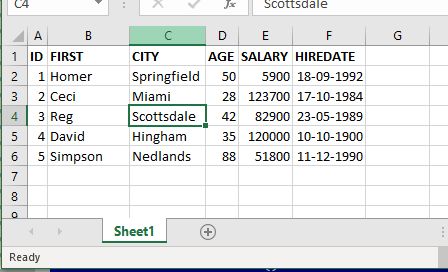
This is how Excel sheet looks.


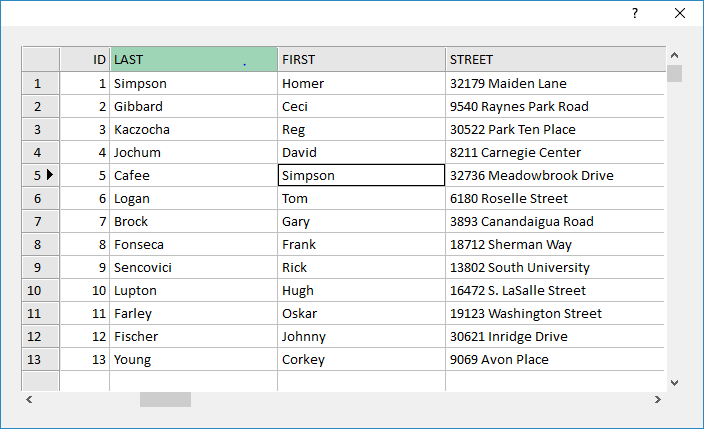
Adopting the same style, this is how xbrowse looks:


Do you call it 2016 style? If not what style we can call this?
If 2016 style is different, can you post a screen shot of Excel 2016 style?
Regards


G. N. Rao.

Hyderabad, India
Posts: 4840
Joined: Fri Nov 18, 2005 04:52 PM
Re: xBrowse look Office 2016
Posted: Fri Dec 28, 2018 08:35 PM

Nages,

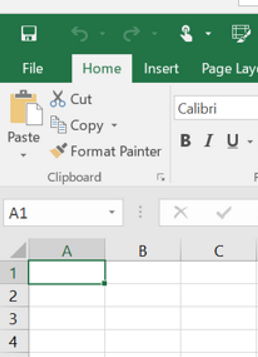
If you do a search for "Excel 2016" and then select "images" you will get a lot of screenshots of the Excel app. I suspect this is the style he is referring to. I found the same issue when working with the ribbonbar-it didn't look like the Microsoft apps. However, in this case the only difference I see is the color of the highlighted color title is gray in the Excel app and green in the Excel 365 version. Hmm, now I see in the Excel app, the current cell outline is also green.

I also note that the Excel app has a green ribbonbar, but that is a separate issue.

FWH 18.05/xHarbour 1.2.3/BCC7/Windows 10
Posts: 10733
Joined: Sun Nov 19, 2006 05:22 AM
Re: xBrowse look Office 2016
Posted: Fri Dec 28, 2018 08:47 PM

Mr. James

Thanks. But I could not find the highlight color in any of the images. The gray color is not the highlight color but column/row indicator color.

We are about to enter 2019. Isn't 2016 too old now? Why can we not adopt the color scheme of Office 360 as 2018 style?
Regards


G. N. Rao.

Hyderabad, India
Posts: 4840
Joined: Fri Nov 18, 2005 04:52 PM
Re: xBrowse look Office 2016
Posted: Fri Dec 28, 2018 09:51 PM
Nages,

>But I could not find the highlight color in any of the images.

Unless you enlarge them, they are hard to see since the highlight color is a dark green.

>The gray color is not the highlight color but column/row indicator color.

Sorry, I said "highlighted color title" but I meant to say "highlighted column color."


So the highlighted column color is dark gray and the highlight cell color is dark green (matching the ribbonbar). At some point Microsoft introduced color themes and they default to a different color for each app (Word, Excel, Powerpoint, etc.).

>We are about to enter 2019. Isn't 2016 too old now?

I agree that maybe going back to 2016 isn't a good idea at this date. However, the color theme is going to continue to be an issue every year or two, so it would be wise to make an interface that we could use to easily change the colors. I don't know about xBrowse but in the ribbonbar class it is impossible to change some of the colors without either modifing the class source or subclassing. In the ribbonbar a lot of the colors are set with codeblocks containing RGB() values which can't be changed from outside the class.

>Why can we not adopt the color scheme of Office 360 as 2018 style?

Personally, I would prefer to use the 2018 style so we can match the xbrowses with the Ribbonbar color themes. I suspect also that users may see the separate Office apps as a higher end product. Maybe others on this forum would like to express their opinions...

James
FWH 18.05/xHarbour 1.2.3/BCC7/Windows 10
Posts: 838
Joined: Wed Aug 22, 2007 10:09 AM
Re: xBrowse look Office 2019
Posted: Sat Dec 29, 2018 09:23 AM

Yes, sorry there was a typo. I was refering to Office 2019 - Office 365 style.

Thank you.

Saludos / Regards,


FWH 20.04, Harbour 3.2.0 dev (r1909261630) y BCC 7.40
Posts: 10733
Joined: Sun Nov 19, 2006 05:22 AM
Re: xBrowse look Office 2019
Posted: Sat Dec 29, 2018 09:27 AM
MOISES wrote:Yes, sorry there was a typo. I was refering to Office 2019 - Office 365 style.

Thank you.

Then we provided 2018 style in FWH 18.12 for XBrowse

oBrw:SetStyle( 2018 )
Regards


G. N. Rao.

Hyderabad, India
Posts: 838
Joined: Wed Aug 22, 2007 10:09 AM
Re: xBrowse look Office 2016
Posted: Sat Dec 29, 2018 10:03 AM

Thanks. Can you please upload a .exe example?.

What about Ribbon?.

Thank you.

Saludos / Regards,


FWH 20.04, Harbour 3.2.0 dev (r1909261630) y BCC 7.40
Posts: 10733
Joined: Sun Nov 19, 2006 05:22 AM
Re: xBrowse look Office 2016
Posted: Sat Dec 29, 2018 10:18 AM

The appearance is what I posted above.

Changes to Ribbon will take time.

Regards


G. N. Rao.

Hyderabad, India
Posts: 838
Joined: Wed Aug 22, 2007 10:09 AM
Re: xBrowse look Office 2016
Posted: Sat Dec 29, 2018 10:50 AM

Thank you very much for your attention and quick response.

I want to express the importance and urgency of the graphic changes. Users don't appreciate a compiler change or the FW_RecToJson function, but they do appreciate a graphic look change. As we all are aware, one of the first ways to sell a software is by eye-catching.

I would like to conclude, once again, by expressing my gratitude for the excellent efforts of the entire Fivetech team.

Saludos / Regards,


FWH 20.04, Harbour 3.2.0 dev (r1909261630) y BCC 7.40
Posts: 7317
Joined: Thu Oct 18, 2012 07:17 PM
Re: xBrowse look Office 2019
Posted: Mon Jan 14, 2019 03:37 PM
nageswaragunupudi wrote:
MOISES wrote:Yes, sorry there was a typo. I was refering to Office 2019 - Office 365 style.

Thank you.

Then we provided 2018 style in FWH 18.12 for XBrowse

oBrw:SetStyle( 2018 )


viewtopic.php?f=3&t=36604
Since from 1991/1992 ( fw for clipper Rel. 14.4 - Momos)

I use : FiveWin for Harbour March-April 2024 - Harbour 3.2.0dev (harbour_bcc770_32_20240309) - Bcc7.70 - xMate ver. 1.15.3 - PellesC - mail: silvio[dot]falconi[at]gmail[dot]com

Continue the discussion