

Hello,
which program should I use to open
ereport.rc.
If I open with Pelles C I only get a text view.
Thank you in advance
Otto
Board index FiveWin for Harbour/xHarbour ereport.rc - how to open

ResEdit-x64.7z
Dear Antonio,
can you advice me how to install this software.
Thank you in advance
Otto
Dear Otto,
If you use Total Commander, then install this plugin to manage 7z files:
https://totalcmd.net/plugring/7z_plugin.html
If you use Total Commander, then install this plugin to manage 7z files:
https://totalcmd.net/plugring/7z_plugin.html

Otto
I can share my resedit 64 bit version with you if you like .. let me know if I can help.
Rick Lipkin
Hello Rick,
this would be great.
Can you please send it to datron (@) aon.at.
Best regards
Otto
7z is a 7zip file. Its utility is at https://www.7-zip.org/download.html
FWH 11.08/FWH 19.12
BCC5.82/BCC7.3
xHarbour/Harbour
BCC5.82/BCC7.3
xHarbour/Harbour
Otto
Just sent you my version of ResEdit64 .. just un-zip the file and put the folder at the root of c:\ .. you will need to re-configure your File locations for FW and your C++ compiler .. leave the resource script template alone ( include directives ) ..
Hopefully my message will not bounce back ..
Thanks
Rick Lipkin
Hello Rick,
thank you. I got the file.
Best regards
Otto

So I decided to look again at ResEdit ... downloaded and installed it without a problem.
Then I took my existing, working xxx.rc file and tried to open it.
It had some complaints, but now it says it cannot recognize. STYLE. WS_POPUP. This is a standard windows style used in resources.
Any thoughts on this ?
Tim Stone
http://www.MasterLinkSoftware.com
http://www.autoshopwriter.com
timstone@masterlinksoftware.com
Using: FWH 23.10 with Harbour 3.2.0 / Microsoft Visual Studio Community 2022-24 32/64 bit
http://www.MasterLinkSoftware.com
http://www.autoshopwriter.com
timstone@masterlinksoftware.com
Using: FWH 23.10 with Harbour 3.2.0 / Microsoft Visual Studio Community 2022-24 32/64 bit
Tim,
You can configure ResEdit settings this way:
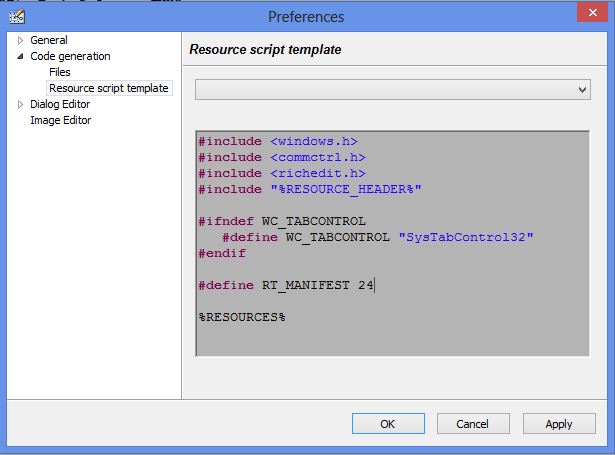
You can configure ResEdit settings this way:
#include <windows.h>
#include <commctrl.h>
#include <richedit.h>
#include "%RESOURCE_HEADER%"

#ifndef WC_TABCONTROL
   #define WC_TABCONTROL "SysTabControl32"
#endif

#ifndef PROGRESS_CLASS
   #define PROGRESS_CLASS "msctls_progress32"
#endif

#ifndef WS_POPUP
   #define WS_POPUP 0x80000000L
#endif

#define RT_MANIFEST 24

%RESOURCES%I'm trying to open an existing .rc file and it tells me WS_POPUP is an undeclared identifier.
Tim Stone
http://www.MasterLinkSoftware.com
http://www.autoshopwriter.com
timstone@masterlinksoftware.com
Using: FWH 23.10 with Harbour 3.2.0 / Microsoft Visual Studio Community 2022-24 32/64 bit
http://www.MasterLinkSoftware.com
http://www.autoshopwriter.com
timstone@masterlinksoftware.com
Using: FWH 23.10 with Harbour 3.2.0 / Microsoft Visual Studio Community 2022-24 32/64 bit