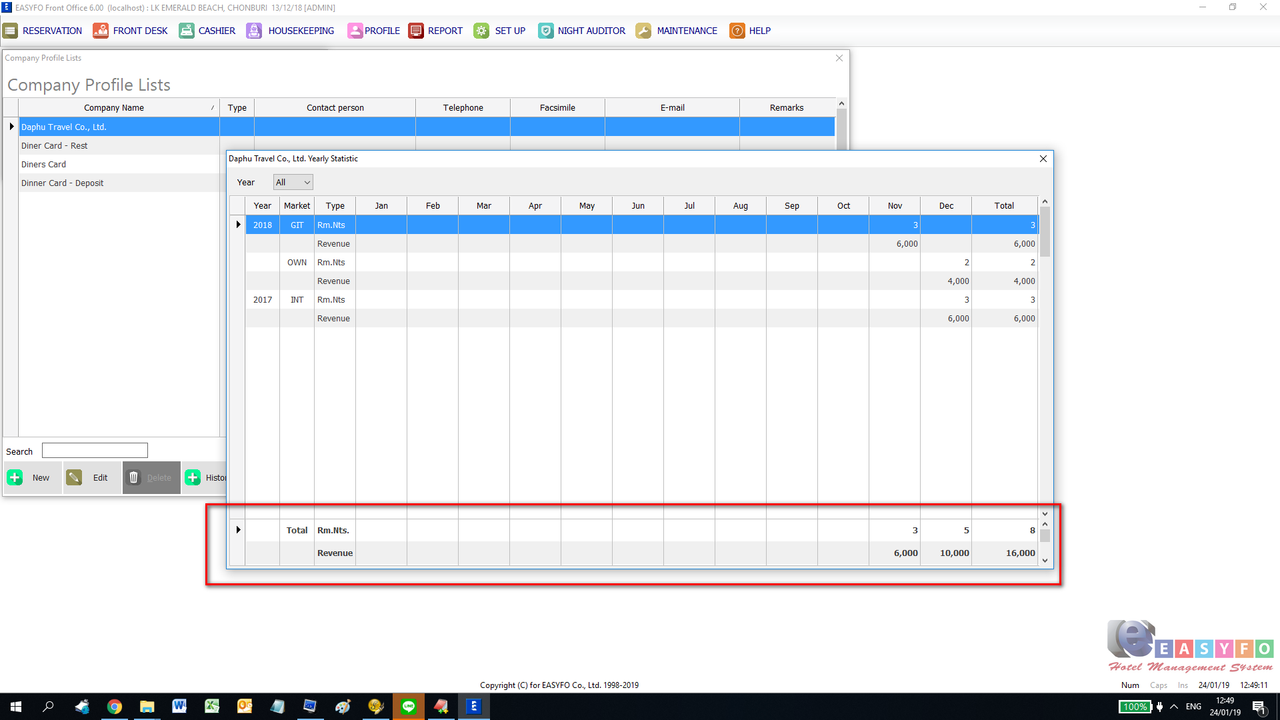
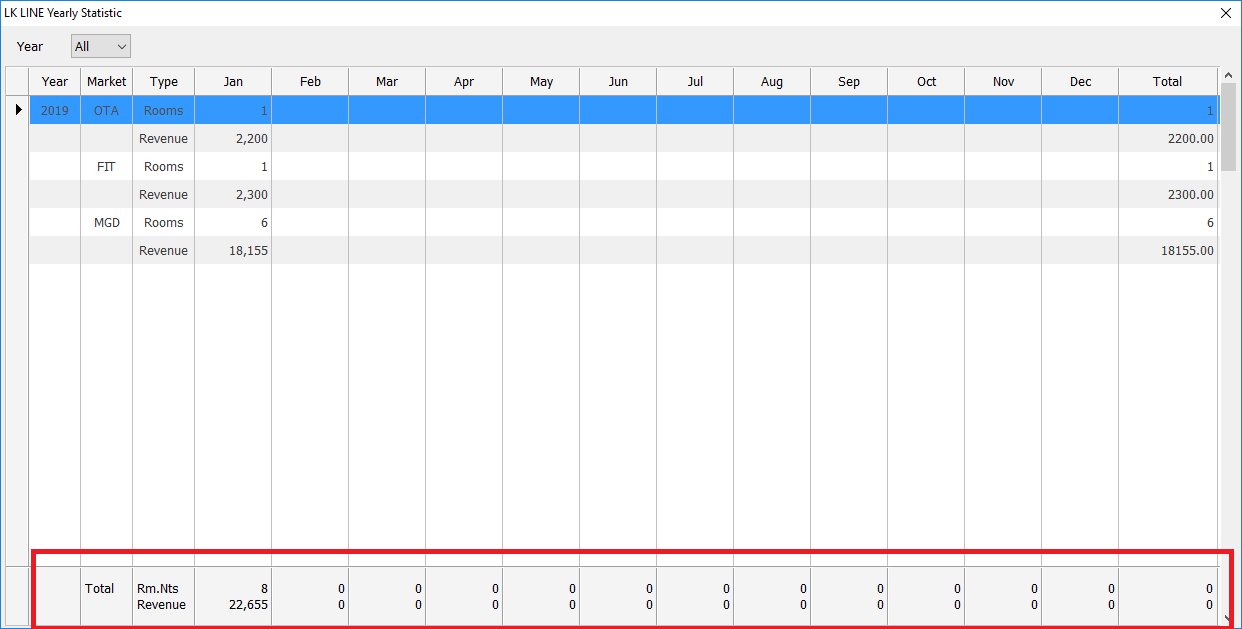
I make 2 XBrowse, 1 for records and another 1 for totals.
*--------------------------*
Procedure ShowStat( cComInt )
local oDlg, oBrw, oBtn, oSay, oCbx, oLbx, oFnt
local aYears, dStartDate, cYear, x, aStat, aSums

cYear := 'All '
aYears:= {'All '}

dStartDate := READDB('fostat','stt_date',,'stt_date',,,1)
for x := 1 to (year(date())-year(dStartDate))+1
     aadd( aYears, str(year(date())-(x-1),4) )
next

aStat := GetStat( cComInt, cYear )
aSums := GetSumStat( aStat, cYear )

if !empty(aStat[1][1])

    oFnt := TFont():New( MEMVAR->aFonts[14],, MEMVAR->aFonts[1]+1, .F., .F., 0, 0, 700, .F., .F., .F., 222, 3, 2, 1, , 34 )

    DEFINE DIALOG oDlg FROM 0, 0 TO 600, 1240 TITLE rtrim(MEMVAR->COM9:gst_last)+' Yearly Statistic' PIXEL FONT MEMVAR->oFont

        oDlg:lHelpIcon := .F.

        @  7, 8 SAY oSay PROMPT TE(0791,'ปี','Year') OF oDlg SIZE 25, 13 PIXEL

        @  5,35 COMBOBOX oCbx VAR cYear ITEMS aYears OF oDlg SIZE 30, 100 PIXEL ;
                  ON CHANGE (aStat := GetStat( cComInt, cYear ), aSums := GetSumStat( aStat, cYear ), ;
                                 oLbx:SetArray( aSums ), oLbx:SetFocus(), oLbx:Refresh(.T.), ;
                                 oBrw:SetArray( aStat ), oBrw:SetFocus(), oBrw:Refresh(.T.) )


        @ 263,2 XBROWSE oLbx OF oDlg ;
                  ARRAY aSums ;
                  COLUMNS 1, 2, 3, 4, 5, 6, 7, 8, 9, 10, 11, 12, 13, 14, 15, 16 ;
                  COLSIZES 50, 50, 60, 75, 75, 75, 75, 75, 75, 75, 75, 75, 75, 75, 75, 75, 75, 100 ;
                  SIZE 616, 36 ;
                  JUSTIFY  2, 2, 0, 1, 1, 1, 1, 1, 1, 1, 1, 1, 1, 1, 1, 1 ;
                  PIXEL ;
                  FONT oFnt ;
                  NOBORDER ;
                  WHEN .F. ;
                  PICTURE ,,,'@Z 99,999,999','@Z 99,999,999','@Z 99,999,999','@Z 99,999,999','@Z 99,999,999','@Z 99,999,999','@Z 99,999,999',;
                                 '@Z 99,999,999','@Z 99,999,999','@Z 99,999,999','@Z 99,999,999','@Z 99,999,999','@Z 99,999,999'

                  oLbx:lHeader := .F.

                  xBrStyles( oLbx )

                  oLbx:nRowHeight := 34

                  oLbx:bClrSel := oLbx:bClrStd

                  oLbx:CreateFromCode()


        @ 21, 2 XBROWSE oBrw OF oDlg ;
                  ARRAY aStat ;
                  COLUMNS 1, 2, 3, 4, 5, 6, 7, 8, 9, 10, 11, 12, 13, 14, 15, 16 ;
                  HEADERS TE(0791,'ปี','Year'), TE(0371,'รหัสลูกค้า','Market'), TE(0542,'ประเภท','Type'), 'Jan', 'Feb', 'Mar', 'Apr', 'May', 'Jun', 'Jul', 'Aug', 'Sep', 'Oct', 'Nov', 'Dec', TE(0355,'ยอดรวม','Total') ;
                  COLSIZES 50, 50, 60, 75, 75, 75, 75, 75, 75, 75, 75, 75, 75, 75, 75, 75, 75, 100 ;
                  SIZE 616, 243 ;
                  JUSTIFY  2, 2, 0, 1, 1, 1, 1, 1, 1, 1, 1, 1, 1, 1, 1, 1 ;
                  PIXEL ;
                  NOBORDER ;
                  PICTURE ,,,'@Z 99,999,999','@Z 99,999,999','@Z 99,999,999','@Z 99,999,999','@Z 99,999,999','@Z 99,999,999','@Z 99,999,999',;
                                 '@Z 99,999,999','@Z 99,999,999','@Z 99,999,999','@Z 99,999,999','@Z 99,999,999','@Z 99,999,999'


                  oBrw:bLClicked := {| nRow, nCol, nFlags| iif( oBrw:nAt>3 .and. oBrw:nAt<16, GetDetails( oBrw:nArrayAt, oBrw:nAt, aStat, cComInt ), ) }

                  xBrStyles( oBrw )

                  oBrw:CreateFromCode()

    ACTIVATE DIALOG oDlg CENTER ;
                ON INIT (oBrw:SetFocus())

end
return


 pic host