I wish have all control with the same style
I have problems with btmbmp : I wish recreate the windows 10 button style color adding an image at Left
To better understand what I'm trying to do I created a simple little program where at the bottom there are two buttons one created with btnbmp and one created with normal Button
obviously I also use the style WindowsXP.manifest in the rc file
The button created with the normal button when we do not go over it with the mouse is gray
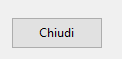
then when the mouse is over it becomes light blue and the border is dark blue.
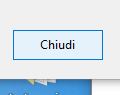
I wanted to do the same style but with the possibility of adding an image to the left.
I tried with Many gradient but I not arrive to the result I wish
How can I solve?
I found the color I need
No Over
nColorBorder_Initial:= nRGB( 173,173,173)
nColorback_Initial:= nRgb(225,225,225)
Over Mouse
nColorBorder_over:= nRGB(0,120,215)
nColorback_over:= nRgb(229,241,251)
I try also with :
local nClrBack := nRgb(225,225,225)
local nClrText := CLR_BLACK
local nCBorder := nRgb(229,241,251)
local nClrBorder := nRGB( 173,173,173)
Local nCBack := nRgb(229,241,251)
Local oBold
DEFINE FONT oBold NAME "Segoe UI" SIZE 0,-14 BOLD
@ oDlg:nBottom - 40,oDlg:nWidth-225 BTNBMP oBtnPrint PROMPT "Stampa" ;
RESOURCE cImage2 SIZE 90,30 PIXEL OF oDlg FLAT NOBORDER ;
COLOR nClrText, nClrBack
WITH OBJECT oBtnPrint
:bAction := dummy()
:nClrBorder := nClrBorder
:bColorMap := { | o | o:lBorder := o:lMOver, nCBorder }
 FontBold := oBold
:lRound := .F.
END
SomeOne can help me please
I have problems with btmbmp : I wish recreate the windows 10 button style color adding an image at Left
To better understand what I'm trying to do I created a simple little program where at the bottom there are two buttons one created with btnbmp and one created with normal Button
#include "Fivewin.ch"
#include "constant.ch"

Function test()
   Local oDlg
   Local oBtn[3],aGet[1]
   Local cCursorBtn:=  TCursor():New(,'HAND')
   Local nBottom   := 33
   Local nRight    := 62
   Local nWidth :=  Max( nRight * DLG_CHARPIX_W, 180 )
   Local nHeight := nBottom * DLG_CHARPIX_H

   Local cImage1:="save.png"
   Local cImage2:="print.png"
   Local cImage3:="no.png"

    DEFINE DIALOG oDlg SIZE 880,600;
      PIXEL TRUEPIXEL RESIZABLE


  @ oDlg:nBottom - 40,oDlg:nWidth-225 BTNBMP oBtnPrint;
    RESOURCE cImage2 FLAT LEFT  ;
    PROMPT "Stampa" SIZE 90,30 PIXEL OF oDlg;
    ACTION dummy()


  @ oDlg:nBottom - 40,oDlg:nWidth-120 Button oBtnClose;
                 PROMPT "Chiudi"    SIZE 90,30 PIXEL OF oDlg;
                  ACTION ( oDlg:end( IDOK ) )

     oDlg:bResized  := <||
             local oRect    := oDlg:GetCliRect()

         oBtnPrint:nLeft   := oRect:nRight - 220
         oBtnPrint:nTop    := oRect:nBottom - 50

         oBtnClose:nLeft      := oRect:nRight - 120
         oBtnClose:nTop       := oRect:nBottom - 50

         RETURN nil
         >

   Activate dialog oDlg ;
   on init (oBtnPrint:SetThemed( .t. ) )

   Return nil

   //-----------------------------------------------//
Function Dummy()
   RETURN NIL


//-------------------------------------------------------------/
obviously I also use the style WindowsXP.manifest in the rc file
The button created with the normal button when we do not go over it with the mouse is gray
then when the mouse is over it becomes light blue and the border is dark blue.
I wanted to do the same style but with the possibility of adding an image to the left.
I tried with Many gradient but I not arrive to the result I wish
How can I solve?
I found the color I need
No Over
nColorBorder_Initial:= nRGB( 173,173,173)
nColorback_Initial:= nRgb(225,225,225)
Over Mouse
nColorBorder_over:= nRGB(0,120,215)
nColorback_over:= nRgb(229,241,251)
I try also with :
local nClrBack := nRgb(225,225,225)
local nClrText := CLR_BLACK
local nCBorder := nRgb(229,241,251)
local nClrBorder := nRGB( 173,173,173)
Local nCBack := nRgb(229,241,251)
Local oBold
DEFINE FONT oBold NAME "Segoe UI" SIZE 0,-14 BOLD
@ oDlg:nBottom - 40,oDlg:nWidth-225 BTNBMP oBtnPrint PROMPT "Stampa" ;
RESOURCE cImage2 SIZE 90,30 PIXEL OF oDlg FLAT NOBORDER ;
COLOR nClrText, nClrBack
WITH OBJECT oBtnPrint
:bAction := dummy()
:nClrBorder := nClrBorder
:bColorMap := { | o | o:lBorder := o:lMOver, nCBorder }
FontBold := oBold:lRound := .F.
END
SomeOne can help me please
Since from 1991/1992 ( fw for clipper Rel. 14.4 - Momos)
I use : FiveWin for Harbour March-April 2024 - Harbour 3.2.0dev (harbour_bcc770_32_20240309) - Bcc7.70 - xMate ver. 1.15.3 - PellesC - mail: silvio[dot]falconi[at]gmail[dot]com
I use : FiveWin for Harbour March-April 2024 - Harbour 3.2.0dev (harbour_bcc770_32_20240309) - Bcc7.70 - xMate ver. 1.15.3 - PellesC - mail: silvio[dot]falconi[at]gmail[dot]com