

I have pngs files and I must use a combobox .
After Uwe's advice, I used features created by Nages Rao to converte Image file into BMP
the problem before was the size of Images but Now I set all Images to 72 X 72
When the function Fw_saveimage converte a png to Bmp not converte the black space ( the alpha transparent on Png)
and when I use these bmps files converted
I have this . it run ok but It is ugly to see and it is not clear
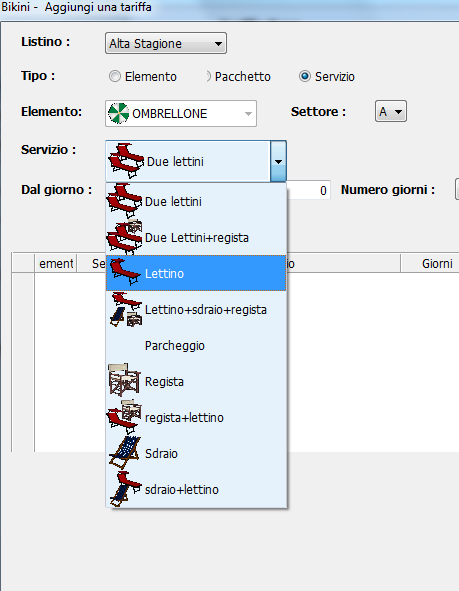
How could I improve the image, perhaps removing the black background?
After Uwe's advice, I used features created by Nages Rao to converte Image file into BMP
the problem before was the size of Images but Now I set all Images to 72 X 72
Local  cFoldertemp:=".\bitmaps\mini\temp\"
Local aServiziBmp:= {}
Local cFileBmp_Servizi:= "TempSe_"

 For n= 1 to Len(aservizi)
         Converti_Immagine_Bmp(alltrim(aServizi [n][2]),cFolderTemp,cFileBmp_Servizi+alltrim(str(n)),0.50)
         aadd(aServiziBmp,cFolderTemp+cFileBmp_Servizi+alltrim(str(n))+".Bmp"   )
       next

//-------------------------------------------------------------------------------------//
Function Converti_Immagine_Bmp(cFile,cFolderTemp,cNewName,nResize)
   Local ext:=".Bmp"
  // Local nResize:=0.30
   Local hBmp := FW_ReadImage( nil, cFile )[ 1 ]
   Local hNew := FW_TransformBitmap( hBmp, NIL, nResize )

   FW_SaveImage( hNew, cFolderTemp+cNewName+ext )

 Return   cFolderTemp+cNewName+ext
//------------------------------------------------------------------//
When the function Fw_saveimage converte a png to Bmp not converte the black space ( the alpha transparent on Png)
and when I use these bmps files converted
I have this . it run ok but It is ugly to see and it is not clear
How could I improve the image, perhaps removing the black background?
Since from 1991/1992 ( fw for clipper Rel. 14.4 - Momos)
I use : FiveWin for Harbour March-April 2024 - Harbour 3.2.0dev (harbour_bcc770_32_20240309) - Bcc7.70 - xMate ver. 1.15.3 - PellesC - mail: silvio[dot]falconi[at]gmail[dot]com
I use : FiveWin for Harbour March-April 2024 - Harbour 3.2.0dev (harbour_bcc770_32_20240309) - Bcc7.70 - xMate ver. 1.15.3 - PellesC - mail: silvio[dot]falconi[at]gmail[dot]com
