

Hello friends,
how can I convert a htm file to UTF-8
Thank you in advance
Otto
Board index FiveWin for Harbour/xHarbour Convert tu UTF-8

Otto wrote:Hello friends,
how can I convert a htm file to UTF-8
Thank you in advance
Otto
Otto,
How about it?
https://onlineutf8tools.com/convert-html-entities-to-utf8
Best Regards,
Richard
Harbour 3.2.0dev (r2503251254) => Borland C++ v7.7 32bit
MySQL v8.0
Harbour 3.2.0dev (r2503251254) => Borland C++ v7.7 64bit
Richard
Harbour 3.2.0dev (r2503251254) => Borland C++ v7.7 32bit
MySQL v8.0
Harbour 3.2.0dev (r2503251254) => Borland C++ v7.7 64bit

Otto,
You can use Word. When you need to save, choose save as, and type web
And select button tools, and in Codification folder select Unicode (UTF-8)
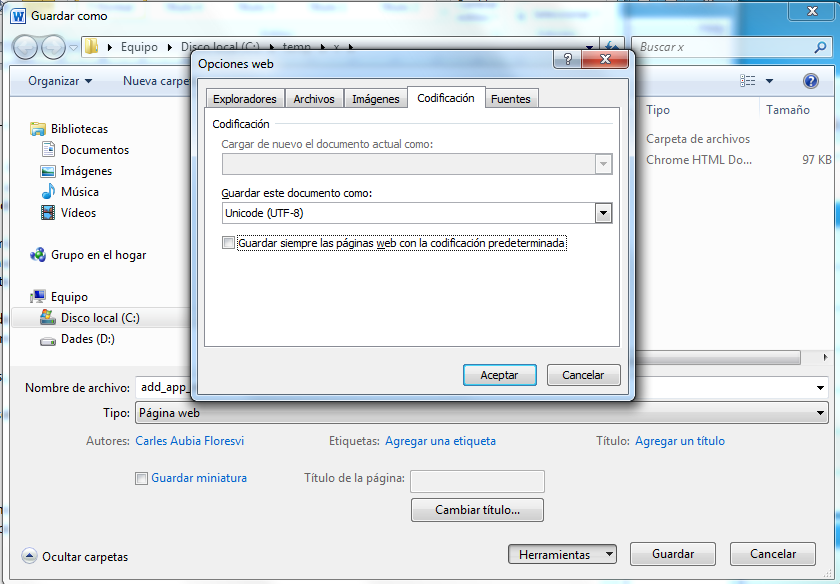
You can use Word. When you need to save, choose save as, and type web
And select button tools, and in Codification folder select Unicode (UTF-8)
Salutacions, saludos, regards
"...programar es fácil, hacer programas es difícil..."
UT Page -> https://carles9000.github.io/
Forum UT -> https://discord.gg/bq8a9yGMWh
HIX -> https://github.com/carles9000/hix
"...programar es fácil, hacer programas es difícil..."
UT Page -> https://carles9000.github.io/
Forum UT -> https://discord.gg/bq8a9yGMWh
HIX -> https://github.com/carles9000/hix
Hello Richard,
thank you.
But I nead a function or a tool with silent mode.
Best regards
Otto
Hello Carles,
that's exactly what I need.
Could you please help to find out how to do this with Fivewin code.
My function is like this:
Thank you in advance
Otto
that's exactly what I need.
Could you please help to find out how to do this with Fivewin code.
My function is like this:
function saveAsHtml( cDatei )
   local oWord
   local cTemplate   :=  cDatei

   local cHtmlText  := ""

   local cAppPath := cFilePath( GetModuleFileName( GetInstance( ) ) )
   local cSaveAsFile := cAppPath + "Email.htm"
   ferase( cSaveAsFile )

   oWord := CreateObject( "Word.Application" )
   oWord:Documents:Open( cTemplate, 0 )
   oWord:Visible := .T.

   // save it in HTML format
   #define wdFormatHTML 8
   oWord:ActiveDocument:SaveAs2( cSaveAsFile, wdFormatHTML  )
   oWord:ActiveDocument:Close()
   oWord:Quit()

   cHtmlText := memoread( cSaveAsFile )
   cHtmlText := STRTRAN( cHtmlText, "v\:* {behavior:url(#default#VML);}", "" )
   cHtmlText := STRTRAN( cHtmlText, "o\:* {behavior:url(#default#VML);}", "" )
   cHtmlText := STRTRAN( cHtmlText, "w\:* {behavior:url(#default#VML);}", "" )
   cHtmlText := STRTRAN( cHtmlText, ".shape {behavior:url(#default#VML);}", "" )
   //? 'src="' + cAppPath
   cHtmlText := STRTRAN( cHtmlText, 'src="', 'src="' + cAppPath  )

   memowrit( cSaveAsFile, cHtmlText )

return NIL

//----------------------------------------------------------------------------//Otto
Hello,
I found this description on the internet and tried with:
But oWord:WebOptions:Encoding = 65001 errors out.
Best regards,
Otto
the time of this writing, it is unclear whether I have encountered a bug with my specific version of Microsoft Word (Word Online) or the VSTO template, but I will answer what made this work for me here.
If this code does not work:
doc = app.Documents.Open("C:\\Temp\\Test.docx");
doc.WebOptions.Encoding = Microsoft.Office.Core.MsoEncoding.msoEncodingUTF8;
doc.SaveAs2("C:\\Temp\\Test.htm", MsWord.WdSaveFormat.wdFormatFilteredHTML);
Then, change the code to refresh the document's fields, like this:
doc = app.Documents.Open("C:\\Temp\\Test.docx");
doc.Fields.Update(); // ** this is the new line of code.
doc.WebOptions.Encoding = Microsoft.Office.Core.MsoEncoding.msoEncodingUTF8;
doc.SaveAs2("C:\\Temp\\Test.htm", MsWord.WdSaveFormat.wdFormatFilteredHTML);
msoEncodingUTF8 65001 UTF-8 encoding.
I found this description on the internet and tried with:
But oWord:WebOptions:Encoding = 65001 errors out.
Best regards,
Otto
oWord := CREATEOBJECT( "Word.Application" )
oWord:Visible := .t.

oWord:ChangeFileOpenDirectory ( cDocPfad )

oWord:Documents:Open( cDocName, 0 , 1 )
//   65001      Microsoft.Office.Core.MsoEncoding.msoEncodingUTF8
oWord:WebOptions:Encoding = 65001
#define wdFormatFilteredHTML    10
oWord:ActiveDocument:SaveAs2( "test.htm", wdFormatFilteredHTML  )
oWord:ActiveDocument:Close()
the time of this writing, it is unclear whether I have encountered a bug with my specific version of Microsoft Word (Word Online) or the VSTO template, but I will answer what made this work for me here.
If this code does not work:
doc = app.Documents.Open("C:\\Temp\\Test.docx");
doc.WebOptions.Encoding = Microsoft.Office.Core.MsoEncoding.msoEncodingUTF8;
doc.SaveAs2("C:\\Temp\\Test.htm", MsWord.WdSaveFormat.wdFormatFilteredHTML);
Then, change the code to refresh the document's fields, like this:
doc = app.Documents.Open("C:\\Temp\\Test.docx");
doc.Fields.Update(); // ** this is the new line of code.
doc.WebOptions.Encoding = Microsoft.Office.Core.MsoEncoding.msoEncodingUTF8;
doc.SaveAs2("C:\\Temp\\Test.htm", MsWord.WdSaveFormat.wdFormatFilteredHTML);
msoEncodingUTF8 65001 UTF-8 encoding.
Hello,
this code now is working.
Best regards,
Otto
output:
this code now is working.
Best regards,
Otto
oWord := CREATEOBJECT( "Word.Application" )
oWord:Visible := .t.
oWord:ChangeFileOpenDirectory ( cDocPfad )
oWord:Documents:Open( cDocName, 0 , 1 )
oDoc := oWord:ActiveDocument
//   65001      Microsoft.Office.Core.MsoEncoding.msoEncodingUTF8
oDoc:WebOptions:Encoding = 65001
#define wdFormatFilteredHTML    10
oWord:ActiveDocument:SaveAs2( "test.htm", wdFormatFilteredHTML  )
oWord:ActiveDocument:Close()<html>
<head>
<meta http-equiv=Content-Type content="text/html; charset=utf-8">
<meta name=Generator content="Microsoft Word 15 (filtered)">