FiveTech Support Forums

FiveWin / Harbour / xBase community
Board index FiveWin for Harbour/xHarbour Insert a logo image on a background image.
Posts: 55
Joined: Thu Mar 13, 2008 02:35 AM
Insert a logo image on a background image.
Posted: Sat Mar 02, 2019 02:06 PM
Hello colleagues, can I overlay two bitmaps and save to a file?

I need one of the bitmaps to have transparent background.

Insert a logo on a background image.

Example

Posts: 2170
Joined: Fri Jul 18, 2008 01:24 AM
Re: Insert a logo image on a background image.
Posted: Sat Mar 02, 2019 02:28 PM
Francisco J. Alegría P.

Chinandega, Nicaragua.


Fwxh-MySql-TMySql
Posts: 10733
Joined: Sun Nov 19, 2006 05:22 AM
Re: Insert a logo image on a background image.
Posted: Mon Mar 04, 2019 04:13 AM
You can use the two FWH functions
1) FW_MakeYourBitmap( nWidth, nHeight, bDrawImage ) --> hBmp
to paint your overlay
and then use
2) FW_SaveImage( hBmp, cImageFile )
to save the image as bmp,jpg or png

In this sample, we overlay \fwh\bitmaps\alphabmp\calendar.bmp over \fwh\bitmaps\olga1.jpg and then save the result as overlay.png.

Code (fw): Select all Collapse
function ImageOverlay()

   local aImage1, aImage2, hBmp
   local cFile1   := "c:\fwh\bitmaps\olga1.jpg"
   local cFile2   := "c:\fwh\bitmaps\alphabmp\calendar.bmp"
   local cSave    := "overlay.png"

   aImage1  := FW_ReadImage( nil, cFile1 ) // [3],[4] are width and height
   aImage2  := FW_ReadImage( nil, cFile2 )

   hBmp     := FW_MakeYourBitmap( aImage1[ 3 ], aImage1[ 4 ], ;
                  { |hDC, w, h| PaintOverlay( hDC, w, h, aImage1, aImage2 ) } )

   PalBmpFree( aImage1 )
   PalBmpFree( aImage2 )

   FW_SaveImage( hBmp, cSave ) // cSave can be bmp,jpg,png

   DeleteObject( hBmp )

   XImage( cSave ) // Test the saved image

return nil


static function PaintOverlay( hDC, w, h, aImage1, aImage2 )

   local t,l

   FW_DrawImage( hDC, aImage1 )

   t     := h - aImage2[ 4 ] - 20
   l     := w - aImage2[ 3 ] - 20

   FW_DrawImage( hDC, aImage2, { t, l, t + aImage2[ 4 ], l + aImage2[ 3 ] } )

return nil


Result:


Note: Requires FWH 18.03 or later.
Regards


G. N. Rao.

Hyderabad, India
Posts: 1598
Joined: Fri Oct 07, 2005 05:56 PM
Re: Insert a logo image on a background image.
Posted: Tue Mar 05, 2019 12:30 PM

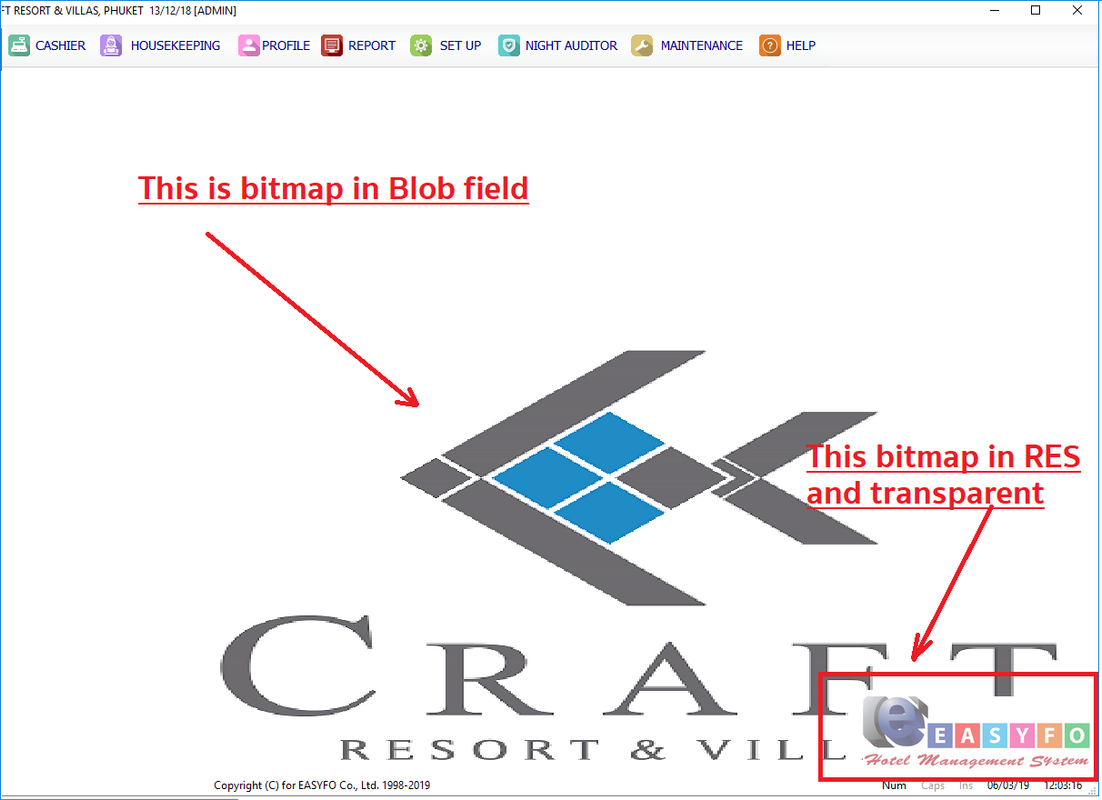
Do we can?

  1. image is in Blob field (MySql)
  2. logo is in .RES file.
  3. logo is transparent over image.

Thanks in advance.

Regards,

Dutch


FWH 2304 / xHarbour Simplex 1.2.3 / BCC73 / Pelles C / UEStudio

FWPPC 10.02 / Harbour for PPC (FTDN)

ADS V.9 / MySql / MariaDB

R&R 12 Infinity / Crystal Report XI R2

(Thailand)
Posts: 10733
Joined: Sun Nov 19, 2006 05:22 AM
Re: Insert a logo image on a background image.
Posted: Tue Mar 05, 2019 02:34 PM
dutch wrote:Do we can?

1. image is in Blob field (MySql)
2. logo is in .RES file.
3. logo is transparent over image.

Thanks in advance.


Yes.

Code (fw): Select all Collapse
aImage1  := FW_ReadImage( nil, oRs:BlobFieldNae )
aImage2  := FW_ReadImage( nil, ResourceName )
Regards


G. N. Rao.

Hyderabad, India
Posts: 1598
Joined: Fri Oct 07, 2005 05:56 PM
Re: Insert a logo image on a background image.
Posted: Wed Mar 06, 2019 04:32 AM
Dear Master,

I would like to show 2 image without merge to a new file. It is the main background of WINDOW and logo is transparent image on background image .
I try .\samples\bmponbmp.prg but it supports Bitmap file.
How do I use TBITMAP or TIMAGE and which is the best choice?

nageswaragunupudi wrote:
dutch wrote:Do we can?

1. image is in Blob field (MySql)
2. logo is in .RES file.
3. logo is transparent over image.

Thanks in advance.


Yes.

Code (fw): Select all Collapse
aImage1  := FW_ReadImage( nil, oRs:BlobFieldNae )
aImage2  := FW_ReadImage( nil, ResourceName )
Regards,

Dutch


FWH 2304 / xHarbour Simplex 1.2.3 / BCC73 / Pelles C / UEStudio

FWPPC 10.02 / Harbour for PPC (FTDN)

ADS V.9 / MySql / MariaDB

R&R 12 Infinity / Crystal Report XI R2

(Thailand)
Posts: 10733
Joined: Sun Nov 19, 2006 05:22 AM
Re: Insert a logo image on a background image.
Posted: Wed Mar 06, 2019 04:35 AM
None of the above.
Use brush for main image.
Use FW_DrawImage() for the image you want to overlay wherever you want.

Try this sample and also try resizing the window:
Code (fw): Select all Collapse
#include "fivewin.ch"

function Main()

   local oWnd, oBrush, aImage

   DEFINE BRUSH oBrush FILE "c:\fwh\bitmaps\sea.bmp" RESIZE
   DEFINE WINDOW oWnd BRUSH oBrush

   aImage   := oWnd:ReadImage( "c:\fwh\bitmaps\alphabmp\calendar.bmp" )

   oWnd:bPainted := { || oWnd:DrawImage( aImage ) }

   ACTIVATE WINDOW oWnd CENTERED
   RELEASE BRUSH oBrush
   PalBmpFree( aImage )

return nil

Change the path images as you like. Instead of filenames you can resources also.
Regards


G. N. Rao.

Hyderabad, India
Posts: 1598
Joined: Fri Oct 07, 2005 05:56 PM
Re: Insert a logo image on a background image.
Posted: Wed Mar 06, 2019 05:08 AM
Dear Master,

This is what I need. But I use white background to avoid the incorrect display.
Regards,

Dutch


FWH 2304 / xHarbour Simplex 1.2.3 / BCC73 / Pelles C / UEStudio

FWPPC 10.02 / Harbour for PPC (FTDN)

ADS V.9 / MySql / MariaDB

R&R 12 Infinity / Crystal Report XI R2

(Thailand)
Posts: 10733
Joined: Sun Nov 19, 2006 05:22 AM
Re: Insert a logo image on a background image.
Posted: Wed Mar 06, 2019 06:49 AM
Please try this program and adapt to your requirements.
Code (fw): Select all Collapse
#include "fivewin.ch"

function Main()

   local oCn, oRs, cImage
   local oWnd, aImage1, aImage2

   oCn   := FW_DemoDB()

   DEFINE WINDOW oWnd

   oWnd:nWidth    := 800
   oWnd:nHeight   := 600

   oRs      := oCn:RowSet( "SELECT IMAGE FROM wwonders WHERE id = 8" )
   aImage1  := oWnd:ReadImage( oRs:Image )
   oRs:Close()

   aImage2  := oWnd:ReadImage( "c:\fwh\bitmaps\alphabmp\calendar.bmp" ) // Your resource name here

   oWnd:bPainted := <||
         oWnd:DrawImage( aImage1, nil, nil, nil, nil, nil, "BR" )
         oWnd:DrawImage( aImage2, { nil, nil, -20, -20 }, nil, nil, nil, nil, "BR" )
         return nil
         >

   ACTIVATE WINDOW oWnd CENTERED
   PalBmpFree( aImage1 )
   PalBmpFree( aImage2 )
   oCn:Close()

return nil
Regards


G. N. Rao.

Hyderabad, India
Posts: 1598
Joined: Fri Oct 07, 2005 05:56 PM
Re: Insert a logo image on a background image.
Posted: Fri Mar 08, 2019 03:05 AM
Dear Master,

Thank you so much. It works great as expectation.
Another point, if I use slider to adjust transparent level. How do I :refresh() this DrawImage() refer object.
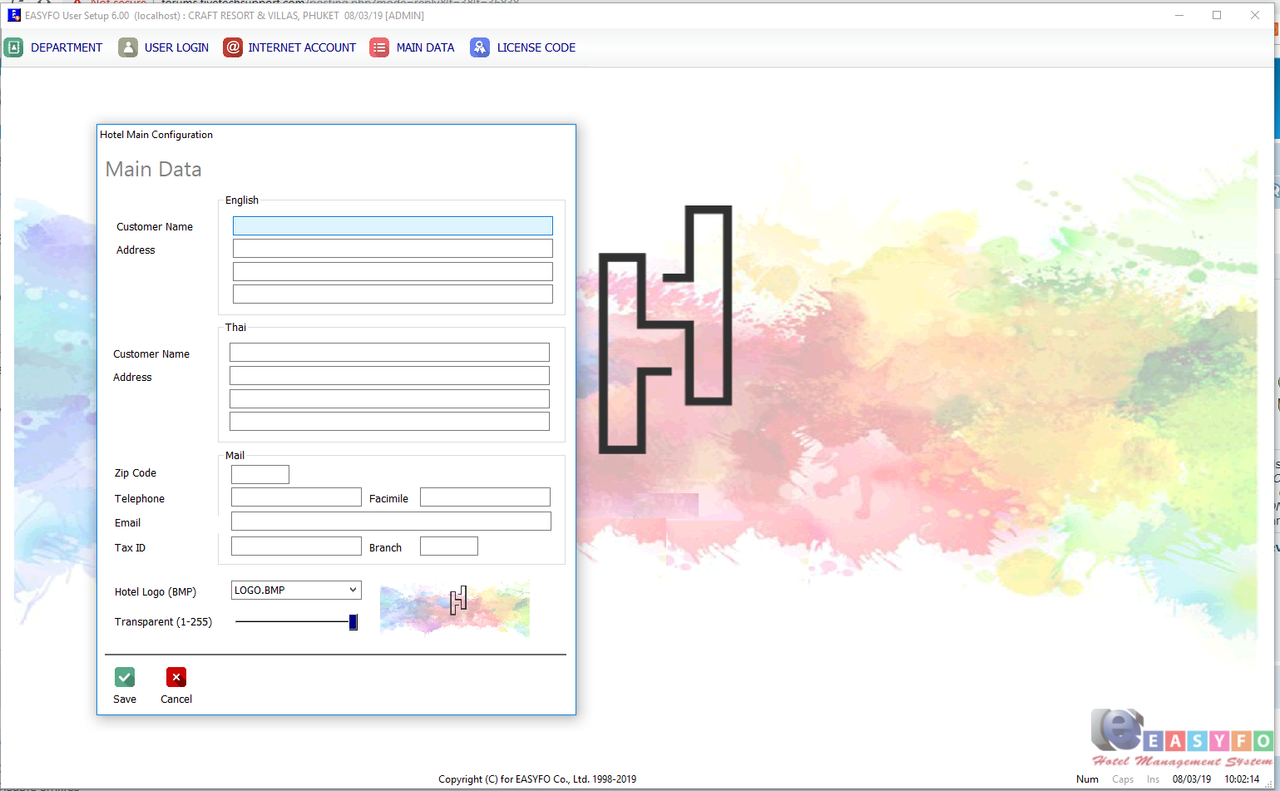


Code (fw): Select all Collapse
oDbf := OPENDB('ezprofile',,,,,,1)

DEFINE DIALOG oDlg RESOURCE cForm ;  // COLOR CLR_BLACK, CLR_HGRAY
         COLOR CLR_BLACK, THEME2007 ;
       FONT MEMVAR->oFont 
       
    oDlg:lHelpIcon := .F.
        
    REDEFINE SAY oHeader PROMPT cTitle ID 100 OF oDlg FONT MEMVAR->oTFont COLOR nRGB(128, 128, 128 )
   

    REDEFINE SAY oSay PROMPT TE(0621,'ชื่อลูกค้า','Customer Name') ID 201 OF oDlg
    REDEFINE SAY oSay PROMPT TE(0621,'ชื่อลูกค้า','Customer Name') ID 205 OF oDlg
    REDEFINE SAY oSay PROMPT TE(0524,'ที่อยู่','Address') ID 202 OF oDlg
    REDEFINE SAY oSay PROMPT TE(0524,'ที่อยู่','Address') ID 206 OF oDlg
    REDEFINE SAY oSay PROMPT TE(0856,'รหัสไปรษณีย์','Zip Code') ID 209 OF oDlg
    REDEFINE SAY oSay PROMPT TE(0622,'โทรศัพท์','Telephone') ID 210 OF oDlg
    REDEFINE SAY oSay PROMPT TE(0623,'แฟกซ์','Facimile') ID 211 OF oDlg
    REDEFINE SAY oSay PROMPT TE(0716,'อีเมล','Email') ID 212 OF oDlg
    REDEFINE SAY oSay PROMPT TE(0624,'เลขผู้เสียภาษี','Tax ID') ID 213 OF oDlg
    REDEFINE SAY oSay PROMPT TE(0635,'สาขา','Branch') ID 214 OF oDlg
    REDEFINE SAY oSay PROMPT 'Hotel Logo (BMP)' ID 215 OF oDlg
    REDEFINE SAY oSay PROMPT 'Transparent (1-255)' ID 216 OF oDlg

   REDEFINE GET oGet[1] VAR oDbf:PRO_ECONAME  ID 101 OF oDlg 
   REDEFINE GET oGet[2] VAR oDbf:PRO_EADD1   ID 102 OF oDlg
   REDEFINE GET oGet[3] VAR oDbf:PRO_EADD2   ID 103 OF oDlg
   REDEFINE GET oGet[4] VAR oDbf:PRO_EADD3   ID 104 OF oDlg

   REDEFINE GET oGet[5] VAR oDbf:PRO_TCONAME  ID 105 OF oDlg 
   REDEFINE GET oGet[6] VAR oDbf:PRO_EADD1   ID 106 OF oDlg
   REDEFINE GET oGet[7] VAR oDbf:PRO_EADD2   ID 107 OF oDlg
   REDEFINE GET oGet[8] VAR oDbf:PRO_EADD3   ID 108 OF oDlg

   REDEFINE GET oGet[9] VAR oDbf:PRO_ZIP        ID 109 OF oDlg
   
   REDEFINE GET oGet[10] VAR oDbf:PRO_TEL    ID 110 OF oDlg
   REDEFINE GET oGet[11] VAR oDbf:PRO_FAX    ID 111 OF oDlg
   REDEFINE GET oGet[12] VAR oDbf:PRO_EMAIL  ID 112 OF oDlg
   REDEFINE GET oGet[13] VAR oDbf:PRO_TAXID  ID 113 OF oDlg
   REDEFINE GET oGet[14] VAR oDbf:PRO_BRANCH ID 114 OF oDlg

   REDEFINE GET oGet[15] VAR oDbf:PRO_LOGO   ID 115  PICTURE '@!' ANSI ;
            BITMAP MEMVAR->ArrBmp ;
            ACTION BmpOpen(oGet[15], oDbf)
    
    // REDEFINE GET oGet[16] VAR oDbf:PRO_ALPHA  ID 116 OF oDlg  

   REDEFINE SLIDER oSlider VAR oDbf:PRO_ALPHA  ID 316 OF oDlg SLIMSTYLE ;
            RANGE 1,255 ON CHANGE oDlg:Refresh()

    REDEFINE GROUP oGrp PROMPT TE(0185,'อังกฤษ','English') ID 301 OF oDlg
    REDEFINE GROUP oGrp PROMPT TE(0184,'ไทย','Thai') ID 302 OF oDlg
    REDEFINE GROUP oGrp PROMPT TE(1595,'เมล','Mail') ID 303 OF oDlg
    //REDEFINE GROUP oGrp PROMPT 'Background Hotel Logo' ID 304 OF oDlg


   REDEFINE BTNBMP oBtn[1] ID 11 OF oDlg ;
             RESOURCE 'SAVE1' ;
            PROMPT TE(0196,'บันทึก','&Save') ;
            ACTION ( lSave := .T. , oDlg:End() ) 

                BtnStyle( oBtn[1] )

   REDEFINE BTNBMP oBtn[2] ID 12 OF oDlg ;
             RESOURCE 'CANCEL1' ;            
            PROMPT TE(0227,'ยกเลิก','&Cancel') ;
            ACTION (oDlg:End()) 
                
                BtnStyle( oBtn[2] )

    aImage1 := oDlg:ReadImage( oDbf:PRO_BKGD )

ACTIVATE DIALOG oDlg CENTER RESIZE16 ;
            ON PAINT (oDlg:DrawImage( aImage1, { 440, 340, 680, 520 }, nil, nil, oDbf:PRO_ALPHA, nil ))
Regards,

Dutch


FWH 2304 / xHarbour Simplex 1.2.3 / BCC73 / Pelles C / UEStudio

FWPPC 10.02 / Harbour for PPC (FTDN)

ADS V.9 / MySql / MariaDB

R&R 12 Infinity / Crystal Report XI R2

(Thailand)
Posts: 10733
Joined: Sun Nov 19, 2006 05:22 AM
Re: Insert a logo image on a background image.
Posted: Fri Mar 08, 2019 03:15 AM

Alpha Level works only if the image has alpha.
That is, if the image is an alpha bitmap or png image.
In that case, your program works without any changes.

Regards


G. N. Rao.

Hyderabad, India
Posts: 1598
Joined: Fri Oct 07, 2005 05:56 PM
Re: Insert a logo image on a background image.
Posted: Fri Mar 08, 2019 03:33 AM
Dear Master,
nageswaragunupudi wrote:Alpha Level works only if the image has alpha.
That is, if the image is an alpha bitmap or png image.
In that case, your program works without any changes.

I can adjust via slider and use oDlg:refresh() to refresh an image. it's working but all object in oDlg is flickering. If I can refresh on DrawImage object, it will refresh only Image without flickering all object in oDlg.

Thanks in advance,
Regards,

Dutch


FWH 2304 / xHarbour Simplex 1.2.3 / BCC73 / Pelles C / UEStudio

FWPPC 10.02 / Harbour for PPC (FTDN)

ADS V.9 / MySql / MariaDB

R&R 12 Infinity / Crystal Report XI R2

(Thailand)
Posts: 10733
Joined: Sun Nov 19, 2006 05:22 AM
Re: Insert a logo image on a background image.
Posted: Fri Mar 08, 2019 03:35 AM

Let me do some tests and get back to you.

Regards


G. N. Rao.

Hyderabad, India

Continue the discussion