

Dear Mr. Rao,
is there a way to open die combobox with larger high to show more items.
Thank you in advance
Otto
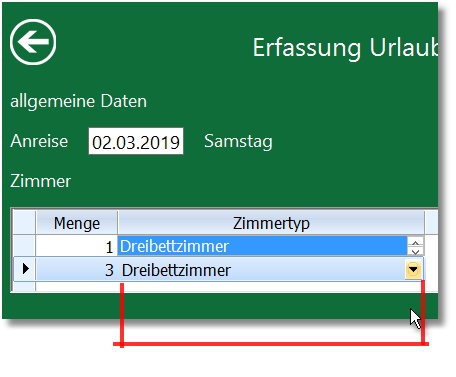
is there a way to open die combobox with larger high to show more items.
Thank you in advance
Otto
Sorry.
Dear Mr. Rao,
is it possible to define Listbox object for editing as a member of the parent window of xBrowse and set height.
Thank you in advance
Otto
Suggest you create a dialog with listbox and trigger it with EDIT_BUTTON
I will soon post a small sample
#include "fivewin.ch"

function Main()
   local oDlg, oBrw
   LOCAL aPlatzhalter := {}

   aadd(aPlatzhalter ,{"Name","[NAME]"} )
   aadd(aPlatzhalter ,{"Vorname","[VORNAME]"} )
   aadd(aPlatzhalter ,{"Ort","[ORT]"} )

   DEFINE DIALOG oDlg ;
      FROM 10, 10 to 500,600;
      SIZE 780, 400 ;
      PIXEL                                     //TRUEPIXEL

   @ 20,20 ;
      XBROWSE oBrw ;
      OF oDlg ;
      PIXEL ;
      SIZE -20, -20 ;
      DATASOURCE aPlatzhalter ;
      HEADERS "Beschreibung", "Platzhalter" ;
      COLSIZES 100,200 ;
      AUTOCOLS ;
      CELL ;
      LINES ;
      NOBORDER

   WITH OBJECT oBrw:aCols[ 2 ]
   :nEditType     := EDIT_BUTTON
   :AddBitmap( "OPEN" )
   :nBtnBmp       := 1
   :bEditBlock    := { || showCombo( oBrw, oDlg ) }
END

WITH OBJECT oBrw
   :nRowHeight          := 60
   :CreateFromCode()
END

ACTIVATE DIALOG oDlg CENTERED

return nil
//----------------------------------------------------------------------------//

function showCombo( oBrw ,oDlgParent)

   local oDlg, cCombo := "2"
   local aItems := { "1", "2", "3" }
   local nRow := 0
   local aRect    := GetClientRect( oDlgParent:hWnd )
   local aPoint := {}
   local nCol := 100
   *----------------------------------------------------------
   xbrowse( oDlgParent )
   nRow := ( oBrw:nRowSel * oBrw:nRowHeight ) + oBrw:HeaderHeight( .t. ) - 1
   aPoint      := ClientToClient( oDlgParent:hWnd, oBrw:hWnd, { nRow, nCol } )
   xbrowse( aPoint )
   nRow := ( oBrw:nRowSel * oBrw:nRowHeight ) + oBrw:HeaderHeight( .t. ) - 1
   DEFINE DIALOG oDlg ;
      TITLE "Test" + str(nRow) ;
      FROM nRow, 300 ;
      TO nRow + 100, 400 + 6 ;
      PIXEL ;
      STYLE nOr( DS_MODALFRAME, WS_POPUP ) ;
      OF oDlgParent

   @ 2, 2 COMBOBOX cCombo ITEMS aItems SIZE 200, 100

   ACTIVATE DIALOG oDlg

return nil
*----------------------------------------------------------

static function ClientToClient( hFrom, hDest, aPoint, lInWnd )

   aPoint   := Client2Screen( hFrom, aPoint )
   lInWnd   := ( WindowFromPoint( aPoint[ 2 ], aPoint[ 1 ] ) == hDest )
   aPoint   := Screen2Client( hDest, aPoint )

return aPoint

//----------------------------------------------------------------------------//

static function Screen2Client( hWnd, aPoint )

   aPoint := ScreenToClient( hWnd, aPoint )
   if aPoint[ 1 ] > 0x8000
      aPoint[ 1 ] -= 0xFFFF
   endif
   if aPoint[ 2 ] > 0x8000
      aPoint[ 2 ] -= 0xFFFF
   endif

return aPoint

//----------------------------------------------------------------------------//

static function Client2Screen( hWnd, aPoint )

   aPoint   := ClientToScreen( hWnd, aPoint )
   if aPoint[ 1 ] > 0x8000
      aPoint[ 1 ] -= 0xFFFF
   endif
   if aPoint[ 2 ] > 0x8000
      aPoint[ 2 ] -= 0xFFFF
   endif

return aPoint

//----------------------------------------------------------------------------//#include "fivewin.ch"
function Main()
local oDlg, oBrw, oFont
local aData := Array( 12 )
AEval( aData, { |u,i| aData[ i ] := { i, Str( i, 2 ), NTOCMONTH( i ) } } )
DEFINE FONT oFont NAME "TAHOMA" SIZE 0,-16
DEFINE DIALOG oDlg SIZE 500,250 PIXEL TRUEPIXEL FONT oFont
@ 40,20 XBROWSE oBrw SIZE -20,-20 PIXEL OF oDlg DATASOURCE aData ;
AUTOCOLS ;
CELL LINES NOBORDER
WITH OBJECT oBrw
WITH OBJECT :aCols[ 3 ]
:nEditType := EDIT_BUTTON
:bEditBlock := { | nRow, nCol, oCol, nKey | MyBtnDialog( nRow, nCol, oCol, nKey ) }
END
:CreateFromCode()
END
ACTIVATE DIALOG oDlg CENTERED
RELEASE FONT oFont
return nil
function MyBtnDialog( nRow, nCol, oCol, nKey )
local cRet
local oDlg, oLbx, oFont, aItems := Array( 12 )
local cItem
AEval( aItems, { |u,i| aItems[ i ] := NTOCMONTH( i ) } )
cItem := oCol:Value
DEFINE FONT oFont NAME "VERDANA" SIZE 0,-16
DEFINE DIALOG oDlg SIZE 150,220 PIXEL TRUEPIXEL FONT oFont
@ 0,0 LISTBOX oLbx VAR cItem ITEMS aItems ;
SIZE 150,185 PIXEL OF oDlg
@ 190,10 BUTTON "OK" SIZE 40,20 PIXEL OF oDlg ACTION ( cRet := cItem, oDlg:End() )
@ 190,60 BUTTON "CANCEL" SIZE 80,20 PIXEL OF oDlg ACTION oDlg:End()
ACTIVATE DIALOG oDlg ;
ON INIT oCol:AnchorToCell( oDlg )
RELEASE FONT oFont
return cRet
Dear Mr. Rao,
thank you I will try. But would you be so kind to tell me what I am missing with oDlgParent:nTop is 0 if I use ACTIVATE DIALOG oDlg CENTERED and why it does not change if I move the DIALOG.
Thank you in advance
Otto
Otto wrote:Dear Mr. Rao,
thank you I will try. But would you be so kind to tell me what I am missing with oDlgParent:nTop is 0 if I use ACTIVATE DIALOG oDlg CENTERED and why it does not change if I move the DIALOG.
Thank you in advance
Otto
function showCombo( oBrw ,oDlgParent)

   local oDlg, cCombo := "2"
   local aItems := { "1", "2", "3" }
   local nRow := 0
//   local aRect    := GetClientRect( oDlgParent:hWnd )
   local aPoint := {}
//   local nCol := 100
   *----------------------------------------------------------
/*
   xbrowse( oDlgParent )
   nRow := ( oBrw:nRowSel * oBrw:nRowHeight ) + oBrw:HeaderHeight( .t. ) - 1
   aPoint      := ClientToClient( oDlgParent:hWnd, oBrw:hWnd, { nRow, nCol } )
   xbrowse( aPoint )
*/
   nRow := ( oBrw:nRowSel * oBrw:nRowHeight ) + oBrw:HeaderHeight( .t. ) - 1

   aPoint := ClientToScreen( oBrw:hWnd, { nRow, oBrw:SelectedCol():nDisplayCol } )

/*
   DEFINE DIALOG oDlg ;
      TITLE "Test" + str(nRow) ;
      FROM nRow, 300 ;
      TO nRow + 100, 400 + 6 ;
      PIXEL ;
      STYLE nOr( DS_MODALFRAME, WS_POPUP ) ;
      OF oDlgParent
*/
   DEFINE DIALOG oDlg TITLE "Test" SIZE 220,100 PIXEL TRUEPIXEL

   @ 2, 2 COMBOBOX cCombo ITEMS aItems SIZE 200, 100

   ACTIVATE DIALOG oDlg ON INIT oDlg:Move( aPoint[ 1 ], aPoint[ 2 ] )

return nilDear Mr. Rao,
thank you.
I mean why is ? oDlgParent:nTop if I send the DIALOG oDlg to the function always 0.
Best regards
Otto
Otto wrote:Dear Mr. Rao,
thank you.
I mean why is ? oDlgParent:nTop if I send the DIALOG oDlg to the function always 0.
Best regards
Otto
