FiveTech Support Forums

FiveWin / Harbour / xBase community
Board index FiveWin for Harbour/xHarbour Problem with say...Border
Posts: 7317
Joined: Thu Oct 18, 2012 07:17 PM
Problem with say...Border
Posted: Thu Mar 21, 2019 05:52 PM


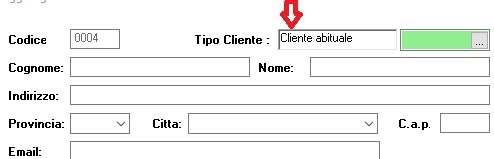
How I can to erase 3d border and have a Border no 3d ? I wish a colored border fine. I remember there is a new command of Cristobal but I not found it

@ 12, 98 SAY "Tipo Cliente :" OF oDlg SIZE 60, 8 PIXEL FONT oBold
@ 10, 140 SAY oTipoSay Prompt oRec:tipocli OF oDlg SIZE 60, 11 PIXEL FONT oFont border
Since from 1991/1992 ( fw for clipper Rel. 14.4 - Momos)

I use : FiveWin for Harbour March-April 2024 - Harbour 3.2.0dev (harbour_bcc770_32_20240309) - Bcc7.70 - xMate ver. 1.15.3 - PellesC - mail: silvio[dot]falconi[at]gmail[dot]com
Posts: 6755
Joined: Wed Feb 15, 2012 08:25 PM
Re: Problem with say...Border
Posted: Thu Mar 21, 2019 06:45 PM
Cristobal Navarro

Hay dos tipos de personas: las que te hacen perder el tiempo y las que te hacen perder la noción del tiempo

El secreto de la felicidad no está en hacer lo que te gusta, sino en que te guste lo que haces
Posts: 7317
Joined: Thu Oct 18, 2012 07:17 PM
Re: Problem with say...Border
Posted: Fri Mar 22, 2019 07:56 AM

yes... but why I not have on include ?

Since from 1991/1992 ( fw for clipper Rel. 14.4 - Momos)

I use : FiveWin for Harbour March-April 2024 - Harbour 3.2.0dev (harbour_bcc770_32_20240309) - Bcc7.70 - xMate ver. 1.15.3 - PellesC - mail: silvio[dot]falconi[at]gmail[dot]com
Posts: 7317
Joined: Thu Oct 18, 2012 07:17 PM
Re: Problem with say...Border
Posted: Fri Mar 22, 2019 08:04 AM

but it is for get
I have a say

Since from 1991/1992 ( fw for clipper Rel. 14.4 - Momos)

I use : FiveWin for Harbour March-April 2024 - Harbour 3.2.0dev (harbour_bcc770_32_20240309) - Bcc7.70 - xMate ver. 1.15.3 - PellesC - mail: silvio[dot]falconi[at]gmail[dot]com
Posts: 4043
Joined: Wed Dec 19, 2007 06:40 PM
Re: Problem with say...Border
Posted: Fri Mar 22, 2019 09:35 AM
Silvio,

You can draw boxes ( borders ) around any object, any position and color like :

...
...
// RoundBox( <hDC>, <nTop>, <nLeft>, <nBottom>, <nRight>, <nEllipseWidth>, <nEllipseHeight> )

// multiple objects :

oDlg:bPainted := < |hDC|
( RoundBox( hDC, 580, 8, 845, 232, 5, 5, 255 ), ; // can be Your SAY-position
RoundBox( hDC, 578, 238, 845, 292, 5, 5, 255 ), ;
RoundBox( hDC, 580, 298, 760, 358, 5, 5, 255 ), ;
RoundBox( hDC, 580, 365, 846, 456, 5, 5, 255 ), ;
RoundBox( hDC, 580, 462, 845, 530, 5, 5, 255 ) )
RETURN NIL

// or for a single object :

oDlg:bPainted := < |hDC|
RoundBox( hDC, 580, 8, 845, 232, 5, 5, 255 )
RETURN NIL

ACTIVATE DIALOG oDlg CENTER

RETURN( NIL)

A test with a border around 2 says ( group-border ) :


@ 230, 675 SAY "Age to = 0" SIZE 150, 22 PIXEL
@ 250, 675 SAY "shows only Age from" SIZE 150, 22 PIXEL

// RoundBox( <hDC>, <nTop>, <nLeft>, <nBottom>, <nRight>, <nEllipseWidth>, <nEllipseHeight> )
oDlg2:bPainted := < |hDC|
RoundBox( hDC, 670, 228, 830, 272, 5, 5, 255 )
RETURN NIL
>


-------------------
-------------------

without a needed pensize You can use the solution from above

because RoundBox doesn't support the pensize :-) , I'm using my own function
a all in one solution for < fillrect and border > :

DRAWBORDER ( hDC, nTop, nLeft, nBottom, nRight, nWidth, nHeight, nPen, nBGColor )
if nPen = NIL, fillrect is used.

@ 230, 675 SAY oSay[1] PROMPT "Age to = 0" SIZE 150, 22 PIXEL COLOR CLR_BLACK
@ 250, 675 SAY oSay[2] PROMPT "shows only Age from" SIZE 150, 22 PIXEL COLOR CLR_BLACK

the calculated border using my new function :

oDlg2:bPainted := < |hDC|
DRAWBORDER( hDC, oSay[1]:nTop -2, oSay[1]:nLeft -2 -5, ; // 2 = space, 5 = pensize
oSay[2]:nBottom +2, oSay[2]:nRight +2, 10, 10, 5, CLR_HBLUE )
RETURN NIL
>


regards
Uwe :-)
Since 1995 ( the first release of FW 1.9 )

i work with FW.

If you have any questions about special functions, maybe i can help.
Posts: 4043
Joined: Wed Dec 19, 2007 06:40 PM
Re: Problem with say...Border
Posted: Fri Mar 22, 2019 09:43 PM
Silvio,

Multiple, seperated says and calculated border-size
for more says just add another section for the say-object ( don't care about the size )
This solution can be used for any objects like radios, gets ....

@ 225, 675 SAY oSay[1] PROMPT "Age to = 0" SIZE 80, 22 PIXEL COLOR CLR_BLACK
@ 250, 675 SAY oSay[2] PROMPT "shows only Age from" SIZE 150, 22 PIXEL COLOR CLR_BLACK

oDlg:bPainted := < |hDC|
( RoundBox( hDC, oSay[1]:nLeft -2, oSay[1]:nTop, ;
oSay[1]:nRight +2, oSay[1]:nBottom, , , 255 ), ;
RoundBox( hDC, oSay[2]:nLeft -2, oSay[2]:nTop, ;
oSay[2]:nRight +2, oSay[2]:nBottom, , , 255 ) )
RETURN NIL
>


regards
Uwe :-)
Since 1995 ( the first release of FW 1.9 )

i work with FW.

If you have any questions about special functions, maybe i can help.

Continue the discussion