FiveTech Support Forums

FiveWin / Harbour / xBase community
Board index FiveWin for Harbour/xHarbour Ribbonbar on w7 and 10
Posts: 7317
Joined: Thu Oct 18, 2012 07:17 PM
Ribbonbar on w7 and 10
Posted: Tue Apr 02, 2019 08:39 AM
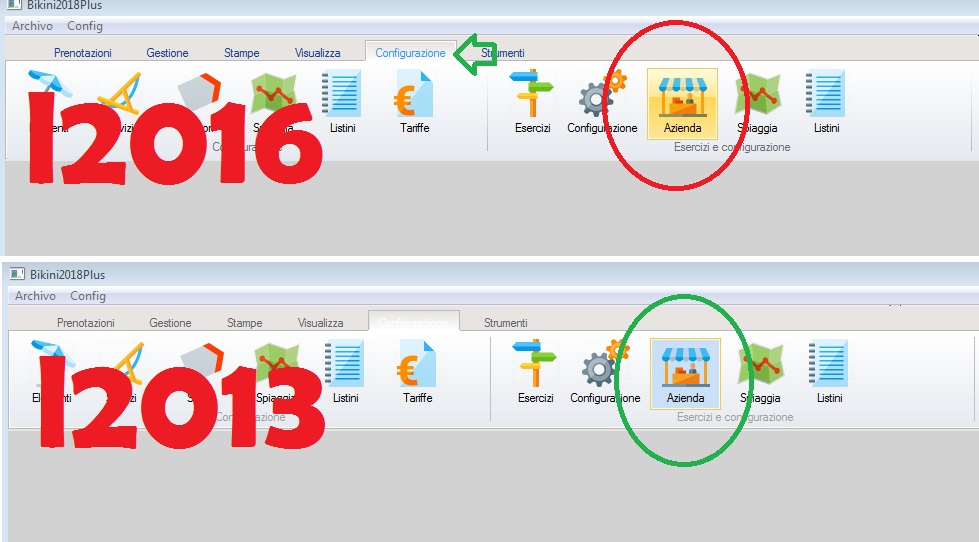
I have problem to show ribbonbar on Win 7 and 10 because the colors are not the same of winword office


I wish change the color of button and the tab
when I select a tab not see clear the text on the tab

I'd like have this style


I was hoping that the changes made by Navarro were included in the latest version of fwh but are not included
Since from 1991/1992 ( fw for clipper Rel. 14.4 - Momos)

I use : FiveWin for Harbour March-April 2024 - Harbour 3.2.0dev (harbour_bcc770_32_20240309) - Bcc7.70 - xMate ver. 1.15.3 - PellesC - mail: silvio[dot]falconi[at]gmail[dot]com
Posts: 346
Joined: Mon Oct 05, 2009 03:35 PM
Re: Ribbonbar on w7 and 10
Posted: Wed Apr 03, 2019 11:22 AM
yo tengo mi estilo personal, modifica la clase tribbonbar, tribbonbutton, creando tu estilo propio y le colocas las definiciones de colores que necesites, las clases modificadas las incluyes como un prg mas a tu proyecto y tienes lo que necesitas

yo creé un estilo nuevo lWin10 en el include ribbon.ch

Code (fw): Select all Collapse
#xcommand DEFINE RIBBONBAR [ <oRBar> ] ;
                           [ <of:OF, WINDOW> <oWnd> ] ;
                           [ <prm: PROMPT, PROMPTS, ITEMS> <cPrompt,...> ] ;
                           [ <act: ACTION, EXECUTE, ON CHANGE> <uAction> ] ;
                           [ OPTION <nOption> ] ;
                           [ HEIGHT <nHeight> ] ;
                           [ TOPMARGIN <nTopMargin> ];
                           [ COLOR <nClrPane> ] ;
                           [ <ColorBox: COLORBOX> <nClrBoxOut>,<nClrBoxIn> ] ;
                           [ <ColorSel: COLORSEL> <nClrBoxSelOut>,<nClrBoxSelIn> ] ;
                           [ <l2010: 2010, _2010> ];
                           [ <l2013: 2013, _2013> ];
                           [ <lWIN10: WIN10, _WIN10> ];    <---
                           [ STARTBTN <nStart> ];


toma como referencia en la clase el método l2010 o el l2013 y modificas a tu gusto los colores

ejemplo:
Code (fw): Select all Collapse
   ELSEIF l2013

           nTopMargin    := 25
           nClrPaneRB    := RGB( 255, 255, 255 )
           nClrBoxOut    := RGB( 192, 192, 192 )
           nClrBoxIn     := RGB( 255, 255, 255 )
           nClrBoxSelOut := RGB( 255, 255, 255 )
           nClrBoxSelIn  := RGB( 255, 255, 255 )
           aGrad         := { { 1, RGB( 255, 255, 255 ), RGB( 255, 255, 255 ) } }
           aGradFld      := {| nOpt | if( nOpt == ::nStart, { { 1, RGB( 255, 255, 255 ), RGB( 255, 255, 255 ) } },;
                                                { { 1, RGB( 43, 87, 154 ), RGB( 43, 87, 154 ) } } ) }
           aGradHigh     := { { 1, RGB( 255, 255, 255 ), RGB( 255, 255, 255 ) } }
           aGradOver     := { { 1, RGB( 255, 255, 255 ), RGB( 255, 255, 255 ) } }

    ELSEIF lWin10

           nTopMargin    := 25
           nClrPaneRB    := RGB(   0,  68, 118 )   // Panel de Fondo Trasero
           nClrBoxOut    := RGB(   0, 101, 184 )
           nClrBoxIn     := RGB(   0,  60, 108 )
           nClrBoxSelOut := RGB(   0, 101, 184 )
           nClrBoxSelIn  := RGB(   0,  88, 148 )
           aGrad         := { { 1, RGB(   0,  60, 108 ), RGB(   0,  46,  83 ) } }                                     // PANEL FRONTAL
           aGradFld      := {| nOpt | if( nOpt == ::nStart, { { 1, RGB(   0,  72, 161 ), RGB(   0, 146, 229 ) } },;
                                                { { 1, RGB(   0,  38,  83 ), RGB(   0,  60, 108 ) } } ) }
           aGradHigh     := { { 1, RGB(   0,  97, 145 ), RGB(   0, 111, 165 ) } }
           aGradOver     := { { 1, RGB(   0,  78, 138 ), RGB(   0,  64, 123 ) } }


está en el método new, de la ribbonbar y en la ribbonbutton

resultado como ejemplo de mi estilo propio

SkyPe: armando.lagunas@hotmail.com

Mail: armando.lagunas@gmail.com
Posts: 7317
Joined: Thu Oct 18, 2012 07:17 PM
Re: Ribbonbar on w7 and 10
Posted: Wed Apr 03, 2019 04:08 PM

Cristobal made a new release of tribbon

DEFINE RIBBONBAR [ <oRBar> ] ;
[ <of:OF, WINDOW> <oWnd> ] ;
[ <prm: PROMPT, PROMPTS, ITEMS> <cPrompt,...> ] ;
[ <act: ACTION, EXECUTE, ON CHANGE> <uAction> ] ;
[ OPTION <nOption> ] ;
[ HEIGHT <nHeight> ] ;
[ TOPMARGIN <nTopMargin> ];
[ COLOR <nClrPane> ] ;
[ <ColorBox: COLORBOX> <nClrBoxOut>,<nClrBoxIn> ] ;
[ <ColorSel: COLORSEL> <nClrBoxSelOut>,<nClrBoxSelIn> ] ;
[ <l2010: 2010, _2010> ];
[ <l2013: 2013, _2013> ];
[ STARTBTN <nStart> ];
[ <l2015: 2015, _2015> ];
[ <l2016: 2016, _2016> ];

but this version there is not on the last package

My problem are RbBtn colors I wish have the same colors when we use buttons on buttonbar 2015

Since from 1991/1992 ( fw for clipper Rel. 14.4 - Momos)

I use : FiveWin for Harbour March-April 2024 - Harbour 3.2.0dev (harbour_bcc770_32_20240309) - Bcc7.70 - xMate ver. 1.15.3 - PellesC - mail: silvio[dot]falconi[at]gmail[dot]com
Posts: 7317
Joined: Thu Oct 18, 2012 07:17 PM
Re: Ribbonbar on w7 and 10
Posted: Thu Apr 04, 2019 08:39 AM
Sorry ,
I made a n mistake

on last releae there is the option l2016

Using the ribbon class I found an error

I explain you I set

::oRebar := TRibbonBar():New(::oWndMain, aRbPrompts,,nOption,,nHeightRib, 26, , ,,,,,,,,.t.,)
::=.t.
::nRoundBox := 0

I see right the color of text of tabs but the grad of the RBBTN must be as when the ribbonbar is l2013

Perhaps there is ar error on TRBBTN class

When I use l2016 I see the color of rbbtn like 2007

Since from 1991/1992 ( fw for clipper Rel. 14.4 - Momos)

I use : FiveWin for Harbour March-April 2024 - Harbour 3.2.0dev (harbour_bcc770_32_20240309) - Bcc7.70 - xMate ver. 1.15.3 - PellesC - mail: silvio[dot]falconi[at]gmail[dot]com
Posts: 7317
Joined: Thu Oct 18, 2012 07:17 PM
Re: Ribbonbar on w7 and 10
Posted: Thu Apr 04, 2019 08:52 AM
I found the error

Create a rIbbonbar with L2016 colors

::oRebar := TRibbonBar():New(::oWndMain, aRbPrompts,,nOption,,nHeightRib, 26, , ,,,,,,,,.t.,)
::=.t.


If I create a GROUP

ADD GROUP oGr1 RIBBON ::oRebar TO OPTION 2 WIDTH 480 PROMPT "Gestione"

to have the colors blue for the rbbtn as l2013 I must set

oGr1:=.t.

and then run ok for the colors on Windows 2010


only the border of the rbbtn is yellow and it must be white or clear gray... SAMPLE oBtn[10]:nClrBoxOut := CLR_HGRAY
Since from 1991/1992 ( fw for clipper Rel. 14.4 - Momos)

I use : FiveWin for Harbour March-April 2024 - Harbour 3.2.0dev (harbour_bcc770_32_20240309) - Bcc7.70 - xMate ver. 1.15.3 - PellesC - mail: silvio[dot]falconi[at]gmail[dot]com

Continue the discussion