FiveTech Support Forums

FiveWin / Harbour / xBase community
Board index FiveWin for Harbour/xHarbour How to use GDIPLUS -> NewGradientBrush ?
Posts: 4043
Joined: Wed Dec 19, 2007 06:40 PM
How to use GDIPLUS -> NewGradientBrush ?
Posted: Sat Apr 06, 2019 09:12 AM
Hello,

I wanted to add a gradient-sample using GDIPLUS
but no gradient is painted.

the defined brush

// NewGradientBrush( nTop, nLeft, nWidth, nHeight, nType,;
// nTrans1, nRed1, nGreen1, nBlue1,;
// nTrans2, nRed2, nGreen2, nBlue2 ) CLASS Brush
// nType : 1_> horizontal 2-> vertical 3->diagonal derecha 4-> diagonal izq
LOCAL oBrush := Brush():NewGradientBrush( 0, 0, 200, 200, 1,; // just the area / size :-)
255, 131, 193, 193,;
255, 255, 255, 255 )


tested as well the same size -> 250, 300, 200, 200 from the defined area.

solid brush is working !

oBrush := Brush():NewSolidBrush( 255, 255, 128, 0 ) // Orange

and the defined area :-)

oGraphics := Graphics():New( oWnd:hDC )
oPath := Path():new()
oPath:AddRoundRect( 250, 300, 200, 200, 50 )
oGraphics:FillPath( oBrush, oPath)
oGraphics:Destroy()


another test :-)

oGraphics := Graphics():New( oWnd:hDC )
oGraphics:DrawRect( , oBrush, 250, 50, 200, 200 )
oGraphics:Destroy()


any idea ? ( maybe a working example )
I found nothing about it in the forum or sample-directory

regards
Uwe :-)
Since 1995 ( the first release of FW 1.9 )

i work with FW.

If you have any questions about special functions, maybe i can help.
Posts: 6755
Joined: Wed Feb 15, 2012 08:25 PM
Re: How to use GDIPLUS -> NewGradientBrush ?
Posted: Sat Apr 06, 2019 10:48 AM
This is a bug in class, please try and tell me
Now
Code (fw): Select all Collapse
METHOD NewGradientBrush( nTop, nLeft, nWidth, nHeight, nType,;
                         nTrans1, nRed1, nGreen1, nBlue1,;
                         nTrans2, nRed2, nGreen2, nBlue2 ) CLASS Brush
   // nType : 0-> horizontal 1-> vertical 2->diagonal derecha  3-> diagonal izq.


   ::hBrush = GdiPlusNewGradientBrush( nTop, nLeft, nWidth, nHeight, nType,;
                         nTrans1, nRed1, nGreen1, nBlue1,;
                         nTrans2, nRed2, nGreen2, nBlue2    )

return Self


Correct
Code (fw): Select all Collapse
METHOD NewGradientBrush( nTop, nLeft, nWidth, nHeight, nType,;
                         nTrans1, nRed1, nGreen1, nBlue1,;
                         nTrans2, nRed2, nGreen2, nBlue2 ) CLASS Brush
   // nType : 0-> horizontal 1-> vertical 2->diagonal derecha  3-> diagonal izq.


   ::hBrush = GdiPlusNewGradientBrush( nTop, nLeft, nWidth, nHeight, ;
                         nTrans1, nRed1, nGreen1, nBlue1,;
                         nTrans2, nRed2, nGreen2, nBlue2, nType    )   // Look parameter nType

return Self
Cristobal Navarro

Hay dos tipos de personas: las que te hacen perder el tiempo y las que te hacen perder la noción del tiempo

El secreto de la felicidad no está en hacer lo que te gusta, sino en que te guste lo que haces
Posts: 4043
Joined: Wed Dec 19, 2007 06:40 PM
Re: How to use GDIPLUS -> NewGradientBrush ?
Posted: Sat Apr 06, 2019 11:43 AM
It is working now but the gradient-position is still missing

aGrad := { { nGradpos, nColorF, nColorB }, { nGradpos, nColorB, nColorF } } // 0.5 = centered

// position = 0 :-)
::hBrush = GdiPlusNewGradientBrush( nTop, nLeft, nWidth, nHeight, ;
nTrans1, nRed1, nGreen1, nBlue1,;
nTrans2, nRed2, nGreen2, nBlue2, nType )


regards
Uwe :-)
Since 1995 ( the first release of FW 1.9 )

i work with FW.

If you have any questions about special functions, maybe i can help.
Posts: 4043
Joined: Wed Dec 19, 2007 06:40 PM
Re: How to use GDIPLUS -> NewGradientBrush ?
Posted: Sun Apr 07, 2019 01:02 PM
We can define brushes for color and gradient

CLASS Brush
DATA hBrush

METHOD NewSolidBrush
METHOD NewGradientBrush


how to define something like

METHOD NewImageBrush :-)

------------


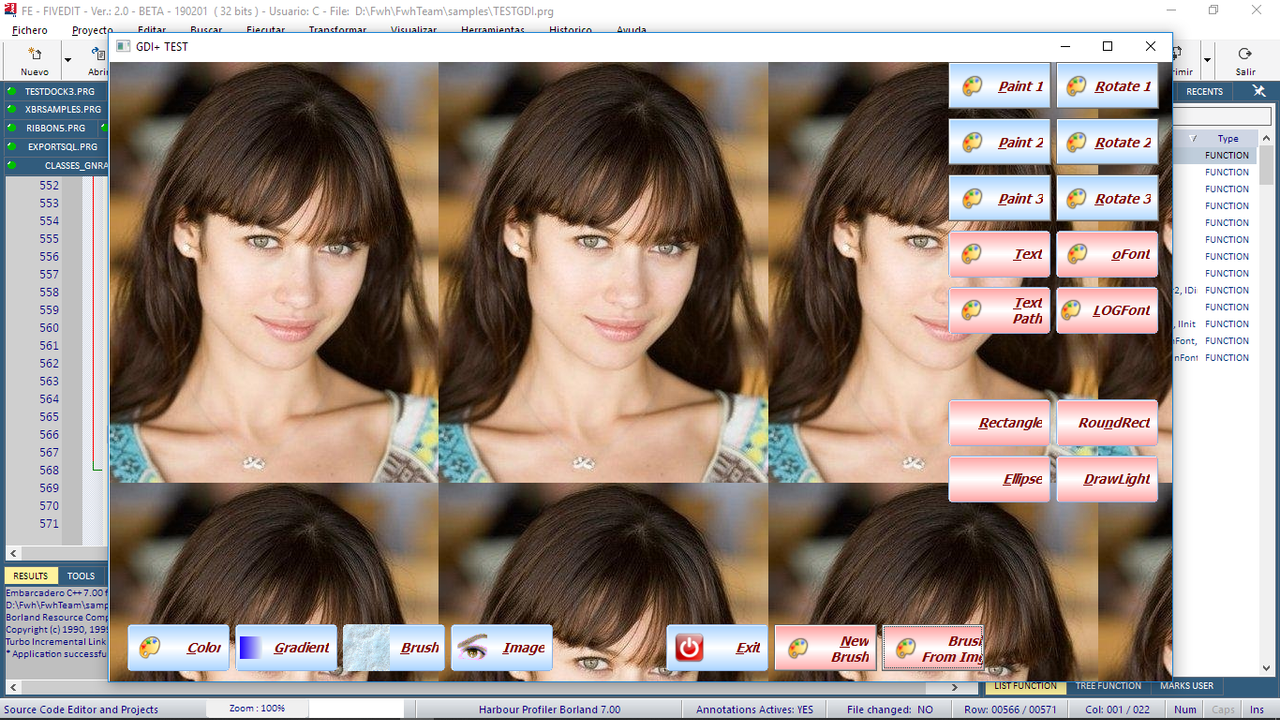
The Bmp-brush is shown as a resized image not tiled
Image-test ( I noticed a little problem with top / left )

LOCAL oImage1 := GDIBmp():new( c_path1 + "Blustone.bmp" )
LOCAL oGraphics1 := Graphics():New( oWnd:hDC )
LOCAL oImage2 := GDIBmp():new( c_path1 + "Marble.bmp" )
LOCAL oGraphics2 := Graphics():New( oWnd:hDC )
LOCAL oGraphics3 := Graphics():New( oWnd:hDC )
LOCAL oGraphics4 := Graphics():New( oWnd:hDC )
LOCAL aRect := GETCLIENTRECT( oWnd:hWnd ), oPen1, oPen2

oGraphics1:DrawImage( oImage1, aRect[1] + 150, aRect[2] + 250, 200, 200 )
oGraphics1:destroy()
oPen1 := Pen():New( 255 , 255, 0 , 0 , .T.)
oPen1:Setsize(10)
oGraphics3:DrawRoundRect( oPen1, , aRect[2] + 250, aRect[1] + 150, 200, 200, 50 )


regards
Uwe :-)
Since 1995 ( the first release of FW 1.9 )

i work with FW.

If you have any questions about special functions, maybe i can help.
Posts: 6755
Joined: Wed Feb 15, 2012 08:25 PM
Re: How to use GDIPLUS -> NewGradientBrush ?
Posted: Mon Apr 08, 2019 10:00 AM
Uwe
At moment
Add this functions to gdiplus.cpp ( .\source\winapi\ )
Try and tell me
Code (fw): Select all Collapse
void TestWrapMode( HDC hdc, LPWSTR cfile, float nLeft, float nTop, float nWidth, float nHeight, int ntype )
{
   Graphics graphics( hdc );

   Image image( ( LPWSTR ) cfile ) ;
   TextureBrush Brush( &image ) //, Rect( 0, 0, image.GetWidth(), image.GetHeight() ) );
   if ( ntype == 0 )
        Brush.SetWrapMode( WrapModeTile ) ;
   if ( ntype == 1 )
        Brush.SetWrapMode( WrapModeTileFlipX ) ;
   if ( ntype == 2 )
        Brush.SetWrapMode( WrapModeTileFlipY ) ;
   if ( ntype == 3 )
        Brush.SetWrapMode( WrapModeTileFlipXY ) ;
   if ( ntype == 4 )
        Brush.SetWrapMode( WrapModeClamp ) ;

   //Pen blackPen(Color(255, 0, 0, 0));
   graphics.FillRectangle( &Brush, Rect( nTop, nLeft, nWidth, nHeight ) );
    //graphics.DrawRectangle(&blackPen, Rect( nTop-1, nLeft-1, nWidth+1, nHeight+1 ));
}

//----------------------------------------------------------------------------//

HB_FUNC( TESTWRAPMODE )
{
   TestWrapMode( ( HDC ) hb_parnl( 1 ), ( LPWSTR ) hb_parc( 2 ), hb_parnd( 3 ), hb_parnd( 4 ), hb_parnd( 5 ), hb_parnd( 6 ), hb_parni( 7 ) ) ;
}
//----------------------------------------------------------------------------//


For use this function

Code (fw): Select all Collapse
//----------------------------------------------------------------------------//

Function DrawBrushImage( oWnd, cFile )

   local hDC       := oWnd:GetDC()

   TestWrapMode( hDC, AnsiToWide( "olga1.jpg" ), 1, 1, oWnd:nWidth - 1, oWnd:nHeight - 1, 0 )
   
   oWnd:ReleaseDC() 

Return nil

//----------------------------------------------------------------------------//


Cristobal Navarro

Hay dos tipos de personas: las que te hacen perder el tiempo y las que te hacen perder la noción del tiempo

El secreto de la felicidad no está en hacer lo que te gusta, sino en que te guste lo que haces
Posts: 4043
Joined: Wed Dec 19, 2007 06:40 PM
Re: How to use GDIPLUS -> NewGradientBrush ?
Posted: Mon Apr 08, 2019 11:19 AM
Cristobal,

is there a modified link sample to include gdiplus.ccp ?
for any reason my changed of the rmk-file don't work

My OLD original rmk-file

Code (fw): Select all Collapse
#Borland make sample, (c) FiveTech Software 2005

HBDIR=i:\xharbour
BCDIR=i:\bcc63
#BCDIR=i:\bcc65
#BCDIR=i:\bcc82
FWDIR=i:\fwh

.path.OBJ = .\obj
.path.PRG = .\
.path.CH  = $(FWDIR)\include;$(HBDIR)\include
.path.C   = .\
.path.rc  = .\

PRG = \
MAIN.PRG \
TGDIPLUS.PRG

# C =          \
# two.C                

PROJECT    : MAIN.exe

MAIN.exe  : $(PRG:.PRG=.OBJ)   $(C:.C=.OBJ) MAIN.res
    echo off
    echo $(BCDIR)\bin\c0w32.obj + > b32.bc

# OBJ-Liste
# -------------
  echo obj\MAIN.obj \
       obj\TGDIPLUS.obj, + >> b32.bc 
   
  echo MAIN.exe, + >> b32.bc
  echo MAIN.map, + >> b32.bc

# Fivewin Lib`s für xHARBOUR
# --------------------------------------

  echo $(FWDIR)\lib\Fivehx.lib + >> b32.bc
  echo $(FWDIR)\lib\FiveHC.lib + >> b32.bc
   
# xHARBOUR-Lib`s
# -----------------------

  echo $(HBDIR)\lib\rtl.lib + >> b32.bc
  echo $(HBDIR)\lib\vm.lib + >> b32.bc
  echo $(HBDIR)\lib\GTcgi.lib + >> b32.bc
  echo $(HBDIR)\lib\GTgui.lib + >> b32.bc
  echo $(HBDIR)\lib\GTpca.lib + >> b32.bc
  echo $(HBDIR)\lib\GTstd.lib + >> b32.bc
  echo $(HBDIR)\lib\GTwin.lib + >> b32.bc
  echo $(HBDIR)\lib\GTwvt.lib + >> b32.bc
  echo $(HBDIR)\lib\gtgui.lib + >> b32.bc
  echo $(HBDIR)\lib\lang.lib + >> b32.bc
  echo $(HBDIR)\lib\macro.lib + >> b32.bc
  echo $(HBDIR)\lib\rdd.lib + >> b32.bc
  echo $(HBDIR)\lib\dbfntx.lib + >> b32.bc
  echo $(HBDIR)\lib\dbfcdx.lib + >> b32.bc
  echo $(HBDIR)\lib\dbffpt.lib + >> b32.bc
  echo $(HBDIR)\lib\hbsix.lib + >> b32.bc
  echo $(HBDIR)\lib\debug.lib + >> b32.bc
  echo $(HBDIR)\lib\common.lib + >> b32.bc
  echo $(HBDIR)\lib\pp.lib + >> b32.bc
  echo $(HBDIR)\lib\codepage.lib + >> b32.bc
  echo $(HBDIR)\lib\pcrepos.lib + >> b32.bc
  echo $(HBDIR)\lib\ct.lib + >> b32.bc
  echo $(HBDIR)\lib\hbzip.lib + >> b32.bc
  echo $(HBDIR)\lib\zlib.lib + >> b32.bc
  echo $(HBDIR)\lib\libmisc.lib + >> b32.bc
  echo $(HBDIR)\lib\tip.lib + >> b32.bc
  echo $(HBDIR)\lib\png.lib + >> b32.bc

# Uncomment these two MAIN to use Advantage RDD
# echo $(HBDIR)\lib\rddads.lib + >> b32.bc
# echo $(HBDIR)\lib\Ace32.lib + >> b32.bc

  echo $(BCDIR)\lib\cw32.lib + >> b32.bc
  echo $(BCDIR)\lib\import32.lib + >> b32.bc
  echo $(BCDIR)\lib\uuid.lib + >> b32.bc
  echo $(BCDIR)\lib\psdk\odbc32.lib + >> b32.bc
  echo $(BCDIR)\lib\psdk\rasapi32.lib + >> b32.bc
  echo $(BCDIR)\lib\psdk\nddeapi.lib + >> b32.bc
  echo $(BCDIR)\lib\psdk\msimg32.lib + >> b32.bc
  echo $(BCDIR)\lib\psdk\iphlpapi.lib + >> b32.bc
  echo $(BCDIR)\lib\psdk\gdiplus.lib + >> b32.bc
  echo $(BCDIR)\lib\psdk\psapi.lib + >> b32.bc 
  echo $(BCDIR)\lib\psdk\iphlpapi.lib + >> b32.bc
  echo $(BCDIR)\lib\psdk\shell32.lib, >> b32.bc

  IF EXIST MAIN.res echo MAIN.res >> b32.bc
     $(BCDIR)\bin\ilink32 -Gn -aa -Tpe -s -v @b32.bc
  #   $(BCDIR)\bin\ilink32 -Gn -aa -Tpe -s @b32.bc
  del b32.bc

.PRG.OBJ:
  $(HBDIR)\bin\harbour $< /N /W /Oobj\ /I$(FWDIR)\include;$(HBDIR)\include > clip.log
  $(BCDIR)\bin\bcc32 -c -tWM -I$(HBDIR)\include -oobj\$& obj\$&.c

.C.OBJ:
  echo -c -tWM -D__HARBOUR__ -DHB_API_MACROS > tmp
  echo -I$(HBDIR)\include;$(FWDIR)\include >> tmp
  $(BCDIR)\bin\bcc32 -oobj\$& @tmp $&.c
  del tmp

MAIN.res : MAIN.rc
  $(BCDIR)\bin\brc32.exe -r MAIN.rc


regards
Uwe :-)
Since 1995 ( the first release of FW 1.9 )

i work with FW.

If you have any questions about special functions, maybe i can help.
Posts: 1516
Joined: Thu May 27, 2010 02:06 PM
Re: How to use GDIPLUS -&gt; NewGradientBrush ?
Posted: Mon Apr 08, 2019 12:39 PM

This code , would serve you ?

HB_FUNC( GDIPLUSNEWTEXTUREBRUSH )
{
Bitmap * newImage = ( Bitmap * ) hb_parptr( 1 );
hb_retptr( new TextureBrush( newImage ) );
}

METHOD NewTextureBrush( oGdiBmp ) CLASS Brush
::hBrush = GdiPlusNewTextureBrush( oGdiBmp:hbmp )
return Self

Posts: 4043
Joined: Wed Dec 19, 2007 06:40 PM
Re: How to use GDIPLUS -&gt; NewGradientBrush ?
Posted: Mon Apr 08, 2019 01:39 PM
I added this solution to tgdiplus.prg for testing
but there are compilr-syntax-errors on

HB_FUNC( GDIPLUSNEWTEXTUREBRUSH )

regards
Uwe :-)
Since 1995 ( the first release of FW 1.9 )

i work with FW.

If you have any questions about special functions, maybe i can help.
Posts: 10733
Joined: Sun Nov 19, 2006 05:22 AM
Re: How to use GDIPLUS -&gt; NewGradientBrush ?
Posted: Mon Apr 08, 2019 03:10 PM

May I know what is it you want to achieve that is not possible now with the existing FWH builtin functions?

Regards


G. N. Rao.

Hyderabad, India
Posts: 1516
Joined: Thu May 27, 2010 02:06 PM
Re: How to use GDIPLUS -&gt; NewGradientBrush ?
Posted: Mon Apr 08, 2019 04:46 PM

HB_FUNC( GDIPLUSNEWTEXTUREBRUSH ) it has to be placed inside gdiplus.cpp file is cpp code .

Posts: 4043
Joined: Wed Dec 19, 2007 06:40 PM
Re: How to use GDIPLUS -&gt; NewGradientBrush ?
Posted: Tue Apr 09, 2019 09:22 AM
Mr. Rao,

May I know what is it you want to achieve that is not possible
now with the existing FWH builtin functions?


There was no GDIPLUS-TEXTUREBRUSH- and GRADIENT - solution included in TGDIPLUS.
I*ve been looking for it to complete my tests.

____________

Trying to compile < GDIPLUS.cpp > I got problems and couldn't test
the suggested different solutions.
Maybe it is possible to include it in my defined make-file from above ?
to test texture-brushes and rounded images.


that works !
oBrush := Brush():NewSolidBrush( 255, 255, 128, 0 ) // Orange

needed
obrush must be a GDI-texture- or imagebrush to fill a rounded area

oGraphics := Graphics():New( oWnd:hDC )
oPath:AddRoundRect( aRect[2] + 700, aRect[1] + 150, ; // must be defined < Left / Top > :-) normally Top / Left
oImage:GetWidth() * 0.5, oImage:GetHeight() * 0.5, 50 ) // resized to 50 %
oGraphics:FillPath( oBrush, oPath)
oGraphics:Destroy()


regards
Uwe
Since 1995 ( the first release of FW 1.9 )

i work with FW.

If you have any questions about special functions, maybe i can help.
Posts: 4043
Joined: Wed Dec 19, 2007 06:40 PM
Re: How to use GDIPLUS -&gt; NewGradientBrush ?
Posted: Sat May 04, 2019 01:57 PM
Is it possible to add the new GDIPLUS-brush-defines to the next FWH-release ?

regards
Uwe :-)
Since 1995 ( the first release of FW 1.9 )

i work with FW.

If you have any questions about special functions, maybe i can help.

Continue the discussion