

image2pdf embeds images only. How does it do in such a small size?
How is MSWord doing it?
Let us not rule out.
It is just that we do not know how they are doing it.
Regards
G. N. Rao.
Hyderabad, India
G. N. Rao.
Hyderabad, India
image2pdf embeds images only. How does it do in such a small size?
How is MSWord doing it?
Let us not rule out.
It is just that we do not know how they are doing it.
 for example the tiger works
mail send. 
Mr. Antonio
Thanks for the explanation.
Very interesting conversation
Very interesting previous conversation http://fivetechsupport.com/forums/viewt ... 15#p212073
I've been away from this for awhile ( traveling ) but saw the recent update to comments. As the originator of the thread I wanted to share my ultimate resolution.
I have used Img2Pdf for many years and it has been very good. However, I was not using color in any of my printouts. They are all directly coded with the tPrinter class and have worked quite well. The PDF's created with Img2Pdf were small and created quickly.
When I decided to add color, I had some problems. So I used SayText( ) instead of Say( ) method and this created problems with my older version of Img2Pdf. Those issues were improved with the newer release of that library, but some still existed. For example, the Box( ) method required enlargement or text within the box, though fine on the preview, would cut off lines in the PDF. In addition, the length of the SayText( ) would have to be defined to fit inside of any other boxes/shading or they would cut off the graphic in the PDF. Finally, I used a watermark on the document ( invoice ), using SayImage( ) and it would not display at all.
If I used the native FWH output, I did not need to make any changes to my coding, and the PDF's were perfect copies of the preview and the printed document. Although the documents were larger, they were still acceptable for emailing.
As a result of this, for invoices, which were the only documents I was using color / graphics, I have the system set to use the native FWH PDF generation, and for all of the report documents that remain simply text without graphics I continue to use the Img2Pdf.
This topic has created interest in providing the best PDF's within FWH and I will be happy to test any options that people may provide. I know people always like samples, but my invoice printout is quite detailed, and involves about 1500 lines of code, so it would be a bit difficult to "condense" into a testable size.
I look forward to the further discussions on this topic.

#include "fivewin.ch"

REQUEST DBFCDX

//----------------------------------------------------------------------------//

function Main()

   USE CUSTOMER VIA "DBFCDX"
   SET FILTER TO RECNO() < 20
   GO TOP

   TPreview():bSaveAsPDF := { |oPreview| TestPDF( oPreview ) }

   XBROWSER "CUSTOMER" COLUMNS "FIRST", "CITY", "SALARY"

return nil

function TestPDF( oPreview )

   CreatePDF( "newtest.pdf", oPreview:oDevice:aMeta ) // emf2pdf.prg
   ShellExecute( 0, "open", "newtest.pdf" )

return nil for each f in aMetas
// hMeta := GetEnhMetaFile(f[1])
hMeta := GetEnhMetaFile(f)static proc pdf_Header(pdf,pRecord,pTable)
local page // GNRstatic proc pdf_TextOut(page,pRecord)
LOCAL i // GNR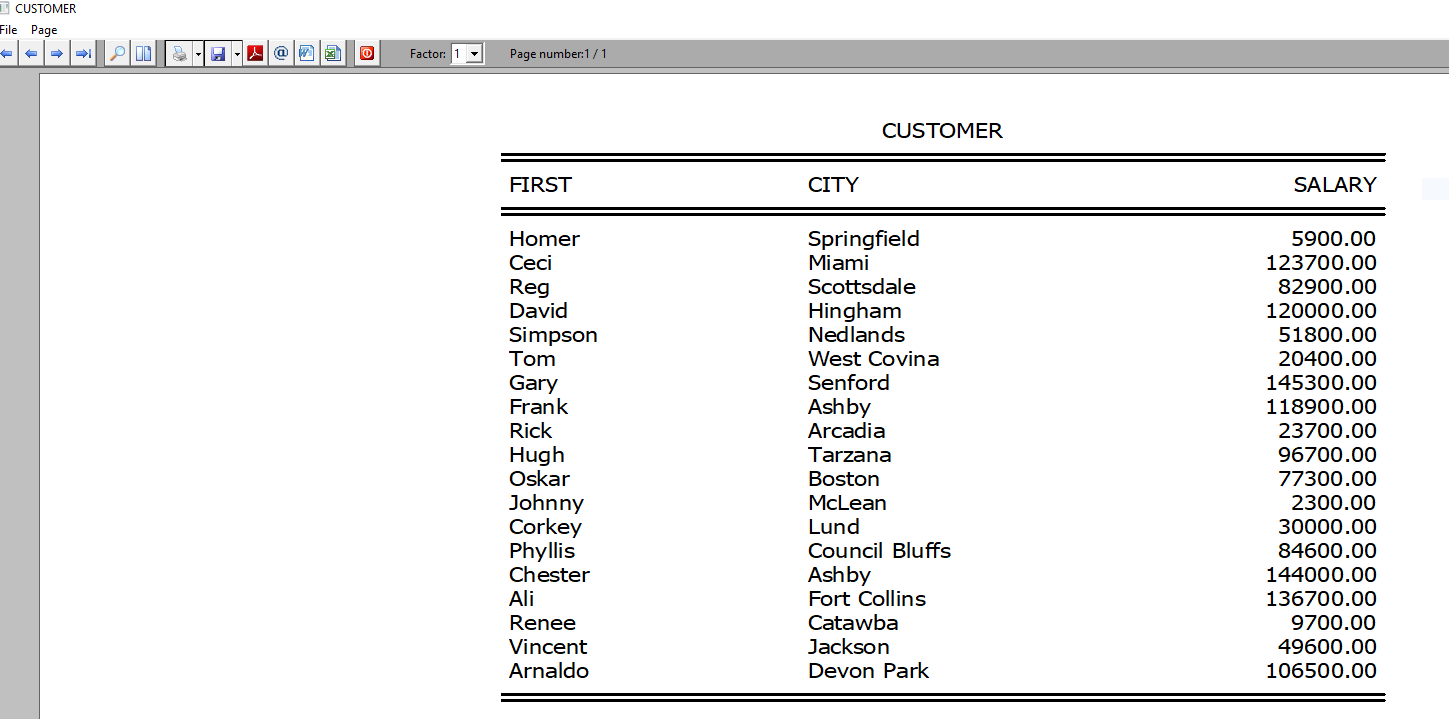

#ifdef __HARBOUR__

#include <hbapi.h>
#include <hbhpdf.h>

HB_FUNC(HPDF_ADDEMF) // pdf (Pointer), cEMFFIle (stringa)
{
    HPDF_Doc pdf = hb_HPDF_Doc_par(1);
    if (pdf == 0)
    {
        hb_ret();
        return;
    }
    Emf2Pdf conv(pdf);
    conv.AddEMF(hb_parc(2));
    hb_ret();
}

#endifTPreview():bSaveAsPDF := {|o| TPrinter2PDF(o:oDevice)}PROC TPrinter2PDF(oPrn, cFile)
LOCAL i, oPdf := HPDF_New()
DEFAULT cFile := cGetFile( "(*.pdf)|*.pdf|", "Select PDF File to Save",, CurDir(), .T. )
//if !empty(oPrn:aMeta)
// ? oPrn:aMeta[1]
//endif
for i:=1 to len(oPrn:aMeta)
HPDF_ADDEMF(oPdf, oPrn:aMeta[i])
next
HPDF_SaveToFile( oPdf, cFile)
returnMr. Antonio
Thank you. I will try.
  TPreview():bSaveAsPDF := { |o| SaveMSPdf( o ) }

Function SaveMSPdf( oPreview )
   local cPrnName := "Microsoft Print to PDF"

      If AScan( aGetPrinters(), cPrnName ) > 0
         oPreview:SelPrinter( cPrnName )
         oPreview:PrintPage()
      else
         Msginfo( "impresora "+ cPrnName + " no encontrada" )
      endif

Return nilmastintin wrote:I have tried with "Microsoft Print to PDF" and it gives a great result.
This code to test ( you have to have win10 and the printer installed. )
  TPreview():bSaveAsPDF := { |o| SaveMSPdf( o ) }

Function SaveMSPdf( oPreview )
   local cPrnName := "Microsoft Print to PDF"

      If AScan( aGetPrinters(), cPrnName ) > 0
         oPreview:SelPrinter( cPrnName )
         oPreview:PrintPage()
      else
         Msginfo( "impresora "+ cPrnName + " no encontrada" )
      endif

Return nil
hmpaquito wrote:
Microsoft Print to PDF use is limited.
Only Windows 10.
How to silent mode ?
How to configure ?
How to assignt pdf full file path name ?
Limited, I think.
Regards.
void Emf2Pdf::ParseFile()
{
....
  case EMR_ROUNDRECT:          nRead += RoundRectangle(); break;
.....
}

//-------------------------------

#include <math.h>

#ifndef min
   #define min(a,b) ((a)<(b)?(a):(b))
#endif

size_t Emf2Pdf::RoundRectangle()
{
   size_t ret = 0;
   RECTL bound;
   fread(&bound, 4, 4, f);  ret += 16;

   PRINT_DBG("  (%ix%i)-(%ix%i) \r\n", bound.right, bound.bottom, bound.left, bound.top);

   float x = bound.left * xScale;
   float r = bound.right * xScale;
   float b = currHeight - bound.bottom * yScale;
   float t = currHeight - bound.top * yScale;

   float w = (bound.right - bound.left) * xScale;
   float h = (bound.bottom - bound.top) * yScale;

   unsigned long cx;
   unsigned long cy;

   fread(&cx, 4, 1, f); ret += 4;
   fread(&cy, 4, 1, f); ret += 4;

   PRINT_DBG("  %i points\r\n", cx);
   PRINT_DBG("  %i points\r\n", cy);


   float fcx = cx *xScale;
   float fcy = cy *yScale;

    float nRound =  min( fcx, fcy ) ;

    double  nRay  ;

    float  currWidth = HPDF_Page_GetWidth( page ) ;

    if ( currWidth  > currHeight ) {
       nRay = round(min( nRound, int(h)/2 )) ;
     }
   else
      {
      nRay =  round(min( nRound, int(w)/2) ) ;
       }


      HPDF_Page_MoveTo ( page, x + nRay,  t )  ;
      HPDF_Page_LineTo ( page, r - nRay, t )  ;

      HPDF_Page_CurveTo( page, r, t, r,  t, r,  t - nRay )  ;

      HPDF_Page_LineTo ( page, r, b + nRay );

      HPDF_Page_CurveTo( page, r, b, r, b, r - nRay,  b  )  ;
      HPDF_Page_LineTo ( page, x + nRay, b )       ;
      HPDF_Page_CurveTo( page, x, b,  x, b, x, b + nRay )   ;

      HPDF_Page_LineTo ( page, x, t - nRay )    ;
      HPDF_Page_CurveTo( page, x, t,  x, t, x + nRay, t ) ;


   //  HPDF_Page_GSave(page) ;

   if (currentPen.width > 0 && currentBrush.solid)
   {
      HPDF_Page_FillStroke(page);
   }
   else if (currentPen.width > 0)
   {
      HPDF_Page_Stroke(page);
   }
   else if (currentBrush.solid)
   {
      HPDF_Page_Fill(page);
   }

   return ret;
}
