FiveTech Support Forums

FiveWin / Harbour / xBase community
Board index FiveWin for Harbour/xHarbour Run Harbour on Apache Linux from Windows 10 !!!
Posts: 44158
Joined: Thu Oct 06, 2005 05:47 PM
Run Harbour on Apache Linux from Windows 10 !!!
Posted: Mon May 20, 2019 07:40 AM
0. Go to Windows features and enable the Windows SubSystem Linux. Windows will ask you to reboot.

1. Go to Windows Store and download Ubuntu 18.04 LTS

2. A prompt will appear on Windows and click on Launch. After some minutes you will be prompted for a username and password of your choice

3. From Ubuntu do this:
Code (fw): Select all Collapse
git clone https://github.com/fivetechsoft/mod_harbour
chmod +x ./mod_harbour/linux/go.sh
./mod_harbour/linux/go.sh

4. On Windows Microsoft Edge or Chrome go to localhost/test.prg

5. To start making your own tests, from Ubuntu do:
sudo nano -c /var/www/html/test.prg
Ctrl+X to save
and refresh your browser

Enjoy the magic of Apache and Harbour working together :-)

regards, saludos

Antonio Linares
www.fivetechsoft.com
Posts: 7317
Joined: Thu Oct 18, 2012 07:17 PM
Re: Run Harbour on Apache Linux from Windows 10 !!!
Posted: Mon May 20, 2019 08:17 AM
Nice,
Antonio is not clear to me about any passage in your guide

0. Go to Windows features and enable the Windows SubSystem Linux. Windows will ask you to reboot.


maybe if you publish the screen where to go to set the subsystem in linux (both for win10 and win7)

Perhaps you use win10, it's possibile also on win7 ?

because I not found this option on windows 10 I have a Miix320 Lenovo
Since from 1991/1992 ( fw for clipper Rel. 14.4 - Momos)

I use : FiveWin for Harbour March-April 2024 - Harbour 3.2.0dev (harbour_bcc770_32_20240309) - Bcc7.70 - xMate ver. 1.15.3 - PellesC - mail: silvio[dot]falconi[at]gmail[dot]com
Posts: 44158
Joined: Thu Oct 06, 2005 05:47 PM
Re: Run Harbour on Apache Linux from Windows 10 !!!
Posted: Mon May 20, 2019 08:22 AM
This only works on Windows 10

regards, saludos

Antonio Linares
www.fivetechsoft.com
Posts: 7317
Joined: Thu Oct 18, 2012 07:17 PM
Re: Run Harbour on Apache Linux from Windows 10 !!!
Posted: Mon May 20, 2019 09:18 AM
thanks
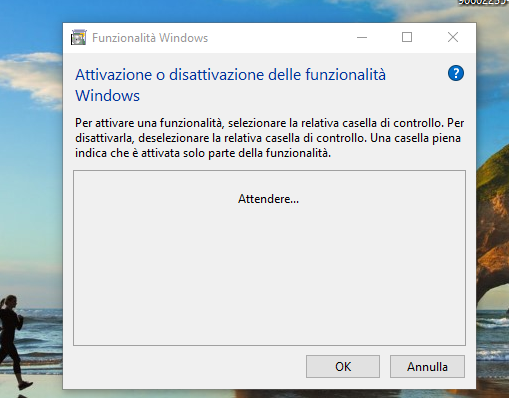
the problem is I open the feature windows dialog and it ask me to wait and not show the tree


it from 15 minutes
Since from 1991/1992 ( fw for clipper Rel. 14.4 - Momos)

I use : FiveWin for Harbour March-April 2024 - Harbour 3.2.0dev (harbour_bcc770_32_20240309) - Bcc7.70 - xMate ver. 1.15.3 - PellesC - mail: silvio[dot]falconi[at]gmail[dot]com
Posts: 7317
Joined: Thu Oct 18, 2012 07:17 PM
Re: Run Harbour on Apache Linux from Windows 10 !!!
Posted: Mon May 20, 2019 09:33 AM

then i saw om windows store it want
Windows 10 versione 16215.0
i have Windows 10 PRO versione 1703 build 15063.13.87

Since from 1991/1992 ( fw for clipper Rel. 14.4 - Momos)

I use : FiveWin for Harbour March-April 2024 - Harbour 3.2.0dev (harbour_bcc770_32_20240309) - Bcc7.70 - xMate ver. 1.15.3 - PellesC - mail: silvio[dot]falconi[at]gmail[dot]com
Posts: 44158
Joined: Thu Oct 06, 2005 05:47 PM
Re: Run Harbour on Apache Linux from Windows 10 !!!
Posted: Mon May 20, 2019 03:08 PM
There is already an active mod_harbour users community live chat where you can learn and share about it:

https://harbourproject.slack.com

Please join us there to the just born web evolution of Harbour :-)

Increible (web) things are already being made !!!
regards, saludos

Antonio Linares
www.fivetechsoft.com
Posts: 44158
Joined: Thu Oct 06, 2005 05:47 PM
Re: Run Harbour on Apache Linux from Windows 10 !!!
Posted: Mon May 20, 2019 04:02 PM
regards, saludos

Antonio Linares
www.fivetechsoft.com
Posts: 44158
Joined: Thu Oct 06, 2005 05:47 PM
Re: Run Harbour on Apache Linux from Windows 10 !!!
Posted: Tue May 21, 2019 05:27 AM
regards, saludos

Antonio Linares
www.fivetechsoft.com
Posts: 6983
Joined: Fri Oct 07, 2005 07:07 PM
Re: Run Harbour on Apache Linux from Windows 10 !!!
Posted: Sun May 26, 2019 06:03 AM
Dear Antonio,
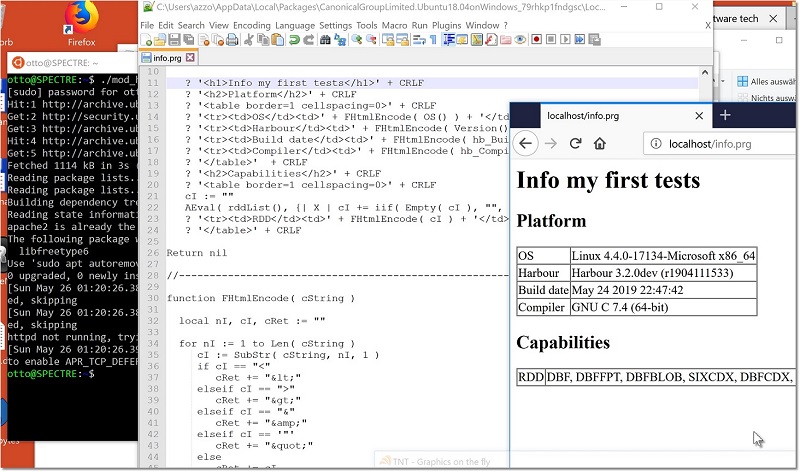
thank you for your great work. All is functioning as you descript here.
My first test was ready within minutes.
Best regards
Otto


Posts: 39
Joined: Wed Jun 25, 2014 11:16 AM
Re: Run Harbour on Apache Linux from Windows 10 !!!
Posted: Mon May 27, 2019 11:52 AM

How can I set this in my Mac ?

export HRB_DIR="/Developer/harbour-apache"
export HRB_INC="$HRB_DIR/include"
export HRB_LIB="$HRB_DIR/lib/darwin/gcc"

export APACHE="/Users/lailton/Developer/harbour-apache/apache/apache-2.4.39"

FW 17.09 - xHB 1.2.3 - Embarcadero C++ 7
xDevStudio 0.72 - FivEdit ( \o/ ) - Pelles C
MySQL 5.7 - DBF
FastReport - PHP for Web Services - Java Android
http://matheusfariasdev.wordpress.com
Posts: 842
Joined: Mon Oct 10, 2005 01:29 PM
Re: Run Harbour on Apache Linux from Windows 10 !!!
Posted: Tue Jul 16, 2019 04:29 PM

Hello Antonio

I try
4. On Windows Microsoft Edge or Chrome go to localhost/test.prg
but doesn't work

Thanks

Posts: 44158
Joined: Thu Oct 06, 2005 05:47 PM
Re: Run Harbour on Apache Linux from Windows 10 !!!
Posted: Tue Jul 16, 2019 06:35 PM

Maurizio,

If you go to "localhost" from the browser, does it show the Apache welcome page ?

regards, saludos

Antonio Linares
www.fivetechsoft.com
Posts: 842
Joined: Mon Oct 10, 2005 01:29 PM
Re: Run Harbour on Apache Linux from Windows 10 !!!
Posted: Wed Jul 17, 2019 06:51 AM
Posts: 44158
Joined: Thu Oct 06, 2005 05:47 PM
Re: Run Harbour on Apache Linux from Windows 10 !!!
Posted: Wed Jul 17, 2019 10:04 AM
Maurizio,

ok, now please check if you have:

1. mod_harbour.so at /usr/lib/apache2/modules

2. libharbour.so.3.2.0 at /var/www/html

3. In /etc/apache2/apache2.conf add these lines:
Code (fw): Select all Collapse
LoadModule harbour_module /usr/lib/apache2/modules/mod_harbour.so
<FilesMatch "\.(prg|hrb)$">
    SetHandler harbour
</FilesMatch>

4. reboot apache: sudo apachectl restart

5. place a test.prg at /var/www/html and go to localhost/test.prg from your browser
regards, saludos

Antonio Linares
www.fivetechsoft.com
Posts: 842
Joined: Mon Oct 10, 2005 01:29 PM
Re: Run Harbour on Apache Linux from Windows 10 !!!
Posted: Wed Jul 17, 2019 03:22 PM
Thanks Antonio ,

test.prg now works :-)

this command dosn't works
Code (fw): Select all Collapse
sudo apachectl restart
[Wed Jul 17 17:20:06.870901 2019] [so:warn] [pid 5828:tid 140207572454336] AH01574: module harbour_module is already loaded, skipping


Now I have to copy the file prg from samples in the directory /var/www/html ?

Thanks
Maurizio