FiveTech Support Forums

FiveWin / Harbour / xBase community
Board index FiveWin for Harbour/xHarbour Selecting numbers
Posts: 7318
Joined: Thu Oct 18, 2012 07:17 PM
Selecting numbers
Posted: Wed May 22, 2019 04:23 PM
On a dialog I must select the number and I made a normal get with a action
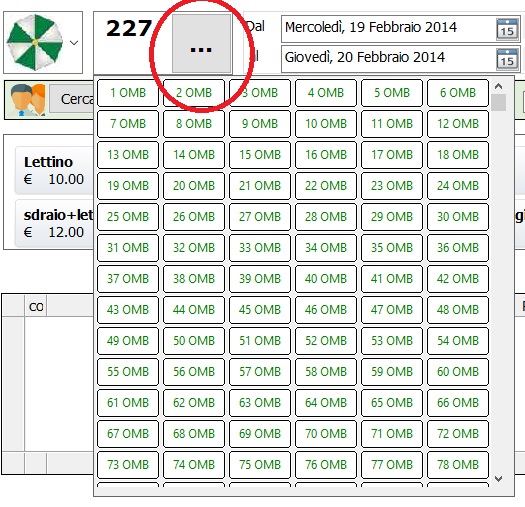


It open a dialog with scrollPanel and on it I list many small btnbmp
I have the number with the font

DEFINE FONT oLarge NAME "VERDANA" SIZE 0,-22 BOLD

to show big and clear

the problem is I have also a big button "..." while I prefer have a button as the combobox

How I can resolve ? because it is no good quality
Since from 1991/1992 ( fw for clipper Rel. 14.4 - Momos)

I use : FiveWin for Harbour March-April 2024 - Harbour 3.2.0dev (harbour_bcc770_32_20240309) - Bcc7.70 - xMate ver. 1.15.3 - PellesC - mail: silvio[dot]falconi[at]gmail[dot]com
Posts: 44162
Joined: Thu Oct 06, 2005 05:47 PM
Re: Selecting numbers
Posted: Thu May 23, 2019 05:54 AM

Silvio,

Reduce the height of the control

regards, saludos

Antonio Linares
www.fivetechsoft.com
Posts: 7318
Joined: Thu Oct 18, 2012 07:17 PM
Re: Selecting numbers
Posted: Thu May 23, 2019 06:30 AM
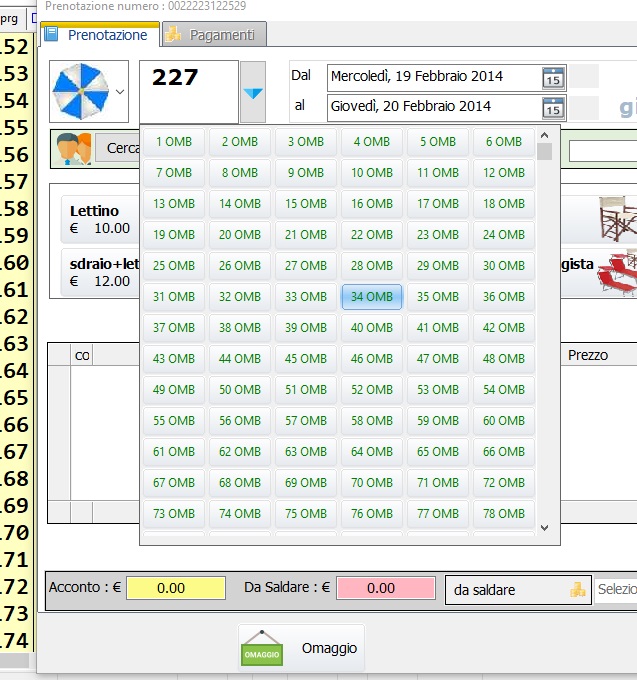
Antonio, I need a big font and the control must be the same height of the date block (gets)
and I must use it on a touch tablet if I make the control small then the user cannot use it

I need something of this
Since from 1991/1992 ( fw for clipper Rel. 14.4 - Momos)

I use : FiveWin for Harbour March-April 2024 - Harbour 3.2.0dev (harbour_bcc770_32_20240309) - Bcc7.70 - xMate ver. 1.15.3 - PellesC - mail: silvio[dot]falconi[at]gmail[dot]com
Posts: 7318
Joined: Thu Oct 18, 2012 07:17 PM
Re: Selecting numbers
Posted: Thu May 23, 2019 10:30 AM
Now I' resolved with a buttobmp easy but I don't like it


it is certainly not beautiful and professional to behold
but I have not found other solutions

I remember there was many year ago a button (dbutton) with the possibility to open a dialog popup but I not found this class on fivewin controls
Since from 1991/1992 ( fw for clipper Rel. 14.4 - Momos)

I use : FiveWin for Harbour March-April 2024 - Harbour 3.2.0dev (harbour_bcc770_32_20240309) - Bcc7.70 - xMate ver. 1.15.3 - PellesC - mail: silvio[dot]falconi[at]gmail[dot]com
Posts: 4043
Joined: Wed Dec 19, 2007 06:40 PM
Re: Selecting numbers
Posted: Fri May 24, 2019 08:20 AM
Silvio,

maybe better one of these images


or


regards
Uwe :-)
Since 1995 ( the first release of FW 1.9 )

i work with FW.

If you have any questions about special functions, maybe i can help.
Posts: 7318
Joined: Thu Oct 18, 2012 07:17 PM
Re: Selecting numbers
Posted: Fri May 24, 2019 08:37 AM
Uwe,
thanks , but I not Know how adapt it ( size of the get)

I create down4.png


DEFINE FONT oLarge NAME "VERDANA" SIZE 0,-22 BOLD

@ 06,50 GET aGet[2] VAR nNumberElemento SIZE 50,32 PIXEL of oFld:aDialogs[1] FONT oLarge
@ 6.01,100 BUTTONBMP oBtnSel ;
SIZE 10,31.5 PIXEL OF oFld:aDialogs[1];
RESOURCE ".\bitmaps\down4.png"
Since from 1991/1992 ( fw for clipper Rel. 14.4 - Momos)

I use : FiveWin for Harbour March-April 2024 - Harbour 3.2.0dev (harbour_bcc770_32_20240309) - Bcc7.70 - xMate ver. 1.15.3 - PellesC - mail: silvio[dot]falconi[at]gmail[dot]com
Posts: 4043
Joined: Wed Dec 19, 2007 06:40 PM
Re: Selecting numbers
Posted: Fri May 24, 2019 09:40 AM
Silvio,

calculated button-position from get :

@ 380, 570 GET oGet VAR cGet SIZE 130, 50 PIXEL OF oDlg

// button adjusted to get size and position
// the button-height should be close to the get-hight
// otherwise the arrow will be stretched to much

@ oGet:nTop +1, oGet:nRight BTNBMP oBtn OF oDlg ;
SIZE 20, oGet:nHeight PIXEL ; // B / H width = fixed value
FILENAME c_path1 + "Down4.png" ;
ACTION MsgAlert( "Test" ) ;
CENTERED NOBORDER ADJUST


Your selected image ( with resized height )


regards
Uwe :-)
Since 1995 ( the first release of FW 1.9 )

i work with FW.

If you have any questions about special functions, maybe i can help.
Posts: 7318
Joined: Thu Oct 18, 2012 07:17 PM
Re: Selecting numbers
Posted: Fri May 24, 2019 10:42 AM
I remember there was a control called Dbutton
it had a button as combobox
if I call the scrolpanel with dbutton and then change the caption with the number selected can be a solution
only I not found dbutton class or another button have the possibility to insert a button at left and call to a function
as this
Since from 1991/1992 ( fw for clipper Rel. 14.4 - Momos)

I use : FiveWin for Harbour March-April 2024 - Harbour 3.2.0dev (harbour_bcc770_32_20240309) - Bcc7.70 - xMate ver. 1.15.3 - PellesC - mail: silvio[dot]falconi[at]gmail[dot]com
Posts: 4043
Joined: Wed Dec 19, 2007 06:40 PM
Re: Selecting numbers
Posted: Fri May 24, 2019 01:29 PM
Silvio,

In one of Your tests You have been trying to draw a button-border
a solution still needed :-)
It is possible to draw a border with any size, colour, round and transparent-level.


regards
Uwe :-)
Since 1995 ( the first release of FW 1.9 )

i work with FW.

If you have any questions about special functions, maybe i can help.
Posts: 7318
Joined: Thu Oct 18, 2012 07:17 PM
Re: Selecting numbers
Posted: Sat May 25, 2019 02:39 PM

>You have been trying to draw a button-border
I not remember and now I'm thinking to resolve a big problem

Since from 1991/1992 ( fw for clipper Rel. 14.4 - Momos)

I use : FiveWin for Harbour March-April 2024 - Harbour 3.2.0dev (harbour_bcc770_32_20240309) - Bcc7.70 - xMate ver. 1.15.3 - PellesC - mail: silvio[dot]falconi[at]gmail[dot]com
Posts: 4043
Joined: Wed Dec 19, 2007 06:40 PM
Re: Selecting numbers
Posted: Sat May 25, 2019 03:02 PM
Inside Your function You defined

Function SetGradientBtnbmp(ntype,ocontrol,nColorBorder)
DEFAULT nColorBorder := nRGB(116,165,216 )
Do case
Case ntype = 2007
...
...
//2007
ocontrol:bClrGrad = { | lInvert | If( ! lInvert,;
...
ocontrol:nClrBorder := { || (IIF(ocontrol:lMOver,nColorBorder,nRgb(225, 225, 225))) } :-)

regards
Uwe :-)
Since 1995 ( the first release of FW 1.9 )

i work with FW.

If you have any questions about special functions, maybe i can help.
Posts: 7318
Joined: Thu Oct 18, 2012 07:17 PM
Re: Selecting numbers
Posted: Sat May 25, 2019 03:36 PM

I don't Know .. remember Antonio sad me ...
try with ocontrol:nClrBorder := { || (IIF(ocontrol:lMOver,nColorBorder,nRgb(225, 225, 225))) }

Since from 1991/1992 ( fw for clipper Rel. 14.4 - Momos)

I use : FiveWin for Harbour March-April 2024 - Harbour 3.2.0dev (harbour_bcc770_32_20240309) - Bcc7.70 - xMate ver. 1.15.3 - PellesC - mail: silvio[dot]falconi[at]gmail[dot]com


Continue the discussion