

How can I edit and limit cursor movement to only one column of an XBrowse?
I searched the forum but couldn't find an answer.
FWH 18.05/xHarbour 1.2.3/BCC7/Windows 10
How can I edit and limit cursor movement to only one column of an XBrowse?
I searched the forum but couldn't find an answer.
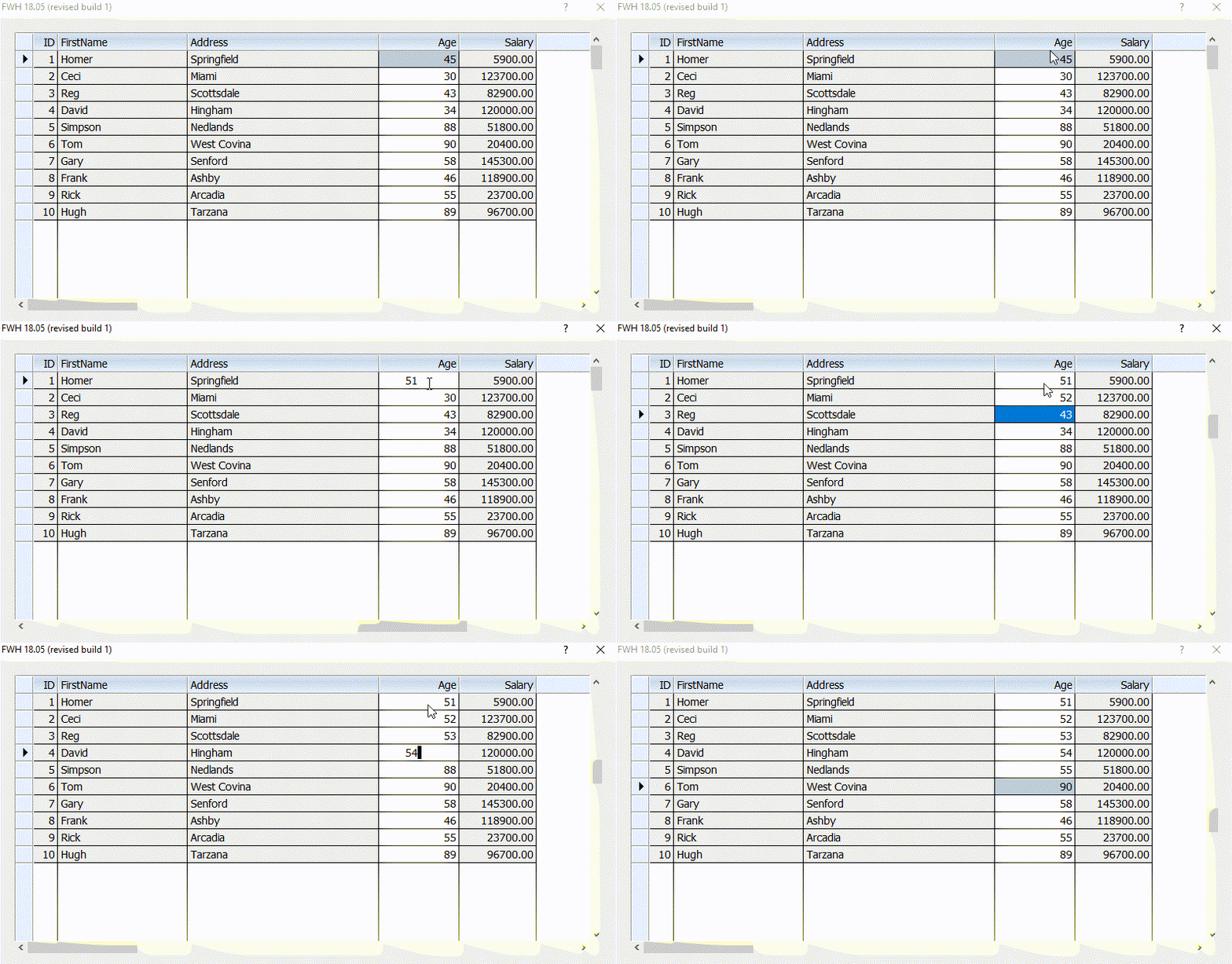
Set oBrw:aCols[ n ]:nEditType := EDIT_GET where nth column is the only column to be edited. By default, nEditType of all other columns is 0.
Then only the nth column can be edited.
If the browse is created with FASTEDIT clause or oBrw:lFastEdit is set to .t., after the user edits this column in one row, the cursor will automatically jump to the same column in the next row, skipping all other columns.
@ 0,0 XBROWSE oBrw OF oWnd ;
      FIELDS oBrw:aRow:PLU, oBrw:aRow:DESCRIP, oBrw:aRow:Cost, oBrw:aRow:qtyord, oBrw:aRow:extPrice ;
      HEADERS "PLU", "Description","Cost","Qty","Total" ;
      COLSIZES 50,140,70,70,70 ;
      ARRAY aItems //;
      //COLORS CLR_WHITE, CLR_BLUE

      oBrw:nRowHeight       := 25
      //oBrw:nMarqueeStyle    := MARQSTYLE_HIGHLROW
      oBrw:lRecordSelector  := .f.
      oBrw:nStretchCol      := STRETCHCOL_LAST
      oBrw:nRowDividerStyle := LINESTYLE_LIGHTGRAY
      oBrw:nColDividerStyle := LINESTYLE_LIGHTGRAY

      oBrw:lFastEdit := .T.

      oBrw:CreateFromCode()

      oBrw:aCols[4]:nEditType(1)  // 1 is a GET
oBrw:aCols[4]:bOnPostEdit:= {|self,uData| …? } // Not working yet.#include "fivewin.ch"
REQUEST DBFCDX
function Main()
local aItems := {}
local oCust, oDlg, oBrw, oFont, n
oCust := TDataBase():Open( nil, "CUSTOMER", "DBFCDX", .t. )
for n := 1 to 10
oCust:GoTo( n )
AAdd( aItems, oCust:record() )
next
DEFINE FONT oFont NAME "TAHOMA" SIZE 0,-14
DEFINE DIALOG oDlg SIZE 800,400 PIXEL TRUEPIXEL FONT oFont ;
TITLE FWVERSION
@ 20,20 XBROWSE oBrw SIZE -20,-20 PIXEL OF oDlg ;
DATASOURCE aItems ;
COLUMNS "ID", "First", "City", "Age", "Salary" ;
HEADERS "ID", "FirstName", "Address", "Age", "Salary" ;
PICTURES "999" ;
CELL LINES NOBORDER FASTEDIT
WITH OBJECT oBrw
:bClrStd := { || { CLR_BLACK, GetSysColor( 15 ) } }
WITH OBJECT :Age
:nEditType := EDIT_GET
:bClrStd := { || { CLR_BLACK, CLR_WHITE } }
END
:bSaveData := { || oBrw:aRow:Save() } // You may change this for your TRecord class
:nColSel := oBrw:oCol( "Age" ):nCreationOrder
//
:CreateFromCode()
END
ACTIVATE DIALOG oDlg CENTERED
RELEASE FONT oFont
// Now, verify that the changes are actually written to the dbf
oCust:GoTop()
XBROWSER oCust
oCust:End()
return nil
//----------------------------------------------------------------------------//
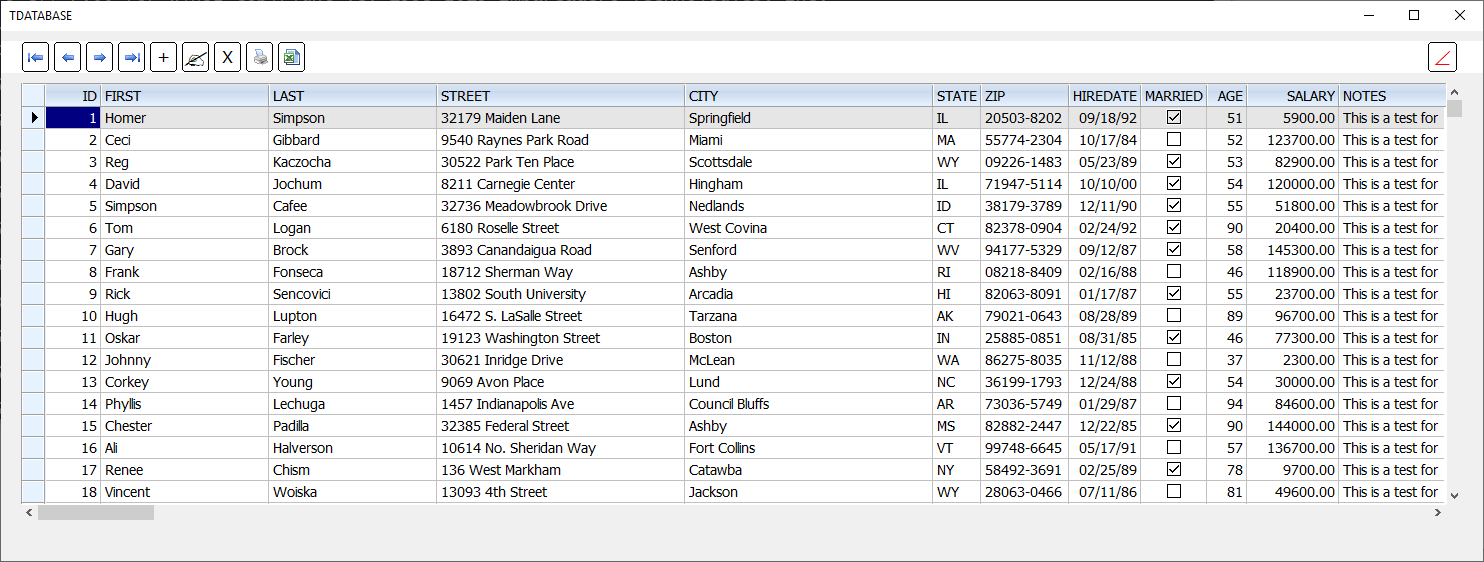
there is an error on FWVERSION
18.05 -------------->19.05
Silvio.Falconi wrote:there is an error on FWVERSION
18.05 -------------->19.05
ah ok
Nages,
how Manage ( with tdatabase ) two dbf as an Invoice ?
the first for as Master and the second for the Items of Master ?
Nages,
Thanks for the reply, but it appears that I was not clear in my question.
I have an invoice class which contains a line Item list. This list is an array of record objects. I don't want to save the edits when they are made, I will save everything when the entire invoice edit is done.
So, what I am trying to do now is just replace the data in the record buffer with the user edits. The only thing editable is the quantity ordered. I can get into the edit mode, but when I leave the cell the data is lost and the old data reappears. I have tried dozens of ways with no luck. Perhaps this is not possible, and if so can it be done with just a multi-dimensional array?
Regards,
James
#include "fivewin.ch"

REQUEST DBFCDX

function Main()

   local aItems   := {}
   local oCust, oDlg, oBrw, oFont, n

   oCust    := TDataBase():Open( nil, "CUSTOMER", "DBFCDX", .t. )

   for n := 1 to 10
      oCust:GoTo( n )
      AAdd( aItems, oCust:record() )
   next

   DEFINE FONT oFont NAME "TAHOMA" SIZE 0,-14
   DEFINE DIALOG oDlg SIZE 800,600 PIXEL TRUEPIXEL FONT oFont ;
      TITLE FWVERSION

   @  70,20 SAY "EDIT MAIN INVOICE BODY HERE" SIZE 760,24 PIXEL OF oDlg CENTER

   @ 150,20 XBROWSE oBrw SIZE -20,-80 PIXEL OF oDlg ;
      DATASOURCE aItems ;
      COLUMNS "ID", "First", "City", "Age", "Salary" ;
      HEADERS "ID", "FirstName", "Address", "Age", "Salary" ;
      PICTURES "999" ;
      CELL LINES NOBORDER FASTEDIT

   WITH OBJECT oBrw
      :bClrStd          := { || { CLR_BLACK, GetSysColor( 15 ) } }
      WITH OBJECT :Age
         :nEditType     := EDIT_GET
         :bClrStd       := { || { CLR_BLACK, CLR_WHITE } }
      END
      :nColSel          := oBrw:oCol( "Age" ):nCreationOrder
      //
      :CreateFromCode()
   END

   @ 540, 20 BUTTON "SAVE"   SIZE 150,30 PIXEL OF oDlg ;
      ACTION ( AEval( aItems, { |o| o:Save() } ), oDlg:End() )

   @ 540,200 BUTTON "CANCEL" SIZE 150,30 PIXEL OF oDlg ACTION oDlg:End()


   ACTIVATE DIALOG oDlg CENTERED
   RELEASE FONT oFont

   oCust:GoTop()
   XBROWSER oCust

   oCust:End()

return nil

//----------------------------------------------------------------------------//Nages,
I think that james refers to two dbf, for a sample Master.dbf Items.dbf
the two archives are linked by the invoice number (set scope to)
when the use open ( ord add new) a record of Master , the record must be lock and create an array for the items
the user can modify the array or add new rows
When the user save the procedue must save the record on Master and the Items on Items.dbf ( having the same invoice number)
and the unlock the record (of Master)
this is in theory but in practice how is it done with tdatabase ?
Silvio.Falconi wrote:Nages,
I think that james refers to two dbf, for a sample Master.dbf Items.dbf
the two archives are linked by the invoice number (set scope to)
when the use open ( ord add new) a record of Master , the record must be lock and create an array for the items
the user can modify the array or add new rows
When the user save the procedue must save the record on Master and the Items on Items.dbf ( having the same invoice number)
and the unlock the record (of Master)
this is in theory but in practice how is it done with tdatabase ?
Nages,
Thanks. It is running here and that was just what I needed. Next I will convert it to my files.
As you said to Silvio, I can handle the rest myself.
Regards,
James
I'd like to change field Salary (Age * 1.5 / Actual Salary value) after I changed age value, how can I do it?
thank you.
oBrw:Age:bOnChange := { |oCol, nOldVal| oBrw:Salary:VarPut( oCol:Value * <yourcalculation> ) }


