FiveTech Support Forums

FiveWin / Harbour / xBase community
Board index FiveWin para Harbour/xHarbour Sobre TRbtn y BtnBmp (solucionado)
Posts: 728
Joined: Fri Oct 07, 2005 07:38 AM
Sobre TRbtn y BtnBmp (solucionado)
Posted: Wed Jun 19, 2019 10:11 AM
Hola! Estoy sustituyendo en mis aplicaciones los TRbtn por TBtnBmp y observo una peque帽a diferencia en el pintado del bot贸n con imagen (layout "LEFT")
En este caso el bot贸n de la izquierda es un TbtnBmp y el de la derecha un TRbtn, 驴posibilidad de que TBtnBmp quede como el TRbtn?


Gracias!
Angel Salom
Visionwin Software - https://www.visionwin.com
------------------------------------------------------------
fwh 19.05 - harbour 3.2 - bcc 7.4
Posts: 10733
Joined: Sun Nov 19, 2006 05:22 AM
Re: Sobre TRbtn y BtnBmp
Posted: Wed Jun 19, 2019 03:27 PM

Please give your code for creating the BtnBmp.

Regards


G. N. Rao.

Hyderabad, India
Posts: 728
Joined: Fri Oct 07, 2005 07:38 AM
Re: Sobre TRbtn y BtnBmp
Posted: Wed Jun 19, 2019 07:03 PM
Of course, here's a self-contained example

Code (fw): Select all Collapse
#include "fivewin.ch"
#include "ribbon.ch"

Function Main()
    Local oDlg, oBtn, oFont
    Local bGradColors:= { | lInvert | If( lInvert, ;
                                        {  { 1, nRgb (255,225,131), nRgb (255,225,131) }, }, ;
                                        {  { 1, CLR_WHITE, CLR_WHITE  }, };
                                      );
                      }
  
    DEFINE FONT oFont NAME GetSysFont() SIZE 0,12 POINTS                  
    DEFINE DIALOG oDlg FROM 0,0 TO 24,79 TITLE "Prueba TBtnBmp" FONT oFont

    @ 5,5 BTNBMP oBtn FILE "..\bitmaps\alphabmp\windows.bmp" SIZE 150,40 ACTION oDlg:End() PROMPT "Prueba TBtnBmp";
                      LEFT GRADIENT bGradColors 2007 FONT oFont

    @ 50,5 RBBTN oBtn BITMAP "..\bitmaps\alphabmp\windows.bmp" SIZE 150,40 ACTION oDlg:End() PROMPT "Prueba TRbtn";
                      LEFT BORDER FONT oFont
    
    ACTIVATE DIALOG oDlg CENTERED
    RELEASE FONT oFont

Return (nil)
Angel Salom
Visionwin Software - https://www.visionwin.com
------------------------------------------------------------
fwh 19.05 - harbour 3.2 - bcc 7.4
Posts: 10733
Joined: Sun Nov 19, 2006 05:22 AM
Re: Sobre TRbtn y BtnBmp
Posted: Thu Jun 20, 2019 12:14 AM
Not exactly like RBBtn, but these are the possible configurations. Optionally, you can specify the position of the bitmap with oBtn:aBmpRect := { t, l, b, r }
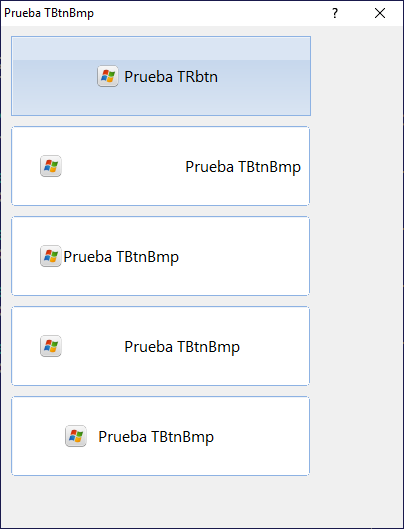


Code (fw): Select all Collapse
#include "fivewin.ch"

Function Main()

    Local oDlg, oBtn, oFont
    Local bGradColors:= { | lInvert | If( lInvert, ;
                                        {  { 1, nRgb (255,225,131), nRgb (255,225,131) }, }, ;
                                        {  { 1, CLR_WHITE, CLR_WHITE  }, };
                                      );
                      }

    DEFINE FONT oFont NAME GetSysFont() SIZE 0,12 POINTS
    DEFINE DIALOG oDlg SIZE 400,500 PIXEL TITLE "Prueba TBtnBmp" FONT oFont TRUEPIXEL

    @  10,10 RBBTN oBtn BITMAP "..\bitmaps\alphabmp\windows.bmp" SIZE 300,80 ACTION oDlg:End() PROMPT "Prueba TRbtn";
                      LEFT BORDER FONT oFont

    @ 100,10 BTNBMP oBtn FILE "..\bitmaps\alphabmp\windows.bmp" SIZE 300,80 ACTION oDlg:End() PROMPT "Prueba TBtnBmp";
                      LEFT GRADIENT bGradColors 2007 FONT oFont

    @ 190,10 BTNBMP oBtn FILE "..\bitmaps\alphabmp\windows.bmp" SIZE 300,80 ACTION oDlg:End() PROMPT "Prueba TBtnBmp ";
                      LEFT GRADIENT bGradColors 2007 FONT oFont

    @ 280,10 BTNBMP oBtn FILE "..\bitmaps\alphabmp\windows.bmp" SIZE 300,80 ACTION oDlg:End() PROMPT " Prueba TBtnBmp ";
                      LEFT GRADIENT bGradColors 2007 FONT oFont

    @ 370,10 BTNBMP oBtn FILE "..\bitmaps\alphabmp\windows.bmp" SIZE 300,80 ACTION oDlg:End() PROMPT " Prueba TBtnBmp ";
                      LEFT GRADIENT bGradColors 2007 FONT oFont

    oBtn:aBmpRect    := { 0, 50, 80, 80 }

    ACTIVATE DIALOG oDlg CENTERED
    RELEASE FONT oFont

Return (nil)
Regards


G. N. Rao.

Hyderabad, India
Posts: 728
Joined: Fri Oct 07, 2005 07:38 AM
Re: Sobre TRbtn y BtnBmp
Posted: Thu Jun 20, 2019 06:28 AM

Solved, thanks.

Angel Salom
Visionwin Software - https://www.visionwin.com
------------------------------------------------------------
fwh 19.05 - harbour 3.2 - bcc 7.4
Posts: 607
Joined: Mon Mar 04, 2013 04:32 PM
Re: Sobre TRbtn y BtnBmp (solucionado)
Posted: Thu Jun 20, 2019 06:50 AM
Mr. Rao.

From Resources , not work .....

Code (fw): Select all Collapse
REDEFINE BTNBMP oBtn ID 110 OF oDlg RESOURCE "Edit" ACTION MsgInfo("Editando Ficha") LEFT
oBtn:aBmpRect    := { 0, 50, 80, 80 }


How calc de positions oBtn:aBmpRect := { xx?, xx??, xx??, xx?? } ?

Regards

Jose
Fwh 24.07 64 bits + Harbour 64 bits 3.2dev(r2407221137) + MSVC64
Posts: 10733
Joined: Sun Nov 19, 2006 05:22 AM
Re: Sobre TRbtn y BtnBmp (solucionado)
Posted: Thu Jun 20, 2019 07:00 AM

oBtn:aBmpRect := { nTop, nLeft, nBottom, nRight }
in pixels relative to the BtnBmp's rect.

Should work with resources also.

Regards


G. N. Rao.

Hyderabad, India
Posts: 728
Joined: Fri Oct 07, 2005 07:38 AM
Re: Sobre TRbtn y BtnBmp (solucionado)
Posted: Thu Jun 20, 2019 07:06 AM
nageswaragunupudi wrote:oBtn:aBmpRect := { nTop, nLeft, nBottom, nRight }
in pixels relative to the BtnBmp's rect.

Should work with resources also.


Yes, it works with resources.
Angel Salom
Visionwin Software - https://www.visionwin.com
------------------------------------------------------------
fwh 19.05 - harbour 3.2 - bcc 7.4
Posts: 607
Joined: Mon Mar 04, 2013 04:32 PM
Re: Sobre TRbtn y BtnBmp (solucionado)
Posted: Thu Jun 20, 2019 10:42 AM
AngelSalom wrote:
nageswaragunupudi wrote:oBtn:aBmpRect := { nTop, nLeft, nBottom, nRight }
in pixels relative to the BtnBmp's rect.

Should work with resources also.


Yes, it works with resources.


Hola lo siento pero no entiendo como lo haceis.
a ver yo tengo en recursos un BtnBmp situado en
X Position : 180
Y Position : 100
width: 80
Height: 15

Entonces hago:

Code (fw): Select all Collapse
oBtn:aBmpRect := { 105, 185, 120, 265 }


Y no aparece el boton.

驴Como lo calculais ?

Gracias y perdon por la confusion.

Off Totip : Por cierto, Angel estamos muy cerca.... (Estoy en Santa Magdalena de Pulpis) Perdon

Saludos.
Fwh 24.07 64 bits + Harbour 64 bits 3.2dev(r2407221137) + MSVC64
Posts: 6755
Joined: Wed Feb 15, 2012 08:25 PM
Re: Sobre TRbtn y BtnBmp (solucionado)
Posted: Thu Jun 20, 2019 12:44 PM

Jose, las coordenadas son respecto al propio boton : { 2, 2 , 40, 40 }, por ejemplo, y no a las coordenadas del contenedor donde est谩 ubicado el bot贸n

Cristobal Navarro

Hay dos tipos de personas: las que te hacen perder el tiempo y las que te hacen perder la noci贸n del tiempo

El secreto de la felicidad no est谩 en hacer lo que te gusta, sino en que te guste lo que haces
Posts: 728
Joined: Fri Oct 07, 2005 07:38 AM
Re: Sobre TRbtn y BtnBmp (solucionado)
Posted: Thu Jun 20, 2019 01:25 PM
brakaman wrote:
AngelSalom wrote:
nageswaragunupudi wrote:oBtn:aBmpRect := { nTop, nLeft, nBottom, nRight }
in pixels relative to the BtnBmp's rect.

Should work with resources also.


Yes, it works with resources.


Hola lo siento pero no entiendo como lo haceis.
a ver yo tengo en recursos un BtnBmp situado en
X Position : 180
Y Position : 100
width: 80
Height: 15

Entonces hago:

Code (fw): Select all Collapse
oBtn:aBmpRect := { 105, 185, 120, 265 }


Y no aparece el boton.

驴Como lo calculais ?

Gracias y perdon por la confusion.

Off Totip : Por cierto, Angel estamos muy cerca.... (Estoy en Santa Magdalena de Pulpis) Perdon

Saludos.


Es tal como te comenta Crist贸bal. Si lo mandas a las posiciones que indicas la imagen se sale del bot贸n.
Si lo necesitas cuelgo un ejemplo desde recursos.

As铆 que pr谩cticamente somos vecinos, genial, est谩 bien saberlo! :-)
Angel Salom
Visionwin Software - https://www.visionwin.com
------------------------------------------------------------
fwh 19.05 - harbour 3.2 - bcc 7.4
Posts: 607
Joined: Mon Mar 04, 2013 04:32 PM
Re: Sobre TRbtn y BtnBmp (solucionado)
Posted: Thu Jun 20, 2019 03:24 PM
Es tal como te comenta Crist贸bal. Si lo mandas a las posiciones que indicas la imagen se sale del bot贸n.
Si lo necesitas cuelgo un ejemplo desde recursos.

As铆 que pr谩cticamente somos vecinos, genial, est谩 bien saberlo! :-)

:-)

Parece ser que tengo el dia malo, ya comprendido lo de las coordenadas me pinta el boton pero las clausulas
LETF = Aparece a la derecha
RIGHT = Aparece en el borde izquierdo y se come el boton.
CENTER = Este si aparece bien OK.

O sea al reves.
Intento mostrar imagenes.
https://ibb.co/gWj9bYD
https://ibb.co/yPGV9J5
https://ibb.co/7Yw8FMX
" alt="" loading="lazy">

Saludos.
Fwh 24.07 64 bits + Harbour 64 bits 3.2dev(r2407221137) + MSVC64
Posts: 728
Joined: Fri Oct 07, 2005 07:38 AM
Re: Sobre TRbtn y BtnBmp (solucionado)
Posted: Thu Jun 20, 2019 03:48 PM

Si, hay que pillarle el concepto ... yo casi tiro la toalla hasta que v铆 la explicaci贸n de Mr. Rao

Suponiendo que se usa la cl谩usula LEFT , para ajustar el texto hay que fijarse en el PROMPT:
- "Prueba BtnBmp" pone el texto a la derecha
- "Prueba BtnBmp " (atento al espacio al final) pone el texto pegado a la imagen de la izquierda
- " Prueba BtnBmp " (espacios al principio y al final) deja el texto centrado y la imagen a la izquierda (esta es la opci贸n que he usado yo, creo que la m谩s elegante).

Angel Salom
Visionwin Software - https://www.visionwin.com
------------------------------------------------------------
fwh 19.05 - harbour 3.2 - bcc 7.4
Posts: 607
Joined: Mon Mar 04, 2013 04:32 PM
Re: Sobre TRbtn y BtnBmp (solucionado)
Posted: Thu Jun 20, 2019 04:05 PM

bUFFF.

Ahora si Angel. Muchisimasss gracias.

Tienes razon lo mas elegante es espacio inicial y final. OK.

Saludos.

Jose

Fwh 24.07 64 bits + Harbour 64 bits 3.2dev(r2407221137) + MSVC64

Continue the discussion
