FiveTech Support Forums

FiveWin / Harbour / xBase community
Board index FiveWin for Harbour/xHarbour Using C# (and .NET) from FWH not working(?)
Posts: 6
Joined: Wed Jun 05, 2019 02:24 PM
Using C# (and .NET) from FWH not working(?)
Posted: Tue Jul 09, 2019 12:55 PM
taken from http://forums.fivetechsupport.com/posting.php?mode=edit&f=3&p=222855

Hello!

It would be nice to use a .NET Dll with Fivewin and I tried the sample, but nothing happend, literally nothing. So I created my own .NET Dll and changed the sample dotnet.prg to this:
Code (fw): Select all Collapse
#include "FiveWin.ch"

function Main()

   local oNet

   oNet := TDotNet():New()
    ? IIF(oNet != nil, "Net yes!", "Net no :(")
    XBrowse(__objGetValueList(oNet))
    
    oNet:Execute("SimpleDllFramework.dll", "SimpleDllFramework.Class1", "GetNumber", 2)
    ? oNet:GetNetError()
    ? oNet:GetReturnValue()
   
   oNet:End()
   
return nil


Code (fw): Select all Collapse
┌────────────────────────────────────────────────────────────────────────────┐
?FiveWin for xHarbour 19.03 - Mar. 2019          xHarbour development power │▄
?(c) FiveTech 1993-2019 for Microsoft Windows 9X/NT/200X/ME/XP/Vista/7/8/10 │█
└────────────────────────────────────────────────────────────────────────────┘?
  ▀▀▀▀▀▀▀▀▀▀▀▀▀▀▀▀▀▀▀▀▀▀▀▀▀▀▀▀▀▀▀▀▀▀▀▀▀▀▀▀▀▀▀▀▀▀▀▀▀▀▀▀▀▀▀▀▀▀▀▀▀▀▀▀▀▀▀▀▀▀▀▀▀▀▀▀?
Compiling...
xHarbour 1.2.3 Intl. (SimpLex) (Build 20190603)
Copyright 1999-2018, http://www.xharbour.org <!-- m --><a class="postlink" href="http://www.harbour-project.org/">http://www.harbour-project.org/</a><!-- m -->
Compiling 'dotnet.prg' and generating preprocessed output to 'dotnet.ppo'...
Generating C source output to 'dotnet.c'...
Done.
Lines 27, Functions/Procedures 1, pCodes 69
Embarcadero C++ 7.30 for Win32 Copyright (c) 1993-2017 Embarcadero Technologies,
 Inc.
dotnet.c:
Turbo Incremental Link 6.80 Copyright (c) 1997-2017 Embarcadero Technologies, In
c.
* Application successfully built *


The sample doesn't show me either the messages or the XBrowse.
What went wrong?
I appreciate every hint I could get here :-)
Thanks in advance.

The simplest Dll I could imagine :-)

Code (fw): Select all Collapse
namespace SimpleDllFramework
{
    public class Class1
    {
      public static int GetNumber(int input = 1)
      {
         return input * 10;
      }
   }
}

Compiled with .NET Framework 4 (first with 4.6.1), Core 2.2 and Standard 2 but nothing worked.

Sincerely
Posts: 6755
Joined: Wed Feb 15, 2012 08:25 PM
Re: Using C# (and .NET) from FWH not working(?)
Posted: Tue Jul 09, 2019 02:13 PM
Anjak,
It works
Sample of use ( excuse my very poor english )

I have a DLL created in C # language named REPORT.DLL

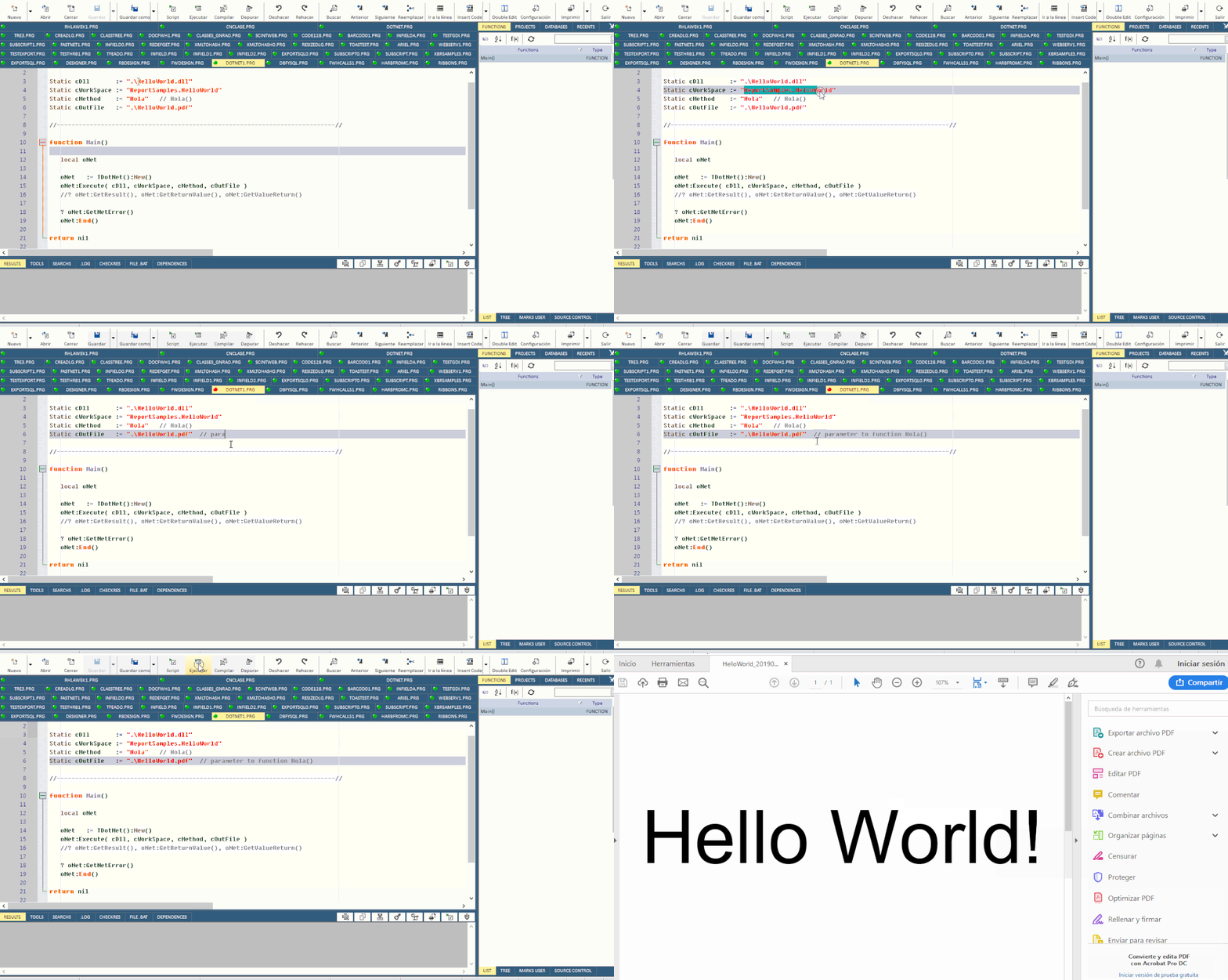
My PRG ( DOTNET1.PRG )
Code (fw): Select all Collapse
//----------------------------------------------------------------------------//
// Author: Cristobal Navarro
//----------------------------------------------------------------------------//
#include "FiveWin.ch"

Static cDll       := ".\HelloWorld.dll"
Static cWorkSpace := "ReportSamples.HelloWorld"
Static cMethod    := "Hola"   // Hola()
Static cOutFile   := ".\HelloWorld.pdf"

//----------------------------------------------------------------------------//

function Main()

   local oNet

   oNet   := TDotNet():New()
   oNet:Execute( cDll, cWorkSpace, cMethod, cOutFile )
   //? oNet:GetResult(), oNet:GetReturnValue(), oNet:GetValueReturn()

   ? oNet:GetNetError()
   oNet:End()

return nil


I have created a DLL with the functions that will serve as a "wrapper" to access the functions of the DLL Report.dll
My file .cs is HelloWorld.cs
Code (fw): Select all Collapse
using Root.Reports;
using System;
using System.IO;

namespace ReportSamples
{
  /// <summary>Hello World (PDF Version)</summary>
  public class HelloWorld
  {
    //----------------------------------------------------------------------------------------------------x
    /// <summary>Starts the "Hello World" sample.</summary>
    //public static Object Hola( string fileout )
    public static int Hola( string fileout )
    {
      //string fileout = args[0];
      Report report = new Report(new PdfFormatter());
      FontDef fd = new FontDef(report, "Arial");
      FontProp fp = new FontPropMM(fd, 25);
      Page page = new Page(report);
//      page.AddCenteredMM(80, new RepString(fp, "Hello World!"));
      page.AddCB_MM(80, new RepString(fp, "Hello World!"));
      RT.ViewPDF(report, fileout ); //"HelloWorld.pdf");
      return 0; //report;
    }
  }


And file .bat for build this DLL ( buildcshello.bat )

csc /out:helloworld.dll /target:library /r:reports.dll helloworld.cs


and when I build and execute my prg ( DOTNET1.EXE )


Later I will add other examples
Cristobal Navarro

Hay dos tipos de personas: las que te hacen perder el tiempo y las que te hacen perder la noción del tiempo

El secreto de la felicidad no está en hacer lo que te gusta, sino en que te guste lo que haces
Posts: 6755
Joined: Wed Feb 15, 2012 08:25 PM
Re: Using C# (and .NET) from FWH not working(?)
Posted: Tue Jul 09, 2019 02:17 PM

FastReporNet with Fivewin

viewtopic.php?f=17t=34973start=30#p217795

&&

Cristobal Navarro

Hay dos tipos de personas: las que te hacen perder el tiempo y las que te hacen perder la noción del tiempo

El secreto de la felicidad no está en hacer lo que te gusta, sino en que te guste lo que haces
Posts: 6755
Joined: Wed Feb 15, 2012 08:25 PM
Re: Using C# (and .NET) from FWH not working(?)
Posted: Tue Jul 09, 2019 08:13 PM
Second example:
Create your own DLL to access its functions

My prg: DOTNET2.PRG

Code (fw): Select all Collapse
#include "FiveWin.ch"

function Main()

   local oNet

   oNet   := TDotNet():New()
   ? oNet:NetVersion()[ 2 ]
   // ? oNet:GetNetError(), oNet:GetResult()
   oNet:Execute( "test.dll", "dllNamespace.dllClass", "ShowMsg", "C# from FWH" )
   ? if( Empty( oNet:GetNetError() ), "OK", oNet:GetNetError() )
   oNet:Execute( "test.dll", "dllNamespace.dllClass", "ShowMsg", "C#" )
   ? if( Empty( oNet:GetNetError() ), "OK", oNet:GetNetError() )
   oNet:Execute( "test.dll", "dllNamespace.dllClass", "GetMsg" )
   ? if( Empty( oNet:GetNetError() ), "OK", oNet:GetNetError() )
   oNet:End()
   
return nil

//----------------------------------------------------------------------------//


My file .cs: TEST.CS
Code (fw): Select all Collapse
using System.Windows.Forms;
using System;
using System.Runtime.InteropServices;

namespace dllNamespace
{
    public class dllClass
    {
        public static int ShowMsg( string msg )
        {
            MessageBox.Show( msg );
            return 0;
        }

        public static int GetMsg( string cVal )
        {
            MessageBox.Show( "KKK" );
            return 0;
        }

    }
}


File .BAT for build file .CS: BUILDCS.BAT

call "%ProgramFiles(x86)%\Microsoft Visual Studio\2017\Community\VC\Auxiliary\Build\vcvarsall.bat" x86
csc /out:test.dll /target:library test.cs


Note that the class still has limitations, especially when returning non-integer values.
Above all it is designed to use DLLs in C #, third-party.
Cristobal Navarro

Hay dos tipos de personas: las que te hacen perder el tiempo y las que te hacen perder la noción del tiempo

El secreto de la felicidad no está en hacer lo que te gusta, sino en que te guste lo que haces
Posts: 6
Joined: Wed Jun 05, 2019 02:24 PM
Re: Using C# (and .NET) from FWH not working(?)
Posted: Wed Jul 10, 2019 10:40 AM
Thank you for your response, Cristobal.

But the problem remains.
If I compile just this code:
Code (fw): Select all Collapse
#include "FiveWin.ch"

function Main()

   local oNet

    ? "Start!"
    
   oNet := TDotNet():New()
    ? IIF(oNet != nil, "Net yes!", "Net no :(")

   oNet:End()
   
return nil


I see the MsgBox with "Start!" but the second one (? IIF(oNet != nil, "Net yes!", "Net no :-)")) doesn't show up. I can not see if the object oNet is nil or not.

How do you compile your PRG?
I use xHarbour with BCC7.

Thank you once again
Anja
Posts: 6755
Joined: Wed Feb 15, 2012 08:25 PM
Re: Using C# (and .NET) from FWH not working(?)
Posted: Wed Jul 10, 2019 04:13 PM

Dear Anja
I have not gotten it to work with xHarbour
Why do not you use Harbour?

Cristobal Navarro

Hay dos tipos de personas: las que te hacen perder el tiempo y las que te hacen perder la noción del tiempo

El secreto de la felicidad no está en hacer lo que te gusta, sino en que te guste lo que haces
Posts: 6
Joined: Wed Jun 05, 2019 02:24 PM
Re: Using C# (and .NET) from FWH not working(?)
Posted: Tue Jul 16, 2019 10:40 AM

Dear Cristobal,

thank you for your answer. Harbour instead of xHarbour is the solution to the problem. Now I know why it isn't working.
But we have a big legacy application and I don't know if it is possible to transform this "big ball of mud" to Harbour.

We will find a way to work with the .NET lib we have, convert to an .exe file or something like that.

Sincerely

Posts: 6755
Joined: Wed Feb 15, 2012 08:25 PM
Re: Using C# (and .NET) from FWH not working(?)
Posted: Tue Jul 16, 2019 11:08 AM
AnjaK wrote:Dear Cristobal,

thank you for your answer. Harbour instead of xHarbour is the solution to the problem. Now I know why it isn't working.
But we have a big legacy application and I don't know if it is possible to transform this "big ball of mud" to Harbour.

We will find a way to work with the .NET lib we have, convert to an .exe file or something like that.

Sincerely


Dear Anja
Another solution is to make a small exe in harbour and be called from your application
If I can help you with something else, do not hesitate to contact me
Cristobal Navarro

Hay dos tipos de personas: las que te hacen perder el tiempo y las que te hacen perder la noción del tiempo

El secreto de la felicidad no está en hacer lo que te gusta, sino en que te guste lo que haces
Posts: 55
Joined: Tue Jun 30, 2015 02:26 AM
Re: Using C# (and .NET) from FWH not working(?)
Posted: Tue Jul 30, 2019 09:02 PM
Good Afternoon Everybody,
I'm trying to call some CSharp functions from my FWH code through an .DLL, but it's not working.

I tried a really simple code as suggested above, but I'm receiving some error messages, and I can't figure out what is happening.

C# function in capture.dll
Code (fw): Select all Collapse
using System.Linq;
using System.Text;
using System.Threading.Tasks;

namespace capture
{
    public class capClass
    {
        public static int teste(int i)
        {
            return i * 2;
        }
    }
}


Harbour code
Code (fw): Select all Collapse
oNet := TDotNet():new()
oNet:Execute("capture.dll","capture.capClass","teste",1)
?oNet:GetNetError()
?oNet:GetReturnValue()

oNet:End()


the first time I execute the code, I'm receiving this message:

Error Description: Error BASE /1081 Argument Error: +

DOTNET_.PRG => TDOTNET:HOSTEXECUTE(257)
DOTNET_.PRG => TDOTNET:EXECUTE(160)


Then, when I close the window and reopen it to my function again, I receive this message

Error HostStart


Does anyone know what is wrong with my code?

P.S.: I'm generating the .DLL via Class Library Project on Visual Studio 2017.
Sds,
Ricardo Arraes
ricardo@vfatec.com.br
Posts: 6755
Joined: Wed Feb 15, 2012 08:25 PM
Re: Using C# (and .NET) from FWH not working(?)
Posted: Tue Jul 30, 2019 09:56 PM
Please try return at moment always string value

Code (fw): Select all Collapse
namespace SimpleDllFramework
{
    public class Class1
    {
      public static int GetNumber(int input = 1)
      {
         int result = input * 10 ;
         string myString = result.ToString();
         return myString;
      }
   }
}
Cristobal Navarro

Hay dos tipos de personas: las que te hacen perder el tiempo y las que te hacen perder la noción del tiempo

El secreto de la felicidad no está en hacer lo que te gusta, sino en que te guste lo que haces
Posts: 55
Joined: Tue Jun 30, 2015 02:26 AM
Re: Using C# (and .NET) from FWH not working(?)
Posted: Wed Jul 31, 2019 01:45 AM
Ok, the first message is gone after I did that. thank you!
But now when I open my window for the first time to execute the function, it show me the error message:

Error HostExecute

And then, when I try to reopen the window as many times as I want, the error message change to:

Error HostStart


cnavarro wrote:Please try return at moment always string value

Code (fw): Select all Collapse
namespace SimpleDllFramework
{
    public class Class1
    {
      public static int GetNumber(int input = 1)
      {
         int result = input * 10 ;
         string myString = result.ToString();
         return myString;
      }
   }
}
Sds,
Ricardo Arraes
ricardo@vfatec.com.br
Posts: 55
Joined: Tue Jun 30, 2015 02:26 AM
Re: Using C# (and .NET) from FWH not working(?)
Posted: Thu Aug 01, 2019 12:04 PM

+1

Sds,
Ricardo Arraes
ricardo@vfatec.com.br
Posts: 114
Joined: Fri Jul 21, 2006 07:15 PM
Re: Using C# (and .NET) from FWH not working(?)
Posted: Thu Aug 22, 2019 11:41 AM

Hi to all.
Is there predict to write the code from tdotnet to xharbour?
Regards.

FWH / xHarbour / BCC / MySql

Visual Studio / Harbour / DotNet Maui / C#
Posts: 6755
Joined: Wed Feb 15, 2012 08:25 PM
Re: Using C# (and .NET) from FWH not working(?)
Posted: Thu Aug 22, 2019 12:34 PM

Not possible, sorry

Cristobal Navarro

Hay dos tipos de personas: las que te hacen perder el tiempo y las que te hacen perder la noción del tiempo

El secreto de la felicidad no está en hacer lo que te gusta, sino en que te guste lo que haces
Posts: 114
Joined: Fri Jul 21, 2006 07:15 PM
Re: Using C# (and .NET) from FWH not working(?)
Posted: Thu Aug 22, 2019 01:53 PM

Ok, thanks for reply.

FWH / xHarbour / BCC / MySql

Visual Studio / Harbour / DotNet Maui / C#