FiveTech Support Forums

FiveWin / Harbour / xBase community
Board index FiveWin for Harbour/xHarbour Virtual Keyboard on tablet
Posts: 7318
Joined: Thu Oct 18, 2012 07:17 PM
Virtual Keyboard on tablet
Posted: Thu Aug 01, 2019 07:28 AM

I have a Lenovo tablet
How I can to call the virtual keyboard on win10 pro?
with osk not run !!!

Before to create a my keyboard I wisk Know if I an use the window keyboard.
thanks

Since from 1991/1992 ( fw for clipper Rel. 14.4 - Momos)

I use : FiveWin for Harbour March-April 2024 - Harbour 3.2.0dev (harbour_bcc770_32_20240309) - Bcc7.70 - xMate ver. 1.15.3 - PellesC - mail: silvio[dot]falconi[at]gmail[dot]com
Posts: 6755
Joined: Wed Feb 15, 2012 08:25 PM
Re: Virtual Keyboard on tablet
Posted: Thu Aug 01, 2019 09:06 AM
Cristobal Navarro

Hay dos tipos de personas: las que te hacen perder el tiempo y las que te hacen perder la noción del tiempo

El secreto de la felicidad no está en hacer lo que te gusta, sino en que te guste lo que haces
Posts: 7318
Joined: Thu Oct 18, 2012 07:17 PM
Re: Virtual Keyboard on tablet
Posted: Thu Aug 01, 2019 10:17 PM

I have Lenovo MIIX320 and the test sample of Navarro not run here
I cannot see the kyboard of windows
nothing with osk or oskb

Since from 1991/1992 ( fw for clipper Rel. 14.4 - Momos)

I use : FiveWin for Harbour March-April 2024 - Harbour 3.2.0dev (harbour_bcc770_32_20240309) - Bcc7.70 - xMate ver. 1.15.3 - PellesC - mail: silvio[dot]falconi[at]gmail[dot]com
Posts: 6755
Joined: Wed Feb 15, 2012 08:25 PM
Re: Virtual Keyboard on tablet
Posted: Thu Aug 01, 2019 10:34 PM
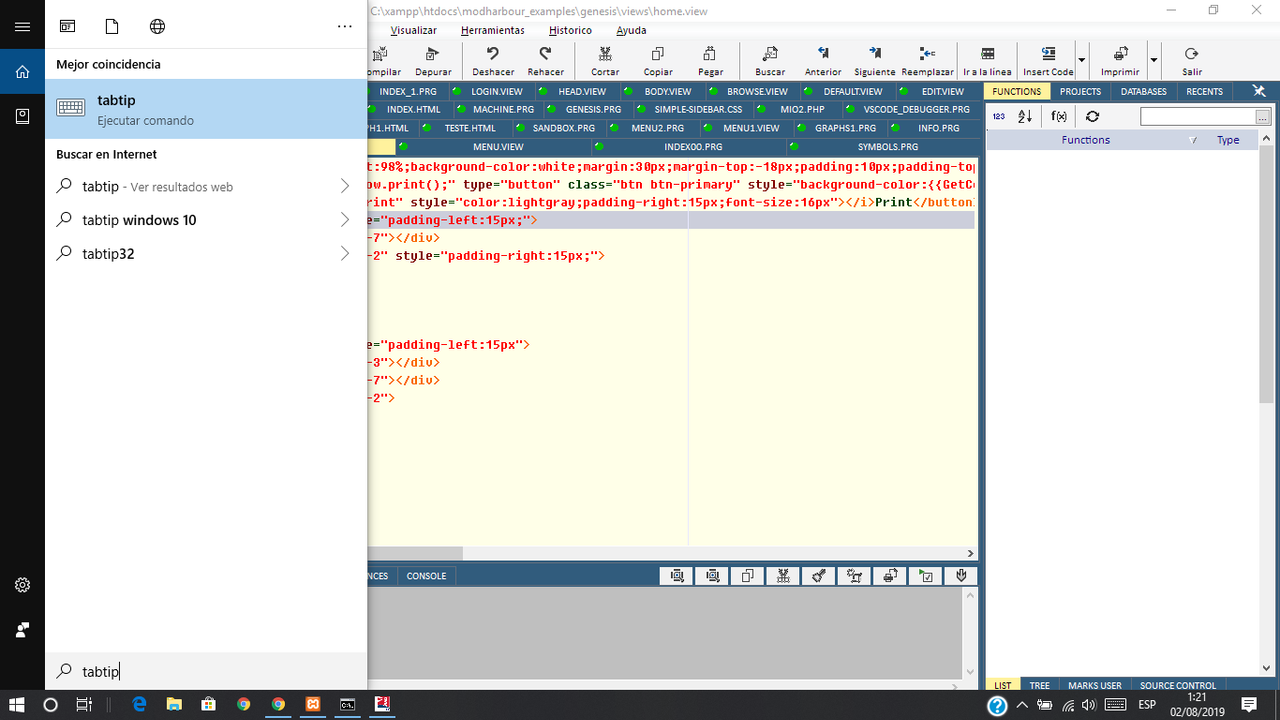
And with tabtip ?

"C:\\Program Files\\Common Files\\microsoft shared\\ink\\tabtip.exe")
Cristobal Navarro

Hay dos tipos de personas: las que te hacen perder el tiempo y las que te hacen perder la noción del tiempo

El secreto de la felicidad no está en hacer lo que te gusta, sino en que te guste lo que haces
Posts: 7318
Joined: Thu Oct 18, 2012 07:17 PM
Re: Virtual Keyboard on tablet
Posted: Thu Aug 01, 2019 11:03 PM

Not run nothing
i tried to call on cortana directly but it non execute the comand

Since from 1991/1992 ( fw for clipper Rel. 14.4 - Momos)

I use : FiveWin for Harbour March-April 2024 - Harbour 3.2.0dev (harbour_bcc770_32_20240309) - Bcc7.70 - xMate ver. 1.15.3 - PellesC - mail: silvio[dot]falconi[at]gmail[dot]com
Posts: 6755
Joined: Wed Feb 15, 2012 08:25 PM
Re: Virtual Keyboard on tablet
Posted: Thu Aug 01, 2019 11:25 PM
I use Windows 10 64 bits
Cortana found tabtip
Cristobal Navarro

Hay dos tipos de personas: las que te hacen perder el tiempo y las que te hacen perder la noción del tiempo

El secreto de la felicidad no está en hacer lo que te gusta, sino en que te guste lo que haces
Posts: 7318
Joined: Thu Oct 18, 2012 07:17 PM
Re: Virtual Keyboard on tablet
Posted: Fri Aug 02, 2019 12:41 AM
yes also here but then not open the keyboard

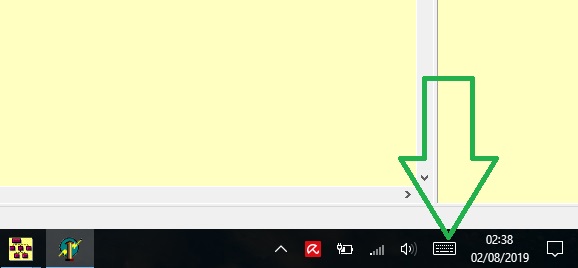
only if click on bar windows


the w 10 open the keyboard

but I wish call it from fwh app
Since from 1991/1992 ( fw for clipper Rel. 14.4 - Momos)

I use : FiveWin for Harbour March-April 2024 - Harbour 3.2.0dev (harbour_bcc770_32_20240309) - Bcc7.70 - xMate ver. 1.15.3 - PellesC - mail: silvio[dot]falconi[at]gmail[dot]com
Posts: 4043
Joined: Wed Dec 19, 2007 06:40 PM
Re: Virtual Keyboard on tablet
Posted: Fri Aug 02, 2019 07:53 AM
Silvio,

ACTIVATE DIALOG oDlg CENTERED ON INIT ControlsDlg( oDlg )

hide or show :
VALID ( HideInputPanel(), .T. )

ShowInputPanel( oDlg )

regards
Uwe :-)
Since 1995 ( the first release of FW 1.9 )

i work with FW.

If you have any questions about special functions, maybe i can help.
Posts: 7318
Joined: Thu Oct 18, 2012 07:17 PM
Re: Virtual Keyboard on tablet
Posted: Fri Aug 02, 2019 02:40 PM
this source not run
Code (fw): Select all Collapse
 

    // Testing GETs

    #include "FiveWin.ch"
    #define WM_SYSCOMMAND 0x0112
    #define SC_CLOSE 0xF060

    function Main()
       LOCAL oDlg, oGet
       local oGet1, oGet2
       LOCAL cCad := "Testing    " // pad("Testing Gets",40)
       LOCAL nNum := 0
       LOCAL dDat := Date()

       Set century On
       Set Date Ansi
       Set Date format "mm/dd/yyyy"

       SET _3DLOOK ON

      DEFINE DIALOG oDlg TITLE "TGet from " + FWDESCRIPTION

       @ 1,    2 SAY "Text..:" OF oDlg
       @ 1,    6 GET oGet VAR cCad OF oDlg SIZE 60, 10 COLOR "W/G" PICTURE "@K"

       @ 1.8,  2 SAY "Number:" OF oDlg
       @ 2,    6 GET oGet1 VAR nNum OF oDlg SIZE 60, 10 PICTURE "9999999.99"

       @ 2.6,  2 SAY "Date:" OF oDlg
       @ 3,    6 GET oGet2 VAR dDat PICTURE "@E" OF oDlg SIZE 60, 10  // "@D"
       
       @ 3,    7 BUTTON "&Ok" OF oDlg SIZE 30, 12 ACTION .T. //oDlg:End()
       @ 3,   16 BUTTON "&Cancel" SIZE 30, 12 OF oDlg ACTION oDlg:End() CANCEL
       
       // TGet():SetColorFocus( nRGB( 200, 120, 120 ) )

       ACTIVATE DIALOG oDlg CENTERED VALID ( HideInputPanel(), .T. ) ON INIT ControlsDlg( oDlg )

    return nil

    //------------------------------------------------------------------------//

    FUNCTION ShowInputPanel( oDlg )
    Local hWndInputPanel
    //hWndInputPanel:= FindWindow("IPTip_Main_Window")
    //if Empty( hWndInputPanel )
       ShellExecute( oDlg:hWnd, "open", "C:\\Program Files\\Common Files\\microsoft shared\\ink\\tabtip.exe")
    //endif
    RETURN NIL

    FUNCTION HideInputPanel()
    Local hWndInputPanel
    hWndInputPanel := FindWindow("IPTip_Main_Window")
    if !Empty( hWndInputPanel )
       PostMessage( hWndInputPanel, WM_SYSCOMMAND, SC_CLOSE, 0 )
    endif
    Return nil

    Function ControlsDlg( oDlg )
    Local x
    Local nLen := Len( oDlg:aControls )
    Local aObj := { "TGET" }
    For x = 1 to nLen
          if !Empty( Ascan( aObj, Upper( oDlg:aControls[x]:ClassName() ) ) )
             WITH OBJECT oDlg:aControls[x]
                :bGotFocus   := {   | o |  ShowInputPanel( oDlg ) }
                :bLostFocus  := {   | o |  HideInputPanel() }
            ENDWITH
          endif
    Next x
    Return nil


I see the cursor as it search the keyboard then not happen nothing
Since from 1991/1992 ( fw for clipper Rel. 14.4 - Momos)

I use : FiveWin for Harbour March-April 2024 - Harbour 3.2.0dev (harbour_bcc770_32_20240309) - Bcc7.70 - xMate ver. 1.15.3 - PellesC - mail: silvio[dot]falconi[at]gmail[dot]com
Posts: 1772
Joined: Thu Sep 05, 2019 05:32 AM
Re: Virtual Keyboard on tablet
Posted: Thu Oct 03, 2019 02:18 AM
hi,

is your App 32 Bit or 64 Bit :-)
i guess App is 32 run on 64 Bit OS :-)

if yes : you need to disable "Wow64 Redirection"
this Xbase++ Code using Ot4xb Syntax show how to call it from 32 Bit App under 64 Bit OS

Code (fw): Select all Collapse
#include "common.ch"
#include "ot4xb.ch"
#define SW_NORMAL           1

* --------------------------------------- *

PROCEDURE Main()
   SHELLOPENFILE( "C:\WINDOWS\system32\" , "osk.exe")
RETURN

FUNCTION SHELLOPENFILE( cPath, cFile, cPara )
LOCAL lSuccess
LOCAL bSaveError
LOCAL oError
LOCAL Retvar := .F.

   DEFAULT cPath TO ""
   DEFAULT cFILE TO ""
   DEFAULT cPara TO ""

   IF Is64Bit()
      @ Kernel32:Wow64EnableWow64FsRedirection( .F. )     // disable bevor API Call
   ENDIF

   bSaveError := ERRORBLOCK( { | e | BREAK( e ) } )
   BEGIN SEQUENCE

      lSuccess := @SHELL32:ShellExecuteA( APPDESKTOP() :GetHWND(), ;
                                       "open", ;
                                       cPath + cFile, ;
                                       cPara, ;
                                       CURDIR(), ;
                                       SW_NORMAL )
      DO CASE
         CASE lSuccess > 32                                 // OK
            Retvar := .T.
      OTHERWISE
         BREAK
      ENDCASE

   RECOVER USING oError
      ERRORBLOCK( bSaveError )
      IF !EMPTY(oError)
         MSGBOX( DosErrorMessage( oError:osCode ), "Error osCode " + LTRIM( STR( oError:osCode ) ) )
      ELSE
         MSGBOX( "Error open "+ cPath + cFile, IF(Is64Bit(),"64 Bit", "32 Bit"))
      ENDIF
   END SEQUENCE
   ERRORBLOCK( bSaveError )

   IF Is64Bit()
      @ Kernel32:Wow64EnableWow64FsRedirection( .T. )      // enable again
   ENDIF

RETURN Retvar

FUNCTION Is64Bit()
RETURN IF( FILE( "C:\WINDOWS\SysWOW64\Format.COM" ), .T., .F. )
greeting,

Jimmy
Posts: 7318
Joined: Thu Oct 18, 2012 07:17 PM
Re: Virtual Keyboard on tablet
Posted: Thu Oct 03, 2019 06:46 AM

I have Tablet Lenovo Miix320 with windows 10 Pro 64 bit

Since from 1991/1992 ( fw for clipper Rel. 14.4 - Momos)

I use : FiveWin for Harbour March-April 2024 - Harbour 3.2.0dev (harbour_bcc770_32_20240309) - Bcc7.70 - xMate ver. 1.15.3 - PellesC - mail: silvio[dot]falconi[at]gmail[dot]com
Posts: 1772
Joined: Thu Sep 05, 2019 05:32 AM
Re: Virtual Keyboard on tablet
Posted: Fri Oct 04, 2019 05:21 AM
hi,
Silvio.Falconi wrote:I have Tablet Lenovo Miix320 with windows 10 Pro 64 bit
i have a older 310 Miix

as i say under 64 Bit when call from 32 Bit App you need to disable WOW64 Redirection as show in Sample here
https://docs.microsoft.com/en-us/windows/win32/api/winbase/nf-winbase-wow64enablewow64fsredirection
greeting,

Jimmy
Posts: 7318
Joined: Thu Oct 18, 2012 07:17 PM
Re: Virtual Keyboard on tablet
Posted: Fri Oct 04, 2019 08:31 AM

I can't waste time to see if the function doesn't work, I prefer to find other solutions

Since from 1991/1992 ( fw for clipper Rel. 14.4 - Momos)

I use : FiveWin for Harbour March-April 2024 - Harbour 3.2.0dev (harbour_bcc770_32_20240309) - Bcc7.70 - xMate ver. 1.15.3 - PellesC - mail: silvio[dot]falconi[at]gmail[dot]com
Posts: 1772
Joined: Thu Sep 05, 2019 05:32 AM
Re: Virtual Keyboard on tablet
Posted: Fri Oct 04, 2019 07:19 PM
Silvio.Falconi wrote:I can't waste time to see if the function doesn't work, I prefer to find other solutions

sorry i'm a Newbie in harbour and not sure about harbour Syntax.

it work that Way with Xbase++ on my 310 Miix so i guess it must work with harbour too.
perhaps there is a other People in this Forum who can help to "translate" it.
greeting,

Jimmy

Continue the discussion