

It is not settodbf(). There is only one T.
FWH 18.05/xHarbour 1.2.3/BCC7/Windows 10
It is not settodbf(). There is only one T.

Silvio,
Well, I see in your source that you are using the XBrowse definition clause "DATASOURCE" which I have never seen before. Apparently this does the same thing that oBrw:SetoDBF() does, so you don't need that. Take it back out.
I also see that in your first post, the database was skipping as it should. Turning off the buffer should not affect skipping the records, so I am guessing that this is a TDatabase bug. I suggest you contact Nages about it.
Silvio,
OK, I did some testing and I have found that the browse reads the buffer, so if you turn the buffer off, you always get the last read record which is the one last read before the buffer was turned off (the first record). I remember being able to turn off the buffer some time ago, but perhaps it was only when using the database directly instead of a database object.
Ok, my mistake. I was right AND I was wrong. You can turn off buffering, but not by changing the class variable lBuffer directly. You must do it this way:
oDBF:setBuffer(.F.)
Technically, lBuffer should be a hidden variable that cannot be changed by the programmer. OOP languages like Smalltalk, do not allow any class variables to be changed directly, you must do it using a method. And this is why.
James Bott wrote:Silvio,
I also see that in your first post, the database was skipping as it should. Turning off the buffer should not affect skipping the records, so I am guessing that this is a TDatabase bug. I suggest you contact Nages about it.
I guess I wasn't clear.
oDbf:setBuffer(.F.)
Works. Did you try it?
oLotto:= TDatabase():Open( , cDir+"Lotto", "DBFCDX", .T. )
oLotto:setorder(nOrder)
oLotto:gotop()James Bott wrote:oLotto:= TDatabase():Open( , cDir+"Lotto", "DBFCDX", .T. ) oLotto:setorder(nOrder) oLotto:gotop()
You should not be opening a database this way. You should always use a class. This encapsulates the opening into one place so if you want to change the database filename (including path), the current index, sharing, original set order, etc., you only have to change it in one place. This reduces the chance of bugs, makes writing code using the class easier, etc.
oLotto := TLotto():New()
Short, and easy to read.
Write each piece of code only once.
CLASS TXData from TNextID
   //DATA cPath init cFilePath(GetModuleFileName( GetInstance() ))  + "Data\"
  DATA cPath init oApp:cDbfPath
ENDCLASS

CLASS TLotto from TXData
   METHOD New()
ENDCLASS

METHOD New( lShared ) CLASS TLotto
   Default lShared := .t.
   ::super:New(,::cPath + "Lotto" ,, lShared)
   if ::use()
      ::setOrder(1)
      ::gotop()
   endif
RETURN SelfoLotto :=TLotto:New()
oLotto:setorder(1)
oLotto:gotop()seems to be really slow:
- when I scroll through all the records or by pages
- when I go to print a record and refresh the xbrowse (doing also setfocus)
- when I insert a record and return to xbrowse (refresh and setfocus)
I just tested a database of 26,000 records. With, or without, buffering it is quite fast--about 1 full screen per second (on a local drive). If yours is slower, it is due to other routines you are calling from TXBrowse, not TXBrowse itself.
I'm not sure why anyone would want to browse a large database anyway. Filters and/or searches would much faster.
James Bott wrote: If yours is slower, it is due to other routines you are calling from TXBrowse, not TXBrowse itself.
I'm not sure why anyone would want to browse a large database anyway. Filters and/or searches would much faster.
Silvio,
OK, I got your code (or partial code), and I can confirm that it is not the xbrowse that is slowing things down, it is all your other code. In order to find which section or sections are slowing it down the most, you need to log the elapsed time it takes to run each section of code. Then for the slowest code, you have to either decide to eliminate it or reprogram it another faster way.
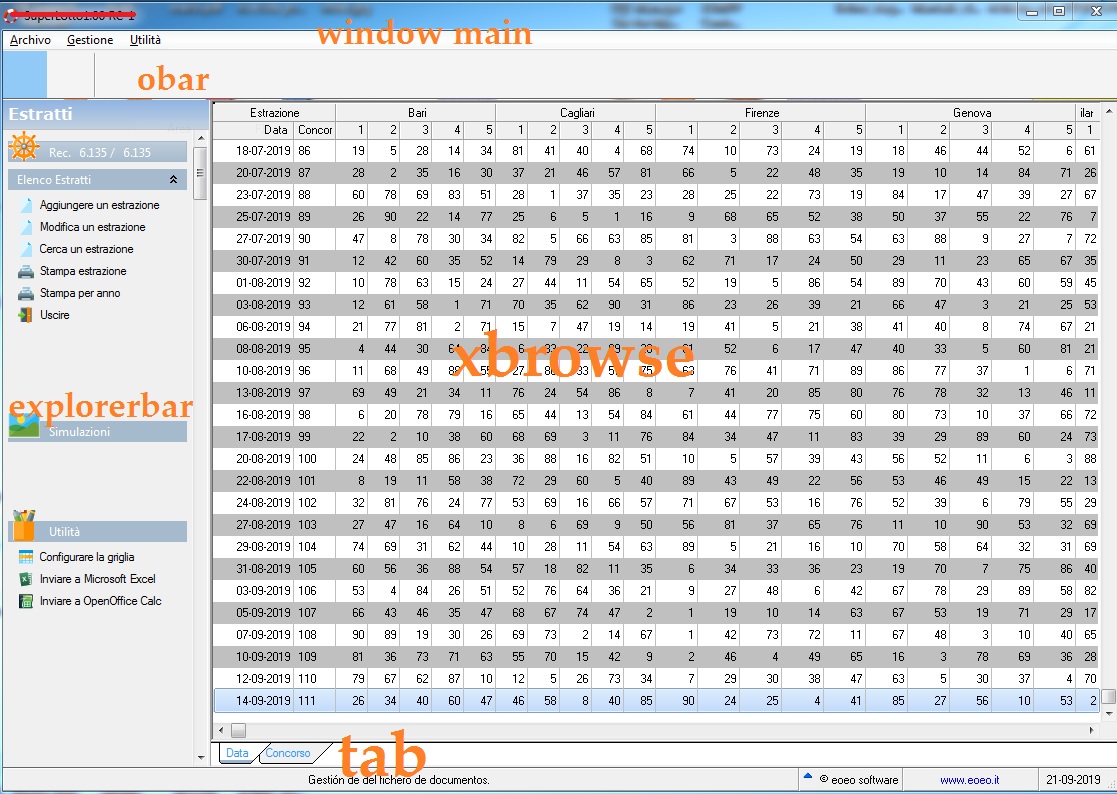
You might also consider that you are giving the user way too much data. It appears that you are showing 52 columns on just the first folder. 52 fields times 6135 records is 319,020 pieces of information. How does anyone evaluate 319,020 pieces of information in their head? Generally, we try to reduce the amount of information that a user manipulates, not just give them everything.
Many years ago, one of my first clients was a wholesaler. He asked me for a printout of all the sales for the day. I told him that would be about 100 pages, then I asked what did he want it for? He said he wanted to find the best and worst selling items. So, I recommended a report just showing the 15 best and 15 worst selling items, and that would be a one page report. He loved it. [His company grew so much in the next five years, that he sold out and retired].
Maybe you should re-think the design of your software.
but the problem in addition to scrolling through the archive, when I insert or when I print later in the cooling takes a while
it is all your other code
Then for the slowest code, you have to either decide to eliminate it or reprogram it another faster way.
You might also consider that you are giving the user way too much data. It appears that you are showing 52 columns on just the first folder. 52 fields times 6135 records is 319,020 pieces of information. How does anyone evaluate 319,020 pieces of information in their head? Generally, we try to reduce the amount of information that a user manipulates, not just give them everything.
Many years ago, one of my first clients was a wholesaler. He asked me for a printout of all the sales for the day. I told him that would be about 100 pages, then I asked what did he want it for? He said he wanted to find the best and worst selling items. So, I recommended a report just showing the 15 best and 15 worst selling items, and that would be a one page report. He loved it. [His company grew so much in the next five years, that he sold out and retired].
Maybe you should re-think the design of your software.
You print from another routine and then return to the same browse that you were already looking at. No refresh of the browse require
