FiveTech Support Forums

FiveWin / Harbour / xBase community
Board index FiveWin for Harbour/xHarbour Xbrowse colors
Posts: 7317
Joined: Thu Oct 18, 2012 07:17 PM
Xbrowse colors
Posted: Tue Sep 17, 2019 08:58 AM

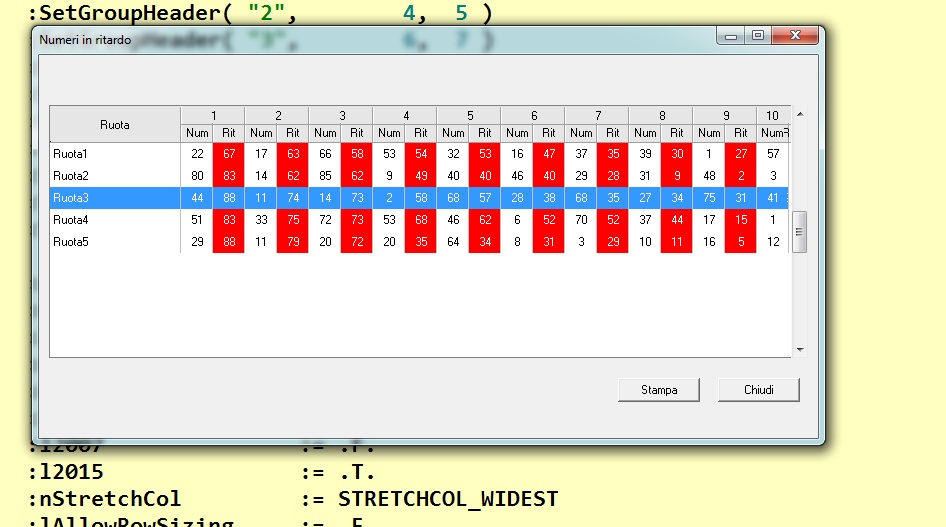
I colorize only some columns
the problem is when I use the MarqueeStyle I cannot use
:nMarqueeStyle := MARQSTYLE_HIGHLROW
or
:nMarqueeStyle := MARQSTYLE_HIGHLWIN7

because it not show the red colors of that columns

how I can resolve it ?
Since from 1991/1992 ( fw for clipper Rel. 14.4 - Momos)

I use : FiveWin for Harbour March-April 2024 - Harbour 3.2.0dev (harbour_bcc770_32_20240309) - Bcc7.70 - xMate ver. 1.15.3 - PellesC - mail: silvio[dot]falconi[at]gmail[dot]com
Posts: 4043
Joined: Wed Dec 19, 2007 06:40 PM
Re: Xbrowse colors
Posted: Tue Sep 17, 2019 10:42 AM
Silvio,

the solution You are looking for ?


regards
Uwe :-)
Since 1995 ( the first release of FW 1.9 )

i work with FW.

If you have any questions about special functions, maybe i can help.
Posts: 7317
Joined: Thu Oct 18, 2012 07:17 PM
Re: Xbrowse colors
Posted: Tue Sep 17, 2019 10:49 AM

yes

Since from 1991/1992 ( fw for clipper Rel. 14.4 - Momos)

I use : FiveWin for Harbour March-April 2024 - Harbour 3.2.0dev (harbour_bcc770_32_20240309) - Bcc7.70 - xMate ver. 1.15.3 - PellesC - mail: silvio[dot]falconi[at]gmail[dot]com
Posts: 4043
Joined: Wed Dec 19, 2007 06:40 PM
Re: Xbrowse colors
Posted: Tue Sep 17, 2019 11:06 AM
Silvio,

Code (fw): Select all Collapse
@ 0, 0 XBROWSE oBrw OF oWnd ;
ALIAS 'CUSTOMER' AUTOCOLS ;
LINES  
//I colorize only some columns
//the problem is when I use the MarqueeStyle I cannot use 
oBrw:nMarqueeStyle := MARQSTYLE_HIGHLROW
//or 
//:nMarqueeStyle := MARQSTYLE_HIGHLWIN7
//because it not show the red colors of that columns

WITH OBJECT oBrw:aCols[ 3 ] // colored column
    :bPaintText := { | oCol, hDC, cText, aRect | ;
    DRAW_RECT( oCol, hDC, cText, aRect, 255 ) } 
END

//------------------------

STATIC FUNCTION DRAW_RECT ( oCol, hDC, cText, aRect, nCellcolor )
LOCAL nTop      := aRect[ 1 ] 
LOCAL nLeft     := aRect[ 2 ] 
LOCAL nBottom   := aRect[ 3 ] 
LOCAL nRight    := aRect[ 4 ] 
LOCAL nFontHt  := GetTextHeight( oCol:oBrw:hWnd, hDC )
LOCAL nColor, Fieldvalue, hBrush1

IF nCellcolor <> NIL // Full cellcolor
     hBrush1 := CreateSolidBrush( nCellcolor ) 
     hOld1:= SelectObject( hBrush1 )
     FillRect( hDC, { nTop -1, nLeft -4, nBottom +1, nRight +2 }, hBrush1 )
     SelectObject( hOld1 )
     DeleteObject( hBrush1 )
ENDIF

//oCol:nDataStyle  0 = lefft, 1 = centered, 2 = right 
DrawTextEx( hDC, cText, { nTop, nLeft, nTop + nFontHt + 4, nRight }, 0 ) //oCol:nDataStyle )

RETURN NIL


regards
Uwe :-)
Since 1995 ( the first release of FW 1.9 )

i work with FW.

If you have any questions about special functions, maybe i can help.
Posts: 7317
Joined: Thu Oct 18, 2012 07:17 PM
Re: Xbrowse colors
Posted: Tue Sep 17, 2019 11:32 AM

I cannot believe is not exist a command directly on xbrowse ...Nages ?

Since from 1991/1992 ( fw for clipper Rel. 14.4 - Momos)

I use : FiveWin for Harbour March-April 2024 - Harbour 3.2.0dev (harbour_bcc770_32_20240309) - Bcc7.70 - xMate ver. 1.15.3 - PellesC - mail: silvio[dot]falconi[at]gmail[dot]com
Posts: 4043
Joined: Wed Dec 19, 2007 06:40 PM
Re: Xbrowse colors
Posted: Tue Sep 17, 2019 11:49 AM
Silvio,

with the solution from above it is possible to color a cellpart

FillRect( hDC, { nTop -1, nRight -20, nBottom +1, nRight +4 }, hBrush1 )


regards
Uwe :-)
Since 1995 ( the first release of FW 1.9 )

i work with FW.

If you have any questions about special functions, maybe i can help.
Posts: 7317
Joined: Thu Oct 18, 2012 07:17 PM
Re: Xbrowse colors
Posted: Tue Sep 17, 2019 11:57 AM
Uwe I have some column on red please see the picture I posted

AEval( oBrw:aCols, { |o| o:bClrStd := SetStdColor( o ) }, 2 )

static function SetStdColor( oCol )
return { || CellColor( oCol ) }

static function CellColor( oCol )

local aColor := { CLR_BLACK, CLR_WHITE }
local oBrw := oCol:oBrw
local nRow := oBrw:nArrayAt
local nCol := oCol:nCreationOrder
local cVal := oCol:Value

if ! Empty( cVal )
if nCol = 3 .or. ncol = 5 ;
.or. nCol= 7 .or. nCol= 9 .or. nCol= 11 ;
.or. nCol= 13 .or. nCol= 15 .or. nCol= 17 .or. nCol= 19 .or. nCol= 21
aColor := { CLR_WHITE, CLR_HRED }
else
aColor := { CLR_BLACK,CLR_WHITE }
endif
endif

return aColor
Since from 1991/1992 ( fw for clipper Rel. 14.4 - Momos)

I use : FiveWin for Harbour March-April 2024 - Harbour 3.2.0dev (harbour_bcc770_32_20240309) - Bcc7.70 - xMate ver. 1.15.3 - PellesC - mail: silvio[dot]falconi[at]gmail[dot]com
Posts: 4043
Joined: Wed Dec 19, 2007 06:40 PM
Re: Xbrowse colors
Posted: Tue Sep 17, 2019 12:59 PM
Silvio,

very short, just a few lines

Code (fw): Select all Collapse
@ 0, 0 XBROWSE oBrw OF oWnd ;
ALIAS 'CUSTOMER' AUTOCOLS LINES  

oBrw:nMarqueeStyle := MARQSTYLE_HIGHLROW
oBrw:bClrStd:= {|| { 0, 16766638 } } // Black on LightBlue

nCol := 2 // start col
FOR I := 2 TO 7
    WITH OBJECT oBrw:aCols[ nCol ]
        :bPaintText := { | oCol, hDC, cText, aRect | ;
        DRAW_RECT( oCol, hDC, cText, aRect, 255 ) } 
    END
    nCol += 2 // every 2. col
NEXT

//------------------------

STATIC FUNCTION DRAW_RECT ( oCol, hDC, cText, aRect, nCellcolor )
LOCAL nFontHt := GetTextHeight( oCol:oBrw:hWnd, hDC )

IF nCellcolor <> NIL // Full cellcolor
    hBrush1 := CreateSolidBrush( nCellcolor ) 
        hOld1   := SelectObject( hBrush1 )
    FillRect( hDC, { aRect[ 1 ] -1, aRect[ 2 ] -2, aRect[ 3 ] +1, aRect[ 4 ] + 1 }, hBrush1 ) 
    SelectObject( hOld1 )
    DeleteObject( hBrush1 )
ENDIF

DeleteObject( hBrush1 )

//oCol:nDataStyle  0 = lefft, 1 = centered, 2 = right 
DrawTextEx( hDC, cText, { aRect[ 1 ], aRect[ 2 ], aRect[ 1 ] + nFontHt + 4, aRect[ 4 ] }, 0 ) //oCol:nDataStyle )

RETURN NIL


regards
Uwe :-)
Since 1995 ( the first release of FW 1.9 )

i work with FW.

If you have any questions about special functions, maybe i can help.

Continue the discussion