FiveTech Support Forums

FiveWin / Harbour / xBase community
Board index FiveWin para Harbour/xHarbour Saber si ventana MDI esta abierta - ( SOLUCIONADO )
Posts: 1816
Joined: Wed Oct 26, 2005 02:49 PM
Saber si ventana MDI esta abierta - ( SOLUCIONADO )
Posted: Mon Sep 30, 2019 04:49 PM

Buenos días para todos...

Requiero saber si una ventana MDI se encuentra abierta, desconozco si se puede hacer mediante el nombre del objeto? o debe ser con título? y si esta abierta indicarle que tome el foco.

de antemano gracias.

Saludos
LEANDRO AREVALO
Bogotá (Colombia)
https://hymlyma.com
https://hymplus.com/
leandroalfonso111@gmail.com
leandroalfonso111@hotmail.com

[ Turbo Incremental Link64 6.98 Embarcadero 7.70 ] [ FiveWin 25.01 ] [ xHarbour 64 bits) ]
Posts: 1286
Joined: Mon Feb 25, 2008 02:54 PM
Re: Saber si ventana MDI esta abierta
Posted: Mon Sep 30, 2019 05:01 PM

if !VerificaWindows()
return
endif

 if ! lChild
     DEFINE WINDOW s_oWndPDF TITLE cTitulo
  else
     DEFINE WINDOW s_oWndPDF MDICHILD of M->oWnd vscroll TITLE cTitulo
  endif

  if  lChild
     s_oWndPDF:bValid   := {|| HB_GCAll(.t.), s_oWndPDF := Nil , .t. }
  else
     s_oWndPDF:bPostEnd := {||  HB_GCAll(.t.), s_oWndPDF := Nil }
  endif
  ACTIVATE WINDOW s_oWndPDF MAXIMIZED

/***********/
static function VerificaWindows()
/
/
if s_oWndPDF!= nil
if !IsZoomed(s_oWndPDF:hWnd)
s_oWndPDF:Maximize()
endif
return(.f.)
endif
return(.t.)

ubiratanmga@gmail.com

FWH24.04
BCC7.3
HARBOUR3.2
xMate
Pelles´C
TDolphin
Posts: 1816
Joined: Wed Oct 26, 2005 02:49 PM
Re: Saber si ventana MDI esta abierta
Posted: Tue Oct 01, 2019 03:17 PM
Amigo gracias por responder....

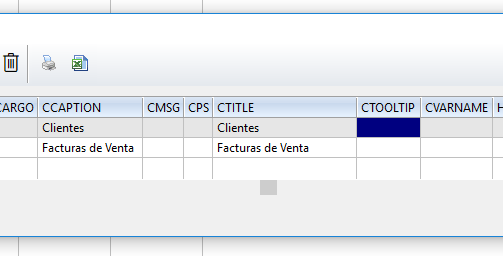
Pero no logro hacer que ande, buscando las propiedades de la oWnd Principal, me encontré con este array, pero no logro sacar la información de ahí. No encuentro dentro del objeto los nombres de las variables de los objetos TMDICLIENT... de antemano gracias.

Code (fw): Select all Collapse
xbrowse(oWnd:oWndclient:aWnd)
Saludos
LEANDRO AREVALO
Bogotá (Colombia)
https://hymlyma.com
https://hymplus.com/
leandroalfonso111@gmail.com
leandroalfonso111@hotmail.com

[ Turbo Incremental Link64 6.98 Embarcadero 7.70 ] [ FiveWin 25.01 ] [ xHarbour 64 bits) ]
Posts: 8515
Joined: Tue Dec 20, 2005 07:36 PM
Re: Saber si ventana MDI esta abierta
Posted: Tue Oct 01, 2019 03:30 PM
STATIC lWinOpen := .T.

FUNCTION Main()

   ...

RETURN NIL


STATIC lWinOpen := .F.

FUNCTION CHAMADO( oWnd, oContato )


   IF lWinOpen = .F.

      lWinOpen := .T.

   ELSE

      ? [No puede... ]

      lLigaBtnChama := .F.
      oContato:Disable()
      oContato:Refresh()

      lWinOpen := .F.

      RETURN NIL

   ENDIF

RETURN NIL
Saludos.
João Santos - São Paulo - Brasil - Phone: +55(11)95150-7341
Posts: 6755
Joined: Wed Feb 15, 2012 08:25 PM
Re: Saber si ventana MDI esta abierta
Posted: Tue Oct 01, 2019 03:55 PM
Tienes que buscar el hWnd de la ventana que quieres comprobar
Function IsOpen( oWndMdi )
      local nAt
      local oWnd
      if ( nAt := AScan( ::aWnd, { | oW | oW:hWnd == oWndMdi:hWnd } ) ) != 0
         oWnd = oWndMdi:aWnd[ nAt ]
      endif
Return oWnd
Cristobal Navarro

Hay dos tipos de personas: las que te hacen perder el tiempo y las que te hacen perder la noción del tiempo

El secreto de la felicidad no está en hacer lo que te gusta, sino en que te guste lo que haces
Posts: 1344
Joined: Wed Nov 16, 2005 09:14 PM
Re: Saber si ventana MDI esta abierta
Posted: Wed Oct 02, 2019 03:10 AM
Hola Leadron:
Yo llevo un control de las ventanas (o funciones mejor dicho) que tengo abiertas al llamar a la funcion que las abrira.
Se que no es exactamente lo mismo que estas preguntando pero te puede dar una idea.
oApp:aVentanas es un array que al iniciar se define vacio (oApp:aVentanas := {})
Cuando abro el procedimiento o la funcion hago
PROCEDURE Artic()
LOCAL hHand, ....
cVentana := PROCNAME()
IF ASCAN(oApp:aVentanas,cVentana) > 0 // Si ya esta abierta, la selecciono y la restauro 
   hHand := ASCAN(oApp:aVentanas,cVentana)
   oApp:oWnd:Select(hHand)
   oApp:oWnd:oWndClient:aWnd[hHand]:Restore()
   RETURN
ENDIF
AADD(oApp:aVentanas,cVentana) // Sino la guardo en la tabla de ventanas abiertas.
Al cerrar el procedimiento llamo a esta funcion
Code (fw): Select all Collapse
STATIC FUNCTION cerrar ( )
LOCAL aNueva := {}, i, j
j := ASCAN(oApp:aVentanas,cVentana)
FOR i := 1 TO LEN(oApp:aVentanas)
    IF i <> j
       AADD(aNueva,oApp:aVentanas[i])
    ENDIF
NEXT i
oApp:aVentanas := ACLONE(aNueva)
RETURN .t.
Rustico pero funciona, tal vez pueda darte una pista
Posts: 1816
Joined: Wed Oct 26, 2005 02:49 PM
Re: Saber si ventana MDI esta abierta
Posted: Wed Oct 02, 2019 04:01 PM
Gracias a todos por las ideas...

Cristobal,

Intente buscar en el array que contiene la información de las ventanas hijas que están abiertas, pero siempre me retorna 0.
********************************************
*BUSCA SI VENTANA ESTA ABIERTA POR EL TITULO
********************************************
Function IsOpen(  )
    Local nAt
    Local aVentanas := oWnd:oWndclient:aWnd  //oWnd ventana principal de la aplicación
    nAt := AScan(aVentanas,"Clientes")
    
Return nAt
Lo raro es que la información si esta contenida dentro de ese array


Cesar, gracias por la idea, pero en este momento lo tengo aun mas rustico, cambiando el valor de una variable PUBLIC a .T., así como lo tiene nuestro colega brasileño karinha. Pero la idea es tomar la información de las datas de la clase.

De antemano gracias.
Saludos
LEANDRO AREVALO
Bogotá (Colombia)
https://hymlyma.com
https://hymplus.com/
leandroalfonso111@gmail.com
leandroalfonso111@hotmail.com

[ Turbo Incremental Link64 6.98 Embarcadero 7.70 ] [ FiveWin 25.01 ] [ xHarbour 64 bits) ]
Posts: 6755
Joined: Wed Feb 15, 2012 08:25 PM
Re: Saber si ventana MDI esta abierta
Posted: Wed Oct 02, 2019 06:25 PM

Leandro no puedes buscar el titulo de la ventana, porque lo que se guarda en aWnds es el identificador de cada ventana ( hWnd ), fíjate en mi ejemplo y podrás conseguirlo

Cristobal Navarro

Hay dos tipos de personas: las que te hacen perder el tiempo y las que te hacen perder la noción del tiempo

El secreto de la felicidad no está en hacer lo que te gusta, sino en que te guste lo que haces
Posts: 199
Joined: Wed Jan 02, 2019 08:36 AM
Re: Saber si ventana MDI esta abierta
Posted: Wed Oct 16, 2019 09:51 AM
Buenos días Leandro.
Yo lo hago de la siguiente manera (y si es con el nombre de la ventana, creo)
Quizá no sea muy ortodoxo, pero me funciona a las mil maravillas.

1) Tengo una venta MDI Principal. Denominada oWndP. (nota: oWndP, la tengo declarada como MEMVAR al principio del primer módulo, para que sea visible en toda la apliación.)

2) Añado los botones, opciones del menú, etc... y en el ACTION le pongo lo siguiente

ACTION IF( Activa_MDI("Proveedores"), ,Prove() )

3) la function Activa_MDI(cTitle)
Busca si existe una ventana MDI hija con ese nombre, en este caso "Proveedores". Si existe le pasa el foco. En caso contrario se ejecuta el tercer parámetro del IF() que es ejecutar la función y obviamente crear una venta MDI hija, donde le pondremos ese titulo.
nota : obviamente al crear la nueva MDI, le tienes que indicar un nombre. Ojo también con el SET EXACT ON/OFF

Te copio la función tal y como yo la tengo. Si necesitas mas ayuda (y si te puedo ayudar), te monto un ejemplo totalmente funcional.

******************************************************************************
FUNCTION Activa_MDI(cTitle) // Esta funcion selecionada una ventana MDI si ya esta abierta.

LOCAL i:=0, lSuccess:=.f.

cTitle:=upper(cTitle)

FOR i=1 TO LEN(oWndP:oWndClient:aWnd)
IF UPPER( oWndP:oWndClient:aWnd[i]:cCaption )=cTitle
oWndP:oWndClient:aWnd[i]:SetFocus()
lSuccess:=.t.
ENDIF
NEXT
RETURN lSuccess

Return NIL
Jesús Marín
deumare@gmail.com
Posts: 1816
Joined: Wed Oct 26, 2005 02:49 PM
Re: Saber si ventana MDI esta abierta
Posted: Tue Nov 12, 2019 04:20 PM

Jesus gracias por la información, lo solucione con tu aporte.

Cristobal, también gracias por ejemplo, pero para este caso, me parece mas conveniente buscar por el titulo de la ventana, que por el nombre del objeto.

Saludos
LEANDRO AREVALO
Bogotá (Colombia)
https://hymlyma.com
https://hymplus.com/
leandroalfonso111@gmail.com
leandroalfonso111@hotmail.com

[ Turbo Incremental Link64 6.98 Embarcadero 7.70 ] [ FiveWin 25.01 ] [ xHarbour 64 bits) ]
Posts: 196
Joined: Tue Jul 01, 2008 06:34 PM
Re: Saber si ventana MDI esta abierta - ( SOLUCIONADO )
Posted: Thu Oct 16, 2025 03:37 PM

Jesus

Gracias por compartir la solución

Luis Ponce
Posts: 1144
Joined: Mon Feb 05, 2007 07:15 PM
Re: Saber si ventana MDI esta abierta - ( SOLUCIONADO )
Posted: Fri Oct 17, 2025 04:51 PM

Interesante funcíon

Activa_MDI(cTitle,oWndP)

para una DEFINE WINDOW que no sea MDI

se puede?

gracias !!!

Cesar Cortes Cruz

SysCtrl Software

Mexico


' Sin +- FWH es mejor "
Posts: 8515
Joined: Tue Dec 20, 2005 07:36 PM
Re: Saber si ventana MDI esta abierta - ( SOLUCIONADO )
Posted: Fri Oct 17, 2025 05:44 PM
Dear César:
// We are going to build a PullDown menu and we are going to assign it
// to our main Window - MODIFICADO EM: 08/10/2025 by Kapiaba.

// This example is the typical way of start building a FiveWin program

#include "FiveWin.ch"

#Define CLR_LGRAY     nRGB( 230, 230, 230 )
#Define CLR_LGREEN    nRGB( 190, 215, 190 )
#Define CLR_AMARELO   nRGB( 255, 255, 000 )  //--> Amarelo Para o Fundo

#Define CLR_WINDOW    nRgb( 130, 130, 130 )  // 16 // COR DO WINDOWS DEFINIDA 16 BITS

Static oWnd, lAbertura := .F.

FUNCTION Main()

   LOCAL oIco, oBar, oBmp, oPopUp, oPopUp2, oPopUp3, oPopUp4, oPopUp5, oFont
   LOCAL oBtn := ARRAY(05)
   LOCAL cWidth := 500, cHeight := 500


   DEFINE FONT oFont NAME "TAHOMA" SIZE 0, - 14
   DEFINE ICON oIco FILE "..\icons\fax.ico"

   DEFINE WINDOW oWnd FROM 1, 1 TO 22, 75 ;
      TITLE "FiveWin sample"              ;
      MENU  BuildMenu()                   ;
      COLOR "B/W"                         ;
      ICON oIco

   DEFINE BUTTONBAR oBar _3D SIZE 50, 40 OF oWnd 2007

   DEFINE BUTTON OF oBar FILENAME "..\bitmaps\16x16\new.bmp" FLAT            ;
      ACTION Bmp_Rand( cWidth, cHeight )                                     ;
      TOOLTIP "Creates a new document"

   DEFINE BUTTON OF oBar FILENAME "..\bitmaps\16x16\open.bmp" FLAT           ;
      ACTION MsgInfo( cGetFile( "*.*", "Select a document to open" ) )       ;
      TOOLTIP "Opens a document" WHEN .f.

   // Aqui Jairo.
   GetnWidthItem( 0.8 ) // Ajusta con un valor < 1, y comprueba 0.8

   MENU oPopUp POPUP 2007 COLORS HEIGHT 2.27 FONT oFont

      MENUITEM "Cadastro de Clientes"                                        ;
         FILENAME "..\bitmaps\16x16\new.bmp"                                 ;
         MESSAGE "Cadastro de Clientes - Pesquisas."                         ;
         ACTION MsgInfo( Time() )

      SEPARATOR
      MENUITEM "Cadastro de Grupos"                                          ;
         FILENAME "..\bitmaps\16x16\open.bmp"                                ;
         MESSAGE "Cadastro de Grupos - Textos Auxiliares."                   ;
         ACTION MsgInfo( Time() )

      SEPARATOR
      MENUITEM "Cadastro de Ferramentas"                                     ;
          FILENAME "..\bitmaps\16x16\printer.bmp"                            ;
         MESSAGE OemToAnsi( "Cadastro de Ferramentas da Proposta" )          ;
         ACTION MsgInfo( Time() )

      SEPARATOR
      MENUITEM "Cadastro de Mão de Obra"                                     ;
         FILENAME "..\bitmaps\16x16\prop.bmp"                                ;
         MESSAGE OemToAnsi( "Cadastro de MÆo de Obra" )                      ;
         ACTION MsgInfo( Time() )

      SEPARATOR
      MENUITEM "Cadastro de Paisagistas"                                     ;
         FILENAME "..\bitmaps\16x16\Help.bmp"                                ;
         MESSAGE OemToAnsi( "Cadastro de Paisagistas da Empresa" )           ;
         ACTION MsgInfo( Time() )

   ENDMENU

   // Aqui Jairo.
   DEFINE BUTTON oBtn[03] OF oBar ACTION oBtn[03]:ShowPopup() FLAT GROUP     ;
      FILENAME "..\bitmaps\16x16\floppy.bmp"                                 ;
      MESSAGE "Saves this document"                                          ;
      TOOLTIP "Saves this document"                                          ;
      MENU oPopup

   DEFINE BUTTON OF oBar FILENAME "..\bitmaps\16x16\printer.bmp" FLAT GROUP  ;
      ACTION MsgInfo( "Prints this document" ) TOOLTIP "Print this document" 

   DEFINE BUTTON OF oBar FILENAME "..\bitmaps\16x16\prop.bmp" FLAT GROUP     ;
      ACTION PrinterSetup() TOOLTIP "Setup the printer"

   DEFINE BUTTON OF oBar FILENAME "..\bitmaps\16x16\HelpInd.bmp" FLAT        ;
      ACTION MsgInfo( Version() ) TOOLTIP "A multiple lines" +               ;
      Chr( 13 ) + Chr( 10 ) + "tooltip!" GROUP

   DEFINE BUTTON OF oBar FILENAME "..\bitmaps\16x16\Help.bmp" FLAT           ;
      ACTION MsgInfo( "fivewin power!" ) TOOLTIP "fivewin power!"

   DEFINE BUTTON OF oBar FILENAME "..\bitmaps\16x16\Exit.bmp" FLAT           ;
      ACTION oWnd:End() TOOLTIP "Exit this app" GROUP

   DEFINE MESSAGE OF oWnd ;
      PROMPT FWVERSION + " " + FWCOPYRIGHT ;
      NOINSET CENTERED KEYBOARD DATE CLOCK 2007

   DEFINE BITMAP oBmp FILENAME "..\bitmaps\fiveback.bmp"

   oWnd:bPainted = { | hDC | BmpTiled( hDC, oWnd, oBmp ) }

   ACTIVATE WINDOW oWnd ;
      VALID MsgYesNo( "Do you want to quit ?" )

   oFont:End()

RETURN NIL

FUNCTION BuildMenu()

   LOCAL oMenu

   MENU oMenu 2007
      MENUITEM "Information"
      MENU
         MENUITEM "&About..." ;
            ACTION MsgInfo( FWDESCRIPTION ) ;
            FILENAME "..\bitmaps\16x16\info.bmp"
         SEPARATOR
         MENUITEM "&End..."  ;
            ACTION oWnd:End() FILENAME "..\bitmaps\16x16\exit.bmp"

      ENDMENU

      MENUITEM "&Clients"
      MENU
         MENUITEM "&New..." ;
            ACTION ( MsgStop( "New Clients" ),;
                     oWnd:Say( 5, 5, "New Clients...", "GR+/G" ) ) ;
            FILENAME "..\bitmaps\16x16\faces.bmp"

         MENUITEM "&Modify..."  ACTION MsgInfo( "Modif. Clients" ) ;
            FILENAME "..\bitmaps\edit.bmp"

         MENUITEM "&Delete..."  ACTION MsgAlert( "Del Clients" ) ;
            FILENAME "..\bitmaps\16x16\delete.bmp"

         SEPARATOR

         MENUITEM "&Browse..."  ACTION MsgInfo( "Browse Clients" ) ;
            FILENAME "..\bitmaps\16x16\browse.bmp"

      ENDMENU

      MENUITEM "&Utilities"
      MENU
         MENUITEM "&Calculator..." ACTION WinExec( "Calc" ) ;
            FILENAME "..\bitmaps\16x16\calc.bmp"

         MENUITEM "&Internet..." ;
            ACTION WinExec( "start iexplore www.fivetech.com", 0 ) ;
            FILENAME "..\bitmaps\16x16\explorer.bmp"
      ENDMENU
   ENDMENU

RETURN( oMenu )

//----------------------------------------------------------------------------//

STATIC FUNCTION BmpTiled( hDC, oWnd, oBmp )

   local nWidth := oWnd:nWidth(), nHeight := oWnd:nHeight()
   local nRow := 0, nCol := 0, n
   local nBmpWidth  := oBmp:nWidth(),  nBmpHeight := oBmp:nHeight()

   if oBmp:hBitmap == 0
      return nil
   endif

   while nRow < nHeight
      nCol = 0
      while nCol < nWidth
         PalBmpDraw( hDC, nRow, nCol, oBmp:hBitmap )
         nCol += nBmpWidth
      end
      nRow += nBmpHeight
   end

return nil

//----------------------------------------------------------------------------//
// Bmp_Rand.Prg - Criador Autom tico de BitMaps Para o Fundo de Tela.
//-----------------------------------------------------------------------------
//
// Random BMP Para Fundo de Tela(Ventana) em Fivewin.
// C‚sar E. Lozada, Oct. 10-2001 - Original em: www.dbwide.com.ar
// cesarlozada@hotmail.com
// Modificado em: 17/10/2025 - Por Joao Santos - kapiabafwh@gmail.com
//-----------------------------------------------------------------------------

/*
#Include "Fivewin.Ch"

#Define CLR_LGRAY     nRGB( 230, 230, 230 )
#Define CLR_LGREEN    nRGB( 190, 215, 190 )
#Define CLR_AMARELO   nRGB( 255, 255, 000 )  //--> Amarelo Para o Fundo

#Define CLR_WINDOW    nRgb( 130, 130, 130 )  // 16 // COR DO WINDOWS DEFINIDA 16 BITS

Static oWnd, lAbertura := .F.
*/

Function Bmp_Rand( cWidth, cHeight )
  
    Local oBrush, oBar, oHand, oIco
    Local NN
    Local cBmpFile  := ( "FUNDOWND.BMP" ) // Nao pode mudar este nome, senao...

    // Para Impedir Uma 2¦ Abertura de Janela!!!
    IF lAbertura = .F.

        lAbertura := .T.

     ELSE

        MsgInfo( OemToAnsi( "Esta Janela J  Est  em Uso..." +CRLF+ ;
                            "Verifique Rodap‚ do  Windows." +CRLF+ ;
                            "Ou Minimize o Programa...    " +CRLF+ ;
                            "Pois Ela  Pode Estar Por Tr s" +CRLF+ ;
                            "do Menu Principal. Verifique!"),      ;
                            "Verifique, Por Favor!" )

        RETURN NIL

    ENDIF

    DEFAULT cWidth  := '65'
    DEFAULT cHeight := cWidth

    DEFINE BRUSH oBrush FILE cBmpFile

    DEFINE CURSOR oHand RESOURCE "Dedo"

    //DEFINE ICON OICO FILE ".\BRASIL__.BMP"
    DEFINE ICON oIco NAME "CASA"

    DEFINE WINDOW oWnd            ;
           FROM 6.70, 5 TO 34, 95 ;
           BRUSH oBrush           ;
           ICON  oIco             ;
           NOZOOM                 ;
           NOSYSMENU              ;
           BORDER SINGLE          ;
           TITLE "Criando Fundo Para Janela do Sistema(Brush) - " + ;
                 "Modelos - Troque o Fundo em: Trocar Fundo da "  + ;
                 "Janela do Sistema"

           /*
           NO CAPTION           ;
           NOICONIZE            ; // NÆo Quero Icone...
           */
    /*
    DEFINE BUTTONBAR OBAR      ;
           _3DLOOK             ;
           SIZE 70, 26         ;
           TOP                 ;
           OF oWnd             ;
           CURSOR oHand
    */

    DEFINE BUTTONBAR OBAR       ; // 40,50 Fica Muito Legal
           BUTTONSIZE 50, 50    ; // Cawind.prg  // 47.50,50
           _3DLOOK              ; // Imagem na Tela em 3D // _3DLOOK
           TOP                  ;
           OF oWnd              ;
           CURSOR oHand 2007      // ESTA EM C:\SAMPLES\TESTGRAD.PRG

    oBar:bRClicked := { || ( NIL ) } // Mouse Direito
    oBar:bLClicked := { || ( NIL ) } // Mouse Esquerdo
    //oBar:SetColor( CLR_LIGHTGRAY, CLR_LGREEN )
    oBar:SetColor( CLR_BLACK, CLR_WINDOW )
    oBar:Adjust()

    /*
    DEFINE BUTTON OF OBAR                                                    ;
           FILE ".\BROWSE.BMP"                                               ;
           MESSAGE ( OemToAnsi( "Criar e Gravar Novo Fundo de Tela" ) )      ;
           PROMPT "Criar Fundo"                                              ;
           ACTION ( CriaRandBmp( cBmpFile, Val( cWidth ), Val( cHeight ) ) ) ;
           CENTER
    */

    DEFINE BUTTON OF OBAR RESOURCE "CAIXA3" PROMPT "Fundo"                   ;
           ACTION ( CriaRandBmp( cBmpFile, Val( cWidth ), Val( cHeight ) ) ) ;
           MESSAGE ( OemToAnsi( "Criar e Gravar Novo Fundo de Tela" ) )      ;
           TOOLTIP "Criar Novo Fundo de Tela Para o Programa"                ;
           NOBORDER GROUP TOP

    /*
    DEFINE BUTTON OF OBAR                       ;
           FILE ".\BROWSE.BMP"                  ;
           MESSAGE ( "Saida do Programa" )      ;
           PROMPT "&Saida"                      ;
           ACTION ( OWND:END() )                ;
           CENTER
    */

    DEFINE BUTTON OF OBAR RESOURCE "SAIDA", "SAIR2" PROMPT "Saida"           ;
           MESSAGE "Saida do Programa"                                       ;
           TOOLTIP "Saida do Programa "                                      ;
           ACTION ( OWND:END() )                                             ;
           NOBORDER GROUP TOP

    SET MESSAGE OF oWnd TO ;
        "Criando Fundo Para Janela do Sistema(Brush) - "             +    ;
        "Modelos - Troque o Fundo em: Trocar Fundo da Janela do Sistema"  ;
        COLOR CLR_HBLUE  CENTERED 2007

    ACTIVATE WINDOW OWND ;
             VALID( PorFalso( @lAbertura ) )

    RELEASE ALL
    RELEASE BRUSH oBrush

Return Nil

//-----------------------------------------------------------------------------
//
// Random BMP y Random Texture
// C‚sar E. Lozada, Oct. 10-2001
// cesarlozada@hotmail.com
//
//-----------------------------------------------------------------------------

#xTranslate Frac(<n>) => <n>-Int(<n>)
#xTranslate Random() => nRandom(999999)/1000000

//-----------------------------------------------------------------------------

Function CriaRandBmp( cBmpFile, nWidth, nHeight )

    Local F, GF2, nBmpSize, nFileSize, oConfirme, nI, nJ, I, J, aData, oDlg, ;
          oGet, oGet2
    Local nLinhaGet    := 25
    Local nColunaGet   := 06
    Local nLinhaBotao  := 35
    Local nColunaBotao := 59
    Local nLinhaSay    := 05
    Local nColunaSay   := 05

    Local cBmpGrava    := ( "        " )

//-------------------Divisao da Dialog--Caixa de Dialogo-----------------------

    DEFINE DIALOG oDlg                    ;
           TITLE "Nome do Arquivo BitMap" ;
           STYLE nOR( DS_MODALFRAME )     ;
           COLORS nRGB( 127, 127, 127 ), nRGB( 255, 215,   0 )

    @ nLinhaSay, nColunaSay                                      ;
            SAY ( OemToAnsi("Informe Nome da BitMap(Arquivo) " + ;
                            "Sem a ExtensÆo(.BMP) " ) )          ;
            OF oDlg                                              ;
            PIXEL                                                ;
            COLOR CLR_HRED, nRGB( 255, 215,   0 )

    nLinhaSay := nLinhaSay + 10

    @ nLinhaSay, nColunaSay                                      ;
            SAY ( OemToAnsi("Este Nome ‚ o Default" ) ) OF oDlg  ;
            PIXEL                                                ;
            COLOR CLR_HRED, nRGB( 255, 215,   0 )

    @ nLinhaGet, nColunaGet                ;
            GET oGet VAR cBmpFile OF oDlg  ;
            SIZE 50, 10                    ;
            PIXEL                          ;
            COLOR CLR_HRED, CLR_HCYAN      ;
            VALID !Empty( cBmpFile )       ;
            CENTER                         ;
            WHEN( .F. )

    @ nLinhaSay, nColunaSay + 97                             ;
            SAY ( OemToAnsi("Este ‚ o Novo Nome" ) ) OF oDlg ;
            PIXEL                                            ;
            COLOR CLR_HRED, nRGB( 255, 215,   0 )

    @ nLinhaGet, nColunaGet + 97           ;
            GET oGet2 VAR cBmpGrava        ;
            Picture "@K!"          OF oDlg ;
            SIZE 50, 10                    ;
            PIXEL                          ;
            COLOR CLR_HRED, CLR_AMARELO    ;
            VALID !Empty( cBmpGrava )      ;
            CENTER

    oGet2:cToolTip := ( OemToAnsi( "Informe Nome do" +CRLF+ ;
                                   "Arquivo  Sem  a" +CRLF+ ;
                                   "ExtensÆo-(.BMP)" ) )

    @ nLinhaBotao, nColunaBotao         ;
            BUTTON oConfirme            ;
            PROMPT "&Confirme"  OF oDlg ;
            SIZE 40, 12                 ;
            PIXEL                       ;
            ACTION ( oDlg:End() ) CANCEL UPDATE

    oConfirme:cToolTip := ( OemToAnsi( "ConfirmeÿNomeÿdoÿArquivo.ÿ  Vazio," +CRLF+ ;
                                       "NÆo Grava Nada. S¢ Mostra Modelos.") )

    ACTIVATE DIALOG oDlg CENTERED

//-------------------Divisao da Gravacao---------------------------------------

    DEFAULT nWidth  := 65
    DEFAULT nHeight := nWidth

    nBmpSize  := nWidth * ( 3 * nHeight + If( nHeight % 2 = 1, 1, 0 ) )

    nFileSize := nBmpSize + 54

    // Gravacao do Primeiro Arquivo - Default, ‚ Obrigat¢rio.
    F := fCreate( cBmpFile )

    fwrite( F, 'BM' )

    fWrite( F, n2dword( nFileSize ) ) // filesize
    fWrite( F, n2dword( 0  ) )        // reserved

    fWrite( F, n2dword( 54 ) )        // offset
    fWrite( F, n2dword( 40 ) )        // header len

    fWrite( F, n2dword( nWidth  ) )   // width
    fWrite( F, n2dword( nHeight ) )   // height

    fWrite( F, n2dword( 1,  .T. ) )   // planes
    fWrite( F, n2dword( 24, .T. ) )   // colors

    fWrite( F, n2dword( 0 ) )         // compression

    fWrite( F, n2dword( nBmpSize ) )  // Size of bmp in bytes

    fWrite( F, n2dword( 3780 ) )      // Pixel /meter horz
    fWrite( F, n2dword( 3780 ) )      // Pixel /meter vert

    fWrite( F, n2dword( 0 ) )         // important colors
    fWrite( F, n2dword( 0 ) )         // important colors
    // Fim da Gravacao do Primeiro Arquivo

    // Gravacao do Segundo Arquivo - ExtensÆo *.BMP ‚ Obrigat¢rio
    GF2 := fCreate( cBmpGrava + '.BMP' )

    fwrite( GF2, 'BM' )

    fWrite( GF2, n2dword( nFileSize ) ) // filesize
    fWrite( GF2, n2dword( 0  ) )        // reserved

    fWrite( GF2, n2dword( 54 ) )        // offset
    fWrite( GF2, n2dword( 40 ) )        // header len

    fWrite( GF2, n2dword( nWidth  ) )   // width
    fWrite( GF2, n2dword( nHeight ) )   // height

    fWrite( GF2, n2dword( 1,  .T. ) )   // planes
    fWrite( GF2, n2dword( 24, .T. ) )   // colors

    fWrite( GF2, n2dword( 0 ) )         // compression

    fWrite( GF2, n2dword( nBmpSize ) )  // Size of bmp in bytes

    fWrite( GF2, n2dword( 3780 ) )      // Pixel /meter horz
    fWrite( GF2, n2dword( 3780 ) )      // Pixel /meter vert

    fWrite( GF2, n2dword( 0 ) )         // important colors
    fWrite( GF2, n2dword( 0 ) )         // important colors
    // Fim da Gravacao do Segundo Arquivo

    aData := BmpRand( nWidth, nHeight )

    nI    := Round( nHeight / 2, 0 )
    nJ    := Round( nWidth  / 2, 0 )

    // For/Next da Primeira Gravacao Arquivo Default 1
    For I := 1 To nHeight
        For J := 1 To nWidth
           fWrite( F, aData[ If( I <= nI, I, nHeight + 1 - I ), ;
                             If( J <= nJ, J, nWidth  + 1 - J ) ] )
        Next
        If nHeight % 2 = 1
            fWrite( F, chr(0) )
        Endif
    Next

    // For/Next da Segunda Gravacao Arquivo Novo 2
    For I := 1 To nHeight
        For J := 1 To nWidth
           fWrite( GF2, aData[ If( I <= nI, I, nHeight + 1 - I ), ;
                               If( J <= nJ, J, nWidth  + 1 - J ) ] )
        Next
        If nHeight % 2 = 1
            fWrite( GF2, chr(0) )
        Endif
    Next

    fClose( F )   // Fecha o Arquivo Default 1
    fClose( GF2 ) // Fecha o Arquivo Novo    2

    oWnd:End() // Fecha Janela Aberta, senÆo da Pau na Reapresenta‡Æo

Return( Bmp_Rand() )

//-----------------------------------------------------------------------------

Static Function BmpRand( nWidth, nHeight )

    Local I, J, K, iJ
    Local C0, C1, C, CC
    Local D, dMax

    Local nI    := Round( nHeight / 2, 0 )
    Local nJ    := Round( nWidth  / 2, 0 )

    Local aData := array( nI, nJ )
 
    Local bMetric

    K := nRandom(4)

    If K = 0
        bMetric := { |x,y| sqrt( x^2+y^2 ) }
     ElseIf K = 1
        bMetric := { |x,y| Abs(x) + Abs(y) }
     ElseIf K = 2
        bMetric := { |x,y| Max( Abs(x), Abs(y) ) }
     ElseIf K = 3
        bMetric := { |x,y| Sqrt( Abs(x) * Abs(y) ) }
     ElseIf K = 4
        bMetric := { |x,y| ( Abs(x) + Abs(y) ) / 2 }
    Endif

    C0   := { nRandom( 255 ), nRandom( 255 ), nRandom( 255 ) }
    C1   := { nRandom( 255 ), nRandom( 255 ), nRandom( 255 ) }
  
    K    := 1 + nRandom( 2 ); CC := nRandom( 255 )

    dMax := Eval( bMetric, -nI + 1, -nJ + 1 )

    For I := -nI + 1 To 0
        For J := -nJ + 1 to 0
            D := Eval( bMetric, I, J )
            C := { C0[1] + Int( D * ( C1[1] - C0[1] ) / dMax ),;
            C0[2] + Int( D * ( C1[2] - C0[2]) / dMax ), ;
            C0[3] + Int( D * ( C1[3] - C0[3]) / dMax ) }
            aData[ I + nI, J + nJ ] := Chr( C[1]) + Chr( C[2]) + Chr( C[3] )
        Next
    Next

Return aData

//-----------------------------------------------------------------------------

Static Function n2dword( N, lWord )

    Local C := ''

    DEFAULT lWord := .F.

    Do While n>0

        C += chr( N % 256 )
        N := Int( N / 256 )

    Enddo

Return PadR( C, If( lWord, 2, 4 ), Chr( 0 ) )

//-----------------------------------------------------------------------------

Function a2RGB( aBGR )
//
Return aBGR[3] + 256 * ( aBGR[2] + 256 * aBGR[1] )

// -------------------------------------------------------------------
// Fun‡Æo ....: PorFalso( lVariavel )
// Descri‡Æo..: Poe o valor de uma variavel l¢gica como Falso.
// Parametros.: lVariavel -> Variavel l¢gica
// Devolve....: .T.       -> para poder Fechar a Janela
// -------------------------------------------------------------------
FUNCTION PorFalso( lVariavel )

   lVariavel := .F.

RETURN .T.

// -------------------------------------------------------------------

// FIM DE BMP_RAND.PRG
Regards, saludos.
João Santos - São Paulo - Brasil - Phone: +55(11)95150-7341
Posts: 1144
Joined: Mon Feb 05, 2007 07:15 PM
Re: Saber si ventana MDI esta abierta - ( SOLUCIONADO )
Posted: Fri Oct 17, 2025 06:20 PM

Gracias Joao, voy a estudiar tu código,

Cesar Cortes Cruz

SysCtrl Software

Mexico


' Sin +- FWH es mejor "
Posts: 199
Joined: Wed Jan 02, 2019 08:36 AM
Re: Saber si ventana MDI esta abierta - ( SOLUCIONADO )
Posted: Sat Oct 18, 2025 08:15 AM
Buenos dias
solo una cosa de la funcion Activa_MDI()

Cuando escribí esa versión no contemplaba tener varias ventanas abiertas con el mismo nombre. En MdiFolder puedes tener : Clientes, Clientes [2], Clientes [3], .... Clientes [n]
Por tanto la función, si buscas (por ejemplo "Clientes [3]", encontrará primero "Clientes".

Por lo tanto debes modificar el = por ==

Lo copio aquí
FUNCTION Activa_MDI(cTitle) // Esta funcion selecionada una ventana MDI si ya esta abierta.

LOCAL i:=0, lSuccess:=.f.

cTitle:=upper(cTitle)

FOR i=1 TO LEN(oWndP:oWndClient:aWnd)
	IF UPPER( oWndP:oWndClient:aWnd[i]:cCaption )==cTitle     //   < ----- aqui el ==
		oWndP:oWndClient:aWnd[i]:SetFocus()
		lSuccess:=.t.
	ENDIF
NEXT
RETURN lSuccess

Return NIL

Para la pregunta :
para una DEFINE WINDOW que no sea MDI
se puede?

Luego hago algunas pruebas

Saludos
Jesús Marín
deumare@gmail.com