

hi,
is there a FW Sample using "Dark Mode"
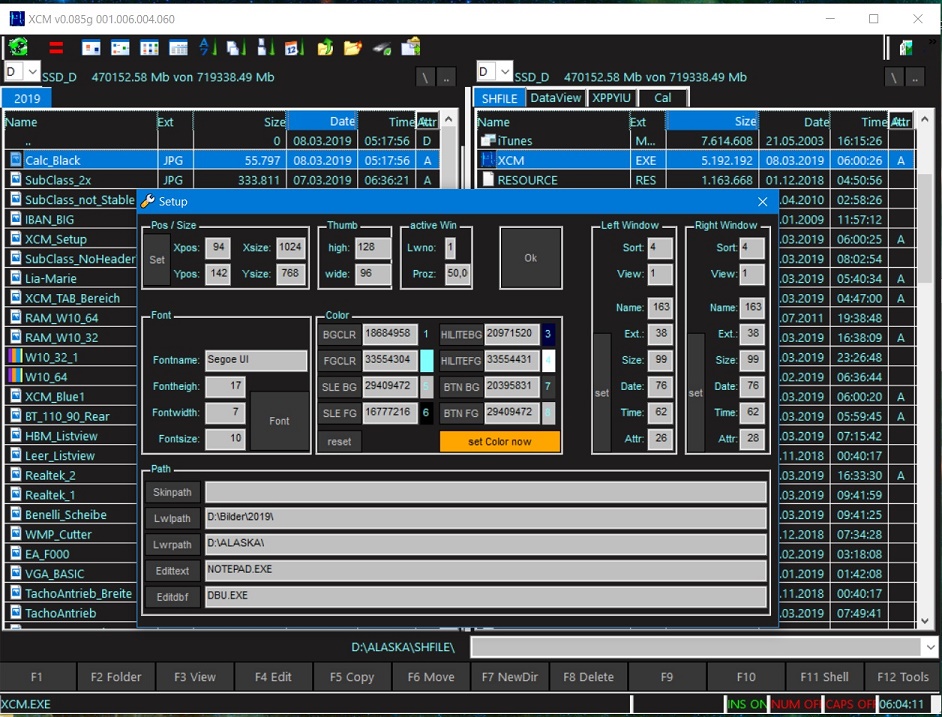
is there a FW Sample using "Dark Mode"
greeting,
Jimmy
Jimmy
Sakudos, aiempre he querodps hacer mis sistemas asi, pero no conseguido como, gracias... 
Jimmy,
If your app is going to use a RibbonBar here you have the source code to build a "dark" RibbonBar:
viewtopic.php?p=221683#p221683
Using these colors and applying them to your app you should get the desired "dark" app
joseluisysturiz wrote:Sakudos, aiempre he querodps hacer mis sistemas asi, pero no conseguido como, gracias...
HKEY_CURRENT_USER\Control Panel\Colors but only as long as User is login.
 nRet := clrtest( CLR_YELLOW, CLR_HRED )
HB_FUNC( CLRTEST )
{
int aElements[2] = { COLOR_CAPTIONTEXT, COLOR_SCROLLBAR };
DWORD aColors[2];
aColors[ 0 ] = hb_parnl( 1 );
aColors[ 1 ] = hb_parnl( 2 );
hb_retl (SetSysColors( 2, aElements, aColors ));
}nRet := SETSYSCOLORSEX({COLOR_SCROLLBAR}, CLR_HMAGENTA)
nRet := SETSYSCOLORSEX({COLOR_CAPTIONTEXT},CLR_HBLUE)
HB_FUNC( SETSYSCOLORSEX )
{
int aElements[1];
DWORD aColors[1];
aElements[ 0 ] = hb_parnl( 1 );
aColors[ 0 ] = hb_parnl( 2 );
hb_retl (SetSysColors( 1, aElements, aColors ));
}Jimmy, any solution?
Regards, saludos.

Thank you Jimmy.
Regards, saludos.
using SetSysColors() will change Color for all Apps
HKEY_CURRENT_USER\Software\Microsoft\Windows\CurrentVersion\Themes\Personalize\AppsUseLightTheme#pragma BEGINDUMP
#include <windows.h>
#include <hbapi.h>
HB_FUNC( SETSYSCOLORS ) // ( aItems, aColors ) --> lSuccess
{
BOOL bRet = FALSE;
int iElements;
INT aElements[22];
COLORREF aRgbValues[22];
if ( ( iElements = hb_parinfa( 1, 0 ) ) == ( int ) hb_parinfa( 2, 0 ) )
{
int i;
for ( i = 1; i <= iElements; i++ )
{
aElements [ i - 1 ] = hb_parvni( 1, i );
aRgbValues[ i - 1 ] = hb_parvnl( 2, i );
bRet = SetSysColors( iElements, aElements, aRgbValues );
}
}
hb_retl( bRet );
}
#pragma ENDDUMP ? SetSysColors( { COLOR_WINDOW, COLOR_WINDOWTEXT }, { CLR_BLACK, CLR_WHITE } )#Include "FiveWin.ch"
#Define COLOR_WINDOW nRGB( 130, 130, 130 )
#Define COLOR_WINDOWTEXT nRGB( 130, 130, 130 )
STATIC oWnd
FUNCTION Main()
// RETORNA: .T. => TRUE.
// ? SetSysColors( { COLOR_WINDOW, COLOR_WINDOWTEXT }, { CLR_BLACK, CLR_WHITE } )
LOCAL oBar, cTitle, nRet
// AQUI:
cTitle := "RODRIGUES & AMORIM MECANICA LTDA TESTE" // WHITE NO FUNCIONA.
DEFINE WINDOW oWnd TITLE cTitle COLORS CLR_WHITE, CLR_WHITE
DEFINE BUTTONBAR oBar _3D OF oWnd
DEFINE BUTTON OF oBar ACTION( Finaliza() )
SET MESSAGE OF oWnd TO cTitle NOINSET CLOCK DATE KEYBOARD
// SetSysColors - Harbour Compila, mas NO FUNCIONA Master Nages.
ACTIVATE WINDOW oWnd MAXIMIZED ;
ON INIT( SetSysColors( { COLOR_WINDOW, COLOR_WINDOWTEXT }, ;
{ CLR_WHITE, CLR_WHITE } ) )
RETURN NIL
FUNCTION Finaliza()
oWnd:End()
RETURN NIL
#pragma BEGINDUMP

#include <windows.h>
#include <hbapi.h>

HB_FUNC( SETSYSCOLORS ) // ( aItems, aColors ) --> lSuccess
{
   BOOL     bRet        = FALSE;
   int      iElements;
   INT      aElements[22];
   COLORREF aRgbValues[22];

   if ( ( iElements = hb_parinfa( 1, 0 ) ) == ( int ) hb_parinfa( 2, 0 ) )
   {
      int i;
      for ( i = 1; i <= iElements; i++ )
      {
         aElements [ i - 1 ]  = hb_parvni( 1, i );
         aRgbValues[ i - 1 ]  = hb_parvnl( 2, i );
         bRet  = SetSysColors( iElements, aElements, aRgbValues );
      }
   }
   hb_retl( bRet );
}

#pragma ENDDUMP
// FIN / ENDkarinha wrote:http://forums.fivetechsupport.com/viewtopic.php?f=6&t=41065&sid=54ad898a54718ceb4499289b28c0db17
// \samples\DARKMODE.PRG - En windows 7 32 bits, no funciona.
/*
In xHarbour, Error:
DARKMODE.c:
Warning W8065 DARKMODE.prg 59: Call to function 'hb_parvni' with no prototype in
function HB_FUN_SETSYSCOLORS
Warning W8065 DARKMODE.prg 60: Call to function 'hb_parvnl' with no prototype in
function HB_FUN_SETSYSCOLORS
*/
#Include "FiveWin.ch"

#Define COLOR_WINDOW     nRGB( 130, 130, 130 )
#Define COLOR_WINDOWTEXT nRGB( 130, 130, 130 )

STATIC oWnd

FUNCTION Main()

   // RETORNA: .T. => TRUE.
   // ? SetSysColors( { COLOR_WINDOW, COLOR_WINDOWTEXT }, { CLR_BLACK, CLR_WHITE } )

   LOCAL oBar, cTitle, nRet

                                                       // AQUI:
   cTitle := "RODRIGUES & AMORIM MECANICA LTDA TESTE"  // WHITE NO FUNCIONA.

   DEFINE WINDOW oWnd TITLE cTitle COLORS CLR_WHITE, CLR_WHITE

   DEFINE BUTTONBAR oBar _3D OF oWnd

   DEFINE BUTTON OF oBar ACTION( Finaliza() )

   SET MESSAGE OF oWnd TO cTitle NOINSET CLOCK DATE KEYBOARD

   // SetSysColors - Harbour Compila, mas NO FUNCIONA Master Nages.
   ACTIVATE WINDOW oWnd MAXIMIZED ;
      ON INIT( SetSysColors( { COLOR_WINDOW, COLOR_WINDOWTEXT }, ;
                             { CLR_WHITE, CLR_WHITE } ) )

RETURN NIL

FUNCTION Finaliza()

   oWnd:End()

RETURN NIL

#pragma BEGINDUMP

#include <windows.h>
#include <hbapi.h>

HB_FUNC( SETSYSCOLORS ) // ( aItems, aColors ) --> lSuccess
{
   BOOL     bRet        = FALSE;
   int      iElements;
   INT      aElements[22];
   COLORREF aRgbValues[22];

   if ( ( iElements = hb_parinfa( 1, 0 ) ) == ( int ) hb_parinfa( 2, 0 ) )
   {
      int i;
      for ( i = 1; i <= iElements; i++ )
      {
         aElements [ i - 1 ]  = hb_parvni( 1, i );
         aRgbValues[ i - 1 ]  = hb_parvnl( 2, i );
         bRet  = SetSysColors( iElements, aElements, aRgbValues );
      }
   }
   hb_retl( bRet );
}

#pragma ENDDUMP

// FIN / END
Regards, saludos.
This function is included in the next version of FWH
COLOR_BTNFACE                15
COLOR_BTNTEXT                18
COLOR_GRAYTEXT               17  // disabled text
COLOR_HIGHLIGHT              13
COLOR_WINDOW                  5  // window background
COLOR_WINDOWTEXT 8 // window textCOLOR_SCROLLBAR 0
COLOR_BACKGROUND 1
COLOR_ACTIVECAPTION 2
COLOR_INACTIVECAPTION 3
COLOR_MENU 4
COLOR_WINDOWFRAME 6
COLOR_MENUTEXT 7
COLOR_CAPTIONTEXT 9
COLOR_ACTIVEBORDER 10
COLOR_INACTIVEBORDER 11
COLOR_APPWORKSPACE 12 // desktop
COLOR_HIGHLIGHTTEXT 14
COLOR_BTNSHADOW 16
COLOR_INACTIVECAPTIONTEXT 19
COLOR_BTNHIGHLIGHT 20
COLOR_3DDKSHADOW 21
COLOR_3DLIGHT 22// \samples\DARKMODE.PRG - 16/11/2021 - Joao.
#Include "FiveWin.ch"
#Define COLOR_BTNFACE 15
#Define COLOR_BTNTEXT 18
#Define COLOR_GRAYTEXT 17 // disabled text
#Define COLOR_HIGHLIGHT 13
#Define COLOR_WINDOW 5 // window background
#Define COLOR_WINDOWTEXT 8 // window text
STATIC oWnd
FUNCTION Main()
LOCAL oBar, cTitle, nRet
cTitle := "RODRIGUES & AMORIM MECANICA LTDA" // WHITE NO FUNCIONA.
DEFINE WINDOW oWnd TITLE cTitle // MDI ?? NO FUNCIONA NORMAL.
DEFINE BUTTONBAR oBar _3D OF oWnd
DEFINE BUTTON OF oBar ACTION( Finaliza() )
SET MESSAGE OF oWnd TO cTitle NOINSET CLOCK DATE KEYBOARD
ACTIVATE WINDOW oWnd MAXIMIZED ;
ON INIT( SetSysColors( { COLOR_WINDOWTEXT, COLOR_WINDOW }, ;
{ CLR_BLACK, CLR_BLACK } ) )
RETURN NIL
FUNCTION Finaliza()
oWnd:End()
RETURN NIL
#IFDEF __XHARBOUR__ // Modificado em: 16/11/2021 - Joao
// if xHarbour -> Nages:
// For xHarbour change hb_parvni as hb_parni and hb_parvnl as hb_parnl
#pragma BEGINDUMP
#include <windows.h>
#include <hbapi.h>
HB_FUNC( SETSYSCOLORS ) // ( aItems, aColors ) --> lSuccess
{
BOOL bRet = FALSE;
int iElements;
INT aElements[22];
COLORREF aRgbValues[22];
if ( ( iElements = hb_parinfa( 1, 0 ) ) == ( int ) hb_parinfa( 2, 0 ) )
{
int i;
for ( i = 1; i <= iElements; i++ )
{
aElements [ i - 1 ] = hb_parni( 1, i );
aRgbValues[ i - 1 ] = hb_parnl( 2, i );
bRet = SetSysColors( iElements, aElements, aRgbValues );
}
}
hb_retl( bRet );
}
#pragma ENDDUMP
#ELSE
#pragma BEGINDUMP
#include <windows.h>
#include <hbapi.h>
// if harbour
HB_FUNC( SETSYSCOLORS ) // ( aItems, aColors ) --> lSuccess
{
BOOL bRet = FALSE;
int iElements;
INT aElements[22];
COLORREF aRgbValues[22];
if ( ( iElements = hb_parinfa( 1, 0 ) ) == ( int ) hb_parinfa( 2, 0 ) )
{
int i;
for ( i = 1; i <= iElements; i++ )
{
aElements [ i - 1 ] = hb_parvni( 1, i );
aRgbValues[ i - 1 ] = hb_parvnl( 2, i );
bRet = SetSysColors( iElements, aElements, aRgbValues );
}
}
hb_retl( bRet );
}
#pragma ENDDUMP
#ENDIF
// FIN / END


