FiveTech Support Forums

FiveWin / Harbour / xBase community
Board index FiveWin for Harbour/xHarbour FW_ExcelToDBF - (2015) Import procedure from Excel not run
Posts: 7317
Joined: Thu Oct 18, 2012 07:17 PM
FW_ExcelToDBF - (2015) Import procedure from Excel not run
Posted: Tue Nov 26, 2019 11:16 AM

On 2015 I had done a procedure to convert the school timetable from Excel into a personal DBF archive.

Now that function no longer turns good.

I didn't make any changes to that file.

I just recompiled my procedure with the new fwh

How is this possible? after 4 years the conversion procedure does not work?

I explain you what I made on source code, perhaps there is something changed ..

Before load the file xls

  
  @ 0,7 SAY  i18n( "Introdurre il file " )     OF oDlgExcel
         @ 1,2 SAY  i18n( "File Xls :" )     OF oDlgExcel

         @ 1.3,6 GET aGet[1] VAR cFileXls PICTURE "@!"  OF oDlgExcel  SIZE 150, 11 UPDATE

         bLook := { | |cFileXls:= GetfileXls(),aGet[1]:refresh()}
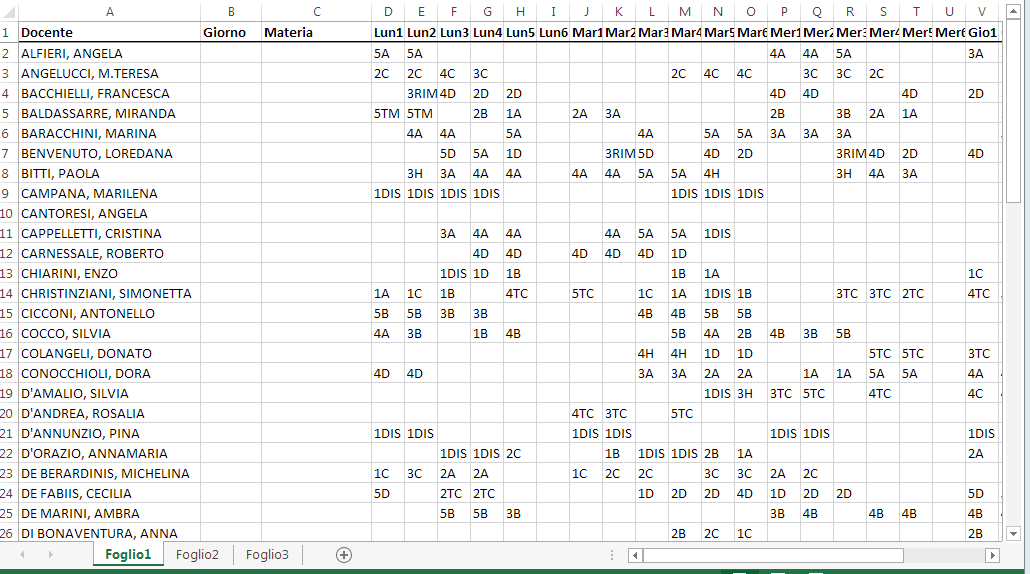
then Open the file Import.dbf where save the xls and convert the file xls into

 
IF oDlgExcel:nresult == IDOK
               IF!Empty(cFileXls)
                  oRange := GetExcelRange(cFileXls , , @lOpened)
                   IF ! Db_Open("Import","TM")
                      lReturn:=.f.
                      MsgAlert("Non riesco a connettermi con gli archivi")
                   else
                      SELECT TM
                      //xbrowse()
                       Dbzap()
                       IF  FW_ExcelToDBF( oRange, nil, .t. )
                             lreturn :=.t.
                          ENDIF
                       TM->(dbclosearea())
                    ENDIF
                    oRange := NIL
                 else
                    MsgAlert("non riesco a trovare il file excel")
                ENDIF
        ENDIF

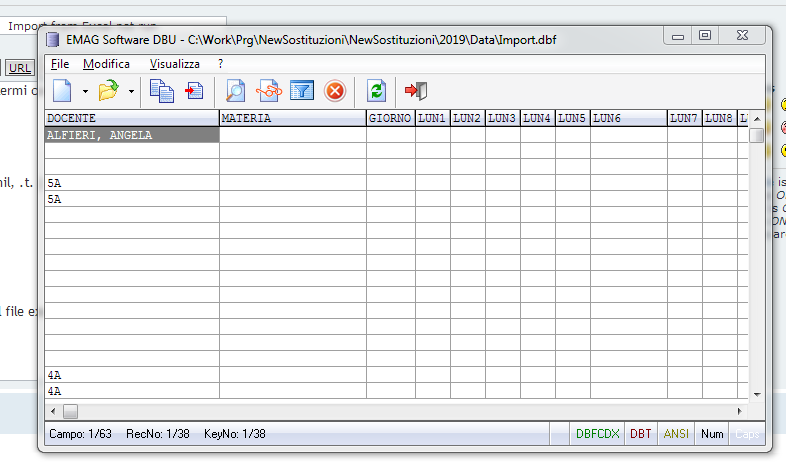
What has been changed?

Now it convert the xls in this mode :
Since from 1991/1992 ( fw for clipper Rel. 14.4 - Momos)

I use : FiveWin for Harbour March-April 2024 - Harbour 3.2.0dev (harbour_bcc770_32_20240309) - Bcc7.70 - xMate ver. 1.15.3 - PellesC - mail: silvio[dot]falconi[at]gmail[dot]com
Posts: 842
Joined: Mon Oct 10, 2005 01:29 PM
Re: FW_ExcelToDBF - (2015) Import procedure from Excel not run
Posted: Wed Nov 27, 2019 07:59 AM

I think it's a Harbor problem like this ,

viewtopic.php?f=3t=37773p=225822hilit=maurizio#p225822

try with xHarbour

Maurizio

&&&

Posts: 7317
Joined: Thu Oct 18, 2012 07:17 PM
Re: FW_ExcelToDBF - (2015) Import procedure from Excel not run
Posted: Wed Nov 27, 2019 08:04 AM

yes
On xharbour run ok

BUt on Harbour you made
oRange := GetExcelRange(cFileXls , , @lOpened)
and then
Xbrowse(oRange)
run ok I see all datas

So, the problem is of Fw_ExcelToDbf()

Please Maurizio try this
testxbrowse(oRange)

Function  testxbrowse(oRange)
   Local oDlg,oBrowse
   Local oBtnDbf

    DEFINE DIALOG oDlg TITLE "TEST EXCEL." SIZE 400,400 ;
             PIXEL TRUEPIXEL RESIZABLE

   @ 1,2 xbrowse oBrowse ARRAY oRange  ;
   SIZE 100,62 PIXEL STYLE FLAT NOBORDER


                   WITH OBJECT oBrowse
                       :nRowHeight    := 25
                      :lDrawBorder      := .t.
                      :lHscroll         := .F.
                      :l2007            := .F.
                      :l2015            := .T.
                      :nStretchCol      := STRETCHCOL_WIDEST
                      :nColDividerStyle := LINESTYLE_LIGHTGRAY
                      :lAllowRowSizing     := .F.
                      :lAllowColSwapping   := .F.
                      :lAllowColHiding     := .F.
                      :nMarqueeStyle       := MARQSTYLE_HIGHLROWMS
                      :CreateFromCode()
                   END

                   @ 1,2 button oBtnDbf Prompt "Conversione" size 120,20 ;
                   of oDlg action oBrowse:ToDbf("test.dbf")
                 oDlg:bResized  := <||
                local oRect    := oDlg:GetCliRect()
                      oBrowse:nTop      := oRect:nTop+10
                      oBrowse:nHeight    := oRect:nBottom-60
                      oBrowse:nWidth    := oRect:nRight-2
                      oBtnDbf:ntop       := oRect:nBottom - 40
                      oBtnDbf:nleft      :=  oRect:nRight - 140
                    return nil
                  >

     ACTIVATE DIALOG oDlg CENTERED;
                  ON INIT ( EVAL(oDlg:bResized ) )
   RETURN NIL

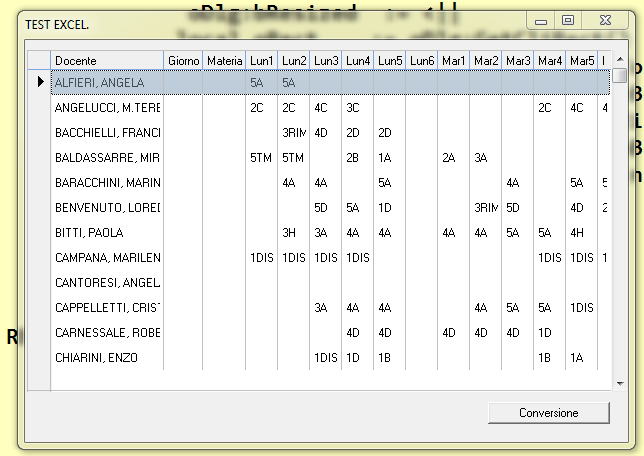
it read the excel ->show on xbrowse -> converte to dbf

Since from 1991/1992 ( fw for clipper Rel. 14.4 - Momos)

I use : FiveWin for Harbour March-April 2024 - Harbour 3.2.0dev (harbour_bcc770_32_20240309) - Bcc7.70 - xMate ver. 1.15.3 - PellesC - mail: silvio[dot]falconi[at]gmail[dot]com
Posts: 7317
Joined: Thu Oct 18, 2012 07:17 PM
Re: FW_ExcelToDBF - (2015) Import procedure from Excel not run
Posted: Wed Nov 27, 2019 09:24 AM
Resolved but also not run ok

put at the end of the function FW_ExcelToDbf before

lRet: = FW_ArrayToDBF (adata, If (Empty (cFieldList), If (Empty (aHead), nil, aHead), cFieldList), bProgress)

this line

aData: = ArrTranspose (aDATA)

only there is another problem on FW_ArrayToDBF because take only bad column

I explain

if in the excel sheet there are only some fields and in the dbf instead there are others
the function FW_ArrayToDBF takes the wrong fields.
How do I check with the right fields?
Since from 1991/1992 ( fw for clipper Rel. 14.4 - Momos)

I use : FiveWin for Harbour March-April 2024 - Harbour 3.2.0dev (harbour_bcc770_32_20240309) - Bcc7.70 - xMate ver. 1.15.3 - PellesC - mail: silvio[dot]falconi[at]gmail[dot]com
Posts: 124
Joined: Sat Dec 05, 2009 12:44 PM
Re: FW_ExcelToDBF - (2015) Import procedure from Excel not run
Posted: Thu Mar 26, 2026 09:32 AM

Dear Silvio Can you send me a copy of this function I am also looking for a simple working function or procedure to transfer an xls file into a dbf file

Posts: 124
Joined: Sat Dec 05, 2009 12:44 PM
Re: FW_ExcelToDBF - (2015) Import procedure from Excel not run
Posted: Thu Mar 26, 2026 09:43 AM

convert xls to dbf open xls in Openoffice save xls as dbf finished

But this simply solution can not be accomplished within a fivewin for harbour procedure or function??

Posts: 654
Joined: Fri Oct 21, 2005 05:54 AM
Re: FW_ExcelToDBF - (2015) Import procedure from Excel not run
Posted: Sun Apr 05, 2026 05:22 AM

Hi Friends,

This solution is suggested by ChatGPT and is working Ok with me.
You can please try it.

-Ramesh Babu

FUNCTION ExcelToDBF( cExcelFile, cSheetName, cDbfFile )

   LOCAL oCn, oRs, cConnStr, cSql
   LOCAL aStruct := {}, nFields, i
   LOCAL cFieldName, cType, nLen, nDec
   LOCAL uVal

   // Connection string for Excel
   cConnStr := "Provider=Microsoft.ACE.OLEDB.12.0;" + ;
               "Data Source=" + cExcelFile + ";" + ;
               "Extended Properties='Excel 12.0 Xml;HDR=YES';"

   TRY
      oCn := TOleAuto():New( "ADODB.Connection" )
      oCn:Open( cConnStr )

  // Read Excel sheet
  cSql := "SELECT * FROM [" + cSheetName + "$]"
  oRs := oCn:Execute( cSql )

  // Build DBF structure
  nFields := oRs:Fields:Count

  FOR i := 0 TO nFields - 1
     cFieldName := ALLTRIM( oRs:Fields(i):Name )

     DO CASE
     CASE oRs:Fields(i):Type == 3     // Integer
        cType := "N"; nLen := 10; nDec := 0
     CASE oRs:Fields(i):Type == 5     // Double
        cType := "N"; nLen := 12; nDec := 2
     CASE oRs:Fields(i):Type == 7     // Date
        cType := "D"; nLen := 8; nDec := 0
     OTHERWISE                        // Text
        cType := "C"; nLen := 50; nDec := 0
     ENDCASE

     AADD( aStruct, { cFieldName, cType, nLen, nDec } )
  NEXT

  // Create DBF
  DBCREATE( cDbfFile, aStruct )
  USE ( cDbfFile ) NEW

  // Transfer data
  DO WHILE ! oRs:Eof

     APPEND BLANK

     FOR i := 0 TO nFields - 1
        uVal := oRs:Fields(i):Value
        IF uVal == NIL
           uVal := ""
        ENDIF
        FIELDPUT( i + 1, uVal )
     NEXT

     oRs:MoveNext()
  ENDDO

  USE
  oRs:Close()
  oCn:Close()

  ?"Conversion of '"+cSheetName+"' Sheet of '"+cExcelFile+"' into '"+cDbfFile+"' is Sucessful."

   CATCH
      ? "Error converting Excel to DBF"
   END

RETURN NIL

Continue the discussion