FiveTech Support Forums

FiveWin / Harbour / xBase community
Board index FiveWin for Harbour/xHarbour FW_AdoImportFromDBF error
Posts: 131
Joined: Tue Dec 26, 2006 04:50 PM
FW_AdoImportFromDBF error
Posted: Thu Dec 05, 2019 03:39 PM
Good day fiveWINERS, I am facing an error trying to use FW_AdoImportFromDBF, given the code:

Code (fw): Select all Collapse
Function importDBF  
    local oCn, oRs
    
    xString := ('Provider='+xPROVIDER+';Data Source='+xSOURCE+';Initial Catalog='+xCATALOGA+';User Id='+xUSERID+';Password='+xPASSWORD )
   oCn := CREATEOBJECT("ADODB.Connection")
        
    TRY
    oCn:Open(xString)
    catch oErr
        ?"Unable to read the database"
        return(.F.)
    END TRY
    TRY
        FW_AdoImportFromDBF( oCn,"&dbtest" )
    catch oErr
        ?"Unable to insert information"
        return(.F.)
    END TRY
    ?"Insert successful"
       oCn:Close()
return nil


The table is created in SQL, but empty, I got the error:
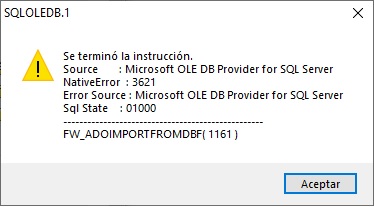

I am using
FWH 16.04
Harbour bcc77
Posts: 10733
Joined: Sun Nov 19, 2006 05:22 AM
Re: FW_AdoImportFromDBF error
Posted: Thu Dec 05, 2019 05:02 PM
Please try
Code (fw): Select all Collapse
function importDBF 

   local oCn
   
   oCn   := FW_OpenAdoConnection( { "MSSQL", xSOURCE, xCATALOG, xUSERID, xPASSWORD }, .t. )
   if oCn == nil
      ? "Failed to connect"
      return .f.
   endif
   
   if FW_AdoImportFromDBF( oCn, cDbfFileName )
      ? "Imported"
   else
      ? "Import Fail"
   endif
   
   oCn:Close()

return nil
Regards


G. N. Rao.

Hyderabad, India
Posts: 131
Joined: Tue Dec 26, 2006 04:50 PM
Re: FW_AdoImportFromDBF error
Posted: Thu Dec 05, 2019 05:40 PM
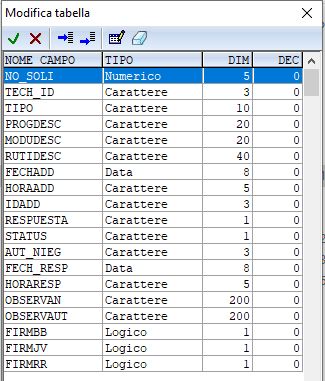
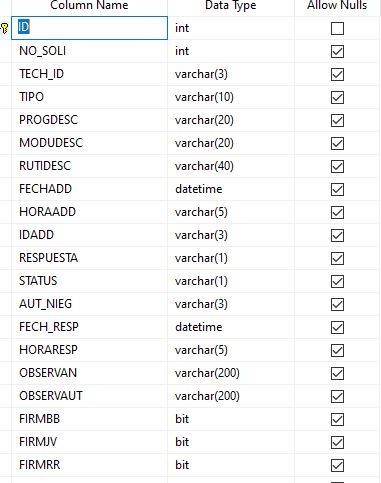
Mr. Rao, thanks for your response, unfortunatelly the error remains. The DBF's structure seems very simple to me, but I am sharing it, perhaps you see something in it.

This is the DBF structure


And this is the SQL structure, I see no important differences.
As a comment I always use smalldatetime when designing tables in SQL but I don't think it is the cause of the problem.
Posts: 10733
Joined: Sun Nov 19, 2006 05:22 AM
Re: FW_AdoImportFromDBF error
Posted: Thu Dec 05, 2019 06:31 PM

please send your dbf to me

nageswaragunupudi@gmail.com

Regards


G. N. Rao.

Hyderabad, India
Posts: 10733
Joined: Sun Nov 19, 2006 05:22 AM
Re: FW_AdoImportFromDBF error
Posted: Thu Dec 05, 2019 07:22 PM
You seem to be using FWH1604. I do not have that version with me. I tried with even an older version FWH1602.

We provide an MSSQL server in the cloud for a demonstration to our users. In the following sample, we connect to this demo server in the cloud and test exporting your DBF.

Our test program:
Code (fw): Select all Collapse
#include "fivewin.ch"

REQUEST DBFCDX

function Main()

   local oCn, oRs, lOk

   MsgRun( "Connecting to MSSQL Cloud Server", FWVERSION, { || ;
      oCn := FW_OpenAdoConnection( { "MSSQL", "208.91.198.196", "gnraore3_", "fwhmsdemo", "fwh@2000#" }, .T. ) ;
      } )

   if oCn == nil
      ? "Connect Fail"
      return nil
   else
      ? "Connected"
   endif

   // Drop the tables if exists
   TRY
      oCn:Execute( "DROP TABLE ACCESOIT" )
   CATCH
   END
   //
   MsgRun( "Importing DBF to MSSQL", FWVERSION, { || ;
      lOK := FW_AdoImportFromDBF( oCn, "ACCESOIT.DBF" ) ;
      } )
   if lOK
      oRs   := FW_OpenRecordSet( oCn, "ACCESOIT" )
      XBROWSER oRs
   else
      ? "Import Fail"
   endif

   oCn:Close()

return nil


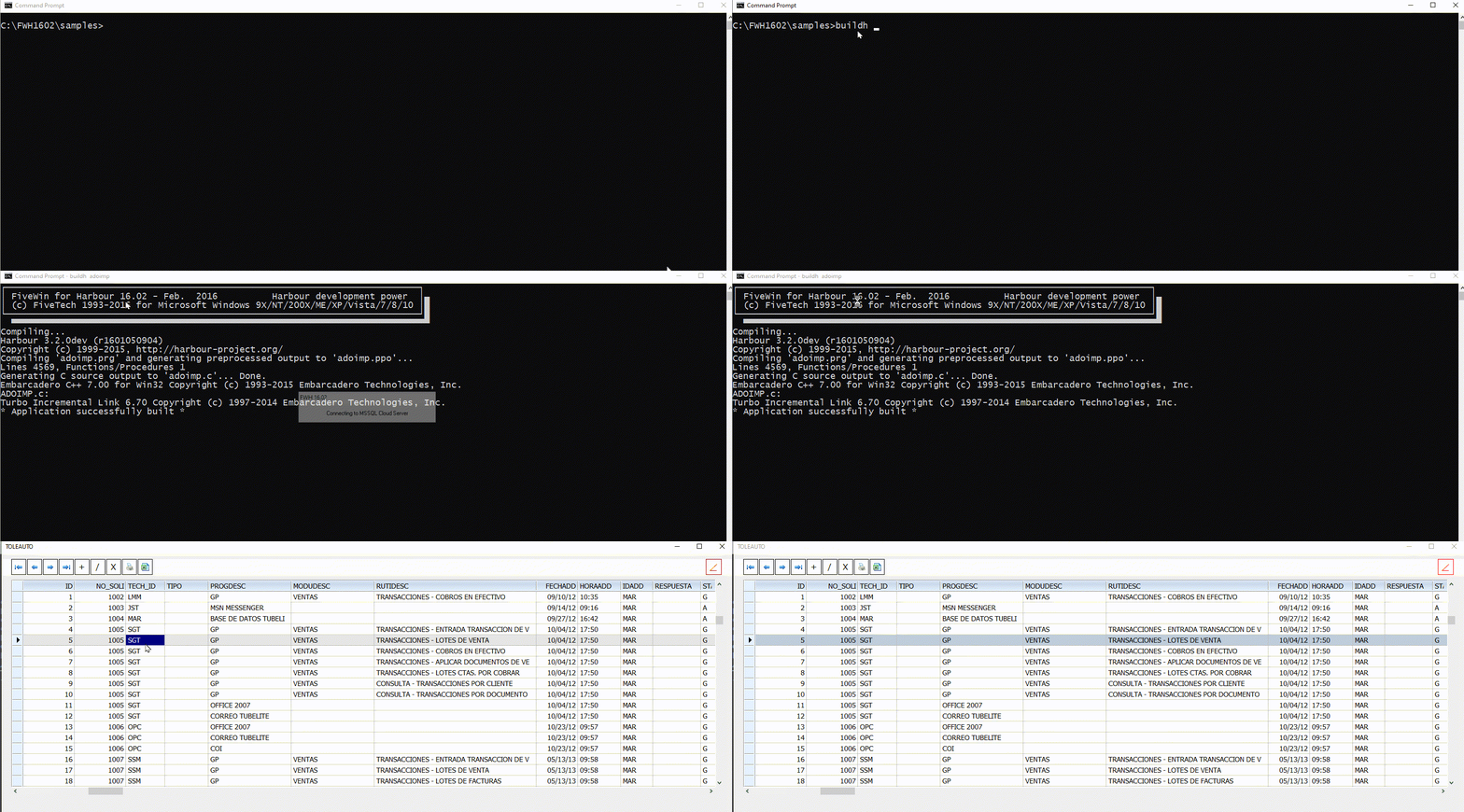
As you can see, the import worked perfectly.

Please copy the above program to fwh\samples folder without any changes and build it with buildx.bat or buildh.bat. It worked here and it SHOULD work for you too there.

After testing the program without changes, then you substitute your server name and credentials and try again. It has to work.
Regards


G. N. Rao.

Hyderabad, India
Posts: 131
Joined: Tue Dec 26, 2006 04:50 PM
Re: FW_AdoImportFromDBF error
Posted: Thu Dec 05, 2019 07:26 PM

Mr. Rao, I will try and let you know if it works.

Posts: 131
Joined: Tue Dec 26, 2006 04:50 PM
Re: FW_AdoImportFromDBF error
Posted: Thu Dec 05, 2019 09:59 PM
Mr. Rao, I tested the program and it worked perfectly on the cloud server, it connects, creates and fills teh table, on my server on the other hand it did not work.

In order to see what the problem was I eliminated all the fields that contained dates, tried again and now it worked, so it obvoiusly has something to do with the way my SQl server handles the dates.

When inserting dates using sql sentences I use the following:

Code (fw): Select all Collapse
cCadsql0:="insert into table (fecha1,fecha2) values ('23/09/2019','12/12/2019')"
    
oRs := TOleAuto():New( "ADODB.Recordset" ) 
oRs:CursorType := 1 // opendkeyset 
oRs:CursorLocation := 3 // local cache 
oRs:LockType := 3 // lockoportunistic
    
TRY
    cursorwait()
    oRS:Open( cCadSql0,'Provider='+xPROVIDER+';Data Source='+xSOURCE+';Initial Catalog='+xCATALOGA+';User Id='+xUSERID+';Password='+xPASSWORD ) 
                
    CATCH oErr 
        MsgInfo( "Error inserting dates" ) 
        RETURN(.F.) 
    END TRY


This way the dates are saved without a problem.

I have tested with other DBF that has no dates and the impor works well.
Posts: 10733
Joined: Sun Nov 19, 2006 05:22 AM
Re: FW_AdoImportFromDBF error
Posted: Thu Dec 05, 2019 10:09 PM

Mr. Rao, I tested the program and it worked perfectly on the cloud server, it connects, creates and fills teh table, on my server on the other hand it did not work.

When you converted my sample to use your server, please change this line only
Code (fw): Select all Collapse
      oCn := FW_OpenAdoConnection( { "MSSQL", "208.91.198.196", "gnraore3_", "fwhmsdemo", "fwh@2000#" }, .T. ) ;

Substitute your values in the FW_OpenAdoConnection function in the above line.
Do not change anything else.

Plese do not use " oCn := CREATEOBJECT("ADODB.Connection")"

Can you try as I said?
Regards


G. N. Rao.

Hyderabad, India
Posts: 131
Joined: Tue Dec 26, 2006 04:50 PM
Re: FW_AdoImportFromDBF error
Posted: Thu Dec 05, 2019 10:19 PM
Yes Mr. Rao, I only changed the values for the sentence to go to my server changing nothing else, the line is this:

Code (fw): Select all Collapse
MsgRun( "Connecting to MSSQL Cloud Server", FWVERSION, { || ;
          oCn := FW_OpenAdoConnection( { "MSSQL", "MyServer", "MyTable", "Myuser", "MyPassword" }, .T. ) ;
          } )
Posts: 10733
Joined: Sun Nov 19, 2006 05:22 AM
Re: FW_AdoImportFromDBF error
Posted: Thu Dec 05, 2019 10:50 PM
FWH ADO functions convert dates for MSSQL like this:
Code (fw): Select all Collapse
"insert into table (fecha1,fecha2) values ('2019-09-23','2019-12-12')"


Can you try if this format is working on your MSSQL server?
Regards


G. N. Rao.

Hyderabad, India
Posts: 131
Joined: Tue Dec 26, 2006 04:50 PM
Re: FW_AdoImportFromDBF error
Posted: Thu Dec 05, 2019 11:03 PM
Mr. Rao, it works:

Posts: 10733
Joined: Sun Nov 19, 2006 05:22 AM
Re: FW_AdoImportFromDBF error
Posted: Thu Dec 05, 2019 11:06 PM

If so, the above sample should work with dates also.
Thinking ...

Regards


G. N. Rao.

Hyderabad, India
Posts: 131
Joined: Tue Dec 26, 2006 04:50 PM
Re: FW_AdoImportFromDBF error
Posted: Fri Dec 06, 2019 02:49 PM

Mr. Rao, I kept trying to understand the reason I got the problem and my conclusion is:

The field type in SQL should be "date", I noticed that when importing DBF's the date type field created in SQL is "datetime", I think it is pointless to generate this type of field due to the fact that DBF always will have simple date information in date data type fields (unless you especifically state the field has to save the date and time, in wich case it will be a text type field).

I don´t mean to be rude and I apologize if it sounds like that, perhaps is my limited English skills.

Posts: 131
Joined: Tue Dec 26, 2006 04:50 PM
Re: FW_AdoImportFromDBF error
Posted: Wed Dec 11, 2019 11:16 PM
Mr. Rao and all that might find this useful, I didn´t give up with this, studied the "adofunc.prg" file and changed the line:
Code (fw): Select all Collapse
         if snDbms == DB_MSSQL
            cSql  += " DateTime"  // Date dataype not compat with older servers
                                       // Even with latest providers there are some issues in usage


And changed it like this:

Code (fw): Select all Collapse
         if snDbms == DB_MSSQL
            cSql  += " DATE"  // Date dataype not compat with older servers
                                       // Even with latest providers there are some issues in usage


Then added adofunc.prg to my project and now the DBF's are imported properly, I hope it helps other with the same problem.

Thanks for the help provided.
Posts: 131
Joined: Tue Dec 26, 2006 04:50 PM
Re: FW_AdoImportFromDBF error
Posted: Mon Feb 10, 2020 03:05 PM
Good morning Mr. Rao, I thought I had this problem solved, but suddenly the error is back, reading here an there I found that the error I am getting refers to a timeout from the client side, I was wondering if you know where I can define this timeout parameter or where I can find it (if such a parameter exists).

Code (fw): Select all Collapse
Question: A client is sending a query to a SQL Server . After 30 seconds a message appears on the SQL Server trace:

User error message : The statement has been terminated

If  I run the code from SSMS, it completes successfully. Could you explain how I can fix this problem?

Answer: SQL Server runs queries  with no timeout.  The  query timeout error is occurring  on the client side.  When a command exceeds the timeout duration,  the client API sends an attention signal to SQL Server to cancel the executing query.


The error is the same (3621) I noticed that the table is created and it starts importing, but for some reason it stops at 1800 records, wheter if I have a table with 2,000 or 25,000 records.

Continue the discussion