FiveTech Support Forums

FiveWin / Harbour / xBase community
Board index FiveWin for Harbour/xHarbour FwDArrow() NOT SHOW THE ARROW
Posts: 7317
Joined: Thu Oct 18, 2012 07:17 PM
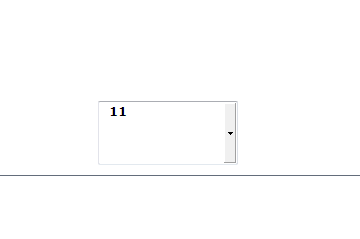
FwDArrow() NOT SHOW THE ARROW
Posted: Fri Dec 20, 2019 04:13 PM


@ 06,50 GET aGet[2] VAR ncella SIZE 70,32 PIXEL;
of oFolder:aDialogs[1] FONT oLarge picture "9999";
BITMAP FwDArrow() ;
ACTION nil
Since from 1991/1992 ( fw for clipper Rel. 14.4 - Momos)

I use : FiveWin for Harbour March-April 2024 - Harbour 3.2.0dev (harbour_bcc770_32_20240309) - Bcc7.70 - xMate ver. 1.15.3 - PellesC - mail: silvio[dot]falconi[at]gmail[dot]com
Posts: 10733
Joined: Sun Nov 19, 2006 05:22 AM
Re: FwDArrow() NOT SHOW THE ARROW
Posted: Sat Dec 21, 2019 03:32 AM
At present only a bmpfilename or resource name can be specified in the BITMAP clause.
Specifying a bitmap handle does not work.

We can suggest a workaround for now:
Code (fw): Select all Collapse
hBmp := FWDArrow()

@ 06,50 GET aGet[2] VAR ncella SIZE 70,32 PIXEL;
of oFolder:aDialogs[1] FONT oLarge picture "9999";
BITMAP LTrim( Str( hBmp ) ) ;
ACTION nil

// other controls

ACTIVATE DIALOG oDlg 

DeleteObject( hBmp )


From the next version of FWH, we can specify a bitmap handle directly as in your original code posted above.
Regards


G. N. Rao.

Hyderabad, India
Posts: 7317
Joined: Thu Oct 18, 2012 07:17 PM
Re: FwDArrow() NOT SHOW THE ARROW
Posted: Sat Dec 21, 2019 11:51 AM
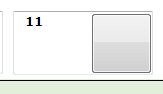
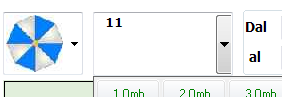
I try also to simulate the btn of the combobox


inserting
activate dialog ....on init aGet[2]:= 20 , ;
aGet[2]:=aget[2]:nWidth-20
but the button not is as the button of the combo as you can see the height is more small
any solution pls
Since from 1991/1992 ( fw for clipper Rel. 14.4 - Momos)

I use : FiveWin for Harbour March-April 2024 - Harbour 3.2.0dev (harbour_bcc770_32_20240309) - Bcc7.70 - xMate ver. 1.15.3 - PellesC - mail: silvio[dot]falconi[at]gmail[dot]com
Posts: 7317
Joined: Thu Oct 18, 2012 07:17 PM
Re: FwDArrow() NOT SHOW THE ARROW
Posted: Sat Dec 21, 2019 12:36 PM
On oldest application I used Btnget classo of Ramirez and it run ok instead of normal tget

@ 80,50 BTNGET aGet[3] VAR ncella SIZE 70,32 PIXEL;
of oFolder:aDialogs[1] FONT oLarge picture "9999";
ACTION NIL


It build the button with arrow on the class

btnget class is not compatible with current tget because it create a button

with Ramirez's class the button is uniform at the get height and automatically forms the arrow.

Unfortunately he wants an old Tget class because the current tget class is not compatible with the class

For what I need, the button with the Ramirez class works more than the button made with the fwh tget because it is more homogeneous to the tget.

I think you can change the button in the fwh tget don't you think?
Since from 1991/1992 ( fw for clipper Rel. 14.4 - Momos)

I use : FiveWin for Harbour March-April 2024 - Harbour 3.2.0dev (harbour_bcc770_32_20240309) - Bcc7.70 - xMate ver. 1.15.3 - PellesC - mail: silvio[dot]falconi[at]gmail[dot]com

Continue the discussion