FiveTech Support Forums

FiveWin / Harbour / xBase community
Board index FiveWin for Harbour/xHarbour Fixed Brush
Posts: 115
Joined: Wed Oct 26, 2005 02:38 PM

Fixed Brush

Posted: Tue Dec 24, 2019 01:20 AM

Friends.

I need to make a solid color brush that has a fixed size in the footer no matter the size of the window, is this possible?

Thanks

Christiano Augusto Silveira
christiano.silveira@gmail.com

MaxxTech Soluções em TI
http://www.maxxtech.com.br
Posts: 10733
Joined: Sun Nov 19, 2006 05:22 AM

Re: Fixed Brush

Posted: Tue Dec 24, 2019 02:06 AM
Code (fw): Select all Collapse
#include "fivewin.ch"

function Main()

   local oWnd
   local nBrushHt    := 80
   local nBrushClr   := CLR_HGRAY

   DEFINE WINDOW oWnd TITLE "FOOTER BRUSH"

   oWnd:bPainted := <|hDC|
      local aRect    := GetClientRect( oWnd:hWnd )
      local hBrush   := CreateSolidBrush( nBrushClr )

      aRect[ 1 ] := aRect[ 3 ] - nBrushHt
      FillRect( hDC, aRect, hBrush )
      DeleteObject( hBrush )

      return nil
      >

   ACTIVATE WINDOW oWnd

return nil
Regards


G. N. Rao.

Hyderabad, India
Posts: 115
Joined: Wed Oct 26, 2005 02:38 PM

Re: Fixed Brush

Posted: Tue Dec 24, 2019 04:14 AM

Thanks for answering.

It worked perfectly, but there was a flaw in translating my message that made window instead of dialog.

Tried to do in a dialog, but generate several errors.

If you can help, I appreciate it.

Christiano Augusto Silveira
christiano.silveira@gmail.com

MaxxTech Soluções em TI
http://www.maxxtech.com.br
Posts: 10733
Joined: Sun Nov 19, 2006 05:22 AM

Re: Fixed Brush

Posted: Tue Dec 24, 2019 04:35 AM

Are you using a very very old version of FWH?

Regards


G. N. Rao.

Hyderabad, India
Posts: 115
Joined: Wed Oct 26, 2005 02:38 PM

Re: Fixed Brush

Posted: Tue Dec 24, 2019 04:44 AM

Resolved with tPanel

Thank you for your help

Christiano Augusto Silveira
christiano.silveira@gmail.com

MaxxTech Soluções em TI
http://www.maxxtech.com.br
Posts: 10733
Joined: Sun Nov 19, 2006 05:22 AM

Re: Fixed Brush

Posted: Tue Dec 24, 2019 07:30 AM
ctoas wrote:Resolved with tPanel

Thank you for your help


No need for workarounds and make the code complex.
We can do it directly with Dialog.

Code (fw): Select all Collapse
   local oDlg, aRect, oFooterBrush, nBrushHt := 80

   DEFINE BRUSH oFooterBrush COLOR CLR_HGREEN
   DEFINE DIALOG oDlg SIZE 500,400 PIXEL
   ACTIVATE DIALOG oDlg CENTERED ON PAINT ;
      (  aRect := GetClientRect( oDlg:hWnd ), ;
         aRect[ 1 ] := aRect[ 3 ] - nBrushHt, ;
         FillRect( hDC, aRect, oFooterBrush:hBrush ) ;
      )
   RELEASE BRUSH oFooterBrush


When you put a question, we request you to indicate the version of FWH you are using. That makes it easy for us to suggest a solution that works with your version. If not we suggest what works with the latest versions.
Regards


G. N. Rao.

Hyderabad, India
Posts: 115
Joined: Wed Oct 26, 2005 02:38 PM

Re: Fixed Brush

Posted: Thu Dec 26, 2019 06:46 PM
Hello, I hope you had a great Christmas!

Sorry, I know the version rule, but when I saw your message I had already found the tPanel class, but I didn't get to test it for what I wanted.

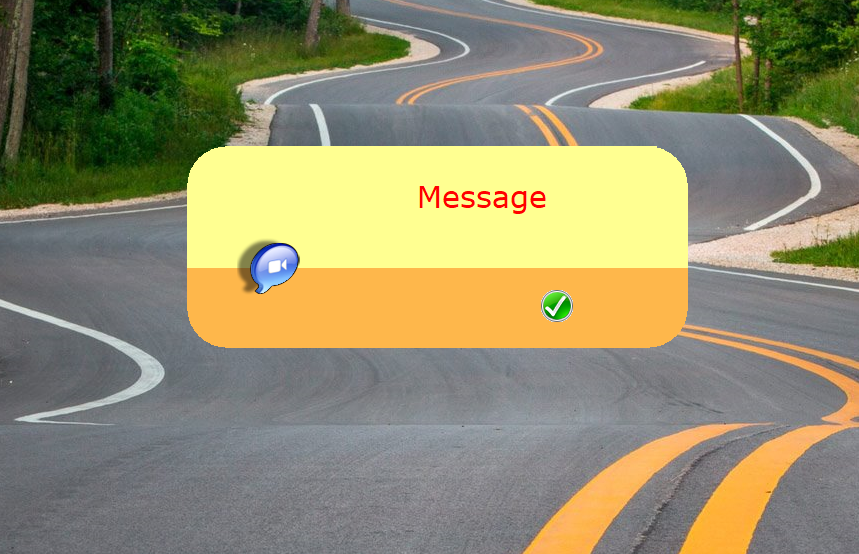
What I want to do would be custom warning, error and etc messages like this in the image, in this case I tested the know example but where the brush does not accept anything over transparent.

Christiano Augusto Silveira
christiano.silveira@gmail.com

MaxxTech Soluções em TI
http://www.maxxtech.com.br
Posts: 4043
Joined: Wed Dec 19, 2007 06:40 PM

Re: Fixed Brush

Posted: Thu Dec 26, 2019 09:17 PM
You can use TTitle

What I want to do would be custom warning, error and etc messages
like this in the image,
in this case I tested the know example but where the brush
does not accept anything over transparent.


use windows or dialog
transparent- or brushed title
brushed 3D-text
defined border with pensize and transparent-level
or NO border

I added another test to sample < Testtitle.prg >


Code (fw): Select all Collapse
...
...
    @ 250, 150 TITLE oTitle3 size 460, 60 of oWnd TRANSPARENT NOBORDER 
    @   8,  100 TITLETEXT OF oTitle3 TEXT FWVERSION FONT oFont1 brush oBrush4 3D SHADOW TOPRIGHT
    @   2,  30 TITLEIMG OF oTitle3 BITMAP "..\bitmaps\32X32\keys.bmp" SIZE 50, 50 REFLEX TRANSPARENT ;
    ACTION MsgInfo( "Keys" )

oWnd:bPainted := < |hDC|
    DRAWBORDER( oWnd, oTitle3 )
RETURN NIL
>
...
...
// -----------

FUNCTION DRAWBORDER( oWnd, oTitle3 )
LOCAL oGraphics := Graphics():New( oWnd:hDC ) 
LOCAL nRed      := nRGBRed( 255 ) // red
LOCAL nGreen    := nRGBGreen( 255 )
LOCAL nBlue     := nRGBBlue( 255 )
LOCAL oPen      := Pen():New( 255, nRed, nGreen, nBlue, 5, .T.) // nTransparency, nRed, nGreen, nBlue

oGraphics:DrawRoundRect( oPen, , oTitle3:nLeft, oTitle3:nTop, oTitle3:nWidth, oTitle3:nHeight, 30 ) 

oGraphics:Destroy()
oPen:Destroy()

RETURN NIL
Since 1995 ( the first release of FW 1.9 )

i work with FW.

If you have any questions about special functions, maybe i can help.
Posts: 10733
Joined: Sun Nov 19, 2006 05:22 AM

Re: Fixed Brush

Posted: Thu Dec 26, 2019 09:43 PM
Is this what you want?
Regards


G. N. Rao.

Hyderabad, India
Posts: 10733
Joined: Sun Nov 19, 2006 05:22 AM

Re: Fixed Brush

Posted: Thu Dec 26, 2019 09:46 PM
Code (fw): Select all Collapse
#include "fivewin.ch"

function Main()

   local oDlg, oFont, oSay, oBtn
   local cMsg  := "Message"
   local aColor   := { 0x91ffff, 0x4bb7fe }

   DEFINE FONT oFont NAME "VERDANA" SIZE 0,-30
   DEFINE DIALOG oDlg SIZE 500,200 PIXEL TRUEPIXEL COLOR CLR_WHITE, 1 STYLE WS_POPUP
   oDlg:nSeeThroClr  := 1

   @ 00,120 SAY oSay PROMPT cMsg SIZE 350,100 PIXEL OF oDlg CENTER VCENTER ;
      FONT oFont COLOR CLR_HRED, aColor[ 1 ]

   @ 140,350 BTNBMP oBtn BITMAP "c:\fwh\bitmaps\32x32\yes.bmp" SIZE 40,40 PIXEL ;
      OF oDlg FLAT NOBORDER ACTION oDlg:End()
   oBtn:bClrGrad  := { || { { 1, aColor[ 2 ], aColor[ 2 ] } } }

   ACTIVATE DIALOG oDlg CENTERED ON PAINT DlgPaint( hDC, oDlg, aColor )
   RELEASE FONT oFont

return nil

static function DlgPaint( hDC, oDlg, aColor )

   local hWnd     := oDlg:hWnd
   local aRect    := GetClientRect( hWnd )
   local nTop     := aRect[ 1 ]
   local nBottom  := aRect[ 3 ]
   local nHt      := 80
   local hRgn     := CreateRoundRectRgn( aRect, 80, 80 )

   local hBrush

   SelectClipRgn( hDC, hRgn )
   hBrush         := CreateSolidBrush( aColor[ 1 ] )
   aRect[ 3 ]     := nBottom - nHt
   FillRect( hDC, aRect, hBrush )
   DeleteObject( hBrush )

   hBrush         := CreateSolidBrush( aColor[ 2 ] )
   aRect[ 1 ]     := aRect[ 3 ]
   aRect[ 3 ]     := nBottom

   FillRect( hDC, aRect, hBrush )
   DeleteObject( hBrush )
   SelectClipRgn( hDC )
   DeleteObject( hRgn )

   FW_DrawImage( hDC, "c:\fwh\bitmaps\alphabmp\ichat.bmp", { 90,50,154,114 } )

return nil
Regards


G. N. Rao.

Hyderabad, India
Posts: 115
Joined: Wed Oct 26, 2005 02:38 PM

Re: Fixed Brush

Posted: Fri Dec 27, 2019 02:07 AM
nageswaragunupudi wrote:Is this what you want?


Perfect, that's what I was looking for.

Thanks!

Christiano Augusto Silveira
christiano.silveira@gmail.com

MaxxTech Soluções em TI
http://www.maxxtech.com.br
Posts: 4043
Joined: Wed Dec 19, 2007 06:40 PM

Re: Fixed Brush

Posted: Fri Dec 27, 2019 11:36 AM
Added brushed text with 3D look,
gradient base,
and border with possible transparent-level,
possible to move the dialog,
mixing my sample from above with Mr. Rao's solution


regards
Uwe :-)
Since 1995 ( the first release of FW 1.9 )

i work with FW.

If you have any questions about special functions, maybe i can help.

Continue the discussion