FiveTech Support Forums

FiveWin / Harbour / xBase community
Board index FiveWin for Harbour/xHarbour Update a scrollpanel
Posts: 7317
Joined: Thu Oct 18, 2012 07:17 PM
Update a scrollpanel
Posted: Mon Feb 03, 2020 12:22 PM
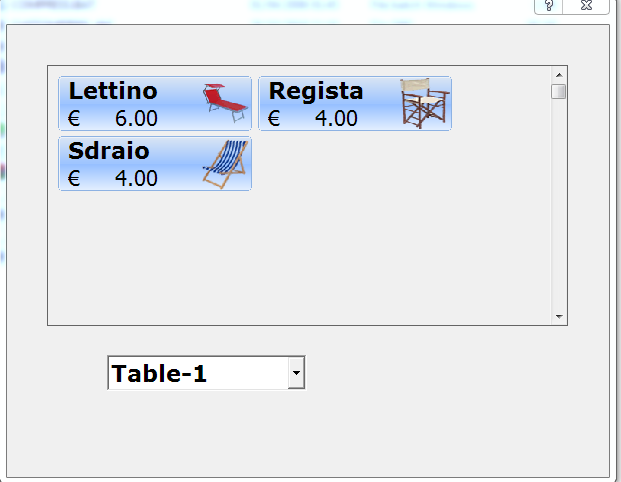
I have a "scrollpanel" control in a dialog where I insert "btnbmp" controls which are the products the user can select: each "btnbmp" control has a description and a price
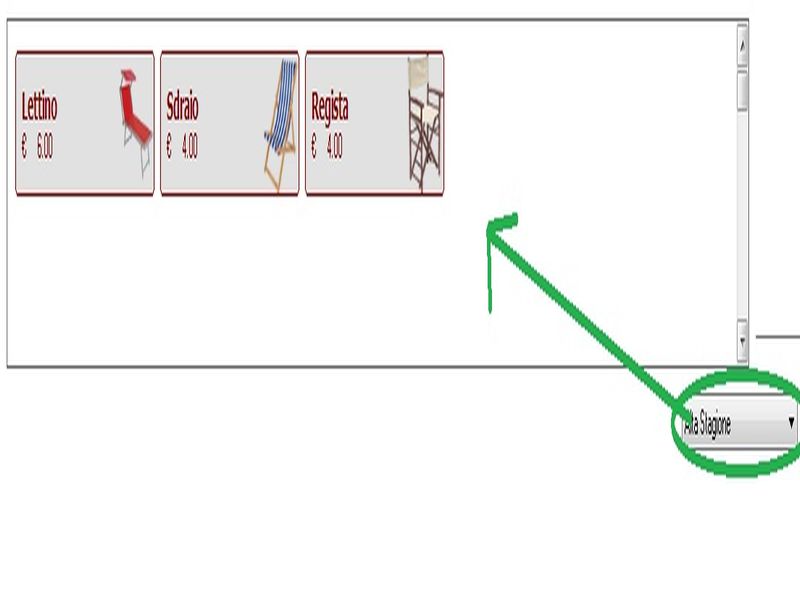


On the side I have a "combobox" control where the end user can select the type of price list.

When the user selects a different type of price list, the procedure must refresh the "btnbmp" checks with the right prices.

My problem is to update the "btnbmp" controls,

1) I tried to eliminate the "btnbmp" controls and update the prices but when I move the mouse over them I see the previous prices

2) I tried to eliminate the "scrollpanel" control and then recreate it again with oPanelscroll: End () but it makes an error

I can't find the solution
Since from 1991/1992 ( fw for clipper Rel. 14.4 - Momos)

I use : FiveWin for Harbour March-April 2024 - Harbour 3.2.0dev (harbour_bcc770_32_20240309) - Bcc7.70 - xMate ver. 1.15.3 - PellesC - mail: silvio[dot]falconi[at]gmail[dot]com
Posts: 7317
Joined: Thu Oct 18, 2012 07:17 PM
Re: Update a scrollpanel
Posted: Tue Feb 04, 2020 12:50 PM
Perhaps


If len(oPanel:acontrols) >0
oPanel:acontrols:End()
Endif


for each oCtrl in oPanel:aControls
oCtrl:End()
next

but make error on oPanel:acontrols

Code (fw): Select all Collapse
Application
===========
   Path and name: C:\Work\Prg\aarray_dlg_invoice\aarray_dlg_invoice\test.Exe (32 bits)
   Size: 4,253,696 bytes
   Compiler version: Harbour 3.2.0dev (r1712141320)
   FiveWin  version: FWH 19.12
   C compiler version: Borland/Embarcadero C++ 7.3 (32-bit)
   Windows version: 6.1, Build 7601 Service Pack 1

   Time from start: 0 hours 0 mins 12 secs 
   Error occurred at: 04-02-2020, 14:01:41
   Error description: Error BASE/1004  Metodo non disponibile: ACONTROLS
   Args:
     [   1] = N   302

Stack Calls
===========
   Called from:  => ACONTROLS( 0 )
   Called from: test.prg => PRODUCTSONPANEL( 1205 )
   Called from: test.prg => (b)TEST_INVOICE( 421 )
Since from 1991/1992 ( fw for clipper Rel. 14.4 - Momos)

I use : FiveWin for Harbour March-April 2024 - Harbour 3.2.0dev (harbour_bcc770_32_20240309) - Bcc7.70 - xMate ver. 1.15.3 - PellesC - mail: silvio[dot]falconi[at]gmail[dot]com
Posts: 7317
Joined: Thu Oct 18, 2012 07:17 PM
Re: Update a scrollpanel
Posted: Wed Feb 05, 2020 10:46 AM
minimal test

there is a bug on btnbmp line 138 ?

Code (fw): Select all Collapse
#include "fivewin.ch"
#include "constant.ch"


Function Test()
Local oDlg,oFolder
Local oPanelScroll
Local oCbxListino
Local aListini:= { {"01","Alta Stagione"  },;
                   {"02","Media Stagione"  },;
                   {"03","Bassa Stagione"  }}

Local nListino:=3
Local oFont,oFontBold,oLarge

       DEFINE FONT oFont NAME "TAHOMA" SIZE 0,-14
       DEFINE FONT oFontBold NAME "TAHOMA" SIZE 0,-14 BOLD
       DEFINE FONT oLarge NAME "VERDANA" SIZE 0,-24 BOLD

DEFINE DIALOG oDlg TITLE "test " SIZE 1130,650 ;
             PIXEL TRUEPIXEL RESIZABLE COLOR CLR_HGRAY ,CLR_WHITE FONT oFont


@ 1, 0 FOLDEREX oFolder OF oDlg SIZE oDlg:nWidth-585,oDlg:nHeight-390 PIXEL  ;
        PROMPT "Prenotazioni","Pagamenti"


 @ 6,5 COMBOBOX oCbxListino VAR nListino Items   ArrTranspose( aListini )[2 ];
            SIZE 80,90 PIXEL  of oFolder:aDialogs[1]  ;
            ON CHANGE (MakeButtons(oPanelScroll,nListino,oFontBold),;
                              oPanelScroll:SetRange(),;
                              oPanelScroll:CheckResize() )

             oDlg:bResized  := <||
                local oRect    := oDlg:GetCliRect()
                oFolder:nWidth     := oRect:nRight-2
                oFolder:nHeight    := oRect:nBottom-60
             *    oCbxListino:nTop   :=   oFolder:nHeight:nTop-30
                 oCbxListino:nLeft  := oRect:nRight - 190
                 oPanelScroll      := oRect:nBottom-350
                 return nil
                 >

          ACTIVATE DIALOG oDlg CENTERED;
                ON INIT ( oPanelScroll := CreatePanel( oFolder,oFontBold,nListino),;
                          oPanelScroll:CheckResize() ,;
                          EVAL( oDlg:bResized)             )
Return nil
//-------------------------------------------------//

Function CreatePanel(oFolder,oFontBold,nListino)
   local oPanel

   oPanel   := TScrollPanel():New( 135,010,250,550,oFolder:aDialogs[1], .t. )
   oPanel:nRightMargin     := 90
   oPanel:nBottomMargin    :=300 // 335
   oPanel:WinStyle(WS_BORDER, .t.)

    MakeButtons(oPanel,nListino,oFontBold)

    oPanel:SetRange()

Return oPanel

//---------------------------------------------------//

Function MakeButtons(oPanel,nListino,oFontBold)
   Local cDesc,nPrice
   local nProductsforRow:= 5
   local nSizeW := 195
   local nSizeH := 55
   local nSpaceH:= 5
   local nSpaceW:= 5
   local n,nProduct:=1
   local nRow:= 10
   local nCol:= 10
   local oHand:= TCursor():New(,'HAND')
   local ctooltip:= "fai click per aggiungere un servizio"
   local oCtrl
   local aProducts:= {}
   local oBtn:=array(3)


       If nListino =1
             aProducts:= {{"Lettino",9},;
                          {"Sdraio",11},;
                          {"Regista",12} }
          elseif nListino =2
             aProducts:= {{"Lettino",90},;
                          {"Sdraio",110},;
                          {"Regista",120} }
           elseif nListino =3
             aProducts:= {{"Lettino",0},;
                           {"Sdraio",0},;
                           {"Regista",0} }
          Endif


      * for each oCtrl in oPanel:aControls
     *  oCtrl:End()
  *  next

                 For n=1 to Len (aProducts)
                     cDesc    := aProducts[n][1]
                     nPrice   := aProducts[n][2]

                     @ nRow,ncol BTNBMP oBtn[n] ;
                               FILENAME "" ;
                          SIZE nSizeW, nSizeH PIXEL;
                          FLAT  RIGHT;
                          PROMPT "" + alltrim(cDesc) + CRLF +;
                          transform( nPrice,'@ €99,999.99') + " " ;
                          OF oPanel ;
                          TOOLTIP ctooltip ;
                          COLOR CLR_RED,Rgb( 225,239,219) //GDIP


         oBtn[n]:oFontBold    := oFontBold
         oBtn[n]:ocursor:= oHand
         oBtn[n]:bClrGrad = { | lInvert | If( ! lInvert,;
                    { { 1, RGB( 225, 225, 225 ), RGB( 225, 225, 225 ) } },;
                    { { 1, RGB( 229,241,251 ), RGB( 229,241,251 ) } } ) }


                     ncol+=nSizeW+nSpaceW
            IF nProduct= nProductsforRow  //  prodotti per linea
                  nRow+=nSizeH+nSpaceH
                  nCol:=10
                 nProduct:= 0
              endif
             nProduct+=1
              cDesc:=""
              nPrice:=""
            Next

            return nil

//---------------------------------------------------//
Since from 1991/1992 ( fw for clipper Rel. 14.4 - Momos)

I use : FiveWin for Harbour March-April 2024 - Harbour 3.2.0dev (harbour_bcc770_32_20240309) - Bcc7.70 - xMate ver. 1.15.3 - PellesC - mail: silvio[dot]falconi[at]gmail[dot]com
Posts: 7317
Joined: Thu Oct 18, 2012 07:17 PM
Re: Update a scrollpanel
Posted: Wed Feb 05, 2020 12:38 PM

any solution please?

Since from 1991/1992 ( fw for clipper Rel. 14.4 - Momos)

I use : FiveWin for Harbour March-April 2024 - Harbour 3.2.0dev (harbour_bcc770_32_20240309) - Bcc7.70 - xMate ver. 1.15.3 - PellesC - mail: silvio[dot]falconi[at]gmail[dot]com
Posts: 10733
Joined: Sun Nov 19, 2006 05:22 AM
Re: Update a scrollpanel
Posted: Wed Feb 05, 2020 04:03 PM
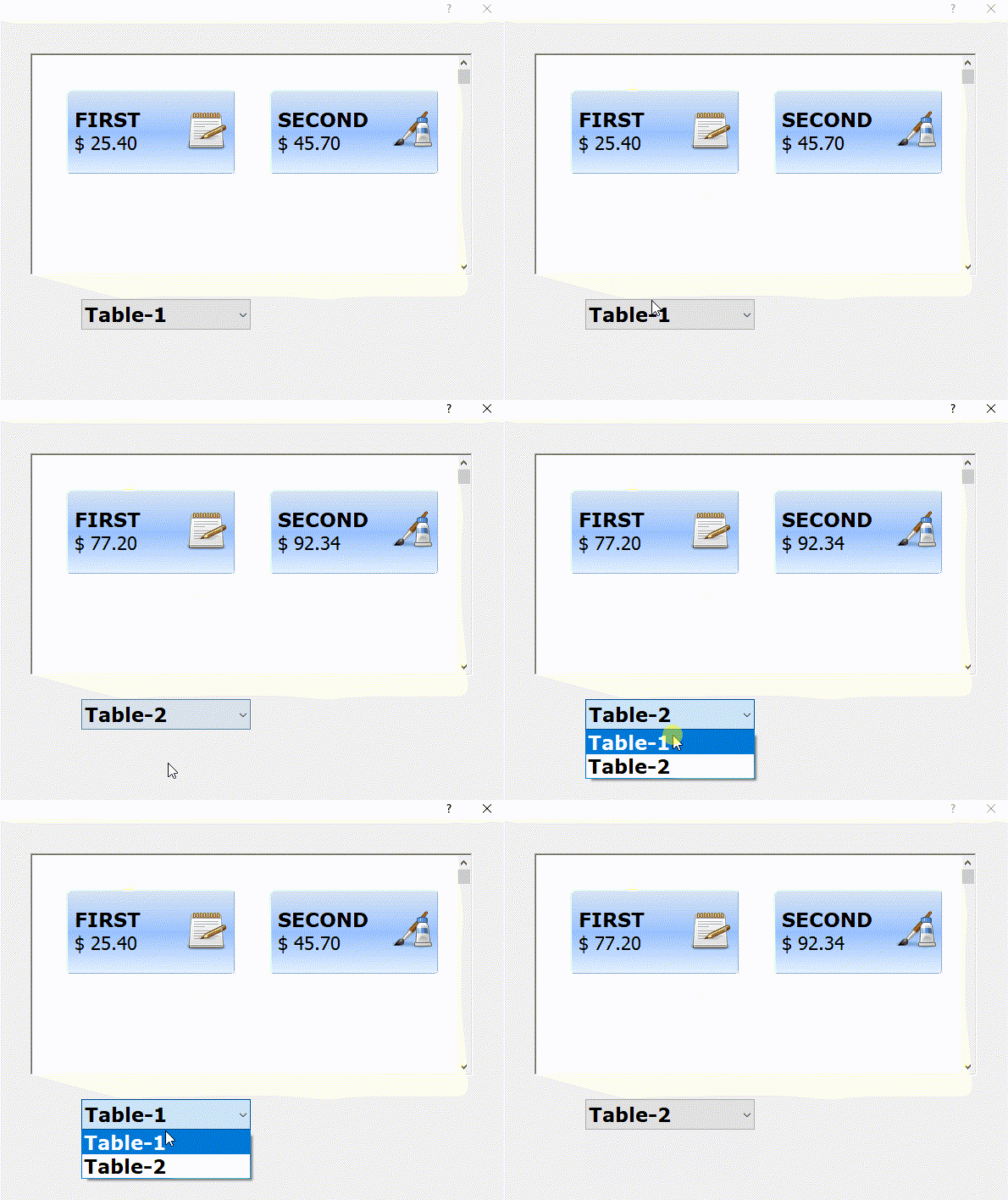
When the user selects a different type of price list, the procedure must refresh the "btnbmp" checks with the right prices.
My problem is to update the "btnbmp" controls,


Very simple.
Please build the following sample.
Use this logic in your application.

Code (fw): Select all Collapse
#include "fivewin.ch"

function Main()

   local oDlg, oPanel, aBtn[ 2 ], oFont, oBold
   local aPrices := { { 25.40, 45.70 }, { 77.20, 92.34 } }
   local nTable := 1

   DEFINE FONT oFont NAME "TAHOMA" SIZE 0,-22
   DEFINE FONT oBold NAME "VERDANA" SIZE 0,-23 BOLD

   DEFINE DIALOG oDlg SIZE 600,450 PIXEL TRUEPIXEL FONT oFont

   oPanel   := TScrollPanel():New( 40,40,300,560, oDlg )

   @ 330,100 COMBOBOX nTable ITEMS { "Table-1", "Table-2" } ;
      ON CHANGE oPanel:Update() ;
      SIZE 200,400 PIXEL OF oDlg FONT oBold

   oDlg:bInit := <||

      @ 40, 40 BTNBMP aBtn[ 1 ] ;
               PROMPT { || "FIRST" + CRLF + TRANSFORM( aPrices[ nTable, 1 ], "$ 99.99" ) } ;
               BITMAP "c:\fwh\bitmaps\pngs\image7.png" RIGHT ;
               SIZE 200,100 PIXEL OF oPanel 2007 UPDATE
      @ 40,280 BTNBMP aBtn[ 2 ] ;
               PROMPT { || "SECOND" + CRLF + TRANSFORM( aPrices[ nTable, 2 ], "$ 99.99" ) } ;
               BITMAP "c:\fwh\bitmaps\pngs\image8.png" RIGHT ;
               SIZE 200,100 PIXEL OF oPanel 2007 UPDATE

      AEval( aBtn, { |o| o:oFontBold := oBold } )

      oPanel:SetRange()
      return nil
   >

   ACTIVATE DIALOG oDlg CENTERED
   RELEASE FONT oFont, oBold

return nil


Regards


G. N. Rao.

Hyderabad, India
Posts: 7317
Joined: Thu Oct 18, 2012 07:17 PM
Re: Update a scrollpanel
Posted: Thu Feb 06, 2020 07:59 AM
Use this logic in your application

Thanks Rao.
that's the problem,


Nages,
your sample run ok , when I insert a dbf not run ok


I load prices from archive(dbf) and then not refresh the btnbmps with new prices
Since from 1991/1992 ( fw for clipper Rel. 14.4 - Momos)

I use : FiveWin for Harbour March-April 2024 - Harbour 3.2.0dev (harbour_bcc770_32_20240309) - Bcc7.70 - xMate ver. 1.15.3 - PellesC - mail: silvio[dot]falconi[at]gmail[dot]com
Posts: 7317
Joined: Thu Oct 18, 2012 07:17 PM
Re: Update a scrollpanel
Posted: Fri Feb 07, 2020 08:29 AM

Mr Rao
the array constructed in this way is not useful to me

local aPrices := { { 25.40, 45.70 }, { 77.20, 92.34} }

because you show one record at a time

that is, or I have to display all the articles that are in the archive

the structure of my dbf

local aFields := { { "DESC", "C", 100, 0 },;
{ "SETTORE", "C", 1, 0 },;
{ "DAY_BASSA", "N", 12, 2 },;
{ "DAY_MEDIA", "N", 12, 2 },;
{ "DAY_ALTA", "N", 12, 2 },;
{ "STAGIONE", "N", 12, 2 },;
{ "IMAGE", "C", 100, 0 },;
{ "MULTIPLE", "L", 1, 0 } }

for each item I have to show the image (Image) , the caption (Desc), and the price

the price may change according to the price list number( 1 day_bassa, 2 day_media, 3 day_alta)

I can't seem to recreate the array with the data I have making it compatible with what you did

Since from 1991/1992 ( fw for clipper Rel. 14.4 - Momos)

I use : FiveWin for Harbour March-April 2024 - Harbour 3.2.0dev (harbour_bcc770_32_20240309) - Bcc7.70 - xMate ver. 1.15.3 - PellesC - mail: silvio[dot]falconi[at]gmail[dot]com
Posts: 6983
Joined: Fri Oct 07, 2005 07:07 PM
Re: Update a scrollpanel
Posted: Fri Feb 07, 2020 08:44 AM

Silvio, very nice design!
Best regards
Otto

Posts: 7317
Joined: Thu Oct 18, 2012 07:17 PM
Re: Update a scrollpanel
Posted: Fri Feb 07, 2020 08:50 AM
Otto wrote:Silvio, very nice design!
Best regards
Otto


Otto not run ok
Since from 1991/1992 ( fw for clipper Rel. 14.4 - Momos)

I use : FiveWin for Harbour March-April 2024 - Harbour 3.2.0dev (harbour_bcc770_32_20240309) - Bcc7.70 - xMate ver. 1.15.3 - PellesC - mail: silvio[dot]falconi[at]gmail[dot]com
Posts: 7317
Joined: Thu Oct 18, 2012 07:17 PM
Re: Update a scrollpanel
Posted: Sun Feb 09, 2020 03:20 PM

Resolved thanks to Nages and Maxp

Since from 1991/1992 ( fw for clipper Rel. 14.4 - Momos)

I use : FiveWin for Harbour March-April 2024 - Harbour 3.2.0dev (harbour_bcc770_32_20240309) - Bcc7.70 - xMate ver. 1.15.3 - PellesC - mail: silvio[dot]falconi[at]gmail[dot]com

Continue the discussion