FiveTech Support Forums

FiveWin / Harbour / xBase community
Board index FiveWin for Harbour/xHarbour How to have a sharp image conversion
Posts: 7317
Joined: Thu Oct 18, 2012 07:17 PM
How to have a sharp image conversion
Posted: Sat Feb 29, 2020 09:51 AM
to convert a png image I use

DEFAULT nResize:=0.30

hBmp: = FW_ReadImage (nil, cFile) [1]
hNew: = FW_TransformBitmap (hBmp, NIL, nResize)

FW_SaveImage (hNew, cFolderTemp + cNewName + ext, 40)

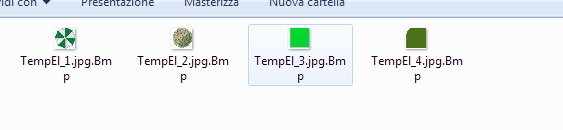
but then using a combo I don't see the sharp image

JPG
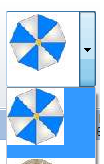

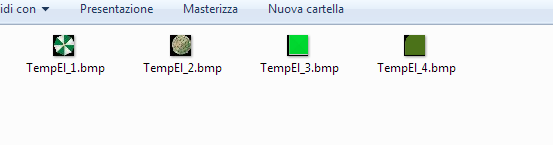
if I turn it into a bmp format it is even worse

bmp
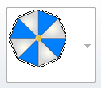


how do i get a clear picture?
Since from 1991/1992 ( fw for clipper Rel. 14.4 - Momos)

I use : FiveWin for Harbour March-April 2024 - Harbour 3.2.0dev (harbour_bcc770_32_20240309) - Bcc7.70 - xMate ver. 1.15.3 - PellesC - mail: silvio[dot]falconi[at]gmail[dot]com
Posts: 10733
Joined: Sun Nov 19, 2006 05:22 AM
Re: How to have a sharp image conversion
Posted: Sat Feb 29, 2020 11:50 AM

Where did you get the function FW_TransformBitmap() from?

Regards


G. N. Rao.

Hyderabad, India
Posts: 7317
Joined: Thu Oct 18, 2012 07:17 PM
Re: How to have a sharp image conversion
Posted: Sat Feb 29, 2020 12:06 PM
Not Remember
I think you make a sample test (fwh 18.03)
http://forums.fivetechsupport.com/viewtopic.php?f=3&t=35547&start=0&hilit=FW_transformBitmap#p211638

we tried also with
FW_SaveImage( "name.png", "name.bmp" )
but the quality is no good
Since from 1991/1992 ( fw for clipper Rel. 14.4 - Momos)

I use : FiveWin for Harbour March-April 2024 - Harbour 3.2.0dev (harbour_bcc770_32_20240309) - Bcc7.70 - xMate ver. 1.15.3 - PellesC - mail: silvio[dot]falconi[at]gmail[dot]com
Posts: 7317
Joined: Thu Oct 18, 2012 07:17 PM
Re: How to have a sharp image conversion
Posted: Sat Feb 29, 2020 12:15 PM
Rao,
Now I tried with

local nJpgQuality := 90

FW_SaveImage( cFile, cFolderTemp+cNewName+ext,nJpgQuality )

and now run ok


before png->jpg
then jpg->bmp
and the image is clear now
Since from 1991/1992 ( fw for clipper Rel. 14.4 - Momos)

I use : FiveWin for Harbour March-April 2024 - Harbour 3.2.0dev (harbour_bcc770_32_20240309) - Bcc7.70 - xMate ver. 1.15.3 - PellesC - mail: silvio[dot]falconi[at]gmail[dot]com
Posts: 10733
Joined: Sun Nov 19, 2006 05:22 AM
Re: How to have a sharp image conversion
Posted: Sat Feb 29, 2020 03:30 PM

I think you make a sample test (fwh 18.03)
viewtopic.php?f=3&t=35547&start=0&hilit=FW_transformBitmap#p211638


Thanks. Now I got it. This function is in source\function\imgtxtio.prg.
Looks like quality is lost while resizing.

So, do you want to convert a png file as jpg with reduced size?


local nJpgQuality := 90

FW_SaveImage( cFile, cFolderTemp+cNewName+ext,nJpgQuality )

and now run ok


This saves png as jpg but does not reduce the size. Is that what you want?

Can you please
1) Let me know why do you want to convert png to jpg with reduced size? Can you not directly use png?
2) Can you send me your png by email? Like to some tests and see.
Regards


G. N. Rao.

Hyderabad, India
Posts: 7317
Joined: Thu Oct 18, 2012 07:17 PM
Re: How to have a sharp image conversion
Posted: Sun Mar 01, 2020 03:58 PM
Can you please
1) Let me know why do you want to convert png to jpg with reduced size? Can you not directly use png?
2) Can you send me your png by email? Like to some tests and see.


1) I must use a combobox control . It use only bmp image so I must convert before png to jpg then png to bmp. If I convert png to bmp directly we have no sharp Image ( with black shadow)
2) I send now a message with Png file
Since from 1991/1992 ( fw for clipper Rel. 14.4 - Momos)

I use : FiveWin for Harbour March-April 2024 - Harbour 3.2.0dev (harbour_bcc770_32_20240309) - Bcc7.70 - xMate ver. 1.15.3 - PellesC - mail: silvio[dot]falconi[at]gmail[dot]com
Posts: 10733
Joined: Sun Nov 19, 2006 05:22 AM
Re: How to have a sharp image conversion
Posted: Sun Mar 01, 2020 04:10 PM

I understand.
We will do some tests and see if we can improve our functions.

You wanted to do resize also. How did you do that?

Regards


G. N. Rao.

Hyderabad, India
Posts: 7317
Joined: Thu Oct 18, 2012 07:17 PM
Re: How to have a sharp image conversion
Posted: Sun Mar 01, 2020 04:31 PM
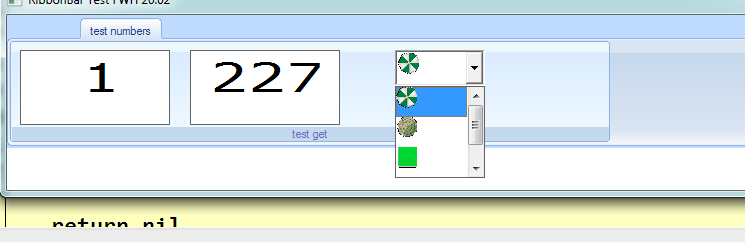
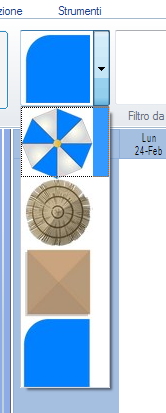
if it is possible I wanted to resize (because it is too big) but for now I use the version that I have as you can see on this image


Now I'm correcting because I have an error on gets , the button of get is bad and I 'm searching a good solution
Since from 1991/1992 ( fw for clipper Rel. 14.4 - Momos)

I use : FiveWin for Harbour March-April 2024 - Harbour 3.2.0dev (harbour_bcc770_32_20240309) - Bcc7.70 - xMate ver. 1.15.3 - PellesC - mail: silvio[dot]falconi[at]gmail[dot]com
Posts: 10733
Joined: Sun Nov 19, 2006 05:22 AM
Re: How to have a sharp image conversion
Posted: Mon Mar 02, 2020 09:44 AM
Mr. Silvio

Can you try this?
Code (fw): Select all Collapse
aBmp: = FW_ReadImage( nil, cFile )
hNew: = FW_TransformBitmap( aBmp[ 1 ], NIL, 0.30 )
FW_SaveHBitmap( hNew, "new.bmp" )
PalBmpFree( aBmp )
DeleteObject( hNew )
Regards


G. N. Rao.

Hyderabad, India
Posts: 7317
Joined: Thu Oct 18, 2012 07:17 PM
Re: How to have a sharp image conversion
Posted: Mon Mar 02, 2020 10:37 AM
I tried and made bmp with black background


Code (fw): Select all Collapse
   cDir:= "temp\"
   

        IF !lIsDir( lower(cDir) )
            IF lMkDir( lower( cDir) )
                  ELSE
                 MsgAlert("Err "+cdir,"Verificare!")
             ENDIF
       ENDIF

      USE ELEMENTI ALIAS EL
      aElementi:=  CaricaElementi(.t.) // load array
     aBmpCombo:= Crea_BMP(aElementi,cFoldertemp,cFileBmp_Elementi)  // create Bmps for combobox


//-----------------------------------------------------------------------------//
Function Crea_Bmp(aElementi,cFolderTemp,cFileBmp_Elementi)
   Local n
   Local k
   Local atempBmp := {}
   Local cFile,cfileNew
   Local cCartella := cFoldertemp+"\"
    For n= 1 to Len(aElementi)
               cfile:=  Conversione(alltrim(aElementi [n][5]),cCartella ,cFileBmp_Elementi+alltrim(str(n)))
                        aadd(atempBmp ,cFile+".bmp")
          next
    return atempBmp
//-----------------------------------------------------------------------------//
Function Conversione(cFile,Cfolder,cNewFile)
   Local aBmp   := FW_ReadImage( nil, cFile )
   Local hNew   := FW_TransformBitmap( aBmp[ 1 ], NIL, 0.30 )
                          FW_SaveHBitmap( hNew, cFolder+cNewFile+".bmp" )
PalBmpFree( aBmp )
DeleteObject( hNew )
return cNewFile
Since from 1991/1992 ( fw for clipper Rel. 14.4 - Momos)

I use : FiveWin for Harbour March-April 2024 - Harbour 3.2.0dev (harbour_bcc770_32_20240309) - Bcc7.70 - xMate ver. 1.15.3 - PellesC - mail: silvio[dot]falconi[at]gmail[dot]com
Posts: 7317
Joined: Thu Oct 18, 2012 07:17 PM
Re: How to have a sharp image conversion
Posted: Mon Mar 02, 2020 11:26 AM
Nages,
If I make in this mode :


Code (fw): Select all Collapse
Function Crea_Bmp(aElementi,cFolderTemp,cFileBmp_Elementi)
   Local n
   Local k
   Local atempBmp := {}
   Local cFile,cfileNew
   Local cCartella := cFoldertemp+"\"
    For n= 1 to Len(aElementi)
                 // to JPG +RESIZE
               cfile:=  Conversione(alltrim(aElementi [n][5]),;
                                    cCartella ,;
                                    cFileBmp_Elementi+alltrim(str(n)))
                 // to BMP
               cFileN := savetobmp(cfile)
                DELETEFILE(cFILE)

               aadd(atempBmp ,cFileN+".bmp")

          next
    return atempBmp

Function Conversione(cFile,Cfolder,cNewFile)
Local aBmp   := FW_ReadImage( nil, cFile )
Local hNew   := FW_TransformBitmap( aBmp[ 1 ], NIL, 0.30 )

//FW_SaveHBitmap( hNew, cFolder+cNewFile+".jpg",90 )
       FW_SaveImage(  hNew, cFolder+cNewFile+".jpg",90 )   // to JPG 
PalBmpFree( aBmp )
DeleteObject( hNew )
return cFolder+cNewFile+".jpg"

Function Savetobmp(cfile)
   Local  aBmp := FW_ReadImage( nil, cfile )[ 1 ]
  FW_SaveImage( aBmp, cfile+".Bmp",40 )
 Return  cfile


I have

Since from 1991/1992 ( fw for clipper Rel. 14.4 - Momos)

I use : FiveWin for Harbour March-April 2024 - Harbour 3.2.0dev (harbour_bcc770_32_20240309) - Bcc7.70 - xMate ver. 1.15.3 - PellesC - mail: silvio[dot]falconi[at]gmail[dot]com
Posts: 10733
Joined: Sun Nov 19, 2006 05:22 AM
Re: How to have a sharp image conversion
Posted: Mon Mar 02, 2020 04:07 PM

For bitmaps FW_SaveHBitmap() saves with better quality than FW_SaveImage()
What you saw as black color is in fact Alpha color and FWH controls correctly paint the bitmaps treating the alpha color as transparent

Note: After some more tests, we will improve FW_SaveImage() in the next version.

Regards


G. N. Rao.

Hyderabad, India
Posts: 7317
Joined: Thu Oct 18, 2012 07:17 PM
Re: How to have a sharp image conversion
Posted: Tue Mar 03, 2020 08:04 AM
nageswaragunupudi wrote:For bitmaps FW_SaveHBitmap() saves with better quality than FW_SaveImage()
What you saw as black color is in fact Alpha color and FWH controls correctly paint the bitmaps treating the alpha color as transparent

Note: After some more tests, we will improve FW_SaveImage() in the next version.


Nages,

if I use
Code (fw): Select all Collapse
For n= 1 to Len(aElementi)
cFileBmp:= Nages_BMP(alltrim(aElementi [n][5]),;
                                    cCartella ,;
                                    cFileBmp_Elementi+alltrim(str(n)))
                        aadd(atempBmp ,cFileBmp)
            next
return atempBmp

Function Nages_BMP(cFile,cFolder,cNewFile)
Local aBmp:= FW_ReadImage( nil, cFile )
Local hNew:= FW_TransformBitmap( aBmp[ 1 ], NIL, 0.30 )
Local cnew :=  cFolder+cNewFile+".bmp"
FW_SaveHBitmap( hNew,cnew )
PalBmpFree( aBmp )
DeleteObject( hNew )
return cnew


Then I can list on pc this


and trying the test I have


the images on the combo are grainy and unclear, they are ugly to look at and do not help the end user!!!!

perhaps on future someone must try to create a control combobox with pngs/jpg compatible!!!
Since from 1991/1992 ( fw for clipper Rel. 14.4 - Momos)

I use : FiveWin for Harbour March-April 2024 - Harbour 3.2.0dev (harbour_bcc770_32_20240309) - Bcc7.70 - xMate ver. 1.15.3 - PellesC - mail: silvio[dot]falconi[at]gmail[dot]com
Posts: 10733
Joined: Sun Nov 19, 2006 05:22 AM
Re: How to have a sharp image conversion
Posted: Tue Mar 03, 2020 08:06 AM

I am seeing. The reason is that combobox is not painting alphabmps properly.
Need to improve this aspect. Takes time.

Regards


G. N. Rao.

Hyderabad, India
Posts: 7317
Joined: Thu Oct 18, 2012 07:17 PM
Re: How to have a sharp image conversion
Posted: Tue Mar 03, 2020 10:29 AM
nageswaragunupudi wrote:I am seeing. The reason is that combobox is not painting alphabmps properly.
Need to improve this aspect. Takes time.


Nages.
thanks
a question ...combometro support png files ?
Since from 1991/1992 ( fw for clipper Rel. 14.4 - Momos)

I use : FiveWin for Harbour March-April 2024 - Harbour 3.2.0dev (harbour_bcc770_32_20240309) - Bcc7.70 - xMate ver. 1.15.3 - PellesC - mail: silvio[dot]falconi[at]gmail[dot]com

Continue the discussion