FiveTech Support Forums

FiveWin / Harbour / xBase community
Board index FiveWin for Harbour/xHarbour Copying from Excel to Word
Posts: 1392
Joined: Mon May 14, 2007 09:49 AM
Copying from Excel to Word
Posted: Wed Mar 11, 2020 07:56 AM

Hi,

There is a large Excel file. Based on this file, I need to make a report in Word format . I copy the Excel file into an array and create a Word document based on it.

itm:=oExc:Sheets(1):Range("A1:L10000"):Value

However, since the original Excel file contains specific characters (≥, м², etc. ), they are replaced with the "? " character when writing to Word. How can we solve this ? ( you can, of course, move fragments through the Clipboard, but it's very, very long)

Posts: 10733
Joined: Sun Nov 19, 2006 05:22 AM
Re: Copying from Excel to Word
Posted: Wed Mar 11, 2020 09:54 AM
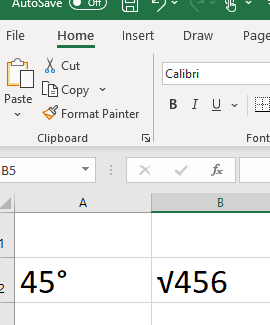
original Excel file contains specific characters (degree, root, etc. ),


Do you mean characters like these?
Regards


G. N. Rao.

Hyderabad, India
Posts: 1392
Joined: Mon May 14, 2007 09:49 AM
Re: Copying from Excel to Word
Posted: Wed Mar 11, 2020 11:15 AM
I mean these symbols - ≥, м², etc.
Posts: 10733
Joined: Sun Nov 19, 2006 05:22 AM
Re: Copying from Excel to Word
Posted: Wed Mar 11, 2020 03:12 PM
Assume you are using Harbour.

Before opening Excel book, set codepage to UTF8
Code (fw): Select all Collapse
   cp := HB_SETCODEPAGE( "UTF8" )

Now read from Excel and export to your Word document.
After finishing, you can restore your original codepage if you want to.
Code (fw): Select all Collapse
 HB_SETCODEPAGE( cp )
Regards


G. N. Rao.

Hyderabad, India
Posts: 1392
Joined: Mon May 14, 2007 09:49 AM
Re: Copying from Excel to Word
Posted: Thu Mar 12, 2020 07:15 AM

I set HB_SETCODEPAGE ("UTF8") and read data from an Excel file. But Unicode characters could not be obtained. Solved the problem of copying text fragments with Unicode characters via Clipboard

Posts: 10733
Joined: Sun Nov 19, 2006 05:22 AM
Re: Copying from Excel to Word
Posted: Thu Mar 12, 2020 08:26 AM

If you are using Harbour, setting codepage to UTF8 works. I mentioned in my post that I assumed you are using Harbour. I posted my answer after testing and confirming at my end, as I always do.

If you are using xHarbour, it does not work, because xHarbour's OLE functions do not support UTF8.

Copying and pasting works in both Harbour and xHarbour.

Regards


G. N. Rao.

Hyderabad, India

Continue the discussion