

Hello,
Can we insert multiple lines at the same time with #define?
Thank you in advance
Otto
Hello,
Can we insert multiple lines at the same time with #define?
Thank you in advance
Otto
If you mean in one #define, can we create multiple definitions, then it is not possible.
Each define has to be separate.
I am not sure if I understood you correctly.
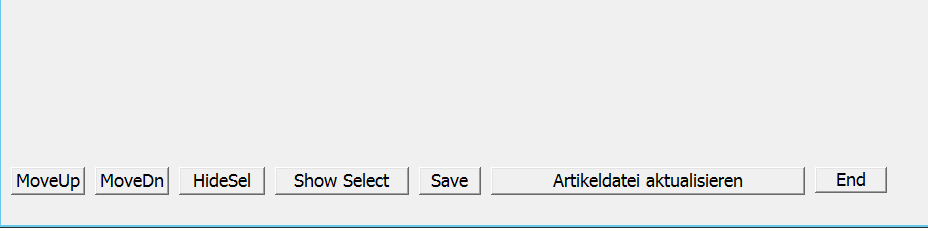
#xtranslate NEXTBTN <prompt> ACTION <uaction> => ;
   nOffset += 5 + oBtn:nwidth ;;
   @ ( oDlg:nHeight - 30 )/2.05, nOffset BUTTON oBtn PROMPT <prompt> OF oDlg PIXEL ACTION <uaction>

// ....

NEXTBTN "myprompt" ACTION MsgInfo( "ok" ) nOffset += 5 + oBtn:nwidth ; oBtn := TButton():New( ( oDlg:nHeight - 30 )/2.05, nOffset, "myprompt", oDlg, {|| MsgInfo( "ok" )},,,,, .F., .T., .F.,, .F.,,, .F., "oBtn", .F. )#define NEXTBTN nOffset += 5 + oBtn:nwidth; @ ( oDlg:nHeight - 30 )/2.05, nOffset BUTTON oBtn PROMPT NEXTBTN "MoveDn" PIXEL OF oDlg ACTION SwapRow( oBrw, .t. )Dear Mr. Rao,
thank you so much. I think this offers much power to build his own toolbox.
Best regards,
Otto
#xtranslate NEXTBTN <prompt> ACTION <uaction> => ;
  nOffset += 5 + oBtn:nwidth ;;
   @ ( oDlg:nHeight - 30 )/2.05, nOffset BUTTON oBtn PROMPT <prompt> SIZE NIL, 25 OF oDlg PIXEL ACTION <uaction>


   #xtranslate NEXTBTN1 <prompt> ACTION <uaction> => ;
   @ ( oDlg:nHeight - 30 )/2.05, nOffset BUTTON oBtn PROMPT <prompt> SIZE NIL, 25 OF oDlg PIXEL ACTION <uaction>
     #include "nextbtn.ch"

    NEXTBTN1 "MoveDn"     ACTION SwapRow( oBrw, .t. )

   NEXTBTN "MoveUp"      ACTION SwapRow( oBrw, .f. )

NEXTBTN "MoveDn" ACTION SwapRow( oBrw, .t. )#xtranslate MYBTN <prompt> ACTION <uaction> => ;
nOffSet := If( oBtn == nil, 5, nOffSet + 5 + oBtn:nWidth );;
@ oDlg:nHeight - 30, nOffset BUTTON oBtn PROMPT <prompt> SIZE 80, 25 OF oDlg PIXEL ACTION <uaction>
func test
local oDlg, nOffset, oBtn
DEFINE DIALOG oDlg SIZE 600,100 PIXEL TRUEPIXEL
MYBTN "ONE" ACTION MsgInfo( "One" )
MYBTN "TWO" ACTION MsgInfo( "Two" )
MYBTN "TEN" ACTION MsgInfo( "ten" )
ACTIVATE DIALOG oDlg CENTERED
return nil
#xtranslate NEXTBTN <prompt> ACTION <uaction> => ;
    nOffSet := If( oBtn == nil, 5, nOffSet + 5 + oBtn:nWidth );;
oBtn := TButton():New( ( oDlg:nHeight - 30 )/2.05, nOffset, , oDlg, , , 30 ,,, .F., .T., .F.,, .F.,,, .F., , .F. )#xtranslate NEXTBTN <prompt> ACTION <uAction> => ;
nOffSet := If( oBtn == nil, 5, nOffSet + 5 + oBtn:nWidth );;
oBtn := TButton():New( oDlg:nHeight - 50, nOffset, <prompt>, oDlg, ;
[\{||<uAction>\}], 80, 25,,, .F., .T., .F.,, .F.,,, .F., "oBtn", .F. )Dear Mr. Rao,
It works perfectly.
I think you can tremendously simplify the source code of your programs.
Comments can be inserted in the #xtranslate files, and the reading flow in the actual program is not disturbed.
I want to show how easy it is to rearrange the switch.
You swap the lines and don't have to worry about anything.
I think even in preparation for the change of the own programs to mod Harbour this can bring something.
Maybe we find a way to exchange the #xTranslate files.
Thanks again.
#xtranslate NEXTBTN <prompt> ACTION <uAction> => ;
   nOffSet := If( oBtn == nil, 5, nOffSet + 5 + oBtn:nWidth );;
   oBtn := TButton():New( oDlg:nHeight/2.05 - 50, nOffset, <prompt>, oDlg, ;
   [\{||<uAction>\}], , 25,,, .F., .T., .F.,, .F.,,, .F., "oBtn", .F. );;
oBtn:nClrPane := CLR_GREENTButton and TButtonBmp are Windows controls. We can not set colors.
It is possible to set colors for TBtnBmp only.
Dear Mr. Rao,
I have seen that TButton inherit from TControl.
But I have not checked whether the paint method takes into account all the data. I will test with ButtonBmp.
I think we should extend AUTOCODE in this direction. 
Thank you for your help and best regard
Otto
Yes. TButton and all other FWH controls are derived from TControl.
TButton class creates a Windows "BUTTON" control and the button is painted by Windows only. TButton does not have its own paint method.
TButtonBmp is derived from TButton class. So this control also creates a Windows "BUTTON" control. This class has its own Paint() method. The Paint() method uses Windows to paint the button and then paints the bitmap over the button.
Therefore, in both the above cases, button is actually painted by Windows.
In contrast, TBtnBmp and TFlatBtn do not depend on any Windows control and paint the entire button themselves.
