FiveTech Support Forums

FiveWin / Harbour / xBase community
Board index FiveWin for Harbour/xHarbour How to print Labels with Fivewin (TO MR.RAO)
Posts: 85
Joined: Wed Nov 19, 2014 01:04 PM
How to print Labels with Fivewin (TO MR.RAO)
Posted: Tue May 12, 2020 06:49 PM
Dear Sirs

How Can I print Labels same as attached photo using Fivewin ?


Same as link
https://imgur.com/tsmrFkm

Mr.Rao Can you provide me example for the same ?
Regards
Dagia Yunus
Regards

Yunus


FWH 21.02
Posts: 7317
Joined: Thu Oct 18, 2012 07:17 PM
Re: How to print Labels with Fivewin
Posted: Tue May 12, 2020 08:19 PM

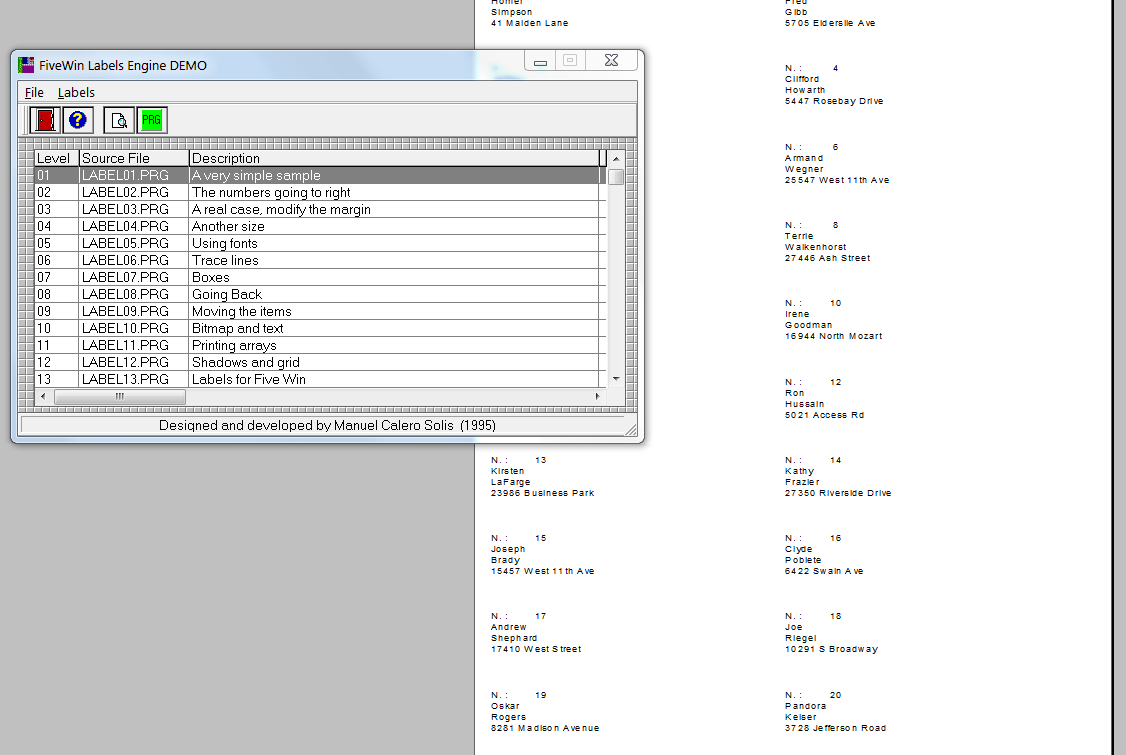
On folder fwh/samples/label you found the classes for label

Since from 1991/1992 ( fw for clipper Rel. 14.4 - Momos)

I use : FiveWin for Harbour March-April 2024 - Harbour 3.2.0dev (harbour_bcc770_32_20240309) - Bcc7.70 - xMate ver. 1.15.3 - PellesC - mail: silvio[dot]falconi[at]gmail[dot]com
Posts: 85
Joined: Wed Nov 19, 2014 01:04 PM
Re: How to print Labels with Fivewin
Posted: Wed May 13, 2020 01:28 PM

Dear Silvio

its gives me following error

Error: Unresolved external '_HB_FUN_TLITEM_NEW' referenced from C:\FWH\SAMPLES\LABELS\SAMPLES\DEMO.OBJ
Error: Unresolved external '_HB_FUN_TLITEM_STABILIZE' referenced from C:\FWH\SAMPLES\LABELS\SAMPLES\DEMO.OBJ
Error: Unresolved external '_HB_FUN_TLITEM_SAYDATA' referenced from C:\FWH\SAMPLES\LABELS\SAMPLES\DEMO.OBJ
Error: Unresolved external '_HB_FUN_TLABEL' referenced from C:\FWH\SAMPLES\LABELS\SAMPLES\DEMO.OBJ
Error: Unable to perform link

Regards

Yunus


FWH 21.02
Posts: 7317
Joined: Thu Oct 18, 2012 07:17 PM
Re: How to print Labels with Fivewin
Posted: Wed May 13, 2020 01:40 PM


here run ok
wich rel of fwh you have ?

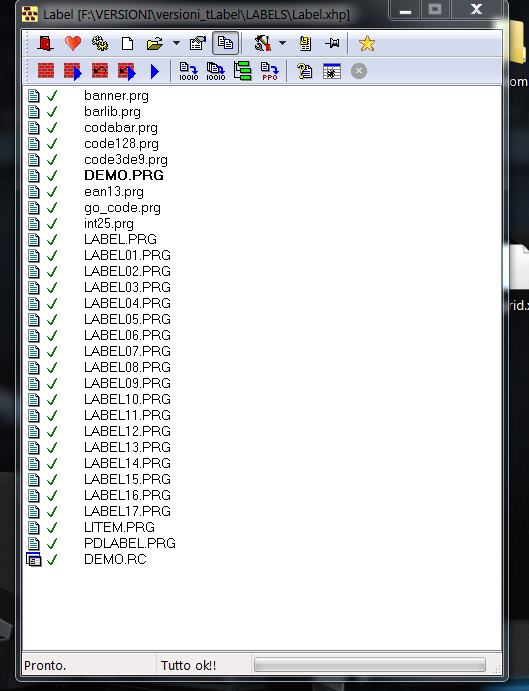
these are the files must be compiled

Since from 1991/1992 ( fw for clipper Rel. 14.4 - Momos)

I use : FiveWin for Harbour March-April 2024 - Harbour 3.2.0dev (harbour_bcc770_32_20240309) - Bcc7.70 - xMate ver. 1.15.3 - PellesC - mail: silvio[dot]falconi[at]gmail[dot]com
Posts: 85
Joined: Wed Nov 19, 2014 01:04 PM
Re: How to print Labels with Fivewin
Posted: Thu May 14, 2020 11:20 AM

Dear Silvio

I am still getting this error

Compile using xmate 1.5

Error: Unresolved external '_HB_FUN_FW_GT' referenced from C:\FWH\SAMPLES\LABELS\SAMPLES\OBJ\DEMO.OBJ
Error: Unresolved external '_HB_FUN_TLITEM_NEW' referenced from C:\FWH\SAMPLES\LABELS\SAMPLES\OBJ\PDLABEL.OBJ
Error: Unresolved external '_HB_FUN_TLITEM_STABILIZE' referenced from C:\FWH\SAMPLES\LABELS\SAMPLES\OBJ\PDLABEL.OBJ
Error: Unresolved external '_HB_FUN_TLITEM_SAYDATA' referenced from C:\FWH\SAMPLES\LABELS\SAMPLES\OBJ\PDLABEL.OBJ
Warning: Public symbol '_HB_FUN_TLITEM' defined in both module C:\FWH\SAMPLES\LABELS\SAMPLES\OBJ\LITEM.OBJ and C:\FWH\SAMPLES\LABELS\SAMPLES\OBJ\PDLABEL.OBJ

Regards

Yunus


FWH 21.02
Posts: 7317
Joined: Thu Oct 18, 2012 07:17 PM
Re: How to print Labels with Fivewin
Posted: Thu May 14, 2020 12:39 PM
dagiayunus wrote:Dear Silvio

I am still getting this error

Compile using xmate 1.5

Error: Unresolved external '_HB_FUN_FW_GT' referenced from C:\FWH\SAMPLES\LABELS\SAMPLES\OBJ\DEMO.OBJ
Error: Unresolved external '_HB_FUN_TLITEM_NEW' referenced from C:\FWH\SAMPLES\LABELS\SAMPLES\OBJ\PDLABEL.OBJ
Error: Unresolved external '_HB_FUN_TLITEM_STABILIZE' referenced from C:\FWH\SAMPLES\LABELS\SAMPLES\OBJ\PDLABEL.OBJ
Error: Unresolved external '_HB_FUN_TLITEM_SAYDATA' referenced from C:\FWH\SAMPLES\LABELS\SAMPLES\OBJ\PDLABEL.OBJ
Warning: Public symbol '_HB_FUN_TLITEM' defined in both module C:\FWH\SAMPLES\LABELS\SAMPLES\OBJ\LITEM.OBJ and C:\FWH\SAMPLES\LABELS\SAMPLES\OBJ\PDLABEL.OBJ


tell me
1) wich rel of fwh you have
2) use xharbour or Harbour
3) public here the env file you use to compile with xmate
Since from 1991/1992 ( fw for clipper Rel. 14.4 - Momos)

I use : FiveWin for Harbour March-April 2024 - Harbour 3.2.0dev (harbour_bcc770_32_20240309) - Bcc7.70 - xMate ver. 1.15.3 - PellesC - mail: silvio[dot]falconi[at]gmail[dot]com
Posts: 7317
Joined: Thu Oct 18, 2012 07:17 PM
Re: How to print Labels with Fivewin (TO MR.RAO)
Posted: Thu May 14, 2020 03:37 PM

I sent you my env

Since from 1991/1992 ( fw for clipper Rel. 14.4 - Momos)

I use : FiveWin for Harbour March-April 2024 - Harbour 3.2.0dev (harbour_bcc770_32_20240309) - Bcc7.70 - xMate ver. 1.15.3 - PellesC - mail: silvio[dot]falconi[at]gmail[dot]com
Posts: 10733
Joined: Sun Nov 19, 2006 05:22 AM
Re: How to print Labels with Fivewin (TO MR.RAO)
Posted: Thu May 21, 2020 03:01 AM
dagiayunus wrote:Dear Sirs

How Can I print Labels same as attached photo using Fivewin ?


Same as link
https://imgur.com/tsmrFkm

Mr.Rao Can you provide me example for the same ?
Regards
Dagia Yunus


Try this code:
Code (fw): Select all Collapse
#include "fivewin.ch"

REQUEST DBFCDX

//----------------------------------------------------------------------------//

function Main()

   local oPrn, nPgWidth, nPgHeight
   local nTop, nLeft, nWidth, nHeight
   local nRow, nRows, nCol, nCols
   local nPrintHeight, nPrintWidth, nTopMargin, nLeftMargin
   local nGutter
   local oFont, oBold, oPen

   USE CUSTOMER NEW SHARED VIA "DBFCDX"
   SET FILTER TO RECNO() > 99 .AND. RECNO() < 141
   GO TOP

   PRINT oPrn PREVIEW

   DEFINE FONT oFont NAME "TAHOMA" SIZE 0,-14 OF oPrn
   DEFINE FONT oBold NAME "VERDANA" SIZE 0,-25 BOLD OF oPrn
   DEFINE PEN oPen STYLE PS_DASH OF oPrn

   nPgWidth    := oPrn:PageWidth(  "CM" )
   nPgHeight   := oPrn:PageHeight( "CM" )

   // label dimensions
   nWidth      := 4 //cm
   nHeight     := 3
   nGutter     := 1 // cm  gap between labels

   nRows       := Int( ( nPgHeight - 2 ) / ( nHeight + nGutter ) )
   nCols       := Int( ( nPgWidth  - 2 ) / ( nWidth  + nGutter ) )

   nPrintHeight   := nRows * ( nHeight + nGutter ) - nGutter
   nPrintWidth    := nCols * ( nWidth  + nGutter ) - nGutter
   nTopMargin     := ( nPgHeight - nPrintHeight ) / 2
   nLeftMargin    := ( nPgWidth  - nPrintWidth  ) / 2

   do while !Eof()

      PAGE

      nTop     := nTopMargin

      for nRow := 1 to nRows

         nLeft := nLeftMargin

         for nCol := 1 to nCols

            if nRow > 1
               oPrn:Line( nTop - nGutter/2, nLeftMargin, nTop - nGutter/2, ;
                  nLeftMargin + nPrintWidth, oPen, "CM" )
            endif

            OneLabel( oPrn, nTop, nLeft, nWidth, nHeight, oFont, oBold )
            nLeft    += ( nWidth + nGutter )

            SKIP
            if Eof()
               EXIT
            endif
         next

         nTop  += ( nHeight + nGutter )

         if Eof()
            EXIt
         endif

      next

      nTop  -= nGutter

      for nCol := 1 to nCols - 1
         oPrn:Line( nTopMargin, nLeftMargin + ( nWidth + nGutter ) * nCol - nGutter / 2, ;
               nTop, nLeftMargin + ( nWidth + nGutter ) * nCol - nGutter / 2, oPen, "CM" )
      next

      ENDPAGE

   enddo

   ENDPRINT

   RELEASE FONT oFont, oBold
   RELEASE PEN oPen

return nil

//----------------------------------------------------------------------------//

function OneLabel( oPrn, nRow, nCol, nWidth, nHeight, oFont, oBold )

   field ID, FIRST, LAST, CITY

   oPrn:Box( nRow, nCol, nRow + nHeight, nCol + nWidth, { CLR_HRED, 2 }, nil, nil, "CM" )

   nRow     += 0.2
   nCol     += 0.2
   nWidth   -= 0.4
   nHeight  -= 0.4

   @ nRow, nCol PRINT TO oPrn TEXT TRIM(FIRST) + " " + TRIM(LAST) ;
      SIZE nWidth, nHeight CM ALIGN "T" FONT oFont
   @ nRow, nCol PRINT TO oPrn TEXT ID * 10 SIZE nWidth, nHeight CM ALIGN "B" FONT oBold
   @ nRow, nCol PRINT TO oPrn TEXT "Fc" SIZE nWidth, nHeight CM ALIGN "BR" FONT oFont

return nil

//----------------------------------------------------------------------------//


Regards


G. N. Rao.

Hyderabad, India
Posts: 85
Joined: Wed Nov 19, 2014 01:04 PM
Re: How to print Labels with Fivewin (TO MR.RAO)
Posted: Thu May 21, 2020 06:58 AM

Dear Sir Mr.Rao

It gives me following error

Error description: Error BASE/1004 Message not found: TPRINTER:PAGEWIDTH
Args:
[ 1] = O TPRINTER

I am using Fivewin 18.07 , Harbour 3.2 & Bcc7

Thanks & Regards
Yunus

Regards

Yunus


FWH 21.02
Posts: 10733
Joined: Sun Nov 19, 2006 05:22 AM
Re: How to print Labels with Fivewin (TO MR.RAO)
Posted: Thu May 21, 2020 07:31 AM
This is for older versions like 1807
Code (fw): Select all Collapse
#include "fivewin.ch"

REQUEST DBFCDX

//----------------------------------------------------------------------------//

function Main()

   local oPrn, nPgWidth, nPgHeight
   local nTop, nLeft, nWidth, nHeight
   local nRow, nRows, nCol, nCols
   local nPrintHeight, nPrintWidth, nTopMargin, nLeftMargin
   local nGutter
   local oFont, oBold, oPen

   USE CUSTOMER NEW SHARED VIA "DBFCDX"
   SET FILTER TO RECNO() > 99 .AND. RECNO() < 141
   GO TOP

   PRINT oPrn PREVIEW

   DEFINE FONT oFont NAME "TAHOMA" SIZE 0,-14 OF oPrn
   DEFINE FONT oBold NAME "VERDANA" SIZE 0,-25 BOLD OF oPrn
   DEFINE PEN oPen STYLE PS_DASH OF oPrn

   nPgWidth    := 21   //oPrn:PageWidth(  "CM" )
   nPgHeight   := 29.7 //oPrn:PageHeight( "CM" )

   // label dimensions
   nWidth      := 4 //cm
   nHeight     := 3
   nGutter     := 1 // cm  gap between labels

   nRows       := Int( ( nPgHeight - 2 ) / ( nHeight + nGutter ) )
   nCols       := Int( ( nPgWidth  - 2 ) / ( nWidth  + nGutter ) )

   nPrintHeight   := nRows * ( nHeight + nGutter ) - nGutter
   nPrintWidth    := nCols * ( nWidth  + nGutter ) - nGutter
   nTopMargin     := ( nPgHeight - nPrintHeight ) / 2
   nLeftMargin    := ( nPgWidth  - nPrintWidth  ) / 2

   do while !Eof()

      PAGE

      nTop     := nTopMargin

      for nRow := 1 to nRows

         nLeft := nLeftMargin

         for nCol := 1 to nCols

            if nRow > 1
               oPrn:cmLine( nTop - nGutter/2, nLeftMargin, nTop - nGutter/2, ;
                  nLeftMargin + nPrintWidth, oPen )
            endif

            OneLabel( oPrn, nTop, nLeft, nWidth, nHeight, oFont, oBold )
            nLeft    += ( nWidth + nGutter )

            SKIP
            if Eof()
               EXIT
            endif
         next

         nTop  += ( nHeight + nGutter )

         if Eof()
            EXIt
         endif

      next

      nTop  -= nGutter

      for nCol := 1 to nCols - 1
         oPrn:cmLine( nTopMargin, nLeftMargin + ( nWidth + nGutter ) * nCol - nGutter / 2, ;
               nTop, nLeftMargin + ( nWidth + nGutter ) * nCol - nGutter / 2, oPen )
      next

      ENDPAGE

   enddo

   ENDPRINT

   RELEASE FONT oFont, oBold
   RELEASE PEN oPen

return nil

//----------------------------------------------------------------------------//

function OneLabel( oPrn, nRow, nCol, nWidth, nHeight, oFont, oBold )

   field ID, FIRST, LAST, CITY

   oPrn:cmBox( nRow, nCol, nRow + nHeight, nCol + nWidth )

   nRow     += 0.2
   nCol     += 0.2
   nWidth   -= 0.4
   nHeight  -= 0.4

   @ nRow, nCol PRINT TO oPrn TEXT TRIM(FIRST) + " " + TRIM(LAST) ;
      SIZE nWidth, nHeight CM ALIGN "T" FONT oFont
   @ nRow, nCol PRINT TO oPrn TEXT ID * 10 SIZE nWidth, nHeight CM ALIGN "B" FONT oBold
   @ nRow, nCol PRINT TO oPrn TEXT "Fc" SIZE nWidth, nHeight CM ALIGN "BR" FONT oFont

return nil

//----------------------------------------------------------------------------//
Regards


G. N. Rao.

Hyderabad, India
Posts: 85
Joined: Wed Nov 19, 2014 01:04 PM
Re: How to print Labels with Fivewin (TO MR.RAO) Solved.
Posted: Thu May 21, 2020 07:49 AM

Dear Mr.Rao

It works now.

Thank you so much for the example.

Regards
Yunus

Regards

Yunus


FWH 21.02
Posts: 7317
Joined: Thu Oct 18, 2012 07:17 PM
Re: How to print Labels with Fivewin (TO MR.RAO)
Posted: Fri May 22, 2020 01:38 PM
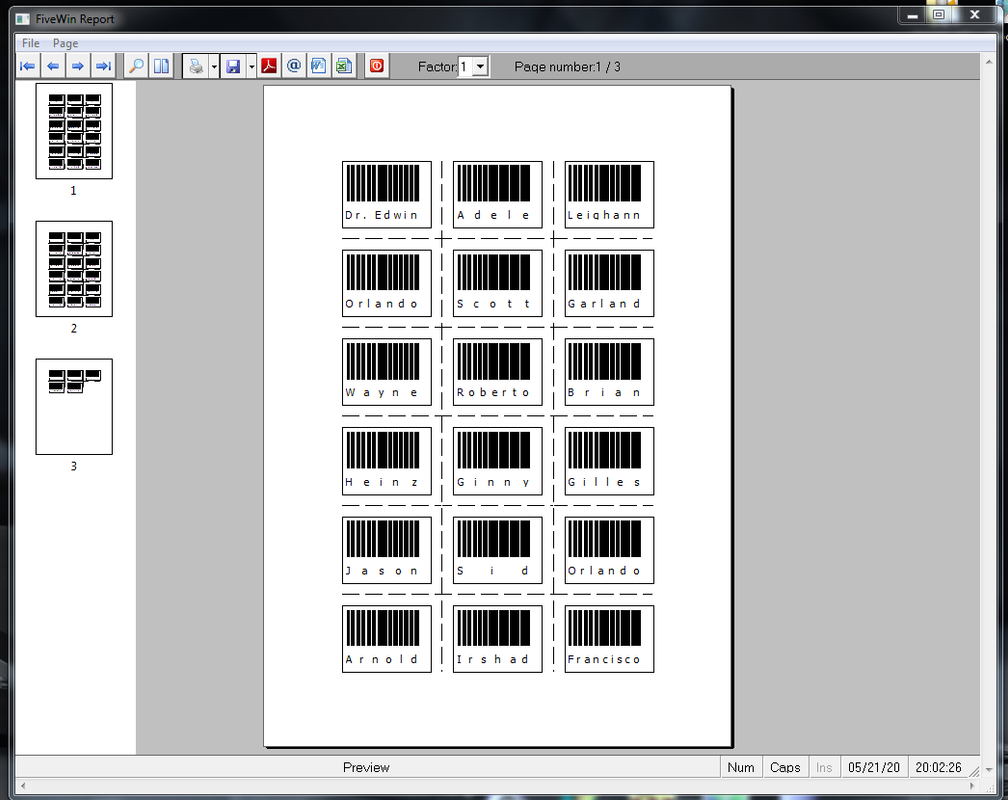
Rao's system lends itself to any label, just make small changes and call it works from our programs, for example I tried to make labels with bar codes
this is mycent.


Code (fw): Select all Collapse
 function OneLabel( oPrn, nRow, nCol, nWidth, nHeight, oFont, oBold )
       local nWid

       field ID, FIRST, LAST, CITY

       oPrn:cmBox( nRow, nCol, nRow + nHeight, nCol + nWidth )

       nRow     += 0.2
       nCol     += 0.2
       nWidth   -= 0.4
       nHeight  -= 0.4

        cText    := TRIM(FIRST)
        @ nRow, nCol PRINT TO oPrn TEXT TRIM(FIRST) AS BARCODE TYPE "EAN13" ;
             SIZE nWidth, nHeight-1 CM BARSIZE nWid

         @ nRow+2, nCol PRINT TO oPrn TEXT cText cm SIZE nWid ALIGN "S" FONT oFont

      * @ nRow, nCol PRINT TO oPrn TEXT TRIM(FIRST) + " " + TRIM(LAST) ;
       *   SIZE nWidth, nHeight CM ALIGN "T" FONT oFont
      * @ nRow, nCol PRINT TO oPrn TEXT ID * 10 SIZE nWidth, nHeight CM ALIGN "B" FONT oBold
     *  @ nRow, nCol PRINT TO oPrn TEXT "Fc" SIZE nWidth, nHeight CM ALIGN "BR" FONT oFont

    return nil
Since from 1991/1992 ( fw for clipper Rel. 14.4 - Momos)

I use : FiveWin for Harbour March-April 2024 - Harbour 3.2.0dev (harbour_bcc770_32_20240309) - Bcc7.70 - xMate ver. 1.15.3 - PellesC - mail: silvio[dot]falconi[at]gmail[dot]com

Continue the discussion