FiveTech Support Forums

FiveWin / Harbour / xBase community
Board index FiveWin for Harbour/xHarbour Problem with conversion Image on W7
Posts: 7318
Joined: Thu Oct 18, 2012 07:17 PM
Problem with conversion Image on W7
Posted: Sat May 16, 2020 04:02 PM
I have problem to converte a Png file on Jpg, and then this jpg to Bmp on Windows Seven
I save the images in a ". \ Temp" folder.
After performing the conversion I use the images in a combobox and in Windows Seven IO I see black lines on the images but in reality there are no images saved in a folder ". \ Temp"
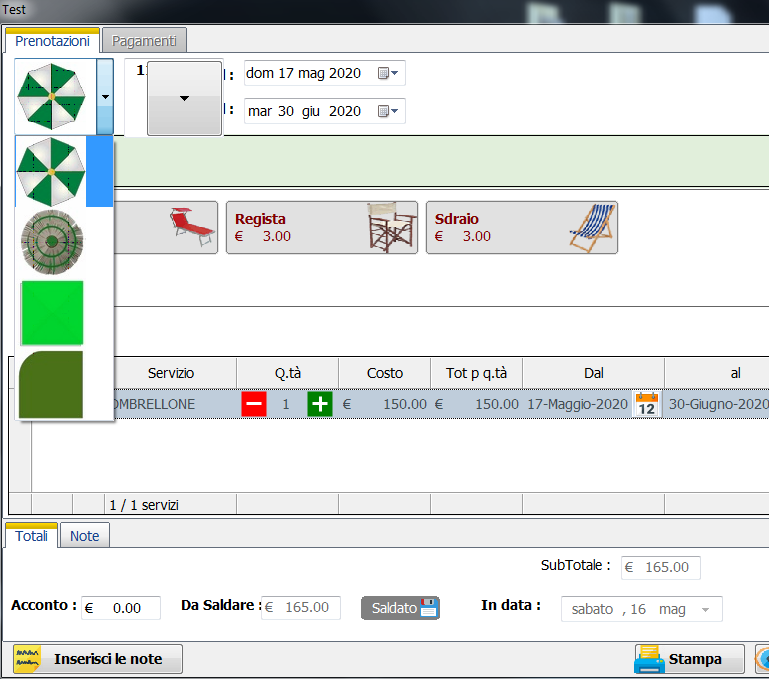


you can see on first picture some black line I not Know why ...


to create jpg from Png I made
hBmp := FW_ReadImage( nil, cFile )[ 1 ]
hNew := FW_TransformBitmap( hBmp, NIL, 40)
ext:= aExt[ntipo]
cNewfile:= cFolderTemp+cNewName+ext
FW_SaveImage( hBmp,cNewfile ,90)

then to converte jpg to BMP I made

cFileBmp:= savetobmp(cfileJpg)

Function Savetobmp(cfile)
Local hBmp := FW_ReadImage( nil, cfile )[ 1 ]
FW_SaveImage( hBmp, cfile+".Bmp",90 )
Return cfile


on windows 10 it runs perfectly, on windows Seven How I can resolve ?
Since from 1991/1992 ( fw for clipper Rel. 14.4 - Momos)

I use : FiveWin for Harbour March-April 2024 - Harbour 3.2.0dev (harbour_bcc770_32_20240309) - Bcc7.70 - xMate ver. 1.15.3 - PellesC - mail: silvio[dot]falconi[at]gmail[dot]com
Posts: 10733
Joined: Sun Nov 19, 2006 05:22 AM
Re: Problem with conversion Image on W7
Posted: Sat May 16, 2020 04:24 PM
What if you try this way?
Code (fw): Select all Collapse
FW_SaveImage( "file.png", "file.jpg", nQuality )
FW_SaveImage( "file.png", "file.bmp )
Regards


G. N. Rao.

Hyderabad, India
Posts: 7318
Joined: Thu Oct 18, 2012 07:17 PM
Re: Problem with conversion Image on W7
Posted: Sun May 17, 2020 07:35 AM
nageswaragunupudi wrote:What if you try this way?
Code (fw): Select all Collapse
FW_SaveImage( "file.png", "file.jpg", nQuality )
FW_SaveImage( "file.png", "file.bmp )


Nages, I tried it but bmp images are created perfectly then when you use the combox you see black lines
in the snapshot below you can see that the selected image has black lines, the image to be selected is shown very well


I made a small test
Code (fw): Select all Collapse
#include "fivewin.ch"

Function test()
   local oDlg
   local oCbx
   local nIcoElemento := 1
   local aGet[1]
   local aElementiItems:= {}
   Local aFiles:={"ombrellone_verde.png",;
                  "Palma_verde.png",;
                  "cabina_verde.png",;
                  "tenda_verde.png"}

   local aBmpCombo:=Convert_2_Bmp(aFiles)

           for n= 1 to  Len(aBmpCombo)
             AaDd(aElementiItems,"")
           next


  define dialog oDlg  size 400,400 title "Test combo Images"
   @ 2,5 COMBOBOX aGet[1] VAR nIcoElemento Items aElementiItems ;
            BITMAPS aBmpCombo SIZE 50,120 PIXEL  of oDlg
  activate dialog oDlg centered

    return nil
//-------------------------------------------------------------------//
Function Convert_2_Bmp(aFiles)
   local atmp:= {}
   local n
   local nQuality:= 90

             For n= 1 to 4
               cNewFile:="temp_"+(ltrim(str(n)))+".bmp"
               FW_SaveImage( aFiles[n],  cNewFile,nQuality )
               aadd( atmp, cNewFile )
             next n

        return atmp
//-------------------------------------------------------------------//


I sent you my images via MAIL
Since from 1991/1992 ( fw for clipper Rel. 14.4 - Momos)

I use : FiveWin for Harbour March-April 2024 - Harbour 3.2.0dev (harbour_bcc770_32_20240309) - Bcc7.70 - xMate ver. 1.15.3 - PellesC - mail: silvio[dot]falconi[at]gmail[dot]com
Posts: 10733
Joined: Sun Nov 19, 2006 05:22 AM
Re: Problem with conversion Image on W7
Posted: Sun May 17, 2020 07:59 AM

So, you have problem in converting to bmp?

One question:
Why do you want to convert png into bmp? You can use png directly with combobox now.

Regards


G. N. Rao.

Hyderabad, India
Posts: 7318
Joined: Thu Oct 18, 2012 07:17 PM
Re: Problem with conversion Image on W7
Posted: Sun May 17, 2020 08:18 AM
>You can use png directly with combobox now

FROM WHEN ?

i MADE

Local aFiles:={"ombrellone_verde.png",;
"Palma_verde.png",;
"cabina_verde.png",;
"tenda_verde.png"}

@ 2,5 COMBOBOX aGet[1] VAR nIcoElemento Items aElementiItems ;
BITMAPS aFiles SIZE 50,120 PIXEL of oDlg

AND IT IS THE SAME
Since from 1991/1992 ( fw for clipper Rel. 14.4 - Momos)

I use : FiveWin for Harbour March-April 2024 - Harbour 3.2.0dev (harbour_bcc770_32_20240309) - Bcc7.70 - xMate ver. 1.15.3 - PellesC - mail: silvio[dot]falconi[at]gmail[dot]com
Posts: 7318
Joined: Thu Oct 18, 2012 07:17 PM
Re: Problem with conversion Image on W7
Posted: Sun May 17, 2020 08:23 AM

SORRY
I have problem to pngs

Since from 1991/1992 ( fw for clipper Rel. 14.4 - Momos)

I use : FiveWin for Harbour March-April 2024 - Harbour 3.2.0dev (harbour_bcc770_32_20240309) - Bcc7.70 - xMate ver. 1.15.3 - PellesC - mail: silvio[dot]falconi[at]gmail[dot]com
Posts: 10733
Joined: Sun Nov 19, 2006 05:22 AM
Re: Problem with conversion Image on W7
Posted: Wed May 20, 2020 04:03 PM
Code (fw): Select all Collapse
function TestCbx()

   local oDlg, oCbx, oBold
   local cVar  := 3
   local aItems   := { "One", "Two", "Three", "Four" }
   local aBmp

   aBmp := { "c:\tests\silvio\ombrellone_verde.png", "c:\tests\silvio\tropical_verde.png", ;
             "c:\fwh\bitmaps\pngs\image3.png",       "c:\fwh\bitmaps\pngs\image4.png" }

   DEFINE FONT oBold NAME "TAHOMA" SIZE 0,-20 BOLD
   DEFINE DIALOG oDlg SIZE 400,400 PIXEL TRUEPIXEL

   @ 30,30 COMBOBOX oCbx VAR cVar ITEMS aItems ;
      BITMAPS aBmp ;
      SIZE 300,200 PIXEL OF oDlg UPDATE FONT oBold

   @ 200,100 BUTTON "OK" SIZE 100,40 PIXEL OF oDlg

   ACTIVATE DIALOG oDlg CENTERED
   RELEASE FONT oBold

   ? cvar

return nil


I do not see any lines.
I tested on windows 10
Regards


G. N. Rao.

Hyderabad, India
Posts: 7318
Joined: Thu Oct 18, 2012 07:17 PM
Re: Problem with conversion Image on W7
Posted: Thu May 21, 2020 07:33 AM
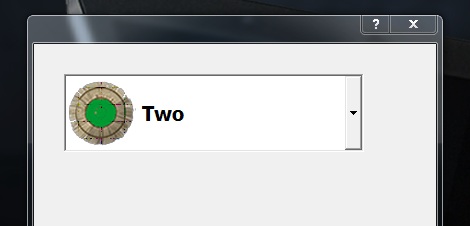
obviously the problem I do not have on windows 10, but in windows Seven as I specified in the first post

so I tried your test on Windows Seven

Please select the tropical selection, when you select this you'll see the line black on bitmap

Since from 1991/1992 ( fw for clipper Rel. 14.4 - Momos)

I use : FiveWin for Harbour March-April 2024 - Harbour 3.2.0dev (harbour_bcc770_32_20240309) - Bcc7.70 - xMate ver. 1.15.3 - PellesC - mail: silvio[dot]falconi[at]gmail[dot]com

Continue the discussion