FiveTech Support Forums

FiveWin / Harbour / xBase community
Board index FiveWin for Harbour/xHarbour To Mister Nages - xBrowser
Posts: 148
Joined: Tue Mar 20, 2007 03:13 PM
To Mister Nages - xBrowser
Posted: Fri Aug 07, 2020 01:02 AM
Dear Mr. Nages,

I need your help on two situations:

1) In a row, within a column of xBrowse and possible, in a sentence put a word in bold?

Sample: "Teste de mensagem para xbrowser"

2) Would it be possible to put an image in a column and write about that image at run time?

Thank you for your help.

Oliveiros Junior
Posts: 10733
Joined: Sun Nov 19, 2006 05:22 AM
Re: To Mister Nages - xBrowser
Posted: Fri Aug 07, 2020 01:42 PM
1) In a row, within a column of xBrowse and possible, in a sentence put a word in bold?

Sample: "Teste de mensagem para xbrowser"


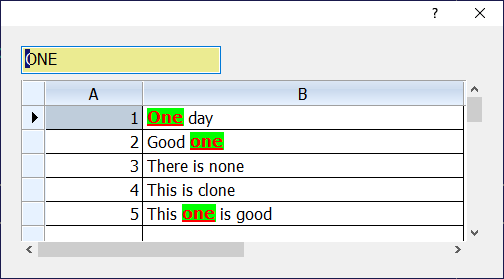
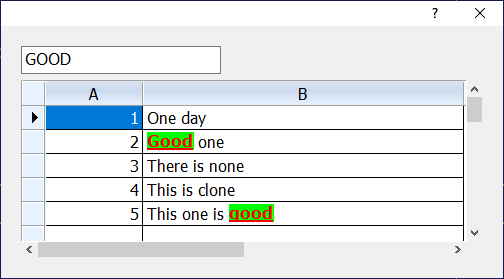
Sample program
Code (fw): Select all Collapse
#include "fivewin.ch

//----------------------------------------------------------------------------//

function XbrHilite

   local oDlg, oBrw, oFont, oBold
   local cWordHL  := PadR( "ONE", 10 )
   local aData := ;
      {  { 1, "One day" }          ;
      ,  { 2, "Good one" }         ;
      ,  { 3, "There is none" }    ;
      ,  { 4, "This is clone" }    ;
      ,  { 5, "This one is good" } ;
      }

   DEFINE FONT oFont NAME "TAHOMA"  SIZE 0,-16
   DEFINE FONT oBold NAME "VERDANA" SIZE 0,-16 BOLD UNDERLINE

   DEFINE DIALOG oDlg SIZE 500,250 PIXEL TRUEPIXEL FONT oFont

   @ 20,20 GET cWordHL SIZE 200,28 PIXEL OF oDlg VALID ( oBrw:Refresh(), .t. )

   @ 55,20 XBROWSE oBrw SIZE -20,-20 PIXEL OF oDlg DATASOURCE aData AUTOCOLS ;
      CELL LINES NOBORDER

   WITH OBJECT oBrw
      :nStretchCol   := 2
      :aCols[ 2 ]:bPaintText := <|oCol, hDC, cText, aRect, aColors|
         FW_SayTextHilite( hDC, cText, aRect, oFont, aColors[ 1 ], aColors[ 2 ], ;
            { { AllTrim( cWordHL ), oBold, CLR_HRED, CLR_HGREEN } } )
         return nil
         >

      :CreateFromCode()
   END

   ACTIVATE DIALOG oDlg CENTERED
   RELEASE FONT oFont, oBold

return nil

//----------------------------------------------------------------------------//


Regards


G. N. Rao.

Hyderabad, India
Posts: 148
Joined: Tue Mar 20, 2007 03:13 PM
Re: To Mister Nages - xBrowser
Posted: Fri Aug 07, 2020 09:48 PM

Mr. Nages, thank you.

That's exactly what I was looking for.

Oliveiros Junior

Posts: 148
Joined: Tue Mar 20, 2007 03:13 PM
Re: To Mister Nages - xBrowser
Posted: Fri Aug 14, 2020 05:58 PM

Mr. Nages,

I ask if it would be possible at runtime to fill the array with the words for highlighting?

Att.,

Oliveiros Junkor

Posts: 148
Joined: Tue Mar 20, 2007 03:13 PM
Re: To Mister Nages - xBrowser
Posted: Fri Aug 14, 2020 06:36 PM

Mr. Nages,

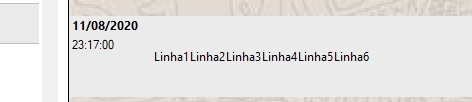
Another thing, when using FW_SayTextHilite in multilines he doesn't respect the line break, he writes everything in succession.

Ex: Linha1
Linha2

After FW_SayTextHilite

 Linha1Linha2

Att.,

Oliveiros Junior

Posts: 148
Joined: Tue Mar 20, 2007 03:13 PM
Re: To Mister Nages - xBrowser
Posted: Fri Aug 14, 2020 06:53 PM

Mr. Nages,

just one more thing: if we put an image in the bottom of the browser, when the word in hilite is at the beginning of the sentence it shows well, but if it is in the middle of the sentence, it puts a white background, not respecting the image of the.

Att.,

Oliveiros Junior

Posts: 10733
Joined: Sun Nov 19, 2006 05:22 AM
Re: To Mister Nages - xBrowser
Posted: Fri Aug 14, 2020 11:08 PM
oliveiros junior wrote:Mr. Nages,

I ask if it would be possible at runtime to fill the array with the words for highlighting?

Att.,

Oliveiros Junkor


Yes.
Regards


G. N. Rao.

Hyderabad, India
Posts: 10733
Joined: Sun Nov 19, 2006 05:22 AM
Re: To Mister Nages - xBrowser
Posted: Fri Aug 14, 2020 11:10 PM
oliveiros junior wrote:Mr. Nages,

Another thing, when using FW_SayTextHilite in multilines he doesn't respect the line break, he writes everything in succession.

Ex: Linha1
Linha2

After FW_SayTextHilite

Linha1Linha2

Att.,

Oliveiros Junior

Yes. This works for single line only.
If we want for multiline, we have to split the lines and write each line one after the other.
Regards


G. N. Rao.

Hyderabad, India
Posts: 10733
Joined: Sun Nov 19, 2006 05:22 AM
Re: To Mister Nages - xBrowser
Posted: Fri Aug 14, 2020 11:13 PM
oliveiros junior wrote:Mr. Nages,

just one more thing: if we put an image in the bottom of the browser, when the word in hilite is at the beginning of the sentence it shows well, but if it is in the middle of the sentence, it puts a white background, not respecting the image of the.

Att.,

Oliveiros Junior

Image in the cell?
Can you post relevant portion of your code and screen-shot if possible?
Regards


G. N. Rao.

Hyderabad, India
Posts: 148
Joined: Tue Mar 20, 2007 03:13 PM
Re: To Mister Nages - xBrowser
Posted: Sat Aug 15, 2020 01:52 AM
Thank you mister nages,

1) how would this refresh occur?

WITH OBJECT :aCols[ 3 ]
:bPaintText := <|oCol, hDC, cText, aRect, aColors|
FW_SayTextHilite( hDC, cText, aRect, oFonte_Browse, aColors[ 1 ], aColors[ 2 ], ;
{ aHilite } )
Return NIL
>
END

There are two browsers when the first line changes the second updates, then the words to be highlighted change.
Step to function that selects from the data the array aHilite that filled according to the first. What bed would you give to renew bPaintText?
I've tried refresh(), Eval(bPaintText) and none worked.

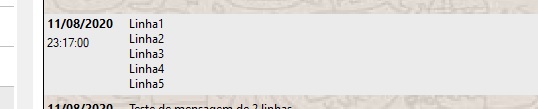
2) Does the FW_SayTextHilite function not multiline automatically?

no FW_SayTextHilite


with FW_SayTextHilite


3) Here's picture:

Posts: 10733
Joined: Sun Nov 19, 2006 05:22 AM
Re: To Mister Nages - xBrowser
Posted: Sat Aug 15, 2020 02:56 AM

You keep aHilite as static variable.
Fill the array with { { <word>, oFont, [nTxtClr],[nBkClr] } }
Then call oBrw:Refresh()

Regards


G. N. Rao.

Hyderabad, India
Posts: 148
Joined: Tue Mar 20, 2007 03:13 PM
Re: To Mister Nages - xBrowser
Posted: Mon Aug 17, 2020 07:31 PM
Dear Mr. Nages,

thank you aHilite has worked.

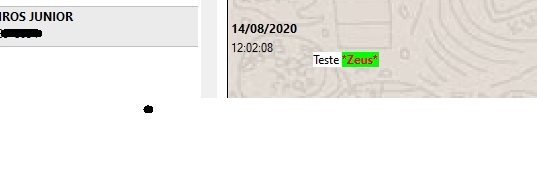
How to keep the background image of the browser when using DrawTextEx.

Look at the bottom of the word "Teste"

Att.,

Oliveiros Junior

Posts: 148
Joined: Tue Mar 20, 2007 03:13 PM
Re: To Mister Nages - xBrowser
Posted: Mon Aug 17, 2020 07:33 PM

WITH OBJECT aBrowser[2]
WITH OBJECT :aCols[ 1 ]
:cHeader := ""
:oHeaderFont := oFonte_padrao
:nHeadStrAlign := AL_CENTER
:nWidth := 80
:bStrData := { || AllTrim( DToC( oMensagem:getValueByPos( 2 ) ) ) }
:nDataStrAlign := AL_TOP
:nCellheight := 20
:oDataFont := oFonte_botao
:SetColsAsRows( { 1, 2 } )
END

   WITH OBJECT :aCols[ 2 ]
        :cHeader       := &quot;&quot;
        <!-- s:o --><img src="{SMILIES_PATH}/icon_surprised.gif" alt=":o" title="Surprised" /><!-- s:o -->HeaderFont   := oFonte_padrao 
        :nHeadStrAlign := AL_CENTER
        :nWidth        := 10
        :bStrData      := { || oMensagem:getValueByPos( 3 ) }
        :nCellheight   := 25
        :nDataStrAlign := AL_TOP
   END

   WITH OBJECT :aCols[ 3 ]
        :cHeader       := &quot;&quot;
        <!-- s:o --><img src="{SMILIES_PATH}/icon_surprised.gif" alt=":o" title="Surprised" /><!-- s:o -->HeaderFont   := oFonte_padrao 
        :nHeadStrAlign := AL_CENTER
        :nWidth        := 250
        :bStrData      := { || oMensagem:getValueByPos( 13 ) }
        <!-- s:o --><img src="{SMILIES_PATH}/icon_surprised.gif" alt=":o" title="Surprised" /><!-- s:o -->DataFont     := oFonte_browse
        :nDataStrAlign := AL_TOP
        :blDClickData  := { || HTMLPOP( GetActiveWindow(), nil, 0x000E, RTrim( oMensagem:getValueByPos( 13 ) ) ) }

        :bPaintText    := &lt;|oCol, hDC, cText, aRect, aColors|
                          FW_SayTextHilite( hDC, cText, aRect, oFonte_Browse, aColors[ 1 ], aColors[ 2 ], ;
                                            aHilite, oCol )
                          Return NIL
                          &gt;
   END

   :nMarqueeStyle        := MARQSTYLE_HIGHLROW
   :nColDividerStyle     := LINESTYLE_NOLINES
   :nRowDividerStyle     := LINESTYLE_NOLINES
   :lColDividerComplete  := .F.
   :lUpdate              := .T.

   :lRecordSelector      := .F.  
   :lHeader              := .F.
   :lHScroll             := .F.

   :nHeaderHeight        := 30
   :nRowHeight           := 85
   :bClrHeader           := { || { CLR_BLACK, CLR_WHITE } }
   :bClrGrad             := { || { CLR_WHITE, CLR_WHITE } }
   :lDrawBorder          := .T.
   :nStretchCol          := STRETCHCOL_WIDEST
   :bClrSel              := { || { CLR_BLACK, nRGB( 235, 235, 235 ) } }
   :bClrSelFocus         := { || { CLR_BLACK, nRGB( 235, 235, 235 ) } }
   :SetBackGround( cLocal_sistema + '\imagens\fundo.bmp', BCK_FILL )

END

Posts: 10733
Joined: Sun Nov 19, 2006 05:22 AM
Re: To Mister Nages - xBrowser
Posted: Mon Aug 17, 2020 09:54 PM
You keep aHilite as static variable.
Fill the array with { { <word>, oFont, [nTxtClr],[nBkClr] } }
Then call oBrw:Refresh()

In the aHilite array, keep [nBkClr] as nil.
Regards


G. N. Rao.

Hyderabad, India
Posts: 148
Joined: Tue Mar 20, 2007 03:13 PM
Re: To Mister Nages - xBrowser
Posted: Tue Aug 18, 2020 08:55 PM
Mister Nages,
Did not work.

Aadd (aHilite, {Upper (SubStr (cMessage, start), (endFinal - start) + 1)),;
oFonte_Botao, nil, nil})


Att.,

Oliveiros Junior